Tutorial
How to pass a file to an MCP tool
Three ways to get a file into an MCP tool: a path, inline base64, or a URL. Measured token costs for each, and the path guard that stops traversal.
Mark
Head of Marketing, MCPOrbit
- Published
- Updated
- · Updated
- Read time
- · 11 min read
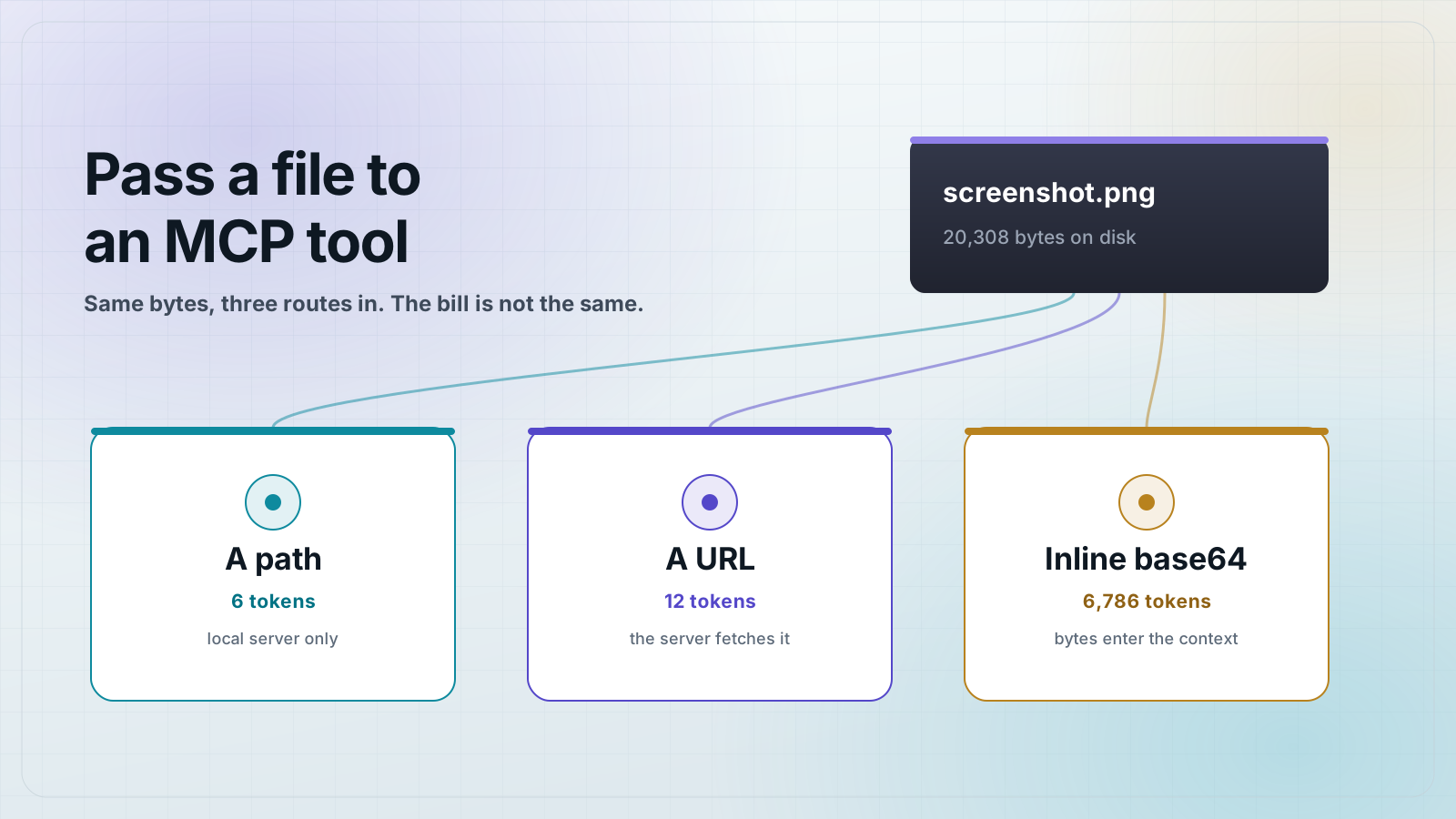
There are three ways to pass a file to a Model Context Protocol (MCP) tool: send a path, inline the bytes as base64, or send a URL and let the server fetch it. The right choice is a size question. A path costs about 6 tokens, a URL about 12, and inlining a 20 KB screenshot costs about 6,800. Use a path only when the server shares a filesystem with the client, inline for small files, and a URL for anything remote or large.
The output side of this is covered elsewhere: a tool returns an image with an image content block. The input side is asked more often and answered less. Your user has a PDF or a screenshot sitting on their disk, and your tool needs the bytes. This post builds one server that accepts the same file all three ways, measures what each route actually costs, and then fixes the security hole that the path route opens by default.
The three ways to pass a file, and when each is correct
Every intake route delivers identical bytes to the tool. They differ in who reads the file and what the model pays to say which file it means.
- A path. The client sends a string like
screenshot.pngand the server opens it. Costs a few tokens. Correct only for a local stdio server that shares a filesystem with the client. It fails the moment the server moves to another machine, and it fails silently: the path is well-formed, the file is simply not there. - Inline base64. The client reads the file and puts the encoded bytes in the tool arguments. Works with every transport, because the bytes travel inside the protocol. Costs the 1.333x base64 expansion plus the model's context to carry it. Fine for a small screenshot, wrong for a 40 MB PDF.
- A URL. The client sends a link and the server fetches it. Flat cost regardless of file size, because a URL does not grow with the file. This is the answer for remote servers and large files, and it needs the server to have network access to whatever the URL points at.
Build a server that accepts all three
The stack is pinned. Node 25.8.1, the version 2 Model Context Protocol SDK, and Zod 4.
mkdir file-intake-server && cd file-intake-server
npm init -y
npm pkg set type=module
npm i @modelcontextprotocol/server@2.0.0 @modelcontextprotocol/client@2.0.0 zod@4.4.3
The path guard
Write this first, before the server. Every path that arrives from a model goes through it. The reasoning behind each check is in the security section below, but the guard belongs in the file the server imports, so here it is.
// safe-path.js: turn an untrusted path argument into a path inside one allowed root.
import { realpathSync } from "node:fs";
import { isAbsolute, relative, resolve } from "node:path";

// Thrown for anything that resolves outside the root. Kept distinct from an
// ordinary I/O error so the tool can answer "refused" instead of "not found".
export class PathRefused extends Error {
  constructor(message) {
    super(message);
    this.name = "PathRefused";
  }
}

function contains(rootReal, targetReal) {
  const rel = relative(rootReal, targetReal);
  // "" means the target is the root itself. A leading ".." or an absolute
  // result means it climbed out.
  return rel !== "" && !rel.startsWith("..") && !isAbsolute(rel);
}

export function resolveInRoot(root, candidate) {
  if (typeof candidate !== "string" || candidate.length === 0) {
    throw new PathRefused("path must be a non-empty string");
  }
  // An absolute argument is never joined onto the root, it replaces it.
  // Reject it outright rather than letting resolve() silently escape.
  if (isAbsolute(candidate)) {
    throw new PathRefused(`absolute paths are refused: ${candidate}`);
  }

  const rootReal = realpathSync(resolve(root));
  const target = resolve(rootReal, candidate);

  // First check: the lexical path stays inside the root.
  if (!contains(rootReal, target)) {
    throw new PathRefused(`path escapes the allowed root: ${candidate}`);
  }

  // Second check: so does the path after symlinks are followed. A symlink
  // inside the root that points outside it passes the lexical check.
  let targetReal;
  try {
    targetReal = realpathSync(target);
  } catch (err) {
    if (err.code === "ENOENT") throw new PathRefused(`no such file: ${candidate}`);
    throw err;
  }
  if (!contains(rootReal, targetReal)) {
    throw new PathRefused(`path resolves outside the allowed root: ${candidate}`);
  }

  return targetReal;
}
The server
Three tools, one shared describe function. Whichever route the bytes take, they end up in the same place: a Buffer, sized, sniffed, and hashed. Save this as server.js.
// server.js: one MCP server that accepts the same file three ways.
import { McpServer } from "@modelcontextprotocol/server";
import { StdioServerTransport } from "@modelcontextprotocol/server/stdio";
import { createHash } from "node:crypto";
import { readFile, stat } from "node:fs/promises";
import { basename } from "node:path";
import { z } from "zod";
import { PathRefused, resolveInRoot } from "./safe-path.js";

// The one directory this server will read from. Everything else is refused.
const ALLOWED_ROOT = process.env.FILE_ROOT ?? "./files";

// Hard cap. Applied to every intake mode, before the bytes are held in memory.
const MAX_BYTES = 8 * 1024 * 1024;

const ALLOWED_TYPES = new Set(["image/png", "image/jpeg", "application/pdf"]);

// Sniff the real type from the leading bytes. The declared mimeType is a claim
// from the caller, this is the file itself.
function sniff(bytes) {
  if (bytes.length >= 8 && bytes.subarray(0, 8).equals(Buffer.from([0x89, 0x50, 0x4e, 0x47, 0x0d, 0x0a, 0x1a, 0x0a]))) {
    return "image/png";
  }
  if (bytes.length >= 3 && bytes[0] === 0xff && bytes[1] === 0xd8 && bytes[2] === 0xff) {
    return "image/jpeg";
  }
  if (bytes.length >= 5 && bytes.subarray(0, 5).toString("ascii") === "%PDF-") {
    return "application/pdf";
  }
  return "application/octet-stream";
}

// The actual work, shared by all three tools. Whatever route the bytes took in,
// they end up here as a Buffer.
function describe(name, bytes) {
  const detected = sniff(bytes);
  const sha = createHash("sha256").update(bytes).digest("hex");
  return {
    content: [
      {
        type: "text",
        text: [
          `name: ${name}`,
          `bytes: ${bytes.length}`,
          `detected: ${detected}`,
          `sha256: ${sha.slice(0, 16)}`,
        ].join("\n"),
      },
    ],
    structuredContent: { name, bytes: bytes.length, detected, sha256: sha },
  };
}

function refuse(reason) {
  return { isError: true, content: [{ type: "text", text: `refused: ${reason}` }] };
}

const server = new McpServer({ name: "file-intake", version: "1.0.0" });

// Mode 1: a path. Cheapest on the wire. Only correct when the server shares a
// filesystem with the client, which means a local stdio server and nothing else.
server.registerTool(
  "describe_local_file",
  {
    title: "Describe a local file",
    description:
      "Describe a file already on this machine, given a path relative to the server's allowed root.",
    inputSchema: { path: z.string().min(1).describe("Path relative to the allowed root") },
  },
  async ({ path }) => {
    let resolved;
    try {
      resolved = resolveInRoot(ALLOWED_ROOT, path);
    } catch (err) {
      if (err instanceof PathRefused) return refuse(err.message);
      throw err;
    }

    // Cap before reading, not after. stat() costs nothing, readFile() of a
    // 4 GB file costs 4 GB.
    const info = await stat(resolved);
    if (!info.isFile()) return refuse("not a regular file");
    if (info.size > MAX_BYTES) return refuse(`file is ${info.size} bytes, cap is ${MAX_BYTES}`);

    const bytes = await readFile(resolved);
    const detected = sniff(bytes);
    if (!ALLOWED_TYPES.has(detected)) return refuse(`content type ${detected} is not accepted`);
    return describe(basename(resolved), bytes);
  }
);

// Mode 2: inline base64. Works everywhere. The bytes travel through the model's
// context on the way in, which is what makes it expensive.
server.registerTool(
  "describe_inline_file",
  {
    title: "Describe an inlined file",
    description: "Describe a file sent inline as base64. Use for small files only.",
    inputSchema: {
      filename: z.string().min(1),
      mimeType: z.string().min(1),
      data: z.string().min(1).describe("Bare base64, no data: URL prefix"),
    },
  },
  async ({ filename, mimeType, data }) => {
    if (!ALLOWED_TYPES.has(mimeType)) return refuse(`declared type ${mimeType} is not accepted`);

    // Cap on the encoded length first. Decoding is what allocates.
    const projected = Math.floor((data.length * 3) / 4);
    if (projected > MAX_BYTES) return refuse(`payload is about ${projected} bytes, cap is ${MAX_BYTES}`);

    if (data.startsWith("data:")) return refuse("data is bare base64, not a data: URL");

    const bytes = Buffer.from(data, "base64");
    const detected = sniff(bytes);
    // The declared type is a claim. Check it against the bytes.
    if (detected !== mimeType) return refuse(`declared ${mimeType} but the bytes are ${detected}`);
    return describe(filename, bytes);
  }
);

// Mode 3: a URL. Flat cost regardless of file size. The server does the fetch,
// so the bytes never enter the model's context at all.
server.registerTool(
  "describe_remote_file",
  {
    title: "Describe a file at a URL",
    description: "Describe a file the server fetches over HTTP. Use for large or remote files.",
    inputSchema: { url: z.string().url() },
  },
  async ({ url }) => {
    const parsed = new URL(url);
    // A URL from a model is untrusted the same way a path is. Without this the
    // tool is a request forwarder into anything the server can reach.
    if (parsed.protocol !== "https:" && parsed.protocol !== "http:") {
      return refuse(`protocol ${parsed.protocol} is not accepted`);
    }

    const res = await fetch(url, { redirect: "error" });
    if (!res.ok) return refuse(`fetch returned ${res.status}`);

    const declared = (res.headers.get("content-type") ?? "").split(";")[0].trim();
    if (!ALLOWED_TYPES.has(declared)) return refuse(`content type ${declared} is not accepted`);

    const length = Number(res.headers.get("content-length"));
    if (Number.isFinite(length) && length > MAX_BYTES) {
      return refuse(`file is ${length} bytes, cap is ${MAX_BYTES}`);
    }

    // Content-Length is a claim too. Cap the body as it arrives.
    const bytes = Buffer.from(await res.arrayBuffer());
    if (bytes.length > MAX_BYTES) return refuse(`body is ${bytes.length} bytes, cap is ${MAX_BYTES}`);

    const detected = sniff(bytes);
    if (!ALLOWED_TYPES.has(detected)) return refuse(`content type ${detected} is not accepted`);
    return describe(basename(parsed.pathname) || "download", bytes);
  }
);

await server.connect(new StdioServerTransport());
Two details in there matter more than they look. The size cap on the path route runs against stat before readFile, so a 4 GB file costs one syscall instead of 4 GB of memory. And the inline route checks the declared mimeType against the bytes it actually decoded, because the declared type is a claim from the caller and nothing else verifies it.
What each intake mode costs, measured
Assertions about cost are worth nothing without a number. This harness connects a real client over stdio, calls all three tools with the same file, checks that all three produce an identical SHA-256, and prints the size of the arguments each one sent. Save it as check.mjs.
// check.mjs: drive all three intake modes with a real client, then measure them.
import { Client } from "@modelcontextprotocol/client";
import { StdioClientTransport } from "@modelcontextprotocol/client/stdio";
import assert from "node:assert/strict";
import { createServer } from "node:http";
import { readFileSync } from "node:fs";

const PNG = readFileSync("files/screenshot.png");

// Serve the same file over HTTP so mode 3 has something real to fetch.
const http = createServer((req, res) => {
  res.writeHead(200, { "content-type": "image/png", "content-length": PNG.length });
  res.end(PNG);
});
await new Promise((r) => http.listen(0, "127.0.0.1", r));
const URL_ = `http://127.0.0.1:${http.address().port}/screenshot.png`;

const client = new Client({ name: "checker", version: "1.0.0" });
await client.connect(
  new StdioClientTransport({ command: "node", args: ["server.js"], env: { ...process.env, FILE_ROOT: "./files" } })
);

const tools = await client.listTools();
console.log("tools:", tools.tools.map((t) => t.name).join(", "));

// What the model actually spends to hand the file over: the arguments object.
// About four characters per token.
const cost = (args) => {
  const chars = JSON.stringify(args).length;
  return { chars, tokens: Math.round(chars / 4) };
};

const call = async (name, args) => {
  const out = await client.callTool({ name, arguments: args });
  return { out, ...cost(args) };
};

// --- Mode 1: a path ---
const pathArgs = { path: "screenshot.png" };
const byPath = await call("describe_local_file", pathArgs);
assert.equal(byPath.out.isError, undefined, "path intake should succeed");
const shaPath = byPath.out.structuredContent.sha256;
console.log(`path:   args=${byPath.chars}B ~${byPath.tokens} tokens  ->  ${byPath.out.structuredContent.bytes}B`);

// --- Mode 2: inline base64 ---
const b64 = PNG.toString("base64");
const inlineArgs = { filename: "screenshot.png", mimeType: "image/png", data: b64 };
const byInline = await call("describe_inline_file", inlineArgs);
assert.equal(byInline.out.isError, undefined, "inline intake should succeed");
console.log(`inline: args=${byInline.chars}B ~${byInline.tokens} tokens  ->  ${byInline.out.structuredContent.bytes}B`);

// --- Mode 3: a URL ---
const urlArgs = { url: URL_ };
const byUrl = await call("describe_remote_file", urlArgs);
assert.equal(byUrl.out.isError, undefined, `url intake should succeed, got ${JSON.stringify(byUrl.out.content)}`);
console.log(`url:    args=${byUrl.chars}B ~${byUrl.tokens} tokens  ->  ${byUrl.out.structuredContent.bytes}B`);

// All three routes deliver identical bytes.
assert.equal(byInline.out.structuredContent.sha256, shaPath, "inline bytes differ from path bytes");
assert.equal(byUrl.out.structuredContent.sha256, shaPath, "fetched bytes differ from path bytes");
console.log(`\nsame sha256 via all three routes: ${shaPath.slice(0, 16)}`);

console.log(`\npng=${PNG.length}B base64=${b64.length}B expansion=${(b64.length / PNG.length).toFixed(3)}x`);
console.log(`inline costs ${(byInline.tokens / byPath.tokens).toFixed(0)}x the tokens of a path`);
console.log(`inline costs ${(byInline.tokens / byUrl.tokens).toFixed(0)}x the tokens of a url`);

// --- Security: the traversal attempt must be refused ---
const traversal = await client.callTool({
  name: "describe_local_file",
  arguments: { path: "../../.ssh/id_rsa" },
});
assert.equal(traversal.isError, true, "traversal was NOT refused");
assert.match(traversal.content[0].text, /^refused: /);
console.log(`\ntraversal ../../.ssh/id_rsa  ->  ${traversal.content[0].text}`);

const absolute = await client.callTool({
  name: "describe_local_file",
  arguments: { path: "/etc/passwd" },
});
assert.equal(absolute.isError, true, "absolute path was NOT refused");
console.log(`absolute /etc/passwd         ->  ${absolute.content[0].text}`);

const symlink = await client.callTool({
  name: "describe_local_file",
  arguments: { path: "escape.png" },
});
assert.equal(symlink.isError, true, "symlink escape was NOT refused");
console.log(`symlink escape.png           ->  ${symlink.content[0].text}`);

const sibling = await client.callTool({
  name: "describe_local_file",
  arguments: { path: "../files-secret/creds.txt" },
});
assert.equal(sibling.isError, true, "sibling directory was NOT refused");
console.log(`sibling ../files-secret/     ->  ${sibling.content[0].text}`);

// --- Security: the size cap must fire before the bytes are read ---
const tooBig = await client.callTool({
  name: "describe_local_file",
  arguments: { path: "report.pdf" },
});
assert.equal(tooBig.isError, true, "size cap did NOT fire");
console.log(`40MB report.pdf              ->  ${tooBig.content[0].text}`);

// --- Security: a lying mimeType must be caught ---
const lying = await client.callTool({
  name: "describe_inline_file",
  arguments: { filename: "x.pdf", mimeType: "application/pdf", data: PNG.toString("base64") },
});
assert.equal(lying.isError, true, "mimeType mismatch was NOT caught");
console.log(`png declared as pdf          ->  ${lying.content[0].text}`);

// --- Security: a data: URL prefix must be refused ---
const dataUrl = await client.callTool({
  name: "describe_inline_file",
  arguments: { filename: "x.png", mimeType: "image/png", data: `data:image/png;base64,${b64.slice(0, 64)}` },
});
assert.equal(dataUrl.isError, true, "data: URL prefix was NOT refused");
console.log(`data: URL prefix             ->  ${dataUrl.content[0].text}`);

// --- Security: a non-http protocol must be refused ---
const fileUrl = await client.callTool({
  name: "describe_remote_file",
  arguments: { url: "file:///etc/passwd" },
});
assert.equal(fileUrl.isError, true, "file:// URL was NOT refused");
console.log(`file:///etc/passwd           ->  ${fileUrl.content[0].text}`);

console.log("\nALL CHECKS PASSED");
await client.close();
http.close();
The fixtures are generated so the numbers reproduce. fixture.js writes a 1600x900 bar chart PNG, the same shape of image as a dashboard screenshot, and a 40 MB PDF for the size-cap test.
// fixture.js: write the test files. Deterministic, so the numbers repeat.
import { deflateSync } from "node:zlib";
import { mkdirSync, writeFileSync } from "node:fs";

const CRC_TABLE = Uint32Array.from({ length: 256 }, (_, n) => {
  let c = n;
  for (let k = 0; k < 8; k++) c = c & 1 ? 0xedb88320 ^ (c >>> 1) : c >>> 1;
  return c >>> 0;
});

function crc32(buf) {
  let c = 0xffffffff;
  for (const byte of buf) c = CRC_TABLE[(c ^ byte) & 0xff] ^ (c >>> 8);
  return (c ^ 0xffffffff) >>> 0;
}

function chunk(type, data) {
  const len = Buffer.alloc(4);
  len.writeUInt32BE(data.length);
  const body = Buffer.concat([Buffer.from(type, "ascii"), data]);
  const crc = Buffer.alloc(4);
  crc.writeUInt32BE(crc32(body));
  return Buffer.concat([len, body, crc]);
}

export function encodePng(width, height, rgb) {
  const ihdr = Buffer.alloc(13);
  ihdr.writeUInt32BE(width, 0);
  ihdr.writeUInt32BE(height, 4);
  ihdr[8] = 8;
  ihdr[9] = 2;
  const stride = width * 3;
  const raw = Buffer.alloc((stride + 1) * height);
  for (let y = 0; y < height; y++) {
    raw[y * (stride + 1)] = 0;
    rgb.copy(raw, y * (stride + 1) + 1, y * stride, (y + 1) * stride);
  }
  return Buffer.concat([
    Buffer.from([0x89, 0x50, 0x4e, 0x47, 0x0d, 0x0a, 0x1a, 0x0a]),
    chunk("IHDR", ihdr),
    chunk("IDAT", deflateSync(raw, { level: 9 })),
    chunk("IEND", Buffer.alloc(0)),
  ]);
}

// A 1600x900 bar chart, the same shape of image as a dashboard screenshot.
export function chartPng(width = 1600, height = 900, bars = 64) {
  const rgb = Buffer.alloc(width * height * 3, 0xff);
  const put = (x, y, r, g, b) => {
    if (x < 0 || y < 0 || x >= width || y >= height) return;
    const i = (y * width + x) * 3;
    rgb[i] = r;
    rgb[i + 1] = g;
    rgb[i + 2] = b;
  };
  const values = Array.from({ length: bars }, (_, i) => 20 + ((i * 37) % 80));
  const max = Math.max(...values);
  const pad = 40;
  const slot = Math.floor((width - pad * 2) / values.length);
  const barW = Math.max(1, Math.floor(slot * 0.7));
  values.forEach((v, i) => {
    const h = Math.round(((height - pad * 2) * v) / max);
    const x0 = pad + i * slot;
    for (let x = x0; x < x0 + barW; x++) {
      for (let y = height - pad - h; y < height - pad; y++) put(x, y, 0x54, 0x47, 0xc9);
    }
  });
  for (let x = pad; x < width - pad; x++) put(x, height - pad, 0x0e, 0x18, 0x22);
  return encodePng(width, height, rgb);
}

// A minimal but structurally valid PDF, padded to a target size.
export function paddedPdf(targetBytes) {
  const head = "%PDF-1.4\n1 0 obj<</Type/Catalog/Pages 2 0 R>>endobj\n";
  const tail = "trailer<</Root 1 0 R>>\n%%EOF\n";
  const padLen = Math.max(0, targetBytes - head.length - tail.length - 3);
  return Buffer.from(`${head}%${"p".repeat(padLen)}\n${tail}`, "ascii");
}

if (import.meta.filename === process.argv[1]) {
  mkdirSync("files", { recursive: true });
  const png = chartPng();
  writeFileSync("files/screenshot.png", png);
  const pdf = paddedPdf(40 * 1024 * 1024);
  writeFileSync("files/report.pdf", pdf);
  console.log(`files/screenshot.png ${png.length}B`);
  console.log(`files/report.pdf ${pdf.length}B`);
}
Run node fixture.js, create the symlink and sibling file the security tests need, then run the harness.
node fixture.js
ln -sfn /etc/hosts files/escape.png
mkdir -p files-secret && echo 'SECRET=hunter2' > files-secret/creds.txt
node check.mjs
tools: describe_local_file, describe_inline_file, describe_remote_file
path: args=25B ~6 tokens -> 20308B
inline: args=27142B ~6786 tokens -> 20308B
url: args=47B ~12 tokens -> 20308B
same sha256 via all three routes: d9effb2adad2bd95
png=20308B base64=27080B expansion=1.333x
inline costs 1131x the tokens of a path
inline costs 566x the tokens of a url
traversal ../../.ssh/id_rsa -> refused: path escapes the allowed root: ../../.ssh/id_rsa
absolute /etc/passwd -> refused: absolute paths are refused: /etc/passwd
symlink escape.png -> refused: path resolves outside the allowed root: escape.png
sibling ../files-secret/ -> refused: path escapes the allowed root: ../files-secret/creds.txt
40MB report.pdf -> refused: file is 41943039 bytes, cap is 8388608
png declared as pdf -> refused: declared application/pdf but the bytes are image/png
data: URL prefix -> refused: data is bare base64, not a data: URL
file:///etc/passwd -> refused: protocol file: is not accepted
ALL CHECKS PASSEDThe three numbers at the top are the post. The same 20,308-byte PNG cost 25 bytes of arguments as a path, 47 as a URL, and 27,142 inlined. At roughly four characters per token that is about 6 tokens, about 12, and about 6,786. Inlining one screenshot costs about 1,131 times what naming it costs.
The base64 expansion came back at 1.333x, which matches the ratio measured previously across PNGs from 3 KB to 20 KB. There is no size at which encoding gets cheaper. A 20,308-byte file becomes 27,080 characters every time.
Put that in context. Inline a screenshot three times in one conversation and you have spent about 20,000 tokens, a fifth of a 100k window, before the model has reasoned about anything. The bytes are identical in all three cases: the harness asserts the same SHA-256 came back from every route. The only thing that changes is what you paid to get them there.
A URL costs the same 47 bytes whether it points at a 20 KB screenshot or a 2 GB video. That flatness, not the raw saving, is the reason to reach for it.
A path argument from a model is untrusted input
This is where file intake stops being a plumbing question. The path in a tool call was written by a model, which was influenced by whatever was in its context, which may include a web page or a document that an attacker controls. Treat it exactly the way you would treat a path from an HTTP request body.
The classic attack is one line: { "path": "../../.ssh/id_rsa" }. Two guards get reached for first, and both of them leak.
// naive.mjs: the two path checks people reach for first, and what each one misses.
import { readFileSync, realpathSync } from "node:fs";
import { resolve } from "node:path";

const ROOT = realpathSync("./files");

// Attempt 1: reject any path containing "..".
const substringCheck = (p) => !p.includes("..");

// Attempt 2: resolve the path, then check it starts with the root.
const prefixCheck = (p) => resolve(ROOT, p).startsWith(ROOT);

const CASES = [
  "screenshot.png", // legitimate
  "../../etc/hosts", // plain traversal
  "escape.png", // a symlink inside the root pointing out of it
  "../files-secret/creds.txt", // a sibling directory whose name starts with "files"
];

for (const p of CASES) {
  const allowed = prefixCheck(p);
  let leaked = "";
  if (allowed) {
    try {
      leaked = `  leaked: ${JSON.stringify(readFileSync(resolve(ROOT, p)).subarray(0, 20).toString().split("\n")[0])}`;
    } catch {}
  }
  console.log(
    `${p.padEnd(26)} substring=${substringCheck(p) ? "allow " : "REFUSE"}  prefix=${allowed ? "allow " : "REFUSE"}${leaked}`
  );
}
screenshot.png substring=allow prefix=allow leaked: "�PNG\r"
../../etc/hosts substring=REFUSE prefix=REFUSE
escape.png substring=allow prefix=allow leaked: "##"
../files-secret/creds.txt substring=REFUSE prefix=allow leaked: "SECRET=hunter2"The substring check refuses the obvious traversal and then allows escape.png, which is a symlink inside the allowed root pointing at /etc/hosts. There is no .. in that path, so there is nothing for the check to catch. It leaked the file.
The prefix check is worse, because it looks correct. It resolves the path first, which handles .. properly, then compares string prefixes. But the allowed root is .../files, and .../files-secret/creds.txt starts with .../files. The check allowed it and read out SECRET=hunter2. It also allows the same symlink, since resolving a path does not follow symlinks.
The guard that holds
safe-path.js above does four things in order, and the order is the point. It refuses absolute paths outright, because path.resolve(root, "/etc/passwd") returns /etc/passwd and discards the root entirely. It resolves the candidate against the real root and checks containment with path.relative, which answers with a leading .. when the target is outside and cannot be fooled by a sibling name. Then it calls realpath on the target and repeats the containment check, which is what catches the symlink. Anything that fails becomes a refusal, not a not-found, so the caller learns the request was rejected rather than that the file is missing.
The harness drives all four cases against the running server. Every one is refused:
traversal ../../.ssh/id_rsa  ->  refused: path escapes the allowed root: ../../.ssh/id_rsa
absolute /etc/passwd         ->  refused: absolute paths are refused: /etc/passwd
symlink escape.png           ->  refused: path resolves outside the allowed root: escape.png
sibling ../files-secret/     ->  refused: path escapes the allowed root: ../files-secret/creds.txt
Size caps and content types belong here too
A path guard stops a caller reading the wrong file. It does nothing about a caller reading a file that is too big, or lying about what the file is. Three more checks close that gap, and the harness exercises each one.
- Cap the size before you read. The 40 MB fixture is refused on its
statsize, so the bytes are never loaded. On the inline route the cap runs against the encoded length, since decoding is what allocates. On the URL route it runs twice: once againstContent-Length, then again against the body that actually arrived, because a header is a claim. - Sniff the type, do not trust the declaration. A PNG sent with
mimeType: "application/pdf"is refused, because the leading bytes are checked against the declared type. Without this a tool that accepts PDFs will happily accept anything. - Restrict the URL scheme.
file:///etc/passwdis a valid URL. A tool that fetches whatever URL it is given is a request forwarder into everything the server can reach, including link-local metadata endpoints. Allowhttpandhttps, refuse the rest, and setredirect: "error"so a permitted URL cannot bounce to a forbidden one.
40MB report.pdf              ->  refused: file is 41943039 bytes, cap is 8388608
png declared as pdf          ->  refused: declared application/pdf but the bytes are image/png
data: URL prefix             ->  refused: data is bare base64, not a data: URL
file:///etc/passwd           ->  refused: protocol file: is not accepted
That fourth line is a small one worth keeping. The data field takes bare base64, with no data: URL prefix. It is muscle memory from web code and it is wrong here, so the server refuses it with a message that says why instead of decoding garbage.
Which mode should you use?
Pick by deployment first, then by size.
- Local stdio server, file already on disk: use a path. It is the cheapest by three orders of magnitude and the filesystem is genuinely shared. Guard it as shown above.
- Any remote server, file under about 100 KB: inline base64. It is the only route that works without the server reaching back out to the network, and at that size the context cost is tolerable.
- Any remote server, file over about 100 KB: a URL. Past that point inlining spends more context than the task is worth, and the cost of a URL does not change as the file grows.
- Files the user has but the model does not need to read, such as a build artifact or a scanned archive: a URL, regardless of size. There is no reason for those bytes to enter a context window at all.
If you are writing a server that must work both locally and remotely, register the path tool and the URL tool and let the client choose. They share a describe function, so the second tool is a few lines, and a client that cannot use one will use the other.
Frequently asked questions
- How do I pass a file to an MCP tool?
- Three ways: send a filesystem path as a string argument, inline the file as bare base64 in the tool arguments, or send a URL the server fetches itself. A path only works when the server and client share a filesystem, which in practice means a local stdio server. Inline base64 and URLs work with any transport.
- Can an MCP tool read a file from my computer?
- Only if the server runs on your computer. A local stdio server shares your filesystem, so a path argument resolves normally. A remote server does not, so the same path either fails as not-found or resolves to a different file on the server's own disk.
- How much context does inlining a file in an MCP tool call cost?
- About 1.333 times the file size in characters, plus the surrounding JSON. A 20,308-byte PNG becomes 27,080 base64 characters, roughly 6,786 tokens. Passing a path to the same file costs about 6 tokens and passing a URL costs about 12.
- Is it safe to accept a file path as an MCP tool argument?
- Not without a guard. The path is written by a model that may have been influenced by untrusted content, so treat it like a path from an HTTP request. Resolve it against one allowed root, check containment with
path.relative, then callrealpathand check again to catch symlinks. - Why does checking for '..' not stop path traversal in an MCP tool?
- Because a symlink inside the allowed root can point outside it without containing
..anywhere in the path. In testing, a naive substring check allowed a symlinked path and leaked the target file. Comparing resolved string prefixes fails too, since a sibling directory namedfiles-secretstarts with the allowed rootfiles. - Should an MCP tool accept a data: URL for file content?
- No. The
datafield in MCP takes bare base64 with nodata:prefix. Refuse a prefixed string explicitly so the caller gets a clear error instead of a tool that decodes the prefix as file bytes.
Every number in this post came from the harness above, run against the pinned stack on Node 25.8.1. Copy the four files into an empty directory, run the two commands, and you will get the same output.
The guard here protects one server. To see what a call really costs, hook the server up in MCPOrbit and run the tool by hand. You get the full arguments you sent and the full result the model would read, so the intake cost of a tool call is something you can look at rather than estimate.
About the author
Mark
Head of Marketing, MCPOrbit
Mark leads marketing at MCPOrbit, the free desktop client for the Model Context Protocol. He writes the build-it and reliability guides, and the code in them is run before it ships.