Tutorial
How to build an MCP server for MySQL
Build a read-only MySQL MCP server in one file, and fix the four mysql2 defaults that silently corrupt IDs, dates and blobs before a model sees them.
Mark
Head of Marketing, MCPOrbit
- Published
- Updated
- · Updated
- Read time
- · 12 min read
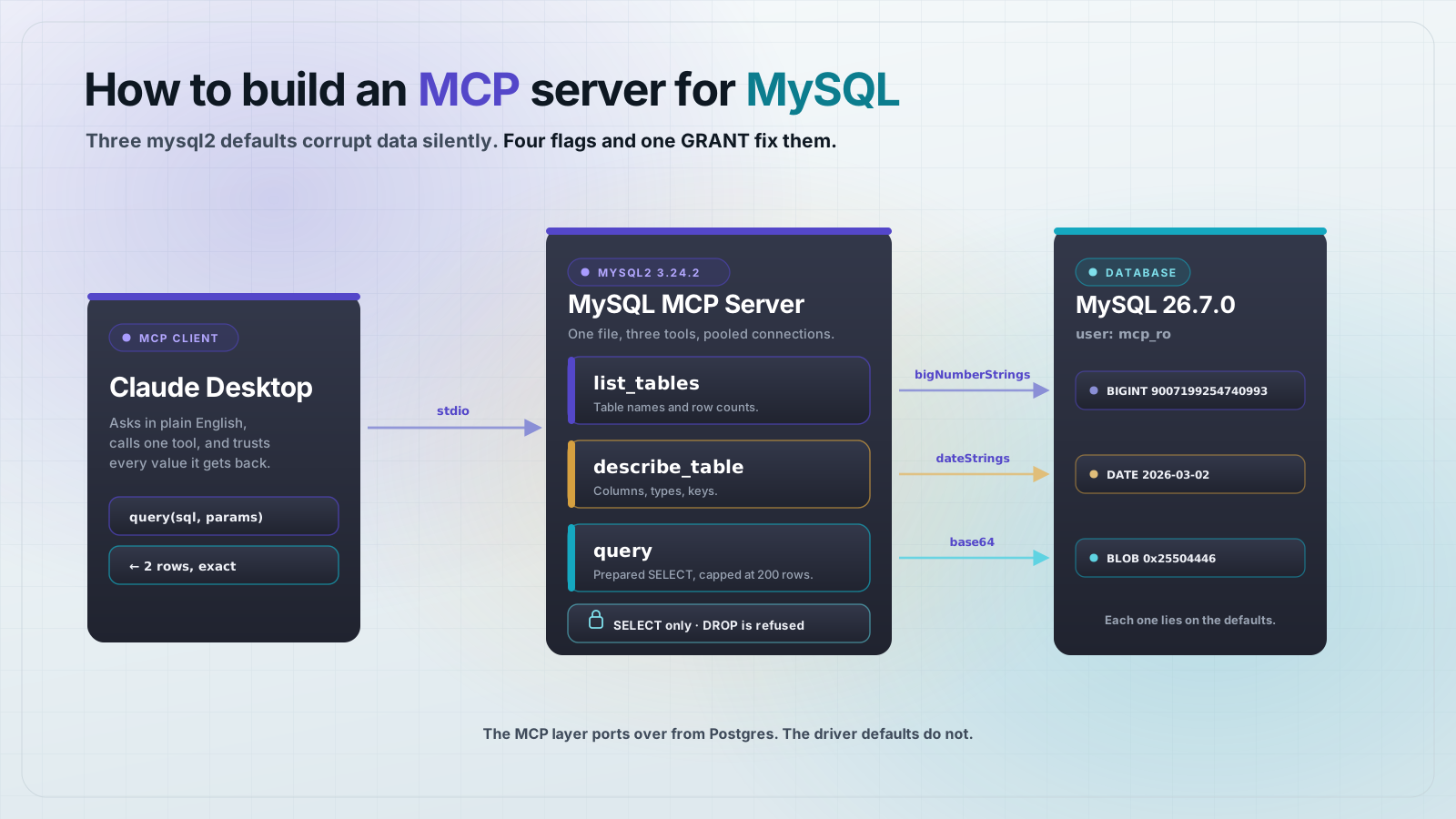
To build a Model Context Protocol (MCP) server for MySQL, connect with mysql2, expose list_tables, describe_table and query as tools, and enforce read-only access with a MySQL user that only holds SELECT. The whole server is about 90 lines. The part that takes longer is the four mysql2 defaults that quietly hand your model wrong data.
If you have built an MCP server for SQLite or Postgres, the advice you will hear is that MySQL is the same job with a different driver. The MCP side really is identical: same three tools, same read-only rule. The driver is not. We built the server below against MySQL 26.7.0 and mysql2 3.24.2, then measured what came back. Four of the defaults are wrong for MCP, and none of them raise an error.
What you need before you start
Node.js 20 or newer, a running MySQL 8.0 or later, and an MCP client such as Claude Desktop. We used MySQL 26.7.0 on port 3399. Create a project and pin the two dependencies:
mkdir mysql-mcp && cd mysql-mcp
npm init -y
npm pkg set type=module
npm install mysql2@3.24.2 @modelcontextprotocol/sdk@1.30.0 zod@3.24.1
For a database to read against, this is the schema every example below uses. The order ID is deliberately 2^53 + 1, the smallest integer a JavaScript double cannot represent:
CREATE DATABASE shop;
USE shop;

CREATE TABLE orders (
  id            BIGINT UNSIGNED PRIMARY KEY,
  customer      VARCHAR(80) NOT NULL,
  total         DECIMAL(12,2) NOT NULL,
  is_paid       TINYINT(1) NOT NULL DEFAULT 0,
  placed_on     DATE NOT NULL,
  placed_at     DATETIME NOT NULL,
  receipt       BLOB
);

INSERT INTO orders VALUES
 (9007199254740993, 'Ada Lovelace', 1299.99, 1, '2026-03-01', '2026-03-01 23:30:00', 0x255044462D312E34),
 (2,                'Grace Hopper',   49.50, 0, '2026-03-02', '2026-03-02 09:15:00', NULL);
Why can't you just swap the driver?
Here is one row read back through mysql2 with default settings, printed exactly as an MCP tool would send it:
{
  "id": 9007199254740992,
  "customer": "Ada Lovelace",
  "total": "1299.99",
  "is_paid": 1,
  "placed_on": "2026-03-01T00:00:00.000Z",
  "placed_at": "2026-03-01T23:30:00.000Z",
  "receipt": { "type": "Buffer", "data": [37, 80, 68, 70, 45, 49, 46, 52] }
}
Compare that to what is in the table. The ID we inserted was 9007199254740993. What came back is 9007199254740992. MySQL stored the value correctly and mysql2 parsed it into a double, which cannot hold it. Ask the model to look up that order and it will query an ID that does not exist.
The other three lines are wrong in the same quiet way. total is a string, so any arithmetic the model tries is string concatenation. receipt is a Buffer that serialized into an array of byte values. And placed_on is the one that bites hardest in production.
The date is wrong in half the world
A MySQL DATE has no time and no timezone. mysql2 turns it into a JS Date at local midnight, and JSON.stringify then converts that to UTC. We read the same row, placed_on = 2026-03-02, under five values of TZ:
TZ=Asia/Tokyo           -> "2026-03-01T15:00:00.000Z"  model reads 2026-03-01
TZ=Australia/Sydney     -> "2026-03-01T13:00:00.000Z"  model reads 2026-03-01
TZ=Europe/Berlin        -> "2026-03-01T23:00:00.000Z"  model reads 2026-03-01
TZ=UTC                  -> "2026-03-02T00:00:00.000Z"  model reads 2026-03-02
TZ=America/Los_Angeles  -> "2026-03-02T08:00:00.000Z"  model reads 2026-03-02
Any timezone east of UTC moves the date back a day. Your tests pass in London and the server is wrong in Berlin. Nothing about the deployment looks different.
How do you make a MySQL MCP server read-only?
Two approaches look reasonable and both fail. The third one works.
The first is a regex on the SQL string, allowing only statements that start with SELECT. mysql2 rejects stacked statements by default with ER_PARSE_ERROR, so this appears to hold. But multipleStatements: true is a common setting, copied in from migration scripts and connection-string examples. With it on, we sent this through a /^\s*select/i guard:
SELECT * FROM customers WHERE id = 1; DROP TABLE customersThe string starts with SELECT, so the guard passed it. The table was dropped. A guard whose correctness depends on a connection flag set somewhere else is not a guard.
The second approach is MySQL's own read-only transaction, which looks like the built-in answer. It is not enough. We opened START TRANSACTION READ ONLY and tried two writes:
INSERT INTO customers VALUES (99,'mallory')
  -> REJECTED  ER_CANT_EXECUTE_IN_READ_ONLY_TRANSACTION

DROP TABLE customers
  -> ACCEPTED  table dropped
DROP TABLE is DDL. DDL causes an implicit commit in MySQL, which ends the read-only transaction before the statement is evaluated against it. The transaction blocked the harmless write and allowed the destructive one.
The approach that holds is a MySQL user that was never granted anything else. Privileges are checked by the server, so no client flag, no injected statement, and no clever SQL can route around them:
CREATE USER 'mcp_ro'@'%' IDENTIFIED BY 'choose-a-real-password';
REVOKE ALL PRIVILEGES, GRANT OPTION FROM 'mcp_ro'@'%';
GRANT SELECT ON shop.* TO 'mcp_ro'@'%';
FLUSH PRIVILEGES;
Connected as that user, every write we tried was refused by the server:
SELECT      ALLOWED
INSERT      DENIED   ER_TABLEACCESS_DENIED_ERROR
UPDATE      DENIED   ER_TABLEACCESS_DENIED_ERROR
DELETE      DENIED   ER_TABLEACCESS_DENIED_ERROR
DROP TABLE  DENIED   ER_TABLEACCESS_DENIED_ERROR
CREATE      DENIED   ER_TABLEACCESS_DENIED_ERROR
TRUNCATE    DENIED   ER_TABLEACCESS_DENIED_ERROR
other db DENIED ER_TABLEACCESS_DENIED_ERRORThe connection settings that fix the type bugs
Four flags correct everything in the bad row above. Set them once on the pool:
const pool = mysql.createPool({
  host: process.env.MYSQL_HOST,
  port: Number(process.env.MYSQL_PORT ?? 3306),
  user: process.env.MYSQL_USER,
  password: process.env.MYSQL_PASSWORD,
  database: process.env.MYSQL_DATABASE,
  connectionLimit: 4,
  multipleStatements: false,   // stacked statements stay a parse error
  supportBigNumbers: true,     // read BIGINT without a double
  bigNumberStrings: true,      // return it as an exact string
  dateStrings: true,           // DATE stays '2026-03-02'
  timezone: "Z",
});
supportBigNumbers alone is not enough. Without bigNumberStrings, mysql2 still returns a number when the value happens to fit, so the bug reappears only for large IDs. Set both and every BIGINT is a string. Leave DECIMAL as a string too: 1299.99 is exact as text and lossy as a float, which is what you want for money.
Buffers need code rather than a flag. Convert them at the edge so a BLOB arrives as something a model can name:
function toJson(rows) {
  return rows.map((row) => {
    const out = {};
    for (const [k, v] of Object.entries(row)) {
      out[k] = Buffer.isBuffer(v) ? { base64: v.toString("base64") } : v;
    }
    return out;
  });
}
Use a pool, not a connection
MySQL closes idle connections after wait_timeout, which defaults to 28800 seconds. An MCP server sits idle between tool calls for exactly that kind of stretch. We set wait_timeout to 3 seconds and idled for 6:
createConnection -> FAILED: Can't add new command when connection is in closed state
createPool       -> recovered, returned {"c":2}
createConnection gives you one socket and no recovery. The pool discards the dead connection and opens a new one, so the tool call just works. This is why the server below uses createPool even though it only ever needs one connection at a time.
The complete server
One file, server.mjs. It exposes three tools: list_tables, describe_table and query. Errors come back as isError tool results rather than thrown exceptions, so the model can read the failure and try again:
import { McpServer } from "@modelcontextprotocol/sdk/server/mcp.js";
import { StdioServerTransport } from "@modelcontextprotocol/sdk/server/stdio.js";
import { z } from "zod";
import mysql from "mysql2/promise";

const pool = mysql.createPool({
  host: process.env.MYSQL_HOST ?? "127.0.0.1",
  port: Number(process.env.MYSQL_PORT ?? 3306),
  user: process.env.MYSQL_USER,
  password: process.env.MYSQL_PASSWORD,
  database: process.env.MYSQL_DATABASE,
  connectionLimit: 4,
  multipleStatements: false,
  supportBigNumbers: true,
  bigNumberStrings: true,
  dateStrings: true,
  timezone: "Z",
});

function toJson(rows) {
  return rows.map((row) => {
    const out = {};
    for (const [k, v] of Object.entries(row)) {
      out[k] = Buffer.isBuffer(v) ? { base64: v.toString("base64") } : v;
    }
    return out;
  });
}

const server = new McpServer({ name: "mysql-mcp", version: "1.0.0" });

server.registerTool(
  "list_tables",
  { description: "List the tables in the configured database.", inputSchema: {} },
  async () => {
    const [rows] = await pool.query(
      "SELECT table_name AS name, table_rows AS approx_rows FROM information_schema.tables WHERE table_schema = DATABASE() ORDER BY table_name"
    );
    return { content: [{ type: "text", text: JSON.stringify(toJson(rows), null, 2) }] };
  }
);

server.registerTool(
  "describe_table",
  {
    description: "Show the columns and types of one table.",
    inputSchema: { table: z.string().describe("Table name") },
  },
  async ({ table }) => {
    const [rows] = await pool.query(
      "SELECT column_name AS name, column_type AS type, is_nullable AS nullable, column_key AS `key` FROM information_schema.columns WHERE table_schema = DATABASE() AND table_name = ? ORDER BY ordinal_position",
      [table]
    );
    if (rows.length === 0) {
      return { content: [{ type: "text", text: `No table named ${table} in this database.` }], isError: true };
    }
    return { content: [{ type: "text", text: JSON.stringify(toJson(rows), null, 2) }] };
  }
);

server.registerTool(
  "query",
  {
    description: "Run one read-only SQL query and return the rows.",
    inputSchema: {
      sql: z.string().describe("A single SELECT statement"),
      params: z.array(z.union([z.string(), z.number(), z.boolean(), z.null()])).optional(),
    },
  },
  async ({ sql, params = [] }) => {
    try {
      const [rows] = await pool.execute(sql, params);
      const capped = rows.slice(0, 200);
      return {
        content: [
          {
            type: "text",
            text: JSON.stringify(
              { row_count: rows.length, truncated: rows.length > capped.length, rows: toJson(capped) },
              null,
              2
            ),
          },
        ],
      };
    } catch (err) {
      return { content: [{ type: "text", text: `${err.code ?? "ERROR"}: ${err.message}` }], isError: true };
    }
  }
);

await server.connect(new StdioServerTransport());
Two details in query are worth naming. It uses pool.execute, which sends a real prepared statement, so ? placeholders are bound by the server and never interpolated into SQL. And it caps results at 200 rows while still reporting the true row_count, because a SELECT * against a large table will otherwise fill the model's context with a single tool result.
Test it end to end
Run the server against the read-only user and call it over stdio. Point your client at it with this config:
{
  "mcpServers": {
    "mysql": {
      "command": "node",
      "args": ["/absolute/path/to/mysql-mcp/server.mjs"],
      "env": {
        "MYSQL_HOST": "127.0.0.1",
        "MYSQL_PORT": "3306",
        "MYSQL_USER": "mcp_ro",
        "MYSQL_PASSWORD": "choose-a-real-password",
        "MYSQL_DATABASE": "shop"
      }
    }
  }
}
Calling query with SELECT id, customer, total, is_paid, placed_on, placed_at, receipt FROM orders ORDER BY id returns this. Every field from the broken row at the top of this post is now correct:
{
  "row_count": 2,
  "truncated": false,
  "rows": [
    {
      "id": "2",
      "customer": "Grace Hopper",
      "total": "49.50",
      "is_paid": 0,
      "placed_on": "2026-03-02",
      "placed_at": "2026-03-02 09:15:00",
      "receipt": null
    },
    {
      "id": "9007199254740993",
      "customer": "Ada Lovelace",
      "total": "1299.99",
      "is_paid": 1,
      "placed_on": "2026-03-01",
      "placed_at": "2026-03-01 23:30:00",
      "receipt": { "base64": "JVBERi0xLjQ=" }
    }
  ]
}
The ID is exact, the date is the date that is in the table, and the BLOB is base64. Now confirm the guard. Both of these come back as isError results, refused at the server rather than by a string check:
query { "sql": "DROP TABLE customers" }
  ER_TABLEACCESS_DENIED_ERROR: DROP command denied to user 'mcp_ro'@'localhost'
  for table 'customers'

query { "sql": "SELECT * FROM customers WHERE id = 1; DROP TABLE customers" }
  ER_PARSE_ERROR: You have an error in your SQL syntax ... near 'DROP TABLE customers'
That is the test worth keeping in your own project. A read-only database server should be able to prove it refuses a DROP, and the proof should come from the database rather than from your code.
Frequently asked questions
Frequently asked questions
- Can I use the same MCP server code for MySQL, Postgres and SQLite?
- The MCP layer ports directly: the same three tools and the same read-only rule work for all three. The driver layer does not.
mysql2truncatesBIGINTto a double by default and returnsDATEas a JSDate, wherepgreturns both as strings. Port the tool definitions, then re-check every column type. - Why does my MySQL MCP server return the wrong ID?
mysql2parsesBIGINTinto a JavaScript number unless you setsupportBigNumbers: trueandbigNumberStrings: true. Any value above 2^53 loses precision silently, so 9007199254740993 comes back as 9007199254740992. Set both flags and IDs are returned as exact strings.- Is START TRANSACTION READ ONLY enough to make an MCP server safe?
- No. It blocks
INSERT,UPDATEandDELETE, but DDL such asDROP TABLEtriggers an implicit commit and executes anyway. Connect as a MySQL user granted onlySELECTon the one schema you are exposing; the server then refuses writes regardless of what SQL reaches it. - Do I need to block SQL injection in an MCP database server?
- Yes, and a regex on the statement is not enough. Use
pool.executewith?placeholders so values are bound by the server, keepmultipleStatements: false, and rely on aSELECT-only grant as the real boundary. Placeholders cannot bind table or column names, so pass any dynamic identifier throughmysql.escapeId. - Why does my MySQL MCP server stop working after it sits idle?
- MySQL closes idle connections after
wait_timeout, 28800 seconds by default, and an MCP server is idle between tool calls. A singlecreateConnectionfails with "Can't add new command when connection is in closed state". Usemysql.createPool, which replaces the dead connection on the next query. - Should I expose database tables as MCP resources instead of tools?
- Expose the schema as resources and the queries as tools. A client can list resources up front to learn what exists, which keeps table discovery out of the model's tool-call budget, while the actual reads stay explicit tool calls you can log and rate-limit.
The server above is a complete, working MySQL MCP server, and the four defaults it corrects are the ones you would otherwise ship without noticing. Build it, point a client at it, then run the DROP TABLE call yourself and watch the database refuse it.
Connect the server in MCPOrbit and call your MySQL tools by hand. You see the exact JSON a model would read, which is how you catch a tool that started returning the wrong row.
About the author
Mark
Head of Marketing, MCPOrbit
Mark leads marketing at MCPOrbit, the free desktop client for the Model Context Protocol. He writes the build-it and reliability guides, and the code in them is run before it ships.