Build it
How to handle API keys in an MCP server
Keep API keys in the MCP server's environment, never in tool arguments or logs. A tested TypeScript walkthrough: fail-fast config, redaction, per-tenant keys.
Mark
Head of Marketing, MCPOrbit
- Published
- Updated
- · Updated
- Read time
- · 9 min read
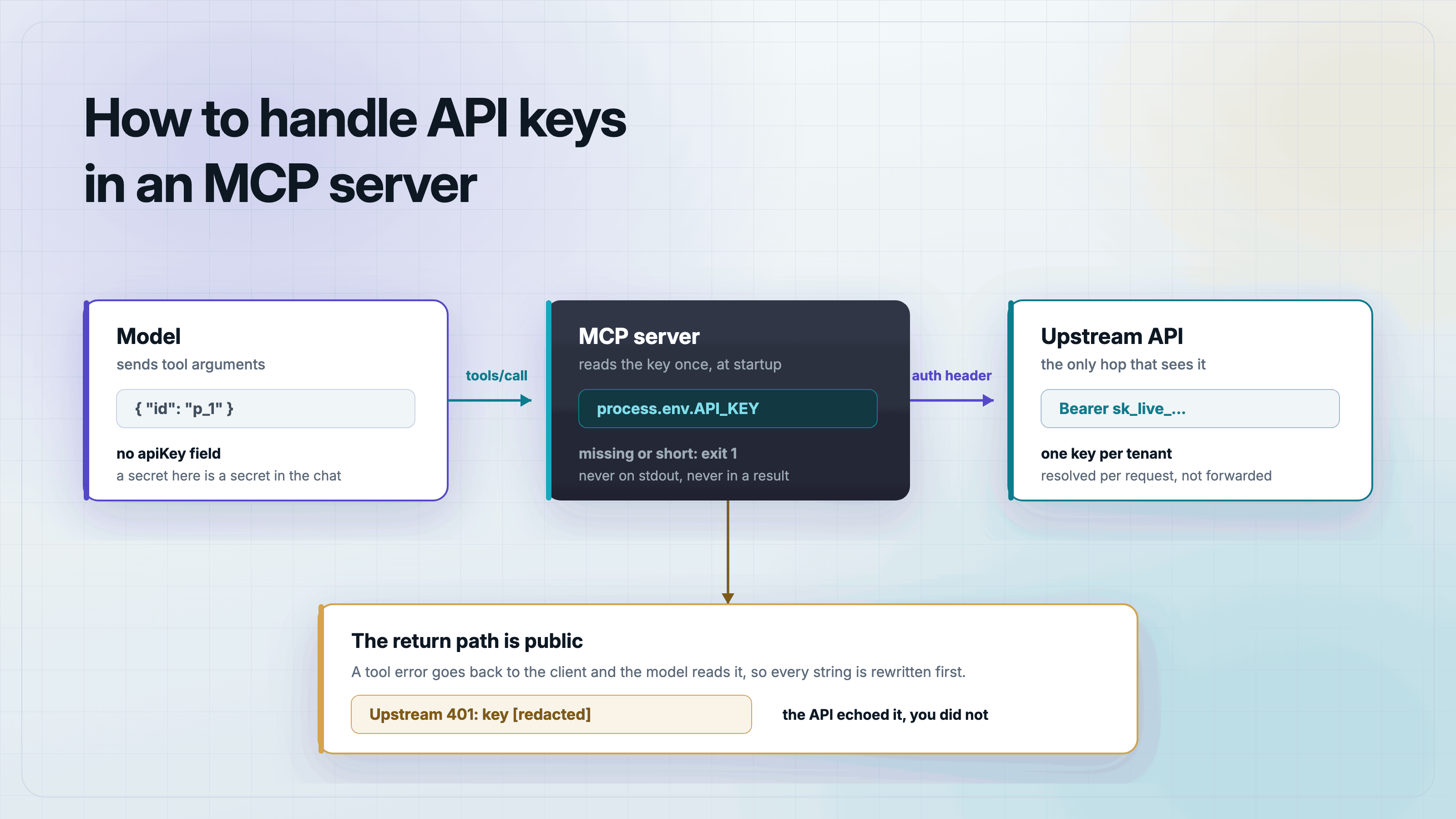
An API key belongs in the Model Context Protocol (MCP) server's own process environment. Read it once at startup, validate it, attach it to the outbound request, and never let it appear in a tool argument, a tool result, or a log line.
That one rule settles most of the design. The model calls your tool, your server calls the upstream API, and the credential only exists on the second hop. If a key ever becomes a tool input, it has to travel through the conversation to get there, which means it lands in the model's context, in the client's transcript, and in whatever the client logs. None of those are places you can revoke.
Where does an MCP server get its API key?
For a local server over stdio, the client spawns your process, so the client supplies the environment. In Claude Desktop, Cursor, or VS Code that is the env object in the MCP config file. The key sits in that file on disk, your server reads it from process.env, and it never crosses the protocol.
{
  "mcpServers": {
    "keyed-api": {
      "command": "npx",
      "args": ["tsx", "/absolute/path/to/keys-mcp/server.ts"],
      "env": {
        "API_BASE_URL": "https://api.example.com",
        "API_KEY": "sk_live_your_key_here"
      }
    }
  }
}
MCPOrbit puts the same two variables in a field instead of a file. Command is npx, Arguments is tsx /absolute/path/to/keys-mcp/server.ts, and both API_BASE_URL and API_KEY go in Environment Variables, which takes the same JSON object you see above. The mechanism does not change: the client supplies the environment, your server reads process.env, and the key never crosses the protocol. How to add an MCP server to MCPOrbit shows that field.
Everything below runs against a fake API that the test file starts for you, so you can copy the whole thing and run it without signing up for anything. Set up the project first.
mkdir keys-mcp && cd keys-mcp
npm init -y && npm pkg set type=module
npm install @modelcontextprotocol/server@2.0.0 zod@4.4.3
npm install -D @modelcontextprotocol/client@2.0.0 tsx@4
Validate the key at startup, not on the first tool call
Parse the environment once, in its own module, and refuse to start if anything is missing. The failure a reader actually hits is a placeholder key copied out of a README, so check the shape too. Print the field name and the reason, never the value.
// config.ts - read every secret once, at startup, from the environment.
import { z } from "zod";

const Env = z.object({
  API_BASE_URL: z.string().startsWith("http", "API_BASE_URL must be an http(s) URL"),
  API_KEY: z.string().min(16, "API_KEY is shorter than 16 characters, so it is probably a placeholder"),
});

const parsed = Env.safeParse(process.env);

if (!parsed.success) {
  // Print the field names and why they failed. Never print the values.
  const problems = parsed.error.issues
    .map((issue) => `  ${issue.path.join(".")}: ${issue.message}`)
    .join("\n");
  process.stderr.write(`Bad configuration, refusing to start:\n${problems}\n`);
  process.exit(1);
}

export const config = parsed.data;

// Anything that might reach a log line or an error message goes through this.
const secrets = [config.API_KEY];

export function redact(text: string): string {
  return secrets.reduce((out, secret) => out.split(secret).join("[redacted]"), text);
}Why a key must never be a tool argument
It is tempting to write the tool below. It looks flexible, and it moves the key problem to somebody else.
// Do not do this.
inputSchema: z.object({
  apiKey: z.string(),   // the model now has to know a secret
  projectId: z.string(),
})
For the model to fill that field, the key has to be somewhere the model can read: a system prompt, an earlier message, a file it opened. From there it is in the context window, in the client transcript, and in any request logged along the way. A prompt injection in some unrelated document can also ask the model to call your tool with a key it saw earlier, and the model has no way to know that is wrong.
The fix is a startup assertion. A credential-shaped input is a design bug, so fail loudly at boot rather than quietly at request time.
// server.ts - an MCP server that calls a keyed HTTP API over stdio.
// The key lives in this process. It is never a tool argument and never
// reaches a log line.
import { McpServer } from "@modelcontextprotocol/server";
import { serveStdio } from "@modelcontextprotocol/server/stdio";
import { z } from "zod";
import { config, redact } from "./config.ts";

const CREDENTIAL_FIELD =
  /^(api[-_]?key|apikey|token|secret|password|passwd|authorization|auth|bearer|credential|credentials)$/i;

// Fails the build, not the request: a tool that asks the model for a
// credential is a design bug, so refuse to start.
function assertNoCredentialFields(name: string, shape: Record<string, unknown>) {
  const offenders = Object.keys(shape).filter((key) => CREDENTIAL_FIELD.test(key));
  if (offenders.length > 0) {
    throw new Error(
      `Tool "${name}" declares credential inputs: ${offenders.join(", ")}. ` +
        `Read credentials from the environment instead.`,
    );
  }
}

async function api(path: string): Promise<any> {
  const res = await fetch(`${config.API_BASE_URL}${path}`, {
    headers: {
      Authorization: `Bearer ${config.API_KEY}`,
      Accept: "application/json",
    },
  });
  if (!res.ok) {
    const body = await res.text();
    // Upstreams echo credentials back more often than you would like.
    throw new Error(redact(`Upstream ${res.status} on ${path}: ${body.slice(0, 200)}`));
  }
  return res.json();
}

function makeServer() {
  const server = new McpServer(
    { name: "keyed-api", version: "1.0.0" },
    { capabilities: { tools: {} } },
  );

  const listProjects = z.object({});
  assertNoCredentialFields("list_projects", listProjects.shape);
  server.registerTool(
    "list_projects",
    {
      title: "List projects",
      description: "List every project the configured account can see.",
      inputSchema: listProjects,
    },
    async () => {
      const projects = await api("/projects");
      const rows = projects.map((p: any) => `${p.id}  ${p.name}`);
      return { content: [{ type: "text", text: rows.join("\n") || "No projects." }] };
    },
  );

  const getProject = z.object({ id: z.string() });
  assertNoCredentialFields("get_project", getProject.shape);
  server.registerTool(
    "get_project",
    {
      title: "Get project",
      description: "Fetch one project by id.",
      inputSchema: getProject,
    },
    async ({ id }) => {
      const project = await api(`/projects/${encodeURIComponent(id)}`);
      return { content: [{ type: "text", text: JSON.stringify(project, null, 2) }] };
    },
  );

  return server;
}

serveStdio(() => makeServer());
Keep the key out of your error messages
The redact call in api() is the part people skip. An MCP tool error is not private. It goes back to the client as tool output, the model reads it, and it usually ends up in a transcript. Plenty of APIs put the offending credential straight into a 401 or 404 body, so a raw pass-through hands the key to everything downstream. One string replace closes that path, and the test below proves it does.
Prove it with a test that runs offline
This test starts a fake keyed API on a loopback port, runs the real server against it, and asserts the four behaviors. The fake API deliberately echoes the key in its error bodies, because that is the case redaction exists for.
// test-client.ts - stands up a fake keyed API, runs the server against it,
// and asserts the four things that matter. No account anywhere.
import { createServer } from "node:http";
import { spawn } from "node:child_process";
import { Client } from "@modelcontextprotocol/client";
import { StdioClientTransport } from "@modelcontextprotocol/client/stdio";

const API_KEY = "sk_live_9f2b7c41aa8e4d63";
const serverPath = new URL("./server.ts", import.meta.url).pathname;

function assert(cond: unknown, msg: string) {
  if (!cond) throw new Error("ASSERT FAILED: " + msg);
  console.log("  ok - " + msg);
}

// A stand-in for the API you are wrapping. It requires the key, and on
// failure it echoes the key back, which is what real APIs do often enough
// to matter.
const upstream = createServer((req, res) => {
  const auth = req.headers.authorization ?? "";
  if (auth !== `Bearer ${API_KEY}`) {
    res.writeHead(401, { "content-type": "application/json" });
    res.end(JSON.stringify({ error: `bad credentials: ${auth}` }));
    return;
  }
  if (req.url === "/projects") {
    res.writeHead(200, { "content-type": "application/json" });
    res.end(JSON.stringify([{ id: "p_1", name: "orbit" }, { id: "p_2", name: "atlas" }]));
    return;
  }
  res.writeHead(404, { "content-type": "application/json" });
  res.end(JSON.stringify({ error: `no such path ${req.url}, key ${API_KEY}` }));
});
await new Promise<void>((r) => upstream.listen(0, "127.0.0.1", r));
const port = (upstream.address() as any).port;
const API_BASE_URL = `http://127.0.0.1:${port}`;

const transport = new StdioClientTransport({
  command: "npx",
  args: ["tsx", serverPath],
  env: { ...process.env, API_BASE_URL, API_KEY },
});
const client = new Client({ name: "test", version: "1.0.0" });
await client.connect(transport);

const { tools } = await client.listTools();
assert(tools.length === 2, "2 tools registered");

// 1. No tool asks the model for a credential.
const credentialish = /^(api[-_]?key|apikey|token|secret|password|authorization|auth|bearer)$/i;
const declared = tools.flatMap((t) => Object.keys((t.inputSchema as any).properties ?? {}));
assert(!declared.some((k) => credentialish.test(k)), "no tool declares a credential input");

// 2. The key travels in the request, not in the conversation.
const list = await client.callTool({ name: "list_projects", arguments: {} });
assert((list.content as any)[0].text.includes("p_1  orbit"), "list_projects reaches the keyed API");

// 3. An upstream failure that echoes the key comes back redacted.
const missing = await client.callTool({ name: "get_project", arguments: { id: "nope" } });
const errorText = (missing.content as any)[0].text as string;
assert(missing.isError === true, "a 404 upstream becomes a tool error");
assert(!errorText.includes(API_KEY), "the tool error does not leak the key");
assert(errorText.includes("[redacted]"), "the leaked key was replaced with [redacted]");

await client.close();

// 4. Starting with no key fails fast, loudly, and without printing a value.
const bare = { ...process.env };
delete bare.API_KEY;
const child = spawn("npx", ["tsx", serverPath], { env: { ...bare, API_BASE_URL } });
let stderr = "";
child.stderr.on("data", (chunk) => (stderr += chunk));
const code = await new Promise<number>((r) => child.on("exit", (c) => r(c ?? -1)));
assert(code === 1, "a missing key exits 1 instead of serving broken tools");
assert(stderr.includes("API_KEY"), "the startup error names the missing variable");

upstream.close();
console.log("\nALL CHECKS PASSED");
npx tsx test-client.ts
# ok - 2 tools registered
# ok - no tool declares a credential input
# ok - list_projects reaches the keyed API
# ok - a 404 upstream becomes a tool error
# ok - the tool error does not leak the key
# ok - the leaked key was replaced with [redacted]
# ok - a missing key exits 1 instead of serving broken tools
# ok - the startup error names the missing variable
#
# ALL CHECKS PASSEDOne remote server, many users, one key each
A single process environment stops working the moment your server is remote and serves more than one customer. Each caller needs a different upstream key, and the obvious shortcut is the wrong one: taking the bearer token the client sent you and forwarding it to the upstream API. That is the confused deputy problem, and MCPOrbit has a separate post on why it burns you.
The v2 TypeScript SDK gives you the right seam. createMcpHandler takes a factory that runs per request and receives a context object with the original Request on it, so you can resolve the caller's identity and construct a server already bound to that tenant's credentials.
// http-server.ts - one remote server, many tenants, one upstream key each.
// The caller's token identifies them. It is never sent upstream.
import { createServer } from "node:http";
import { createMcpHandler, McpServer } from "@modelcontextprotocol/server";
import { z } from "zod";

// Stand-in for your user store. In production this is a database lookup and
// the keys come from a secret manager, not a literal.
const TENANTS: Record<string, { tenant: string; upstreamKey: string }> = {
  tok_alice: { tenant: "acme", upstreamKey: "sk_live_acme_2f81c0d4aa93" },
  tok_bob: { tenant: "globex", upstreamKey: "sk_live_globex_77b1e0a3cd52" },
};

function makeServer(upstreamKey: string, tenant: string) {
  const server = new McpServer(
    { name: "keyed-api", version: "1.0.0" },
    { capabilities: { tools: {} } },
  );
  server.registerTool(
    "whoami",
    {
      title: "Who am I",
      description: "Report which tenant this connection is bound to.",
      inputSchema: z.object({}),
    },
    async () => ({
      content: [
        {
          type: "text",
          // Uses the key, never returns it.
          text: `tenant=${tenant} keyFingerprint=${upstreamKey.slice(-4)}`,
        },
      ],
    }),
  );
  return server;
}

// The factory runs per request. ctx.requestInfo is the original Request, so
// this is where a connection gets bound to one tenant's credentials.
const handler = createMcpHandler((ctx) => {
  const header = ctx.requestInfo?.headers.get("authorization") ?? "";
  const principal = TENANTS[header.replace(/^Bearer /, "")];
  if (!principal) throw new Error("unauthorized");
  return makeServer(principal.upstreamKey, principal.tenant);
});

createServer(async (req, res) => {
  const chunks: Buffer[] = [];
  for await (const chunk of req) chunks.push(chunk as Buffer);
  const headers = new Headers();
  for (const [key, value] of Object.entries(req.headers)) {
    if (typeof value === "string") headers.set(key, value);
  }
  const response = await handler.fetch(
    new Request(`http://localhost${req.url}`, {
      method: req.method,
      headers,
      body: chunks.length ? Buffer.concat(chunks) : undefined,
      // @ts-expect-error duplex is required by Node for a streamed body
      duplex: "half",
    }),
  );
  res.writeHead(response.status, Object.fromEntries(response.headers));
  res.end(Buffer.from(await response.arrayBuffer()));
}).listen(3000, () => process.stderr.write("listening on http://localhost:3000\n"));
Two clients hitting that endpoint with different tokens get two servers, each closed over one key. Alice gets tenant=acme, Bob gets tenant=globex, an unknown token never gets a session, and no key appears in any tool result. Note the fingerprint trick in whoami: when you need to show which credential is in play, show the last four characters, not the credential.
A checklist before you ship
- Every secret is read from
process.envin one module, validated, and the process exits non-zero when it is missing. - No tool input schema has a credential-shaped field, and a startup assertion enforces that.
- Every error string that can reach a tool result passes through a redactor.
- Diagnostics go to stderr, never stdout, on a stdio server.
- The
.envfile and the client config file holding the key are both in.gitignore. - On a remote server, the caller's token is verified by you and is never forwarded to the upstream API.
- Anywhere you have to display a credential, show the last four characters only.
Frequently asked questions
Frequently asked questions
- Where do I put the API key for a local MCP server?
- In the
envblock of the client's MCP config file, for exampleclaude_desktop_config.json. The client passes that object to your process when it spawns it, and your server reads it fromprocess.env. The key never travels over the MCP connection. - Can an MCP tool take an API key as a parameter?
- It can, and it should not. For the model to fill that argument the key must be readable in the conversation, which puts it in the context window, the client transcript, and any request logs. Read credentials from the server's environment instead.
- Should I forward the client's OAuth token to the upstream API?
- No. That is the confused deputy problem: a token issued for your server gets replayed against a service that never agreed to trust it. Verify the caller's token yourself, map it to an identity, and use the credential your server holds for that identity.
- How do I stop an API key from leaking into MCP tool errors?
- Run every outgoing error string through a redactor that replaces the secret with a placeholder. Upstream APIs frequently echo the credential back in 401 and 404 bodies, and a tool error is returned to the client and read by the model.
- How do I use different API keys for different users on a remote MCP server?
- Build the server inside the
createMcpHandlerfactory. It runs per request and receives the originalRequest, so you can verify the caller, look up that tenant's key, and return anMcpServerclosed over it. - Why does my stdio MCP server disconnect when I add logging?
- Because stdout is the protocol channel. A
console.logwrites a non-JSON line into the message stream and the client drops the connection. Write diagnostics toprocess.stderr.
The whole example runs offline against the fake API in test-client.ts, so you can copy the four files, watch the assertions pass, then point API_BASE_URL at the service you actually wrap. When you want to check the result by hand, MCPOrbit connects to your server over stdio or HTTP and lists every tool with its live JSON schema, and its request and response log shows the full payload of each call, so you can confirm that no credential-shaped field ever reached a tool argument and that no key came back in an error.
About the author
Mark
Head of Marketing, MCPOrbit
Mark leads marketing at MCPOrbit, the free desktop client for the Model Context Protocol. He writes the build-it and reliability guides, and the code in them is run before it ships.