Build-it
How to mark MCP tools read-only or destructive
MCP tool annotations (readOnlyHint, destructiveHint, and two more) tell a client which tools are safe to auto-run. Build-it, tested on Node 25 with the SDK.
Mark
Head of Marketing, MCPOrbit
- Published
- Updated
- · Updated
- Read time
- · 8 min read
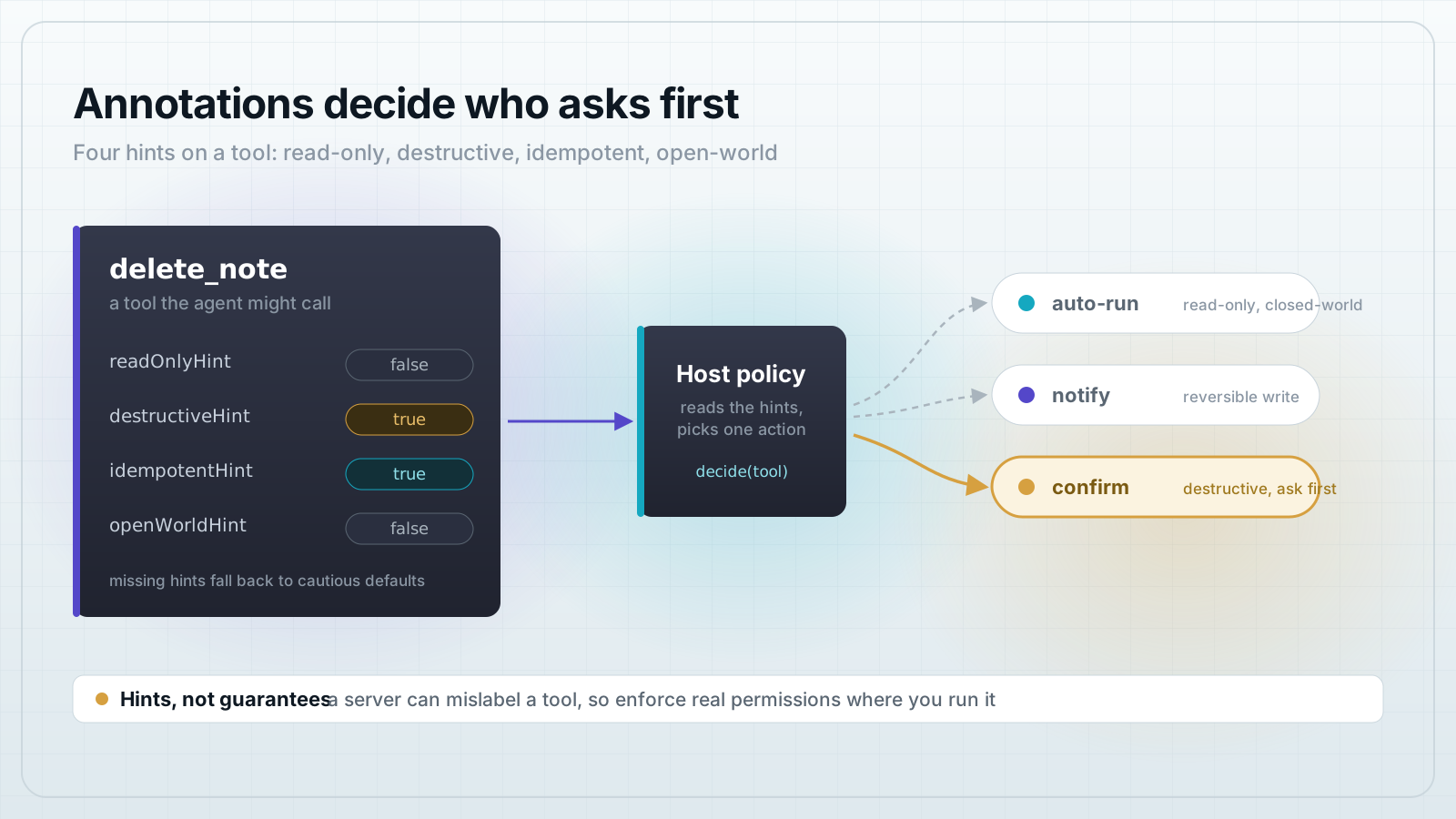
To tell a Model Context Protocol (MCP) client which of your tools are safe to run on their own, add annotations to each tool: readOnlyHint, destructiveHint, idempotentHint, and openWorldHint. The client reads those hints from the tool list and decides when to run a tool silently and when to stop and ask the user first.
This matters because an agent calling your tools makes a choice on every call: run it, or check with a human. With no signal, a careful host asks about everything, which is tedious, or asks about nothing, which is dangerous. Annotations give the host that signal up front, in the tool descriptor, before any call runs.
What are MCP tool annotations?
Tool annotations are optional metadata on a tool descriptor that describe how the tool behaves before anyone calls it. They shipped in the 2025-03-26 MCP spec revision and are stable in the current spec. There are five fields: a title for display, plus four behavior hints.
readOnlyHint: the tool does not modify anything.destructiveHint: the tool may make changes that are hard or impossible to undo. Only meaningful whenreadOnlyHintis false.idempotentHint: calling it again with the same arguments adds no further effect.openWorldHint: the tool may reach an external system such as the web, email, or another API, not just a closed local dataset.
Why the defaults matter more than the fields
Here is the part that trips people up. Every hint is optional, and each has a default. When you leave a hint out, the client fills in that default. The defaults are deliberately cautious: readOnlyHint is false, destructiveHint is true, idempotentHint is false, and openWorldHint is true.
So a tool with no annotations at all reads as: it writes, its writes are destructive, repeats add effects, and it reaches outside. That is the safest assumption, and it is why an unannotated tool gets a confirmation prompt. Two things follow. First, annotating a safe tool is what earns it auto-run. Second, the destructiveHint default of true only bites when readOnlyHint is false, so a read-only tool is never treated as destructive.
Turn that into a small policy. resolveAnnotations fills the spec defaults, and decide maps the result to one of three actions.
// policy.mjs: turn tool annotations into a confirmation decision.
// Annotations are optional hints. When one is missing, the spec defines a
// default, and the safe reading is the cautious one. Fill defaults first.
export function resolveAnnotations(tool) {
  const a = tool.annotations ?? {};
  return {
    readOnlyHint: a.readOnlyHint ?? false,      // assume it can write
    destructiveHint: a.destructiveHint ?? true, // assume writes can destroy
    idempotentHint: a.idempotentHint ?? false,  // assume repeats add effects
    openWorldHint: a.openWorldHint ?? true,     // assume it reaches outside
  };
}

// Return "auto", "notify", or "confirm" for a tool.
export function decide(tool) {
  const { readOnlyHint, destructiveHint, openWorldHint } = resolveAnnotations(tool);

  // Read-only and closed-world: nothing to undo, no outside reach. Auto-run.
  if (readOnlyHint && !openWorldHint) return "auto";

  // destructiveHint only means anything when the tool is not read-only.
  if (!readOnlyHint && destructiveHint) return "confirm";

  // Writes, but reversible: run it, tell the user what happened.
  return "notify";
}
Annotate the tools on the server
Build a small notes server with four tools that span the space: a read-only search, a reversible upsert, a destructive delete, and an email send that reaches outside. Each tool passes an annotations object to registerTool.
// server.mjs: an MCP server whose tools declare behavior with annotations.
import { McpServer } from "@modelcontextprotocol/sdk/server/mcp.js";
import { z } from "zod";

export function buildServer() {
  const server = new McpServer({ name: "notes-server", version: "1.0.0" });

  // Read-only, closed-world: safe to call without asking the user.
  server.registerTool(
    "search_notes",
    {
      title: "Search notes",
      description: "Full-text search over the local notes index.",
      inputSchema: { query: z.string() },
      annotations: {
        title: "Search notes",
        readOnlyHint: true,
        openWorldHint: false,
      },
    },
    async ({ query }) => ({
      content: [{ type: "text", text: `3 notes match "${query}"` }],
    })
  );

  // Writes, but not destructive, and safe to repeat: create-or-replace by id.
  server.registerTool(
    "upsert_note",
    {
      title: "Save note",
      description: "Create or overwrite a note by id.",
      inputSchema: { id: z.string(), body: z.string() },
      annotations: {
        title: "Save note",
        readOnlyHint: false,
        destructiveHint: false,
        idempotentHint: true,
        openWorldHint: false,
      },
    },
    async ({ id }) => ({
      content: [{ type: "text", text: `Saved note ${id}` }],
    })
  );

  // Irreversible local change: destructive, so a client should confirm first.
  server.registerTool(
    "delete_note",
    {
      title: "Delete note",
      description: "Permanently delete a note by id.",
      inputSchema: { id: z.string() },
      annotations: {
        title: "Delete note",
        readOnlyHint: false,
        destructiveHint: true,
        idempotentHint: true,
        openWorldHint: false,
      },
    },
    async ({ id }) => ({
      content: [{ type: "text", text: `Deleted note ${id}` }],
    })
  );

  // Reaches an external system: not read-only, and open-world.
  server.registerTool(
    "send_email",
    {
      title: "Send email",
      description: "Send an email to an external address.",
      inputSchema: { to: z.string(), subject: z.string() },
      annotations: {
        title: "Send email",
        readOnlyHint: false,
        destructiveHint: true,
        idempotentHint: false,
        openWorldHint: true,
      },
    },
    async ({ to }) => ({
      content: [{ type: "text", text: `Email sent to ${to}` }],
    })
  );

  return server;
}
Read the four annotation blocks top to bottom. search_notes is read-only and closed-world. upsert_note writes but is not destructive and is idempotent, since saving the same note twice lands you in the same place. delete_note is destructive. send_email is destructive and open-world, because it acts on something you cannot recall.
Read the annotations on the client and decide
The client lists the tools once, reads each tool's annotations, and applies the policy. We connect client and server in-process with the SDK's in-memory transport, so the whole demo is one command with no network.
// run.mjs: connect a client to the server in-process, read every tool's
// annotations, and apply the confirmation policy. One command, no network.
import { Client } from "@modelcontextprotocol/sdk/client/index.js";
import { InMemoryTransport } from "@modelcontextprotocol/sdk/inMemory.js";
import { buildServer } from "./server.mjs";
import { decide, resolveAnnotations } from "./policy.mjs";

const [clientTransport, serverTransport] = InMemoryTransport.createLinkedPair();
const server = buildServer();
await server.connect(serverTransport);

const client = new Client({ name: "notes-host", version: "1.0.0" });
await client.connect(clientTransport);

const { tools } = await client.listTools();

console.log("tool           read  destr  idem  open   -> action");
console.log("-------------- ----- ------ ----- -----  ---------");
for (const tool of tools) {
  const a = resolveAnnotations(tool);
  const action = decide(tool);
  const flag = (b) => (b ? "yes" : "no ");
  console.log(
    tool.name.padEnd(14),
    flag(a.readOnlyHint).padEnd(5),
    flag(a.destructiveHint).padEnd(6),
    flag(a.idempotentHint).padEnd(5),
    flag(a.openWorldHint).padEnd(5),
    "->",
    action
  );
}

// Prove the policy gates a real call. A destructive tool needs a yes first.
async function callWithPolicy(name, args, userSaysYes) {
  const tool = tools.find((t) => t.name === name);
  const action = decide(tool);
  if (action === "confirm" && !userSaysYes) {
    return `BLOCKED: ${name} needs confirmation`;
  }
  const res = await client.callTool({ name, arguments: args });
  return `${action.toUpperCase()}: ${res.content[0].text}`;
}

console.log("");
console.log(await callWithPolicy("search_notes", { query: "mcp" }, false));
console.log(await callWithPolicy("delete_note", { id: "42" }, false));
console.log(await callWithPolicy("delete_note", { id: "42" }, true));

await client.close();
await server.close();
Run it and watch the policy gate a real call
Save the three files, install the two pinned dependencies, and run. Tested end to end on Node v25.8.1.
npm init -y
npm i @modelcontextprotocol/sdk@1.30.0 zod@3.25.76
node run.mjs
tool read destr idem open -> action
-------------- ----- ------ ----- ----- ---------
search_notes yes yes no no -> auto
upsert_note no no yes no -> notify
delete_note no yes yes no -> confirm
send_email no yes no yes -> confirm
AUTO: 3 notes match "mcp"
BLOCKED: delete_note needs confirmation
CONFIRM: Deleted note 42Read the table. search_notes auto-runs. delete_note and send_email require confirmation, so the client blocks the first delete and only runs it after the user says yes. upsert_note runs with a notice. Notice that search_notes shows destr yes, its default value, but the policy ignores that because the tool is read-only, which is exactly the rule from earlier.
Frequently asked questions
Frequently asked questions
- What are MCP tool annotations?
- They are optional metadata on an MCP tool that describe its behavior before it runs:
readOnlyHint,destructiveHint,idempotentHint, andopenWorldHint, plus a displaytitle. A client reads them from the tool list to decide whether to auto-run a tool or ask the user first. - What is the difference between readOnlyHint and destructiveHint?
readOnlyHintsays the tool changes nothing.destructiveHintsays the tool may make changes that are hard to undo, and it only applies whenreadOnlyHintis false. A read-only tool is never treated as destructive.- What happens if I do not set any tool annotations?
- The client fills cautious defaults:
readOnlyHintfalse,destructiveHinttrue,idempotentHintfalse, andopenWorldHinttrue. An unannotated tool is treated as a destructive, open-world write, so it usually triggers a confirmation prompt. - Can an MCP client trust annotations for security?
- No. Annotations are hints, not guarantees. A buggy or hostile server can mislabel a tool. Use annotations to shape the user experience, and enforce real permissions where you control execution.
- Which MCP spec version added tool annotations?
- The 2025-03-26 spec revision added them, and they are stable in the current spec. They are supported by
@modelcontextprotocol/sdk1.30.0, so you can set them today withregisterTool.
Add a server to MCPOrbit and read each tool's full description and input schema by hand, so you can see what a tool says about itself before you let an agent call it.
About the author
Mark
Head of Marketing, MCPOrbit
Mark leads marketing at MCPOrbit, the free desktop client for the Model Context Protocol. He writes the build-it and reliability guides, and the code in them is run before it ships.