Build-it
How to Deploy a Stateless MCP Server to Cloudflare Workers
Since the July 28, 2026 MCP spec dropped session IDs, a full MCP server fits in a single Cloudflare Workers fetch handler. Here is the handler, the wrangler.toml, and a verified deploy.
Mark
Head of Marketing, MCPOrbit
- Published
- Updated
- · Updated
- Read time
- · 8 min read
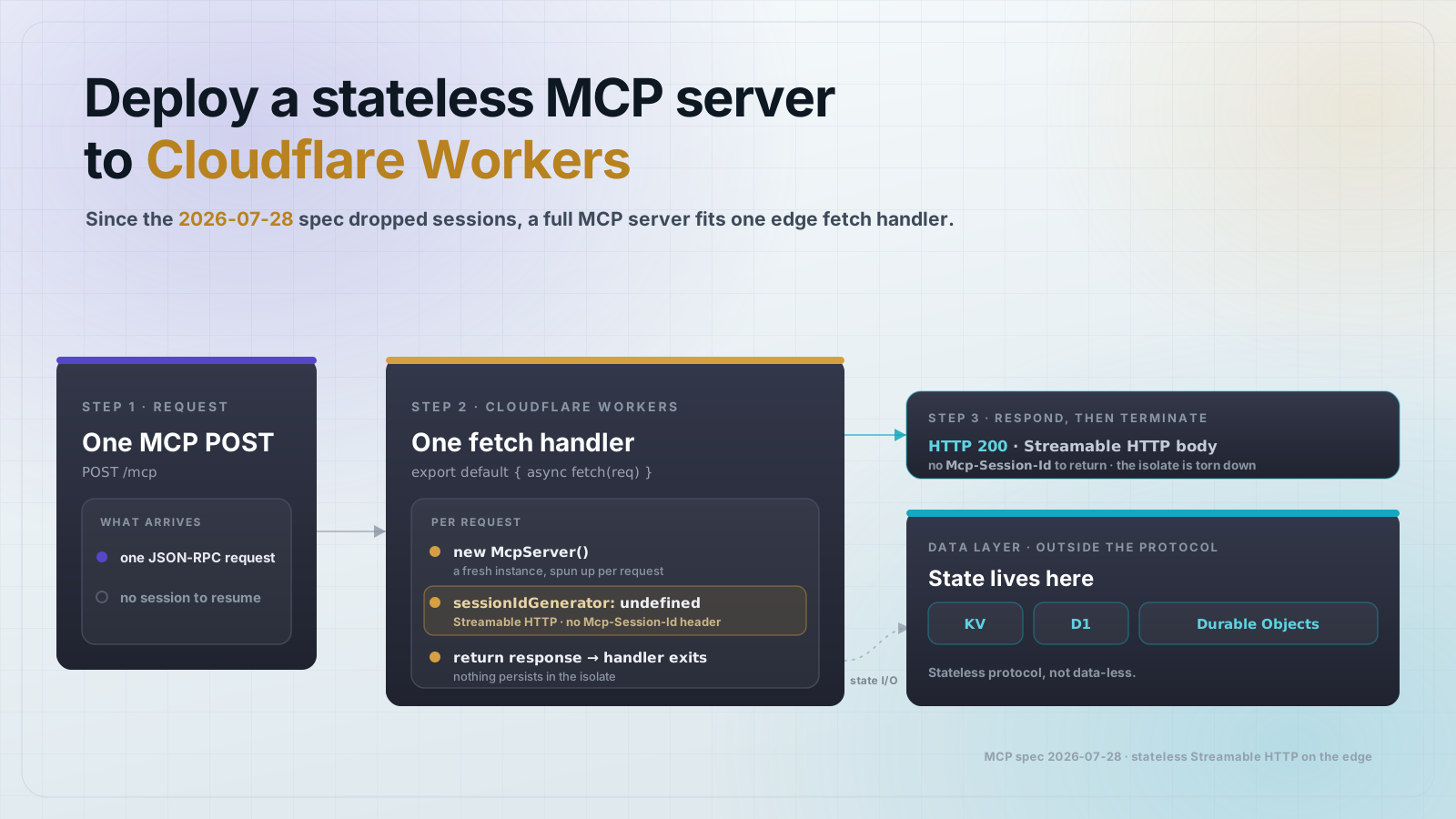
A stateless MCP server deploys to Cloudflare Workers as a single fetch handler over Streamable HTTP: build the MCP server, bind it in wrangler.toml, and run wrangler deploy. Since the July 28, 2026 MCP spec removed Mcp-Session-Id, every request is self-contained, with no sticky sessions and no shared worker state, which is exactly the execution model Cloudflare Workers were built for.
Why the July 2026 spec unlocked edge deployment
Before the July 28, 2026 MCP spec revision, the protocol relied on Mcp-Session-Id headers to tie requests to a running server instance. On serverless platforms where any instance can answer any request, that made session correlation painful: a request landing on a cold instance had no session to resume. Operators worked around it with sticky sessions or Redis-backed session stores, both expensive and stateful.
The July revision removed sessions from the core protocol. Tool calls, resource reads, and prompt requests are now fully self-contained. An MCP server on Cloudflare Workers can receive a request, spin up, handle it, and terminate, with nothing to maintain between requests.
The Worker: an MCP server as a fetch handler
The MCP TypeScript SDK ships a WebStandardStreamableHTTPServerTransport that accepts a standard Request and returns a standard Response, which is exactly the signature of a Cloudflare Workers fetch handler. Create a new McpServer per request, register your tools, connect the transport, and return the response. (The plain StreamableHTTPServerTransport is the Node.js HTTP variant and pulls in Node-only server glue; on Workers, Deno, and Bun you want the web-standard transport shown here.)
npm create cloudflare@latest my-mcp-worker -- --type worker
cd my-mcp-worker
npm install @modelcontextprotocol/sdk@1.30.0 zod@4.4.3
// src/index.ts
import { McpServer } from "@modelcontextprotocol/sdk/server/mcp.js";
import { WebStandardStreamableHTTPServerTransport } from "@modelcontextprotocol/sdk/server/webStandardStreamableHttp.js";
import { z } from "zod";
interface Env {
// Add KV, D1, or other bindings here
}
export default {
async fetch(request: Request, env: Env, ctx: ExecutionContext): Promise<Response> {
if (request.method !== "POST") {
return new Response("Method not allowed", { status: 405 });
}
const server = new McpServer({
name: "my-worker-mcp",
version: "1.0.0",
});
server.tool(
"echo",
"Echoes the input back",
{ message: z.string().describe("Text to echo") },
async ({ message }) => ({
content: [{ type: "text", text: message }],
})
);
const transport = new WebStandardStreamableHTTPServerTransport({
sessionIdGenerator: undefined,
});
await server.connect(transport);
return transport.handleRequest(request);
},
};Two things to note. A new McpServer instance is created per request, so there is no shared in-memory state across requests. Setting sessionIdGenerator to undefined tells the transport to run in stateless mode, so no Mcp-Session-Id header is issued or expected.
Where state lives when the protocol is stateless
A stateless protocol means no session context between requests. It does not mean your tools cannot reach data. Cloudflare Workers give you several persistence options:
- KV: read-heavy, eventually-consistent key-value store. Good for config, lookup tables, and cached results. Bind as MY_KV: KVNamespace in wrangler.toml.
- D1: SQLite at the edge, for structured, queryable data that needs SQL. Bind as DB: D1Database.
- Durable Objects: single-instance and strongly consistent. Use when multiple clients coordinate against the same logical entity. The MCP protocol is stateless; the Durable Object is not.
- External database over fetch: call Postgres, Supabase, PlanetScale, or any HTTP-accessible database directly from the tool handler. Standard fetch is available in Workers.
wrangler.toml and local dev
# wrangler.toml
name = "my-mcp-worker"
main = "src/index.ts"
compatibility_date = "2026-07-01"

# Example KV binding (remove if unused)
# [[kv_namespaces]]
# binding = "MY_KV"
# id = "your-kv-namespace-id"
# Local dev, Worker serves on http://localhost:8787
wrangler dev
# Test with a raw MCP initialize call. Streamable HTTP requires the client to
# accept BOTH application/json and text/event-stream, or the server returns 406.
curl -X POST http://localhost:8787 \\
-H "Content-Type: application/json" \\
-H "Accept: application/json, text/event-stream" \\
-d '{"jsonrpc":"2.0","id":1,"method":"initialize","params":{"protocolVersion":"2026-07-28","capabilities":{},"clientInfo":{"name":"test","version":"0.1.0"}}}'Deploy and verify
wrangler deploy
# Deployed to: https://my-mcp-worker.your-subdomain.workers.dev

# Verify the live Worker handles initialize (note the Accept header)
curl -X POST https://my-mcp-worker.your-subdomain.workers.dev \\
  -H "Content-Type: application/json" \\
  -H "Accept: application/json, text/event-stream" \\
  -d '{"jsonrpc":"2.0","id":1,"method":"initialize","params":{"protocolVersion":"2026-07-28","capabilities":{},"clientInfo":{"name":"test","version":"0.1.0"}}}'
A successful initialize response confirms the Worker is accepting MCP requests. The response comes back as a text/event-stream body carrying the JSON-RPC result, which is why the client must accept text/event-stream. The endpoint is public by default, so add auth before you expose real tooling.
Auth on the edge
The cleanest pattern for Workers is a Bearer token check at the top of the fetch handler, before the MCP server is created. Store the secret in Cloudflare's secret store, not in wrangler.toml or source.
// Add at the top of the fetch handler, before server construction
const authHeader = request.headers.get("Authorization");
if (!authHeader || authHeader !== `Bearer ${env.AUTH_TOKEN}`) {
  return new Response("Unauthorized", { status: 401 });
}
# Store the secret, never commit it to source
wrangler secret put AUTH_TOKENFAQ
- Can I use stdio transport on Cloudflare Workers?
- No. Cloudflare Workers do not have a stdin or stdout pipe. Use WebStandardStreamableHTTPServerTransport, which maps directly to the Workers fetch handler signature.
- Does a Worker cold start affect MCP clients?
- Workers cold starts are typically under 5ms because of the V8 isolate model, not a container. For most MCP tool calls this is imperceptible. If sub-millisecond cold starts matter, keep the Worker warm with Cron Triggers.
- Where does session state go if the protocol is stateless?
- The MCP protocol carries no session context. For tool results that must persist across a multi-step workflow, store them in KV or D1 keyed by a token you pass through the tool input and output.
- How do I expose many tools without a monolithic file?
- Register all tools on the single McpServer instance inside the fetch handler. Split tool definitions into separate modules and import them. For very large tool sets, consider a Workers for Platforms dispatch namespace.
- Does this pattern work on Vercel Edge or Deno Deploy?
- Yes. WebStandardStreamableHTTPServerTransport works anywhere that accepts a Request and returns a Response, including Vercel Edge Functions, Deno Deploy, and Bun.serve. The wrangler.toml is Workers-specific; the MCP code is portable.
- What MCP spec version does this target?
- The July 28, 2026 revision that removed Mcp-Session-Id from the core protocol. The pinned SDK (1.30.0) advertises protocol 2025-11-25, which already implements the stateless Streamable HTTP mode this deploy relies on; it will negotiate initialize to 2025-11-25 until the SDK ships the dated 2026-07-28 string.
About the author
Mark
Head of Marketing, MCPOrbit
Mark leads marketing at MCPOrbit, the free desktop client for the Model Context Protocol. He writes the build-it and reliability guides, and the code in them is run before it ships.