Tutorial
How to build an MCP server for a SQLite database
Build a read-only Model Context Protocol server over a SQLite database in TypeScript: list tables, describe schema, and run SELECT queries. Runnable code.
Mark
Head of Marketing, MCPOrbit
- Published
- Updated
- · Updated
- Read time
- · 11 min read
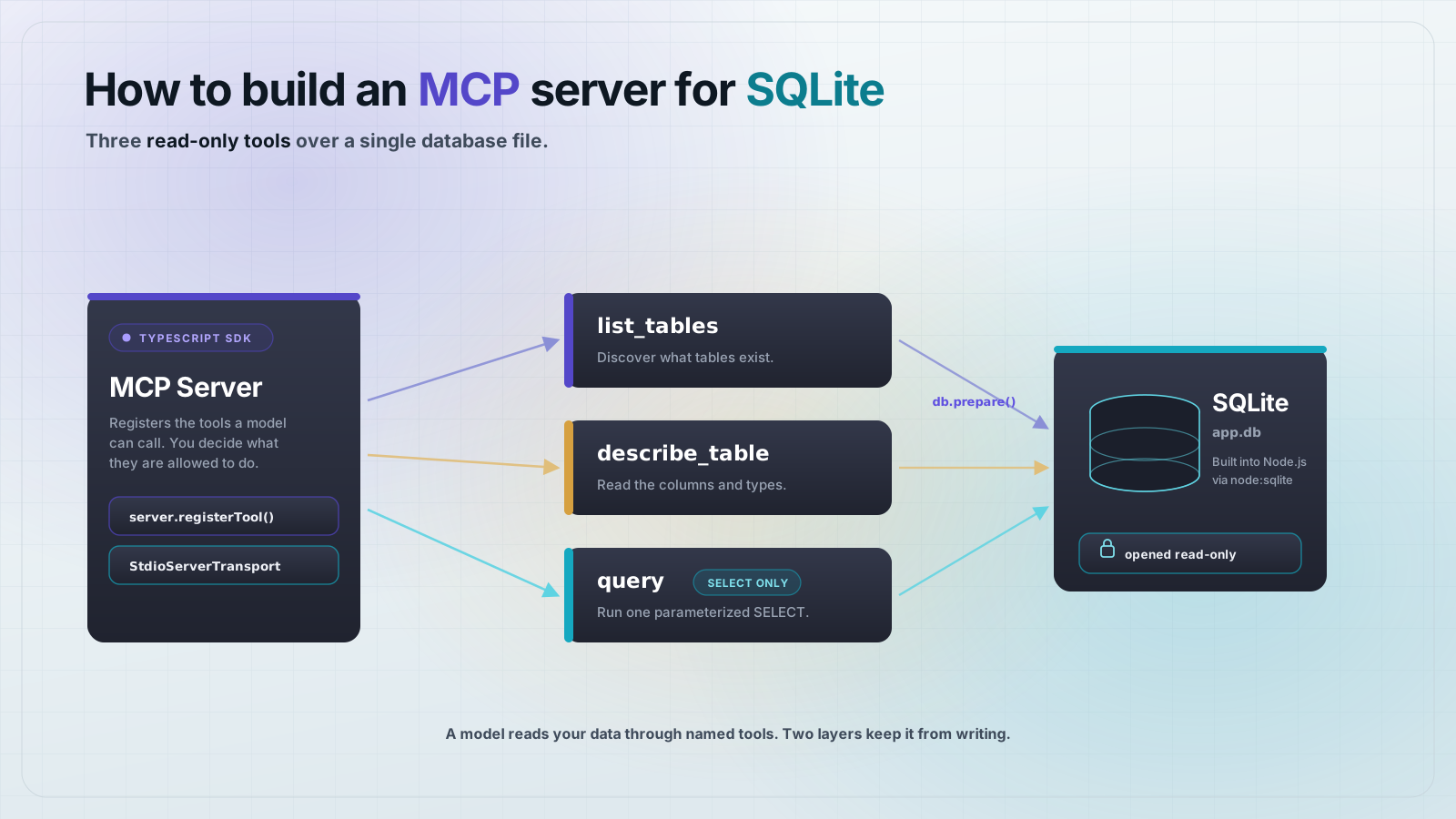
To build a Model Context Protocol (MCP) server for a SQLite database, open the database file read-only, then expose three tools with the official TypeScript SDK: one to list tables, one to describe a table, and one to run a SELECT query. Open the file read-only and reject anything that is not a SELECT, so a model can read your data but never change it.
A database is the most common thing people want to put behind MCP. Once a model can list your tables and run a query, it can answer real questions about your data instead of guessing. SQLite is the easiest place to start: it is a single file, and Node.js 25 ships a built-in node:sqlite module, so there is no database server to install and no extra driver to add. This guide builds the server end to end and tests it against a real database.
What is an MCP server for a database?
An MCP server for a database is a small program that sits between a model and your data. It does not hand the model a raw connection. Instead it exposes a few named tools with typed inputs, and the model calls those tools. You decide what the tools can do. That is where the safety comes from: the model only ever gets to do what your tools allow.
For a read-only analytics use case, three tools cover almost everything. list_tables lets the model discover what exists. describe_table gives it the columns and types so it can write correct SQL. query runs a single SELECT and returns rows. The model chains them: list, describe, then query.
Set up the project
Create a fresh directory and install the SDK. The project is an ES module, so type is set to module. zod declares the tool input schemas. The database itself needs no package: node:sqlite is built into Node.js 25.
{
  "name": "mcp-sqlite-demo",
  "private": true,
  "type": "module",
  "version": "1.0.0",
  "dependencies": {
    "@modelcontextprotocol/sdk": "^1.30.0",
    "zod": "^3.25.76"
  }
}
npm install @modelcontextprotocol/sdk@1.30.0 zod@3.25.76Create a database to read
You need something to query. This seed script creates app.db with one customers table and a few rows. Save it as seed.js and run it once with node seed.js. In a real project you would point the server at your existing database file instead.
// seed.js: create a demo SQLite database the server can read.
import { DatabaseSync } from "node:sqlite";

const db = new DatabaseSync("app.db");

db.exec(`
  DROP TABLE IF EXISTS customers;
  CREATE TABLE customers (
    id      INTEGER PRIMARY KEY,
    name    TEXT NOT NULL,
    plan    TEXT NOT NULL,
    country TEXT NOT NULL,
    mrr     INTEGER NOT NULL
  );
`);

const insert = db.prepare(
  "INSERT INTO customers (name, plan, country, mrr) VALUES (?, ?, ?, ?)"
);
insert.run("Ada Lovelace", "pro", "GB", 49);
insert.run("Alan Turing", "team", "GB", 199);
insert.run("Grace Hopper", "pro", "US", 49);
insert.run("Katherine Johnson", "enterprise", "US", 999);

db.close();
console.log("Seeded app.db with 4 customers.");
Run node seed.js and it prints Seeded app.db with 4 customers.. You now have a real SQLite file to serve.
How do you expose a SQLite database over MCP?
The server opens the database file read-only and registers the three tools. Each tool declares its inputs with zod and returns its result as a JSON string in a text content block. The one rule that matters for safety lives in the query tool: it accepts a statement only if it starts with select or with, and it rejects anything with a second statement. Save this as server.js.
// server.js: an MCP server that exposes a read-only SQLite database.
import { McpServer } from "@modelcontextprotocol/sdk/server/mcp.js";
import { StdioServerTransport } from "@modelcontextprotocol/sdk/server/stdio.js";
import { DatabaseSync } from "node:sqlite";
import { z } from "zod";

// Path to the database file. Default to app.db in the current directory.
const DB_PATH = process.env.SQLITE_DB_PATH ?? "app.db";

// Open read-only. The server can never write, drop, or alter the database.
const db = new DatabaseSync(DB_PATH, { readOnly: true });

const server = new McpServer({ name: "sqlite-server", version: "1.0.0" });

server.registerTool(
  "list_tables",
  {
    title: "List tables",
    description: "List the names of all tables in the database.",
    inputSchema: {},
  },
  async () => {
    const rows = db
      .prepare(
        "SELECT name FROM sqlite_master WHERE type = 'table' AND name NOT LIKE 'sqlite_%' ORDER BY name"
      )
      .all();
    const names = rows.map((r) => r.name);
    return { content: [{ type: "text", text: JSON.stringify(names) }] };
  }
);

server.registerTool(
  "describe_table",
  {
    title: "Describe table",
    description: "Return the columns and types of one table.",
    inputSchema: { table: z.string() },
  },
  async ({ table }) => {
    // Validate the name against the catalog before interpolating it.
    // PRAGMA does not accept bound parameters for the table name.
    const exists = db
      .prepare(
        "SELECT 1 FROM sqlite_master WHERE type = 'table' AND name = ?"
      )
      .get(table);
    if (!exists) {
      return {
        isError: true,
        content: [{ type: "text", text: `No such table: ${table}` }],
      };
    }
    const cols = db.prepare(`PRAGMA table_info(${JSON.stringify(table)})`).all();
    const schema = cols.map((c) => ({
      name: c.name,
      type: c.type,
      notnull: Boolean(c.notnull),
      pk: Boolean(c.pk),
    }));
    return { content: [{ type: "text", text: JSON.stringify(schema, null, 2) }] };
  }
);

server.registerTool(
  "query",
  {
    title: "Run a read-only SQL query",
    description:
      "Run a single read-only SELECT query and return the rows as JSON. Writes are rejected.",
    inputSchema: {
      sql: z.string(),
      params: z.array(z.union([z.string(), z.number(), z.null()])).optional(),
    },
  },
  async ({ sql, params = [] }) => {
    const trimmed = sql.trim().replace(/;+\s*$/, "");
    // Reject anything that is not a single SELECT/WITH statement.
    if (!/^(select|with)\b/i.test(trimmed)) {
      return {
        isError: true,
        content: [
          { type: "text", text: "Only SELECT queries are allowed." },
        ],
      };
    }
    if (/;/.test(trimmed)) {
      return {
        isError: true,
        content: [
          { type: "text", text: "Only a single statement is allowed." },
        ],
      };
    }
    try {
      const rows = db.prepare(trimmed).all(...params);
      return { content: [{ type: "text", text: JSON.stringify(rows, null, 2) }] };
    } catch (err) {
      return {
        isError: true,
        content: [{ type: "text", text: `Query failed: ${err.message}` }],
      };
    }
  }
);

await server.connect(new StdioServerTransport());
Three things in that file carry the safety story. The connection is opened with { readOnly: true }, so SQLite itself refuses any write. The query tool allows only a single statement that begins with select or with. And describe_table checks the table name against the catalog before interpolating it, because PRAGMA cannot take a bound parameter. Values in query are always bound through params, never concatenated into the SQL.
Test the server end to end
Write a small client that spawns the server over stdio, lists the tools, and calls each one. It also tries a write and a second-statement injection to prove both get rejected. Save it as client.js.
// client.js: connect to the SQLite MCP server and exercise every tool.
import { Client } from "@modelcontextprotocol/sdk/client/index.js";
import { StdioClientTransport } from "@modelcontextprotocol/sdk/client/stdio.js";

const transport = new StdioClientTransport({ command: "node", args: ["server.js"] });
const client = new Client({ name: "demo-client", version: "1.0.0" });
await client.connect(transport);

const call = async (name, args) => {
  const r = await client.callTool({ name, arguments: args });
  return r.content[0].text + (r.isError ? "  [isError]" : "");
};

console.log("TOOLS:", (await client.listTools()).tools.map((t) => t.name).join(", "));
console.log("list_tables ->", await call("list_tables", {}));
console.log("describe_table ->", await call("describe_table", { table: "customers" }));
console.log("query (pro plan) ->", await call("query", {
  sql: "SELECT name, mrr FROM customers WHERE plan = ? ORDER BY mrr DESC",
  params: ["pro"],
}));
console.log("query (aggregate) ->", await call("query", {
  sql: "SELECT country, SUM(mrr) AS total FROM customers GROUP BY country ORDER BY total DESC",
}));
console.log("write blocked ->", await call("query", { sql: "DELETE FROM customers" }));
console.log("multi blocked ->", await call("query", { sql: "SELECT 1; DROP TABLE customers" }));
console.log("bad table ->", await call("describe_table", { table: "nope" }));

await client.close();
Run it with node client.js. The client starts the server, handshakes, and exercises every tool:
TOOLS: list_tables, describe_table, query
list_tables -> ["customers"]
describe_table -> [ ... id, name, plan, country, mrr ... ]
query (pro plan) -> [{ "name": "Ada Lovelace", "mrr": 49 }, { "name": "Grace Hopper", "mrr": 49 }]
query (aggregate) -> [{ "country": "US", "total": 1048 }, { "country": "GB", "total": 248 }]
write blocked -> Only SELECT queries are allowed.  [isError]
multi blocked -> Only a single statement is allowed.  [isError]
bad table -> No such table: nope  [isError]
That is the whole server. list_tables finds the tables, describe_table returns the schema, and query runs a parameterized SELECT and returns rows. The write and the injection both come back as errors, so a model connected to this server can read your data and nothing more.
Why open the database read-only if you already block writes?
The two checks guard different failures. The SELECT-only filter is your first line: it rejects an obvious DELETE or UPDATE before it ever reaches SQLite. But string checks can be fooled, and code changes over time. The read-only connection is the backstop. Even if a write slipped past the filter, SQLite refuses it at the storage layer with attempt to write a readonly database. Two independent layers mean one mistake does not cost you your data.
Connect it to a client
Any MCP client can now use this server. In a desktop client, register it as a stdio server that runs node server.js in the project directory. Point it at a different file by setting SQLITE_DB_PATH in the server's environment. From that point the model can ask questions like which country has the most revenue, and the server answers them from your actual database.
Frequently asked questions
Frequently asked questions
- Do I need to install a database driver to build a SQLite MCP server?
- No. Node.js 22.5 and later ship a built-in
node:sqlitemodule, so a SQLite server needs no third-party driver. This guide usesDatabaseSyncfromnode:sqlitedirectly. On older Node, usebetter-sqlite3instead. - How do I stop a model from writing to or dropping my tables?
- Use two layers. Open the connection with
{ readOnly: true }so SQLite refuses every write, and in the query tool accept only a single statement that starts withselectorwith. ADELETE,UPDATE, or a second statement is rejected before it runs. - How do I avoid SQL injection in the query tool?
- Never concatenate values into SQL. The query tool takes a
paramsarray and binds each value withdb.prepare(sql).all(...params). For identifiers like a table name, which cannot be bound, validate the name againstsqlite_masterbefore you use it. - Can I use this same pattern for Postgres or MySQL?
- Yes. The MCP side is identical: the same three tools and the same read-only rules. Swap
node:sqlitefor a driver likepg, open a read-only connection or role, and keep the SELECT-only guard on the query tool. - Should the server return rows as JSON or as a table?
- Return JSON in a text content block, as this server does. A model parses JSON reliably, and you keep types intact. If you want a human-readable table too, format it in the client after the tool returns.
You now have a read-only database server that a model can query safely. Point it at a real SQLite file, register it with your MCP client, and you have grounded answers from your own data. To try it before you wire it into an agent, open the server in MCPOrbit and call the tools by hand.
About the author
Mark
Head of Marketing, MCPOrbit
Mark leads marketing at MCPOrbit, the free desktop client for the Model Context Protocol. He writes the build-it and reliability guides, and the code in them is run before it ships.