Tutorial
How do you add an MCP server to Claude Code?
Claude Code adds MCP servers with one command in your terminal. Here is the exact syntax for local and remote servers, plus the three connection scopes.
Mark
Head of Marketing, MCPOrbit
- Published
- Updated
- · Updated
- Read time
- · 6 min read
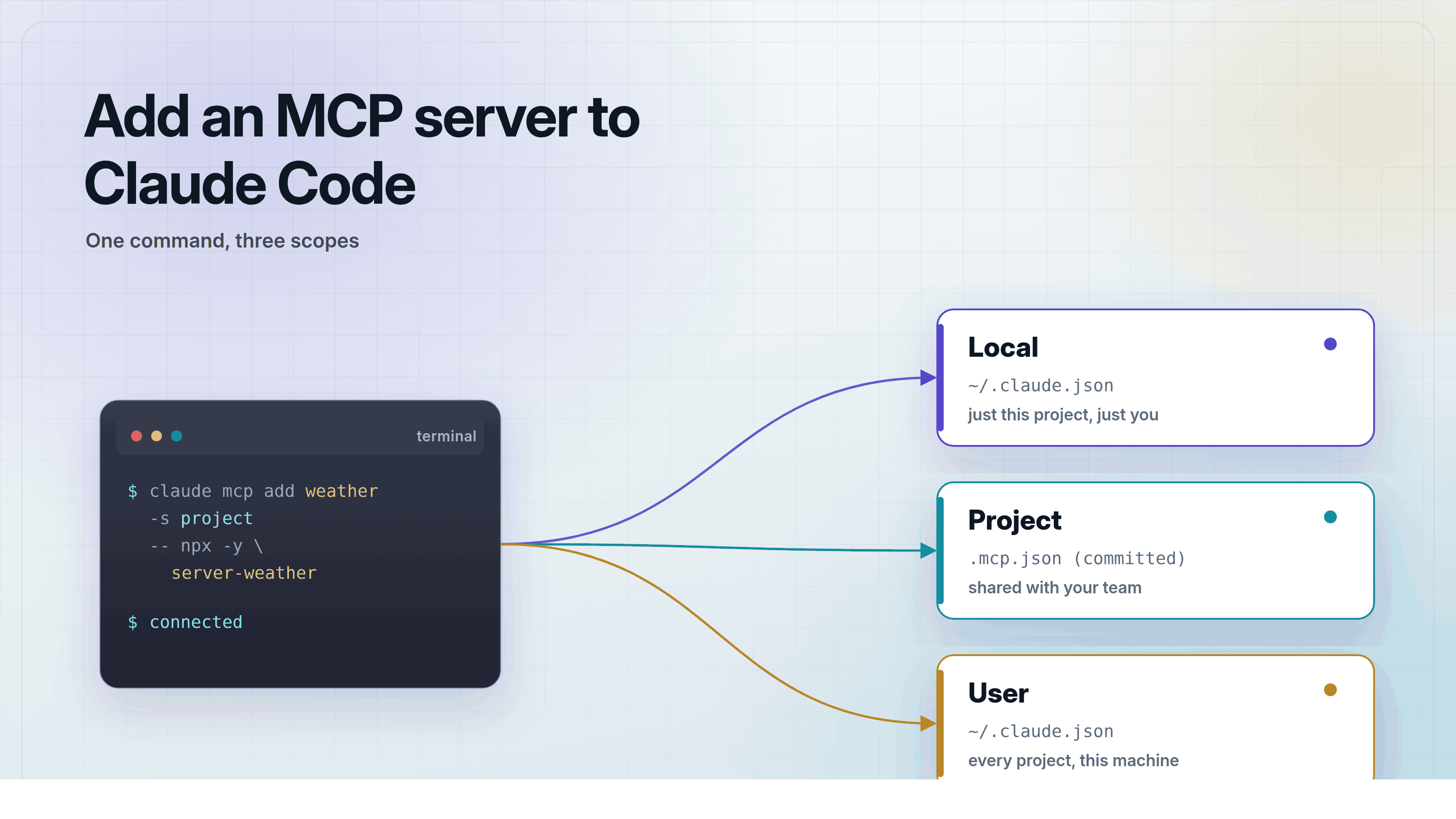
You add an MCP server to Claude Code with one terminal command: claude mcp add. Claude Code is Anthropic's command-line coding tool that can connect to a local server over stdio or a remote server over HTTP. No config file is required to get started.
This guide covers the exact add commands, the three connection scopes, and how to check that Claude Code can actually see your server's tools.
How do you add a local MCP server to Claude Code?
Run claude mcp add <name> -- <command> in your terminal. Replace <name> with a label for the server, and <command> with whatever starts it. Claude Code runs that command as its own process.
That connection uses stdio, short for standard input and output. Think of it like two people talking through a pair of walkie-talkies. Claude Code sends a message, the server replies on the same channel, and nothing else listens in.
Here is a working example. This registers the official filesystem server, which lets Claude Code read and write files in a folder you choose:
claude mcp add filesystem -- npx -y @modelcontextprotocol/server-filesystem ~/projectsSome servers need a secret, like an API key. Pass it with -e instead of writing it into a file Claude Code has to read every time. Here is a server that needs a GitHub token, like the one built in how to build an MCP server for GitHub:
claude mcp add github -e GITHUB_TOKEN=your_token_here -- node ~/mcp-servers/github-server/index.jsClaude Code passes GITHUB_TOKEN to the server process as a real environment variable, the same way your terminal already passes PATH and HOME. The server reads it the normal way: process.env.GITHUB_TOKEN in Node.js, os.environ in Python.
How do you add a remote MCP server to Claude Code?
Add --transport http, a name, and a URL instead of a command. Claude Code connects to that address over the network instead of starting a local process.
A remote server works like a website instead of an installed app. Claude Code sends a request to the address you give it, and reads back whatever the server answers.
claude mcp add --transport http notion https://mcp.notion.com/mcpStreamable HTTP is the current transport for remote servers. An older transport called SSE, short for Server-Sent Events, still works with some servers, but use --transport http unless a server's own docs ask for SSE by name.
Some remote servers need an API key or an OAuth login before they answer. Claude Code walks you through that the first time you use a server that needs it.
What are the three connection scopes in Claude Code?
Every server you add gets a scope, set with -s on the add command. The scope decides where the setting is stored and who else can see it.
localis the default. It lives in~/.claude.json, tied to the one project folder you were in when you ran the command.projectlives in a.mcp.jsonfile at the project root. Commit that file and anyone who clones the repository gets the same server.useralso lives in~/.claude.json, but is not tied to any one project. It follows you into every project on this machine.
Use project scope for a server the whole team needs, like an internal API wrapper. Use user scope for a personal tool you always want, like a notes server. Leave a server you are still testing on the default local scope.
How do you check that Claude Code can see your server's tools?
Run claude mcp list in your terminal. Claude Code shows every registered server and marks each one connected or failed.
For the full tool list, start a session with claude and type /mcp. That opens a panel listing every connected server, its status, and the exact tools it offers.
A server that fails to connect almost always has one of two causes. Either the command in claude mcp add does not run on its own. Or the server is printing a log line to standard output, the channel reserved for protocol messages. Send logs to standard error instead, then check again with claude mcp list.
Frequently asked questions
Frequently asked questions
- How do I remove an MCP server from Claude Code?
- Run
claude mcp remove <name>with the same name you gave it inclaude mcp add. If the server was added with-s useror-s project, pass the same flag, since removal only checks the local and project scopes for the current folder by default. - Can Claude Code use the same MCP servers as Claude Desktop?
- Not automatically. Claude Code and Claude Desktop read separate configuration files, so a server added in one does not appear in the other. Run
claude mcp add-from-claude-desktopto copy servers already set up in Claude Desktop into Claude Code. - Does Claude Code support the same MCP servers as Cursor or VS Code?
- Yes. Model Context Protocol (MCP) is an open standard, so a server built for one client works with any of them. Only the registration step differs: Claude Code uses the
claude mcp addcommand, while Cursor and VS Code read a configuration file. - What is the difference between stdio and HTTP transport in Claude Code?
- Stdio, short for standard input and output, runs the server as a local process and talks to it through the same pipes a terminal uses. HTTP connects to a server running somewhere else over the network. Use stdio for a server that reads local files, and HTTP for one shared by a team or hosted by a vendor.
- Why does claude mcp list show my server as failed?
- The most common cause is a command that does not run on its own, so test it directly in your terminal first. The second most common cause is a server writing a log line to standard output, which corrupts the protocol messages Claude Code is trying to read.
You add an MCP server to Claude Code with claude mcp add, a scope flag, and either a command or a URL. Try a server's tools yourself first in MCPOrbit, a free Mac app built for exactly that.
About the author
Mark
Head of Marketing, MCPOrbit
Mark leads marketing at MCPOrbit, the free desktop client for the Model Context Protocol. He writes the build-it and reliability guides, and the code in them is run before it ships.