Explainer
How do you write good descriptions for MCP tools?
A good MCP tool description starts with a verb, states its inputs and output, and says when not to use it. Here is what to include, with a before-and-after example.
MCPOrbit Team
Engineering, MCPOrbit
- Published
- Updated
- · Updated
- Read time
- · 6 min read
A good Model Context Protocol (MCP) tool description starts with a verb, states exactly what the tool needs and returns, and says when not to use it. An AI model picks a tool by reading that text alone, not by asking a person, so the description works as the entire manual.
This post covers what to put in a tool description, how long it should be, and a real before-and-after rewrite you can copy the pattern from.
Why does an MCP tool description matter so much?
A Model Context Protocol (MCP) client shows an AI model a list of tools before any of them run. Each entry has a name, a description, and an input schema. That text is the only signal the model gets before it decides which tool to call and what arguments to send.
Get the description wrong and the model picks the wrong tool, or the right tool with the wrong arguments. Every retry costs tokens and time, and a bad enough description makes the model avoid a tool it should have used.
Think of a tool description like a job posting. A posting that says 'various duties as assigned' tells a candidate nothing useful. One that lists the exact tasks, the hours, and what the role does not cover gets the right people applying. An MCP tool description does the same job for a model deciding whether to call it.
What should an MCP tool description include?
A good description answers four questions in one or two sentences: what the tool does, what it needs, what it returns, and when to skip it.
- Start with a verb. "Creates a support ticket with a title and priority" beats "A tool for ticket management."
- State what it needs. Name the required inputs and any limits, like a maximum row count or a date range.
- State what it returns. "Returns a JSON object with
id,status, andurl" stops the model guessing the shape of the reply. - Say when not to use it. "Do not use this for updates over 50 records" heads off a slow loop of single calls.
How long should an MCP tool description be?
One to two sentences, with the most important fact first. A model does not always read to the end of a long description before it decides, so put the part that matters most at the start.
- Too short: "Manages tickets." The model does not know what "manage" covers, so it either avoids the tool or guesses at the arguments.
- Too long: a five-sentence paragraph covering edge cases and internal details. Most models weigh the first sentence heavily and skim the rest.
- Right length: "Creates a support ticket with a title, description, and priority. Returns the new ticket's id and a URL." Two sentences, and both are doing work.
What does a bad MCP tool description look like next to a good one?
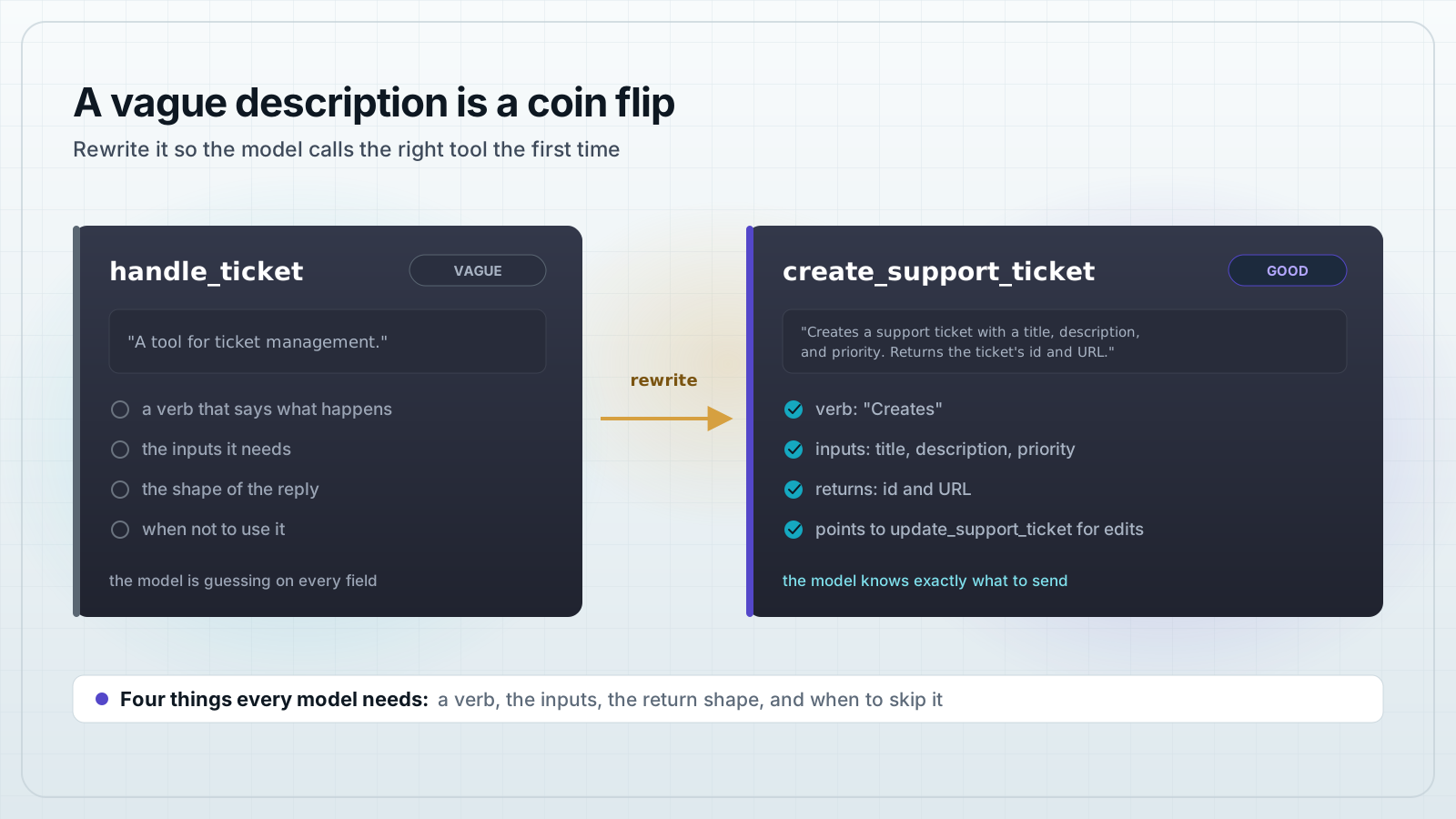
Here is the same tool, described badly and then well. The tool itself does not change, only the text a model reads before calling it.
{
  "name": "handle_ticket",
  "description": "A tool for ticket management."
}
That description does not say what "handle" means, what arguments the tool takes, or what comes back. A model calling it is guessing on every field.
{
  "name": "create_support_ticket",
  "description": "Creates a support ticket with a title, description, and priority (low, medium, or high). Returns the new ticket's id and URL. Use update_support_ticket to change an existing ticket."
}
The rewrite starts with a verb, names the three inputs, states the return shape, and points to a different tool for updates. A model reading this knows exactly when to call it and what to send.
Does a constraint belong in the description or the schema?
Both, but they do different jobs. The tool-level description is the overview: what the tool does and where its limits are. Each parameter's own description in the JSON schema carries the detail for that one field, like a format or a valid range.
{
  "priority": {
    "type": "string",
    "enum": ["low", "medium", "high"],
    "description": "How urgent the ticket is. Defaults to medium if omitted."
  }
}
Put the big picture in the tool description and the field-level rules in the schema. A model reads both before it fills in a call, so neither one should repeat the other word for word.
Common questions
- What makes an MCP tool description good?
- A good MCP tool description starts with a verb, states what the tool needs, states what it returns, and says when not to use it, all in one or two sentences that a model reads before deciding which tool to call.
- How long should an MCP tool description be?
- One to two sentences. Put the most important fact first, since a model weighs the opening of a description more than the sentences that follow it.
- Should the description repeat what is in the input schema?
- No. The tool description covers what the tool does and its limits. Each parameter's own description in the JSON schema covers the detail for that one field, like a format or a default value.
- Can a bad MCP tool description cause errors?
- Yes. A vague description leads a model to call the wrong tool or send the wrong arguments, which costs a retry. A clear description with stated inputs, outputs, and limits cuts down on those wrong calls.
- Do MCP tool descriptions support formatting like bold text or links?
- Description fields in the MCP tool schema are plain strings. Clients are not required to render markdown, so do not rely on bold text, links, or headers. Put anything important in plain sentences instead.
A good MCP tool description tells a model what it does, what it needs, what it returns, and when to leave it alone, in a sentence or two. Add your MCP server to MCPOrbit and its tool explorer shows how your own tool descriptions read to a model before you connect it to an agent.
About the author
MCPOrbit Team
Engineering, MCPOrbit
The MCPOrbit engineering team builds MCPOrbit, a free desktop client for the Model Context Protocol. It connects to any MCP server so you can browse its tools, call them by hand, and run them through a real agent loop.