Explainer
How many tools should an MCP server have?
OpenAI caps tools at 128 but advises fewer than 20, and Claude Code degrades at 15 to 20. Aim for 5 to 15 per server, and check a server's tools first.
Mark
Head of Marketing, MCPOrbit
- Published
- Updated
- · Updated
- Read time
- · 6 min read
This post looks at four Model Context Protocol (MCP) clients: OpenAI, Cursor, GitHub Copilot and Claude Code. Three of them publish a hard tool cap — 128, 40 and 128 — but the counts that keep answers accurate are far lower: OpenAI advises fewer than 20, and Claude Code's tool selection degrades once 15 to 20 are active. The fix is not one giant server. It is fewer, focused servers, and checking a server's tool count before you connect it.
This post covers why tool count hurts accuracy and what the real limits are across popular clients. It also covers how to check a server's tools before you wire it into your AI assistant.
Why do more MCP tools make an AI agent worse?
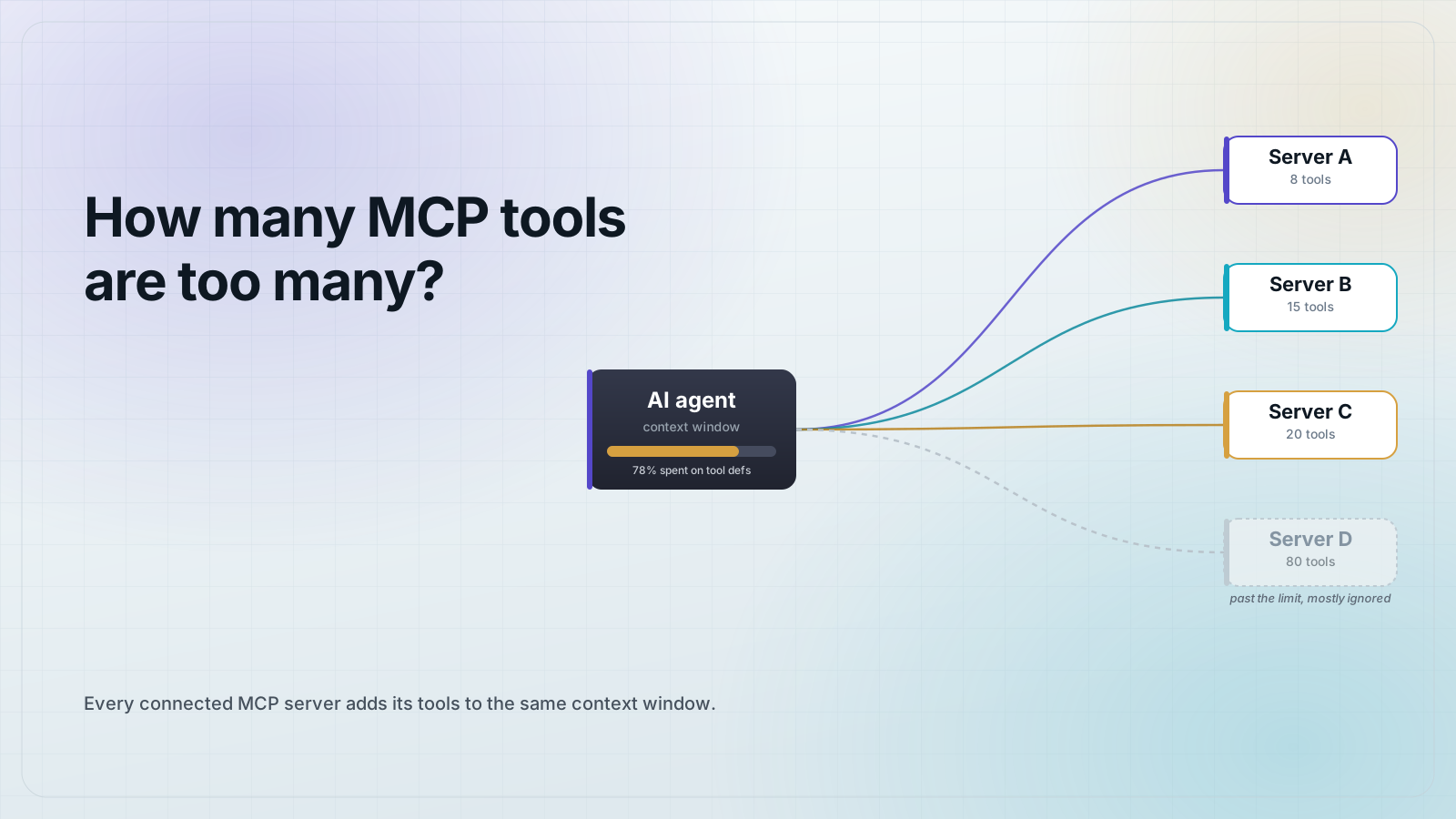
Every tool you connect adds its name, description, and input schema to the model's context window. That is the pool of text the model reads before it responds. More tools means less of that pool is left for your actual request.
Think of the context window like a desk. Each tool description is a folder on that desk. Ten folders and you still find things fast. Eighty folders and you spend more time searching than working.
A single busy MCP server can add tens of thousands of tokens to list its tools alone. Connect five or six servers like that and a model can burn through a large share of its context window before it reads your message.
Beyond the token cost, more tools make it harder for the model to pick the right one. Tests on tool-calling models show accuracy drops as the list of available tools grows, because similar-sounding tools start to blur together.
How many tools can an MCP client handle?
Clients set up to two different numbers: a hard cap and a lower, softer recommendation. The hard cap is the most tools the client will accept. The recommendation is the number that keeps answers accurate. Of the four here, only OpenAI publishes both.
- OpenAI: a hard cap of 128 tools, with guidance to aim for fewer than 20 for the best accuracy.
- Cursor: caps MCP tools at 40 for stability.
- GitHub Copilot: a hard cap of 128 tools.
- Claude Code: tool selection gets noticeably worse once 15 to 20 tools are active at the same time.
These numbers change as vendors ship updates, so treat them as a range, not a fixed rule. Where a client publishes both, the hard cap sits far above the number that works well.
What is a safe tool count for a single MCP server?
Aim for 5 to 15 tools per MCP server, and treat 20 as a warning sign. A server with 40 or 50 tools is not being generous. It is asking the model to search a long menu on every request.
An MCP server is like a restaurant kitchen. A short, focused menu lets the kitchen, and the customer, decide fast. A menu with 200 items slows everyone down, even if the kitchen can technically cook all of them.
If your server naturally needs more than 15 to 20 tools, split it. A github-issues server and a github-actions server are two focused menus. One github-everything server with 60 tools is one long menu nobody reads in full.
How do you check a server's tool count before you connect it?
Open the server in a client that lists every tool, its description, and its input schema. Do this before you decide to connect it to your AI assistant. Reading the full list up front is the only reliable way to know what you are adding to your context window.
- Add the server's connection details, stdio or HTTP, to a client with a tool explorer.
- Open the tool explorer and read every tool name and description.
- Count the tools. If the list runs past 15 to 20, decide which ones you need.
- Test a few tools directly, without an AI assistant in the loop, before you connect the server to one.
MCPOrbit is a free Mac app that connects to an MCP server and lists every tool it exposes. It shows the full description and input schema in a tool explorer. You can browse the list and test individual tools by hand, without writing any code and without wiring the server into an AI assistant first.
That matters because most AI assistants only show you the tool count after you have already connected a server. By then it has already eaten into your context window. Checking first means you decide whether a server's tool list earns its place before your agent ever sees it.
Frequently asked questions
Frequently asked questions
- How many tools should one MCP server expose?
- Aim for 5 to 15 tools per Model Context Protocol (MCP) server. Once a single server passes 20 tools, split it into smaller, focused servers so an AI assistant can find the right tool faster.
- What happens when an AI agent has too many MCP tools connected?
- The agent spends more of its context window reading tool definitions instead of your request, and it more often picks the wrong tool. Tests on tool-calling models show accuracy drops as the tool list grows past 20 to 40 tools.
- Is there a hard limit on how many MCP tools a client accepts?
- Yes, and it varies by client. OpenAI accepts up to 128 tools and GitHub Copilot accepts up to 128, while Cursor caps MCP tools at 40. Those are ceilings, not targets. Accuracy drops well before you reach them.
- How do I see how many tools an MCP server has before connecting it?
- Open the server in a client with a tool explorer, such as MCPOrbit. Read its full tool list, descriptions, and schemas before wiring it into an AI assistant. That lets you judge the tool count first.
- Does combining several small MCP servers cause the same problem as one big server?
- Yes. An AI assistant sees the combined tool list from every connected server at once. Five servers with 20 tools each add up to 100 tools in context, the same problem as one 100-tool server.
The answer to how many tools is too many comes down to checking the list before you decide, not after. MCPOrbit's free tool explorer for macOS lets you browse and test any MCP server's full tool list before you connect it to an AI assistant. Adding your server to MCPOrbit takes one short form.
About the author
Mark
Head of Marketing, MCPOrbit
Mark leads marketing at MCPOrbit, the free desktop client for the Model Context Protocol. He writes the build-it and reliability guides, and the code in them is run before it ships.