Explainer
What is an MCP client?
An MCP client is the part of an app that connects to one MCP server and calls what it offers. Here is how it fits into the Model Context Protocol.
MCPOrbit Team
Engineering, MCPOrbit
- Published
- Updated
- · Updated
- Read time
- · 5 min read
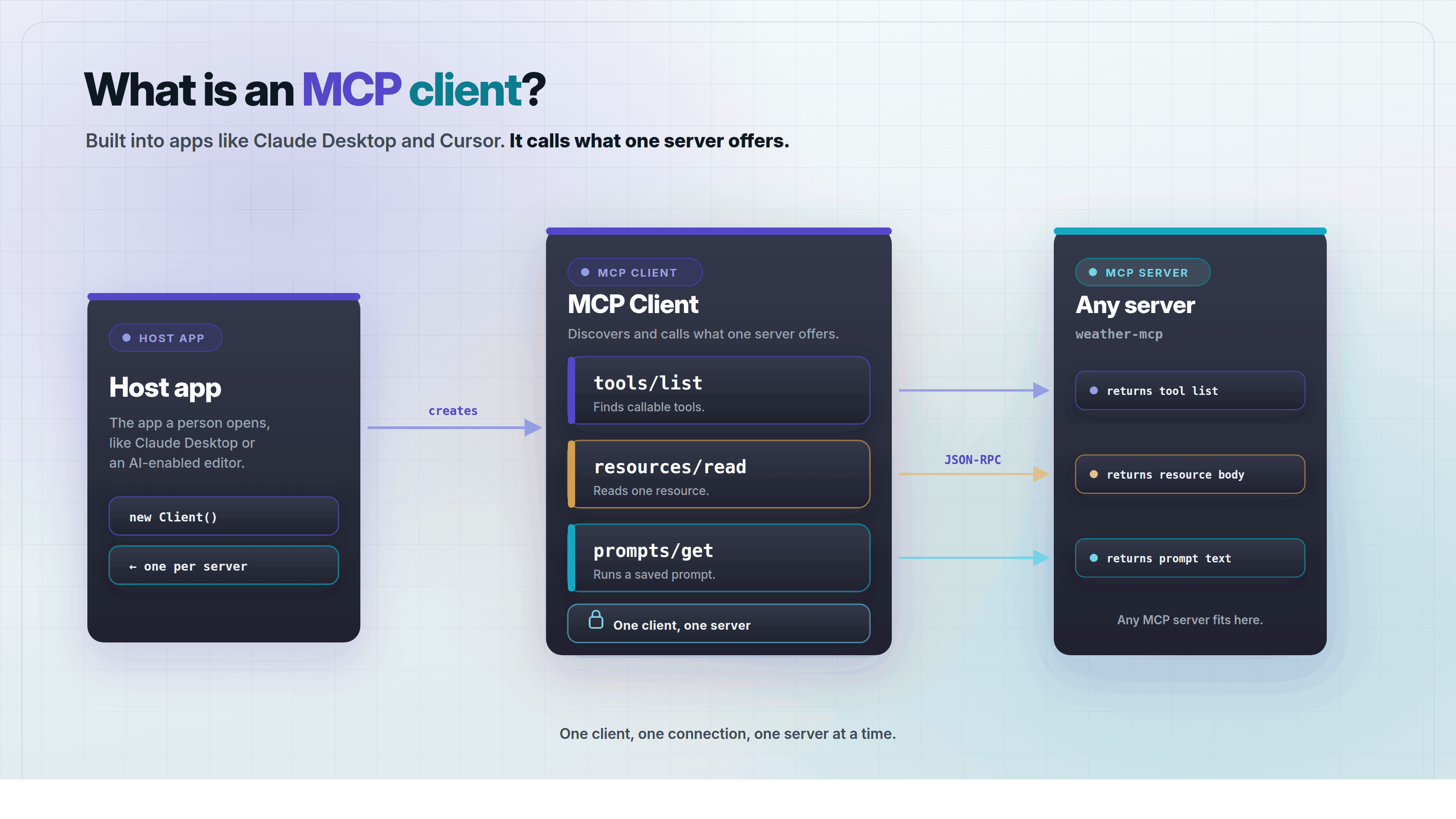
An MCP client is the part of an app that connects to one MCP server and uses what it offers. Model Context Protocol (MCP) is an open standard that lets AI apps use outside tools and data. Claude Desktop, Claude Code, Cursor, and MCPOrbit are all examples of apps that include an MCP client.
Most developers never build their own client. They install an app that already has one, point it at a server, and start calling tools. This post explains what the client does, how it differs from the host and the server, and which apps already include one.
What does an MCP client do?
An MCP client finds out what an MCP server can do, then calls it on the model's behalf. It sends requests like tools/list or resources/read, and hands the answers back to the model.
Think of an MCP client as a waiter in a restaurant. The kitchen, the MCP server, has a menu of things it can make. The client carries each order to the kitchen and brings the result back to the table.
Every request and response travels as JSON-RPC, a plain text message format. The client does not know what a server offers in advance. It asks first, with a method called tools/list, and the server answers with its full list.
// client -> server
{ "jsonrpc": "2.0", "id": 1, "method": "tools/list" }

// server -> client
{
  "jsonrpc": "2.0",
  "id": 1,
  "result": {
    "tools": [
      { "name": "get_weather", "description": "Look up current weather for a city" }
    ]
  }
}
That exchange is the whole pattern. A client asks what exists, then calls whichever tool, resource, or prompt it needs for the task in front of it.
How is an MCP client different from an MCP host?
An MCP host is the whole app a person opens, like Claude Desktop or an AI-enabled code editor. An MCP client is a smaller piece inside that host. It handles exactly one connection to one server.
A host can run many clients at once. Connect an app to a database, a file system, and a search tool, and the host creates three separate clients, one for each server.
In everyday conversation, people often call the whole host app the MCP client. That is close enough for most purposes. The protocol itself draws the line at the host-to-client boundary, not the client-to-server one.
How is an MCP client different from an MCP server?
An MCP server offers capabilities. An MCP client discovers those capabilities and calls them on the model's behalf. The server answers; the client asks.
- Tools: actions the client can call, like sending a message or running a query.
- Resources: data the client can read, like a file or a database row.
- Prompts: saved templates the client can run, often shown as a menu option.
Which apps include an MCP client today?
Several widely used AI apps already include their own MCP client, so most developers never have to build one.
- Claude Desktop: Anthropic's chat app for macOS, Windows, and Linux.
- Claude Code: Anthropic's command-line coding assistant.
- Cursor, VS Code, and similar AI-enabled editors, through their own tool-calling extensions.
- MCPOrbit: a free macOS app built only to test MCP servers, no code required.
Support varies by app and by plan, and it keeps changing as vendors add it. How to find out what an MCP client actually supports before you build around it.
Do you need to build your own MCP client?
No, not for most purposes. A ready-made client already covers the common cases: chatting with tools, coding with tools, or just checking what a server exposes.
Build your own client only if you are shipping a product with a custom chat interface or a custom tool-calling loop. Building an MCP client covers the parts you would need.
Frequently asked questions
- What is the difference between an MCP client and an MCP server?
- The server offers tools, resources, and prompts. The client discovers those capabilities and calls them on behalf of an AI model, over one connection to that one server.
- Is Claude Desktop an MCP client?
- Yes. Claude Desktop is a host app that runs one MCP client for every server you connect, which is why people often call the whole app an MCP client.
- Can one MCP client connect to more than one server?
- No. Each client holds exactly one connection to one server. A host app that talks to several servers runs a separate client for each one.
- Do I need to write code to use an MCP client?
- No. Apps like Claude Desktop, Claude Code, Cursor, and MCPOrbit already include one. You only write code if you are building a new app from scratch.
- What protocol does an MCP client use to talk to a server?
- JSON-RPC 2.0, sent over stdio for a local server or Streamable HTTP for a remote one. The client sends a method name, like
tools/list, and the server answers in the same format.
An MCP client is what turns a server's tools into something an AI model can use, one connection at a time. MCPOrbit is a free MCP client for macOS, built to let you try a server before you build anything around it.
About the author
MCPOrbit Team
Engineering, MCPOrbit
The MCPOrbit engineering team builds MCPOrbit, a free desktop client for the Model Context Protocol. It connects to any MCP server so you can browse its tools, call them by hand, and run them through a real agent loop.