Tutorial
How to build an MCP client in TypeScript
Build a Model Context Protocol client in TypeScript: connect over stdio and Streamable HTTP, discover tools, call them, and read resources. Runnable code.
Mark
Head of Marketing, MCPOrbit
- Published
- Updated
- · Updated
- Read time
- · 10 min read
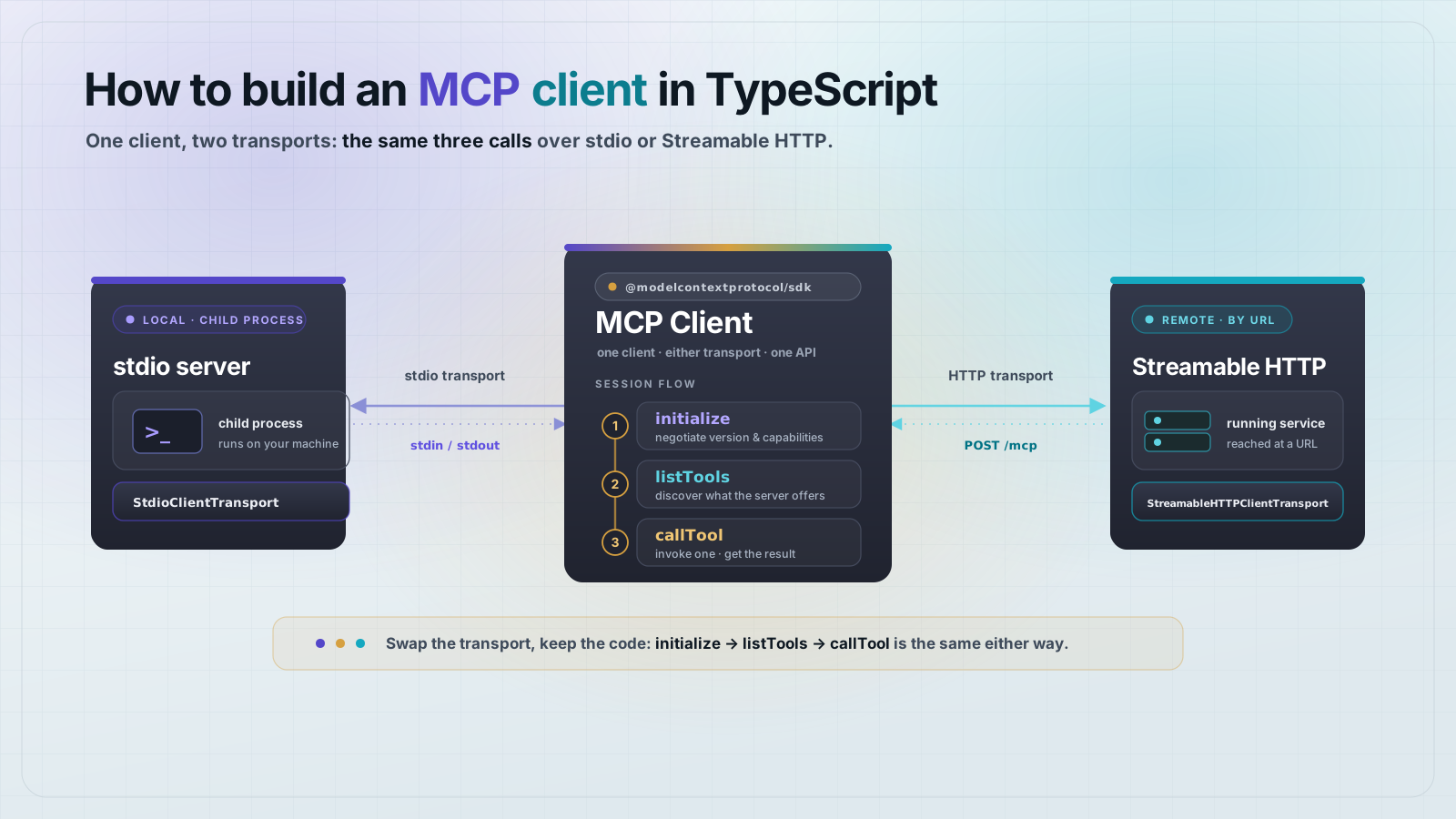
To build a Model Context Protocol (MCP) client, create a Client from the official TypeScript SDK, connect it through a transport (stdio for a local server, Streamable HTTP for a remote one), then call listTools, callTool, and readResource. A working client is under 30 lines.
Almost every MCP tutorial builds a server. But something has to connect to that server, discover what it exposes, and call it. That something is the client. If you are wiring MCP into your own agent, a test script, or a backend service instead of a chat app, you write the client yourself. This guide builds one end to end in TypeScript and tests it against a real server.
What is an MCP client?
An MCP client is the side of an MCP connection that consumes capabilities. The server exposes tools, resources, and prompts. The client discovers them and calls them. In a product like Claude Desktop the client is built in, but when you integrate MCP into your own code you become the client author.
A client does four things: open a transport to the server, run the initialize handshake to agree on protocol version and capabilities, list what the server offers, and invoke it. The SDK handles the JSON-RPC framing and the handshake. You write the calls.
Set up the project
Create a fresh directory and install the SDK. The project is an ES module, so type is set to module. zod is used to declare the demo server's input schema.
{
  "name": "mcp-client-demo",
  "private": true,
  "type": "module",
  "version": "1.0.0"
}
npm install @modelcontextprotocol/sdk@1.30.0 zod@3.25.76How do you connect an MCP client to a local server over stdio?
The stdio transport spawns the server as a child process and talks to it over standard input and output. It is the simplest way to connect: no ports, no HTTP, no auth. To have something to connect to, here is a tiny server that exposes one tool and one resource. Save it as server.js.
// server.js: a minimal MCP server for the client to target.
import { McpServer } from "@modelcontextprotocol/sdk/server/mcp.js";
import { StdioServerTransport } from "@modelcontextprotocol/sdk/server/stdio.js";
import { z } from "zod";

const server = new McpServer({ name: "demo-server", version: "1.0.0" });

server.registerTool(
  "add",
  {
    title: "Add two numbers",
    description: "Adds a and b and returns the sum.",
    inputSchema: { a: z.number(), b: z.number() },
  },
  async ({ a, b }) => ({
    content: [{ type: "text", text: String(a + b) }],
  })
);

server.registerResource(
  "readme",
  "file:///readme.txt",
  { title: "Project README", mimeType: "text/plain" },
  async (uri) => ({
    contents: [{ uri: uri.href, text: "Hello from the demo MCP server." }],
  })
);

await server.connect(new StdioServerTransport());
Now the client. It spawns server.js, connects, and the connect call runs the initialize handshake. After that you can list and call tools, and list and read resources. Save it as client.js.
// client.js: connect over stdio, discover tools, call one, read a resource.
import { Client } from "@modelcontextprotocol/sdk/client/index.js";
import { StdioClientTransport } from "@modelcontextprotocol/sdk/client/stdio.js";

const transport = new StdioClientTransport({
  command: "node",
  args: ["server.js"],
});

const client = new Client({ name: "demo-client", version: "1.0.0" });
await client.connect(transport); // runs the initialize handshake

const { tools } = await client.listTools();
console.log("TOOLS:", tools.map((t) => t.name).join(", "));

const result = await client.callTool({
  name: "add",
  arguments: { a: 2, b: 3 },
});
console.log("add(2,3) ->", result.content[0].text);

const { resources } = await client.listResources();
console.log("RESOURCES:", resources.map((r) => r.uri).join(", "));

const read = await client.readResource({ uri: "file:///readme.txt" });
console.log("readme ->", read.contents[0].text);

await client.close();
Run it with node client.js. The client starts the server, handshakes, and prints what it found:
TOOLS: add
add(2,3) -> 5
RESOURCES: file:///readme.txt
readme -> Hello from the demo MCP server.
That is a complete client. connect handshakes, listTools returns the tool definitions, callTool invokes one by name with typed arguments, and readResource pulls a resource by its URI. close shuts the transport down and ends the child process.
How do you connect to a remote MCP server over HTTP?
For a remote server you swap the transport, not the client. Use StreamableHTTPClientTransport with the server's URL. Everything after the connect call is identical: listTools, callTool, readResource, close. Here is a client that connects to a Streamable HTTP server:
// http-client.js: same client, remote transport.
import { Client } from "@modelcontextprotocol/sdk/client/index.js";
import { StreamableHTTPClientTransport } from "@modelcontextprotocol/sdk/client/streamableHttp.js";

const transport = new StreamableHTTPClientTransport(
  new URL("http://localhost:3939/mcp")
);

const client = new Client({ name: "remote-demo-client", version: "1.0.0" });
await client.connect(transport);

const { tools } = await client.listTools();
console.log("REMOTE TOOLS:", tools.map((t) => t.name).join(", "));

const r = await client.callTool({ name: "ping", arguments: {} });
console.log("ping ->", r.content[0].text);

await client.close();How do you call a tool and handle its result?
callTool takes the tool name and an arguments object that matches the server's input schema. The result carries a content array. Text tools return a text block, so you read result.content[0].text. A tool can return multiple content blocks and can set isError: true to signal a failure inside a normal response, so check for it before trusting the output.
const result = await client.callTool({
  name: "add",
  arguments: { a: 2, b: 3 },
});

if (result.isError) {
  throw new Error(result.content[0].text);
}

for (const block of result.content) {
  if (block.type === "text") console.log(block.text);
}
Wrap the whole session in try/finally so the transport always closes, even when a call throws. A leaked stdio transport leaves the server child process running.
client.listTools()returns{ tools }, each withname,description, andinputSchema.client.callTool({ name, arguments })invokes a tool and returns{ content, isError? }.client.listResources()andclient.readResource({ uri })cover the resource side.client.listPrompts()andclient.getPrompt({ name, arguments })cover prompts.client.close()tears down the transport. Always call it in afinallyblock.
Frequently asked questions
Frequently asked questions
- What is the minimum code to connect to an MCP server?
- Import
Clientand a transport from@modelcontextprotocol/sdk, create the client, andawait client.connect(transport). That single connect call runs the initialize handshake, solistToolsworks on the next line. A usable client is under 30 lines. - What is the difference between the stdio and Streamable HTTP client transports?
StdioClientTransportspawns a local server as a child process and talks over standard input and output, with no ports or auth.StreamableHTTPClientTransportconnects to a remote server over HTTP by URL. The client API is identical after connect; only the transport changes.- Do I need to send an initialize request myself?
- No.
client.connect(transport)performs the initialize handshake, including protocol version and capability negotiation. You calllistToolsorcallTooldirectly after it resolves. - Should a new MCP client use SSE or Streamable HTTP?
- Streamable HTTP. The 2026-07-28 MCP specification deprecated the legacy HTTP+SSE transport with a year-long offramp, so new clients should use
StreamableHTTPClientTransport. - How do I know if a tool call failed?
- Check
result.isError. A tool can returnisError: truewith the error text in itscontentarray instead of throwing, so a normal-looking response can still represent a failure. Inspect the flag before using the output. - Can one client connect to more than one MCP server?
- Yes. Create a separate
Clientand transport per server and keep them in a map. Each connection is independent, so an agent can fan a request out to several servers and merge the tool lists.
Want a reference client to check yours against? MCPOrbit is a free MCP client for macOS. Connect the same server in both, then compare the tool lists and the call results to see where your client differs.
About the author
Mark
Head of Marketing, MCPOrbit
Mark leads marketing at MCPOrbit, the free desktop client for the Model Context Protocol. He writes the build-it and reliability guides, and the code in them is run before it ships.