Build-it
How to find out what an MCP client actually supports
Client docs and declared capabilities both mislead. Point the client at a small probe server, read the request log, and see which MCP methods it really sends.
Mark
Head of Marketing, MCPOrbit
- Published
- Updated
- · Updated
- Read time
- · 9 min read
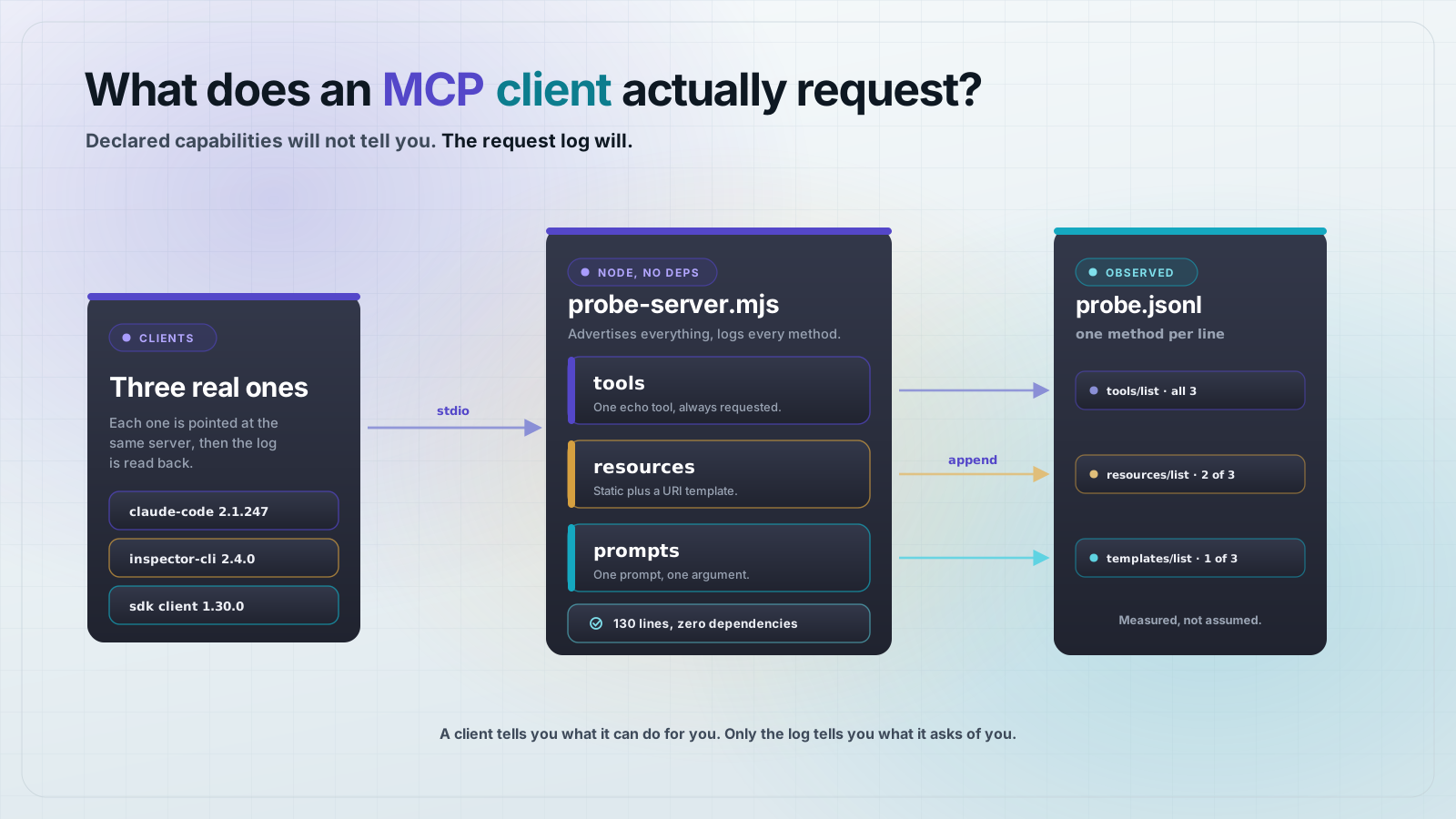
To find out what a Model Context Protocol (MCP) client actually supports, do not read its docs or trust the capabilities it declares. Point it at a small probe server that logs every JSON-RPC method it receives, then read the log. The methods a client actually sends are the only reliable answer, and they differ from both the docs and the declaration.
A client tells you two different things about itself, and neither one answers the question you care about. Its initialize request declares what the *client* can do for the server, things like roots and elicitation. That says nothing about which of your server's features it will ask for. A client can declare nothing at all and still request tools, resources and prompts. A client can declare plenty and never once call resources/list.
The question a server author actually has is narrower: if I ship resources, will this client ever fetch them? The only honest way to answer it is to watch the wire. This post gives you a probe server that does that in about 130 lines with no dependencies, plus the measured results from three real clients.
Why declared capabilities are not a support matrix
MCP's handshake is symmetric. The server advertises what it serves: tools, resources, prompts, completions, logging. The client advertises what it can do on the server's behalf: roots, sampling, elicitation. These are two different lists, and people read the second one as if it answered the first.
Here is what Claude Code 2.1.247 sends. Read it closely: there is no statement anywhere about resources or prompts, because that is not what this field is for.
{
  "protocolVersion": "2025-11-25",
  "capabilities": {
    "roots": { "listChanged": true },
    "elicitation": {}
  },
  "clientInfo": {
    "name": "claude-code",
    "title": "Claude Code",
    "version": "2.1.247",
    "description": "Anthropic's agentic coding tool",
    "websiteUrl": "https://claude.com/claude-code"
  }
}
Nothing in that payload predicts whether the client will call resources/list. It happens to, but you cannot tell from here. The declaration is a promise about the client's own features, and it is also incomplete as a promise: this client declares elicitation but not sampling.
The probe server
This server advertises everything a server can advertise, answers every method with a valid stub, and appends each inbound method to a JSON Lines file. It speaks raw JSON-RPC over stdio with no SDK, on purpose: an SDK would normalize the traffic, and the traffic is the measurement. It needs Node 18 or newer and nothing else.
Save it as probe-server.mjs:
#!/usr/bin/env node
// probe-server.mjs - a dependency-free MCP server that records what the client asks for.
// It advertises tools, resources, resource templates, prompts, completions and logging,
// then appends every inbound JSON-RPC method to PROBE_LOG.

import { appendFileSync } from "node:fs";

const LOG = process.env.PROBE_LOG || "/tmp/mcp-probe.jsonl";
const record = (entry) => appendFileSync(LOG, JSON.stringify(entry) + "\n");

const CAPABILITIES = {
  tools: { listChanged: true },
  resources: { subscribe: true, listChanged: true },
  prompts: { listChanged: true },
  completions: {},
  logging: {},
};

const TOOLS = [
  {
    name: "probe_echo",
    description: "Echo a string back. Used to confirm the client can call a tool.",
    inputSchema: {
      type: "object",
      properties: { text: { type: "string" } },
      required: ["text"],
    },
  },
];

const RESOURCES = [
  {
    uri: "probe://readme",
    name: "Probe readme",
    description: "A static text resource.",
    mimeType: "text/plain",
  },
];

const RESOURCE_TEMPLATES = [
  {
    uriTemplate: "probe://item/{id}",
    name: "Probe item",
    description: "A templated resource.",
    mimeType: "text/plain",
  },
];

const PROMPTS = [
  {
    name: "probe_prompt",
    description: "A one-argument prompt.",
    arguments: [{ name: "topic", description: "Anything", required: true }],
  },
];

function handle(msg) {
  const { id, method, params } = msg;
  record({ t: new Date().toISOString(), method, params: params ?? null, hasId: id !== undefined });

  // Notifications carry no id and get no response.
  if (id === undefined) return null;

  switch (method) {
    case "initialize":
      return {
        protocolVersion: params?.protocolVersion ?? "2025-11-25",
        capabilities: CAPABILITIES,
        serverInfo: { name: "probe-server", version: "1.0.0" },
      };
    case "tools/list":
      return { tools: TOOLS };
    case "tools/call":
      return { content: [{ type: "text", text: `echo: ${params?.arguments?.text ?? ""}` }] };
    case "resources/list":
      return { resources: RESOURCES };
    case "resources/templates/list":
      return { resourceTemplates: RESOURCE_TEMPLATES };
    case "resources/read":
      return {
        contents: [{ uri: params?.uri, mimeType: "text/plain", text: "probe resource body" }],
      };
    case "prompts/list":
      return { prompts: PROMPTS };
    case "prompts/get":
      return {
        description: "probe",
        messages: [{ role: "user", content: { type: "text", text: "probe prompt body" } }],
      };
    case "completion/complete":
      return { completion: { values: ["alpha", "beta"], hasMore: false } };
    case "logging/setLevel":
      return {};
    case "ping":
      return {};
    default:
      return { __error: { code: -32601, message: `Method not found: ${method}` } };
  }
}

let buffer = "";
process.stdin.on("data", (chunk) => {
  buffer += chunk.toString();
  let nl;
  while ((nl = buffer.indexOf("\n")) !== -1) {
    const line = buffer.slice(0, nl).trim();
    buffer = buffer.slice(nl + 1);
    if (!line) continue;
    let msg;
    try {
      msg = JSON.parse(line);
    } catch {
      record({ t: new Date().toISOString(), method: "<unparseable>", raw: line.slice(0, 200) });
      continue;
    }
    const messages = Array.isArray(msg) ? msg : [msg];
    for (const m of messages) {
      const result = handle(m);
      if (result === null) continue;
      const body =
        result.__error !== undefined
          ? { jsonrpc: "2.0", id: m.id, error: result.__error }
          : { jsonrpc: "2.0", id: m.id, result };
      process.stdout.write(JSON.stringify(body) + "\n");
    }
  }
});

process.stdin.on("end", () => process.exit(0));
Two details matter. It advertises logging and implements logging/setLevel, because at least one real client calls it on connect and aborts if it is missing. And it answers resources/templates/list even though nothing in this test ever asked for it, so that a negative result means the client did not ask rather than that the server could not answer.
Point a client at the probe
Every client is configured the same way: give it a command to run and an env var telling the probe where to write. For Claude Desktop or Cursor, use the mcpServers shape. Claude Desktop reads ~/Library/Application Support/Claude/claude_desktop_config.json on macOS; Cursor reads ~/.cursor/mcp.json or .cursor/mcp.json in a repo.
{
  "mcpServers": {
    "probe": {
      "command": "node",
      "args": ["/absolute/path/to/probe-server.mjs"],
      "env": { "PROBE_LOG": "/absolute/path/to/probe.jsonl" }
    }
  }
}
VS Code uses servers instead of mcpServers and needs an explicit type. Put this in .vscode/mcp.json:
{
  "servers": {
    "probe": {
      "type": "stdio",
      "command": "node",
      "args": ["/absolute/path/to/probe-server.mjs"],
      "env": { "PROBE_LOG": "/absolute/path/to/probe.jsonl" }
    }
  }
}
For Claude Code, skip the file and register it from the command line, then start a session that calls the tool:
claude mcp add probe -s local \
  -e PROBE_LOG=$PWD/probe.jsonl \
  -- node $PWD/probe-server.mjs

claude -p "Call the probe_echo tool with text='hello' and report what it returned."
MCPOrbit is a form rather than a file or a command. Type is STDIO, Command is node, Arguments is the path to probe-server.mjs, and PROBE_LOG goes in Environment Variables as a JSON object. It is worth pointing the probe at it too, because the whole argument of this post is that a published table does not tell you what your client actually asks for. How to add an MCP server to MCPOrbit covers the fields.
Then read the log. Each line is one inbound message, in order:
$ cat probe.jsonl | python3 -c 'import json,sys
for line in sys.stdin:
    print(json.loads(line)["method"])'

initialize
notifications/initialized
tools/list
prompts/list
resources/list
tools/call
That is the answer for your client, on your machine, at the version you have installed. It does not go stale the way a published table does.
What three real clients requested
Measured on macOS on 2026-08-28 against the probe above. These are worked examples, not a complete matrix. Run the probe against your own client rather than assuming a row here transfers.
Claude Code 2.1.247
A real session requests initialize, notifications/initialized, tools/list, prompts/list, resources/list, then tools/call. It does not request resources/templates/list. The tools/call arrives with a progressToken, so it is prepared to receive progress notifications.
A health check is not the same thing. claude mcp list connects, reports the server healthy, and requests only initialize, notifications/initialized and tools/list. If you probe with a health check and conclude the client ignores resources, you are wrong, and the mistake is invisible.
MCP Inspector 2.4.0
The official Inspector, in CLI mode, requests initialize, notifications/initialized, logging/setLevel, then whatever --method you passed. It is the only client tested that touches logging/setLevel, and it declares two protocol extensions:
{
  "protocolVersion": "2025-11-25",
  "capabilities": {
    "roots": { "listChanged": true },
    "extensions": {
      "io.modelcontextprotocol/tasks": {},
      "io.modelcontextprotocol/ui": {
        "mimeTypes": ["text/html;profile=mcp-app"]
      }
    }
  },
  "clientInfo": { "name": "inspector-cli", "version": "2.4.0" }
}
TypeScript SDK client 1.30.0
An SDK-built client sends initialize, notifications/initialized, and then exactly the calls your code makes. It is the only one of the three that requested resources/templates/list, and only because the test called listResourceTemplates() explicitly. It declared empty capabilities and still listed tools, resources, templates and prompts without trouble, which is the cleanest demonstration that the declaration and the request set are unrelated.
Three results worth designing around
Advertising a capability you did not implement breaks clients
The first version of the probe advertised logging and had no logging/setLevel handler. The Inspector did not warn or degrade. It failed the entire invocation before reaching tools/list:
$ npx @modelcontextprotocol/inspector@2.4.0 --cli node probe-server.mjs \
    --method tools/list

{"error":{"code":"error","message":"Method not found: logging/setLevel"}}
Adding a two-line handler that returns {} fixed it. The lesson generalizes past logging: the capabilities object is a contract, and a client is entitled to call anything you list there on connect. Advertise only what you have implemented.
Templated resources may never be requested
resources/templates/list is a separate method from resources/list, and a client that calls the second does not necessarily call the first. Neither Claude Code nor the Inspector asked for templates. If your server exposes data only through a URI template, a client can read your static resources and still never discover it. Expose the important entry points as concrete resources too, or as tools.
The negotiated revision lags the published spec
All three clients proposed 2025-11-25. None proposed 2026-07-28. If you build against the newest revision and assume clients speak it, you are writing for a version that is not on the wire yet. The probe records the proposed protocolVersion on the first line of the log, so you can check rather than guess.
Frequently asked questions
Frequently asked questions
- How do I know if an MCP client supports resources?
- Run a probe server that logs inbound JSON-RPC methods, connect the client, and check whether
resources/listappears in the log. A client's declaredcapabilitieswill not tell you, because that field describes the client's own features such asrootsandelicitation, not which server features it requests. - What does a client's capabilities object in initialize actually mean?
- It declares what the client can do for the server:
rootsto expose directories,samplingto run model completions on the server's behalf,elicitationto prompt the user for input. It is not a list of the server features the client will use. Claude Code 2.1.247 declares onlyrootsandelicitation, yet still requests tools, prompts and resources. - Why does my MCP server fail to connect to the Inspector?
- Check whether you advertise a capability you did not implement. The Inspector calls
logging/setLevelimmediately afterinitializeif the server declares theloggingcapability, and a-32601method-not-found response aborts the whole invocation before any tools are listed. Implement the handler or removeloggingfrom your capabilities. - Do MCP clients request resource templates?
- Not reliably.
resources/templates/listis a separate method fromresources/list. In testing on 2026-08-28, neither Claude Code 2.1.247 nor MCP Inspector 2.4.0 requested it; only an SDK-built client did, and only when the code calledlistResourceTemplates()explicitly. Do not rely on a URI template as the only path to important data. - Which MCP protocol version do clients actually negotiate?
- Test what you have rather than assuming the latest. Claude Code 2.1.247, MCP Inspector 2.4.0 and the TypeScript SDK client 1.30.0 all proposed
2025-11-25, not the2026-07-28revision. The probe server records the proposedprotocolVersionin the first logged line. - Does a server health check tell me what a client supports?
- No, and it will mislead you.
claude mcp listreports a server healthy after requesting onlyinitialize,notifications/initializedandtools/list. The same client in a real session also requestsprompts/listandresources/list. Always probe with a real session.
The probe is 130 lines and disposable. Keep it next to your server and re-run it whenever you add a primitive or a client ships an update, because both of those change the answer and neither one announces it.
Knowing which methods your clients call is the first half. Seeing it happen is the second. MCPOrbit is an MCP client, so you can connect your server to it and call each tool by hand, then read the full request and response JSON for every call in its log.
About the author
Mark
Head of Marketing, MCPOrbit
Mark leads marketing at MCPOrbit, the free desktop client for the Model Context Protocol. He writes the build-it and reliability guides, and the code in them is run before it ships.