Field notes
What happens when two MCP servers have the same tool name?
When two MCP servers publish a tool with the same name, most AI clients do not merge them cleanly. Here is what Claude Desktop, Cursor, and VS Code do.
Mark
Head of Marketing, MCPOrbit
- Published
- Updated
- · Updated
- Read time
- · 6 min read
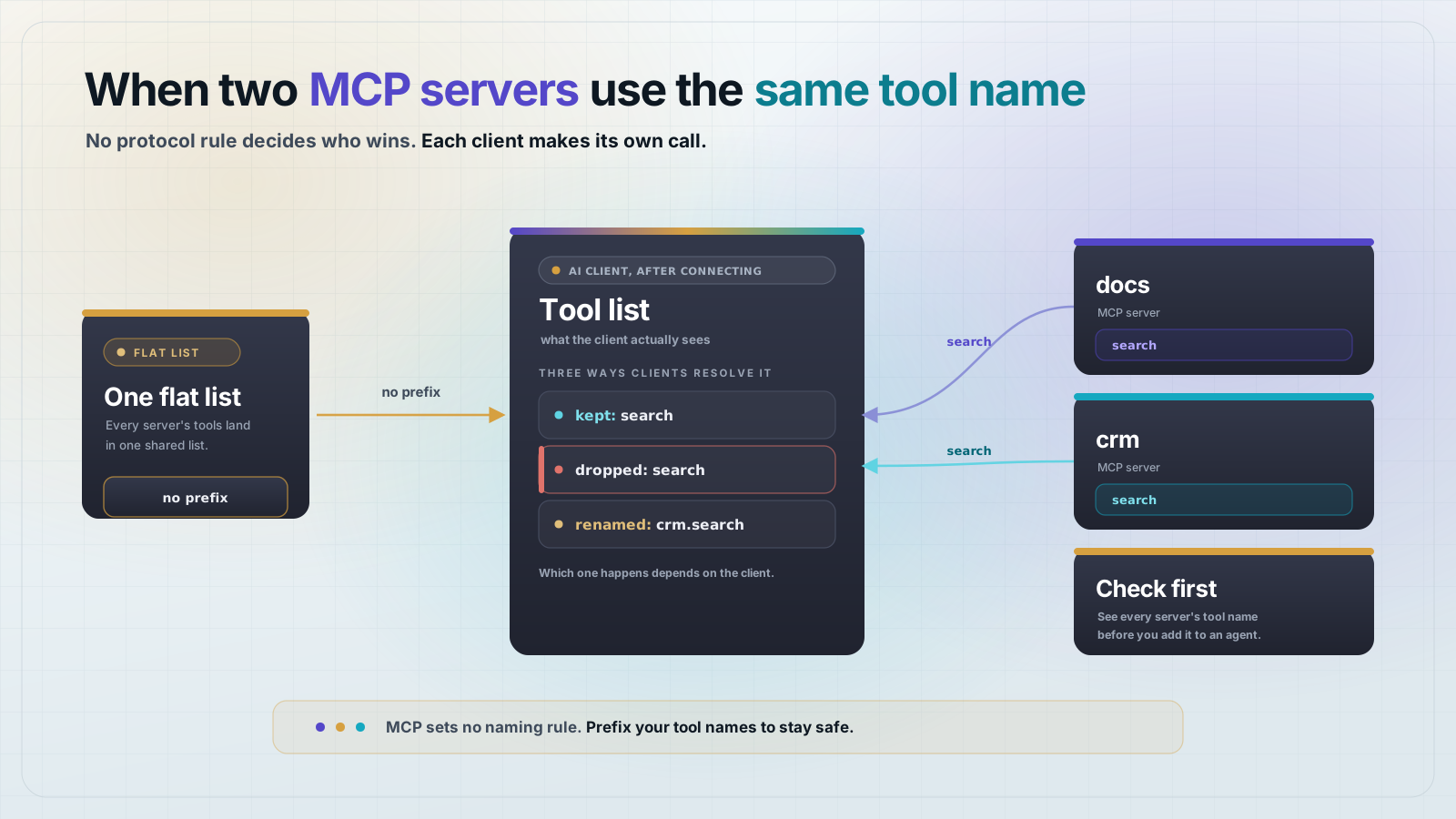
When two Model Context Protocol (MCP) servers both publish a tool with the same name, MCP itself has no rule for who wins. The client you are using decides that. Some clients keep one copy and quietly drop the other. Some add the server's name as a prefix instead. A few refuse to load both servers at all.
This is not a hypothetical edge case. Search the issue trackers for Claude Desktop, Cursor, and VS Code and you will find real bug reports about it. This post covers why the clash happens, what each major client actually does about it, and how to stop it from breaking your own setup.
Why do MCP servers clash on tool names at all?
A clash happens because MCP has no global registry of tool names. Each server just answers a tools/list request with its own list. The client is the one that combines every connected server's list into one.
It is like inviting two people named Sam to the same meeting. Nobody planned the collision. search or get_data is a name more than one author reaches for.
The Model Context Protocol (MCP) defines the shape of that tools/list response. It does not say what a client should do if two servers hand back a tool with the same name. That decision was left open, and different clients have filled the gap differently.
What does Claude Desktop do when tool names collide?
Claude Desktop merges the tool lists from every connected server into one list. When two tools share a name, it does not show you both. Which one you get depends on load order, not on anything you configured on purpose.
Bug reports against Claude Desktop describe this as last write wins: whichever server's config was read last quietly overrides the earlier one. There is no warning in the interface, and no way to tell which server actually answered your last tool call.
Claude Desktop can load the same server twice, from two different config sources. If that server bills by the call, you pay for calls you never knew were made.
What does Cursor do about duplicate tool names?
Cursor avoids the clash by renaming tools as it loads them. Every tool gets its server's name folded in, so a search tool from a server called github becomes mcp_github_search.
This is the cleanest fix of the three, because it keeps both tools instead of dropping one. The tradeoff is a longer, less readable tool name, and a model that has to be told what the prefix means.
It is not perfect either. Some users report that Cursor can still route a call to the wrong server when two names are nearly identical. A prefix reduces the collision. It does not remove the whole class of bug.
What does VS Code (GitHub Copilot) do about it?
VS Code's Copilot Chat has shipped several different behaviors for this, and the project's own issue tracker is the best record of it. In some versions, tools with identical names get de-duplicated down to one entry. There is no UI showing the other ever existed.
In other cases, VS Code shows a warning that a tool "has been renamed." It asks you to call it by a server-prefixed name instead. The un-prefixed name it just warned about then stops working.
Enabling a built-in integration, like the GitHub one, can add a second copy of the same server through a different config file. The two copies then collide with each other.
The common thread is the same one from Claude Desktop. Nothing forces two independently built servers to pick different tool names. Any client that connects to more than one has to make its own judgment call.
How do you avoid a tool name clash in your own setup?
Three things help, and none of them require waiting on a spec change.
- If you are building an MCP server, do not name a tool something generic like
search,get, orlist. Prefix it with your product or domain, likelinear_searchorsearch_invoices. - If you are connecting several servers as a user, check what each one actually exposes before you wire them into an agent. MCPOrbit lists every server's tools side by side, so a clash shows up on screen instead of in a wrong answer.
- If a client lets you choose, prefer one that prefixes tool names automatically over one that silently drops a duplicate. A visible rename is a smaller problem than a tool call that silently goes to the wrong server.
Frequently asked questions
Frequently asked questions
- What happens if two MCP servers have a tool with the same name?
- The Model Context Protocol (MCP) has no rule for this, so it is up to the client. Some clients keep one tool and silently drop the other. Some rename both tools by adding the server's name as a prefix. A few refuse to connect at all.
- Does MCP support namespacing for tool names?
- Not automatically. A server can name its own tools anything it wants, including a prefix like
github_search, but MCP itself does not require or enforce one. Any namespacing you see is a convention a client or server author chose, not a protocol feature. - Why did my MCP tool call go to the wrong server?
- This usually happens when two connected servers expose a tool with the same name and the client is not clearly routing by server. Check your client's tool list for duplicate names, and rename or prefix the tool on one of the servers if you control it.
- How does Cursor handle duplicate MCP tool names?
- Cursor prefixes every tool with its server's name as it loads it, so
searchfrom a server nameddocsbecomes something likemcp_docs_search. That keeps both tools available instead of dropping one, at the cost of a longer tool name. - How can I check for tool name clashes before connecting an agent?
- Connect to each MCP server with a client that lists tool names directly, rather than only through the AI assistant. MCPOrbit shows every tool from every connected server in one list, so you can spot a duplicate name before an agent ever calls it.
MCP leaves tool name conflicts to the client, not to a rule in the spec. Check what a server exposes before you connect it to anything else, and MCPOrbit makes that easy to see.
About the author
Mark
Head of Marketing, MCPOrbit
Mark leads marketing at MCPOrbit, the free desktop client for the Model Context Protocol. He writes the build-it and reliability guides, and the code in them is run before it ships.