Field notes
How to version an MCP server without breaking clients
Version an MCP server by keeping tool changes additive: add tools and optional fields, never rename, remove, or retype what clients already depend on.
MCPOrbit Team
Engineering, MCPOrbit
- Published
- Updated
- · Updated
- Read time
- · 7 min read
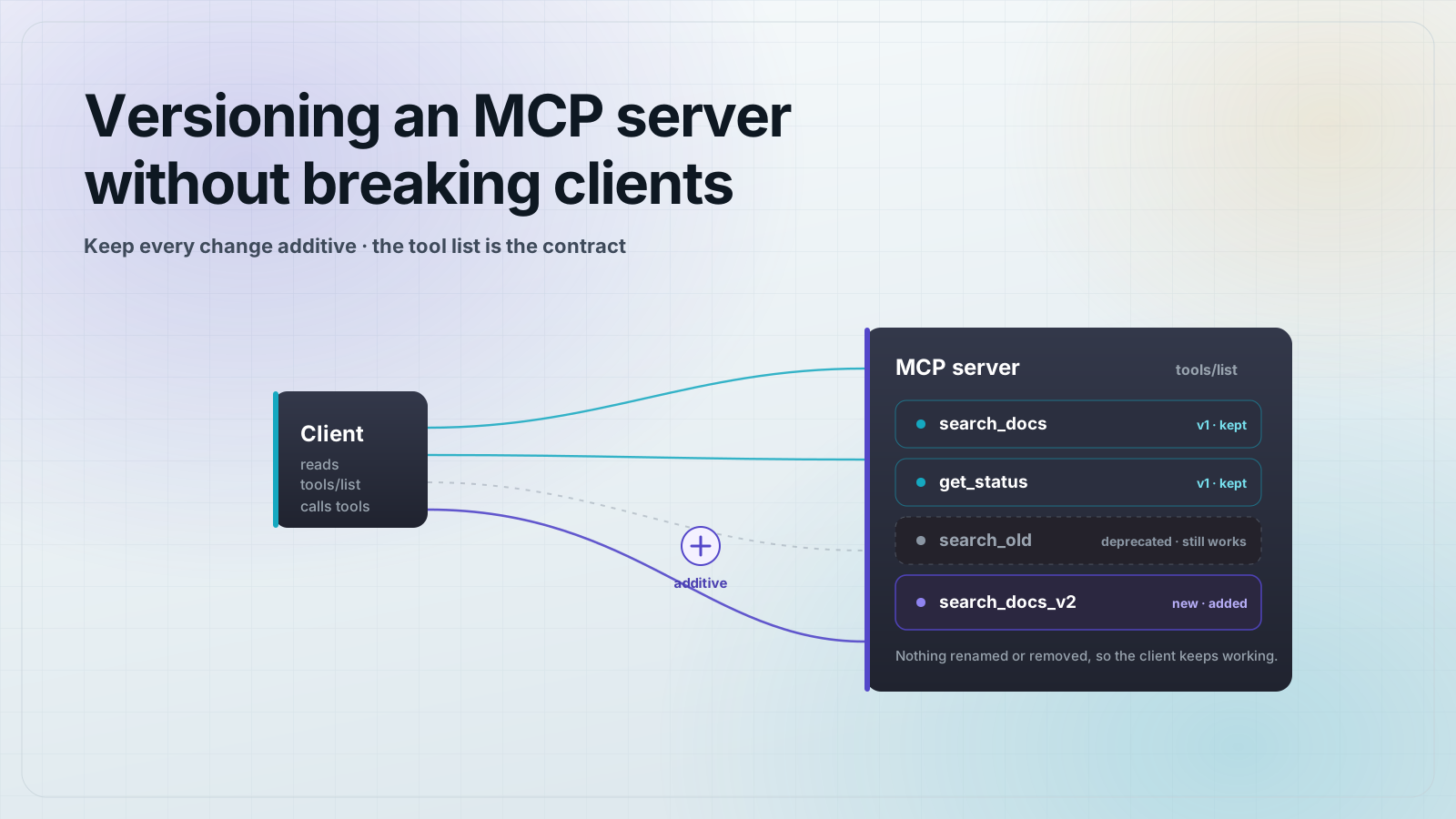
You version an MCP server by keeping every change to your tool set additive. Add new tools and new optional fields, and never rename, remove, or change the type of anything a client already calls. The tool names and input schemas you ship are a contract, and clients bind to that contract, so treat a rename the way you would treat deleting a public API endpoint.
There are two kinds of versioning in play, and only one of them is yours to manage. The MCP protocol version is negotiated for you during initialize and is controlled by the spec. Your server's tool and resource surface is the part you own, and it is the part that breaks a client when you change it carelessly. This post is about the second one.
What actually breaks a client when you change an MCP server?
A client discovers your tools by calling tools/list, then calls them with tools/call. The model reads each tool's name, description, and input schema to decide when and how to invoke it. That means your compatibility surface is not your source code. It is the shape of tools/list: the set of tool names, each input schema, and the structure of what each tool returns.
Anything a connected client or the model already reads can break it if you change it. A tool that vanishes from tools/list looks like a removed capability. An input field that changes from optional to required makes every existing call fail validation. An output field that disappears breaks any client that read it. None of these throw at build time on your side, which is why they slip through.
Change to your server                         Safe or breaking?
--------------------------------------------  -----------------
Add a brand new tool                          Safe (additive)
Add an optional input field to a tool         Safe (additive)
Add a field to a tool's output                Safe (additive)
Loosen a constraint (wider enum, higher max)  Safe
Improve a tool description or annotation       Safe

Rename or remove a tool                        Breaking
Remove or rename an input field                Breaking
Make an optional input required                Breaking
Change an input field's type                    Breaking
Remove a field from a tool's output            Breaking
Change units or meaning of a value Breaking (silent)How do you make a breaking change without breaking clients?
You add, you do not mutate. When a tool needs a change that would break its contract, leave the old tool exactly as it is and add a new tool beside it. A client on the old tool keeps working, and a client that wants the new behavior can discover and adopt the new one. This is the same move as shipping a /v2 endpoint next to /v1 instead of editing /v1 in place.
Say you have a search_docs tool that takes a single query string, and you now want structured filters. Do not add a required filters object to search_docs, and do not change query into an array. Add search_docs_v2 with the new schema, keep search_docs working, and point the old one's description at the new one.
// tools/list keeps BOTH tools during the migration window
[
  {
    "name": "search_docs",
    "description": "Deprecated. Use search_docs_v2, which supports filters. This tool still works and searches by a single query string.",
    "inputSchema": {
      "type": "object",
      "properties": { "query": { "type": "string" } },
      "required": ["query"]
    }
  },
  {
    "name": "search_docs_v2",
    "description": "Search docs by query with optional structured filters.",
    "inputSchema": {
      "type": "object",
      "properties": {
        "query": { "type": "string" },
        "filters": {
          "type": "object",
          "properties": {
            "since": { "type": "string" },
            "tag": { "type": "string" }
          }
        }
      },
      "required": ["query"]
    }
  }
]
Most changes never need a _v2 tool at all. Adding an optional field is additive, so a new optional filters on the original tool would have been fine. You only split into a new tool when the change is genuinely breaking: a required field, a type change, or a change in meaning.
How do you deprecate an MCP tool cleanly?
Deprecation on an MCP server is done in the open, through the tool's own description, because that is the text the model reads. Mark the old tool deprecated in its description, name its replacement, and keep it working through a migration window. Do not delete it the same day you ship the replacement. A client that is offline when you remove it will simply find the tool gone the next time it connects.
- Mark the tool deprecated in its
descriptionand name the replacement tool explicitly. - Keep the deprecated tool functional for a defined window, not zero days.
- Announce the removal date the same way you would for a REST endpoint sunset.
- Only after the window closes, remove the tool, and emit a list-changed notification so live clients refresh.
How do clients find out the tool set changed?
If your server declared the listChanged capability for tools during initialize, it can send a notifications/tools/list_changed message when the tool set changes at runtime. A client that receives it re-fetches tools/list and picks up the new surface. This matters when you add or retire tools while clients are connected, for example after a feature flag flips or a backing service comes online.
// Server -> client, sent after the tool set changes
{
  "jsonrpc": "2.0",
  "method": "notifications/tools/list_changed"
}
The notification carries no payload. It is only a signal that says re-read the list. The client is responsible for calling tools/list again. Resources and prompts have their own equivalent list-changed notifications, so the same pattern applies if you add or remove those.
What about the MCP protocol version?
The protocol version is separate from your tool contract, and you mostly do not version it, you negotiate it. During initialize the client sends the protocol version it wants, as a date string. Your server replies with the version it will actually use. If you support the version the client asked for, echo it back. If you do not, respond with a version you do support and let the client decide whether it can proceed.
How do you keep a change from breaking clients by accident?
Snapshot your contract and test against it. Capture the full tools/list output, including every tool name and input schema, as a fixture, and fail your test suite when a change to that fixture is not explicitly reviewed. This turns a silent breaking change into a visible diff in a pull request, which is the whole point.
// A contract test that fails when the tool surface changes unreviewed
import { test } from "node:test";
import assert from "node:assert/strict";
import { readFileSync } from "node:fs";
import { listTools } from "./server.js";

test("tool contract is unchanged", async () => {
  const current = (await listTools()).map((t) => ({
    name: t.name,
    inputSchema: t.inputSchema,
  }));
  const snapshot = JSON.parse(readFileSync("./tools.contract.json", "utf8"));

  // A diff here means someone changed the public surface.
  // If the change is intentional and additive, update the snapshot.
  // If it renames or removes a tool, it is a breaking change: stop.
  assert.deepEqual(current, snapshot);
});
When the test fails, the reviewer answers one question: is this diff additive or breaking? Additive diffs get the snapshot updated and ship. Breaking diffs get turned into a new tool plus a deprecation, following the pattern above. Your package can still use normal semantic versioning for humans, but the wire contract is what clients feel, and this test guards it.
Frequently asked questions
Frequently asked questions
- Should I put a version number in my MCP tool names?
- Only when you have a genuinely breaking change and need both versions live at once, like
search_docsandsearch_docs_v2. Do not version every tool by default. Most changes are additive and need no rename, and a_v2suffix on a tool that never changed just adds noise the model has to reason about. - Is adding an optional field to a tool's input a breaking change?
- No. Adding an optional input field is additive and safe. Existing clients that omit it keep working exactly as before. It becomes breaking only if you make the new field required, which forces every existing call to supply it.
- Do I need to bump the MCP protocol version when I add a tool?
- No. The protocol version describes the MCP wire format and is negotiated during
initialize, not something you bump for your own tools. Adding, changing, or removing tools is your server's own contract and is independent of the protocol version. - How do connected clients know I added or removed a tool?
- If your server declared the tools
listChangedcapability, send anotifications/tools/list_changedmessage after the tool set changes. Clients that receive it re-fetchtools/list. Clients that connect fresh always see the current list, so the notification only matters for already-connected sessions. - What is the safest way to remove a tool nobody should use anymore?
- Deprecate it first: mark it in the description, name the replacement, and keep it working for a defined window. Remove it only after the window closes, then emit a list-changed notification. Removing a tool with no notice breaks any client mid-session and any client that reconnects expecting it.
Set your server up in MCPOrbit and read its tool list before a release, then read it again after. You see the real tools/list a client gets, so a renamed tool or a changed schema turns up in front of you instead of in a support ticket.
About the author
MCPOrbit Team
Engineering, MCPOrbit
The MCPOrbit engineering team builds MCPOrbit, a free desktop client for the Model Context Protocol. It connects to any MCP server so you can browse its tools, call them by hand, and run them through a real agent loop.