Field notes
How to handle errors in an MCP server
Handle errors in an MCP server by splitting them in two: return a tool result with isError true when the tool ran and failed, and a JSON-RPC error only when the request itself is invalid.
MCPOrbit Team
Engineering, MCPOrbit
- Published
- Updated
- · Updated
- Read time
- · 7 min read
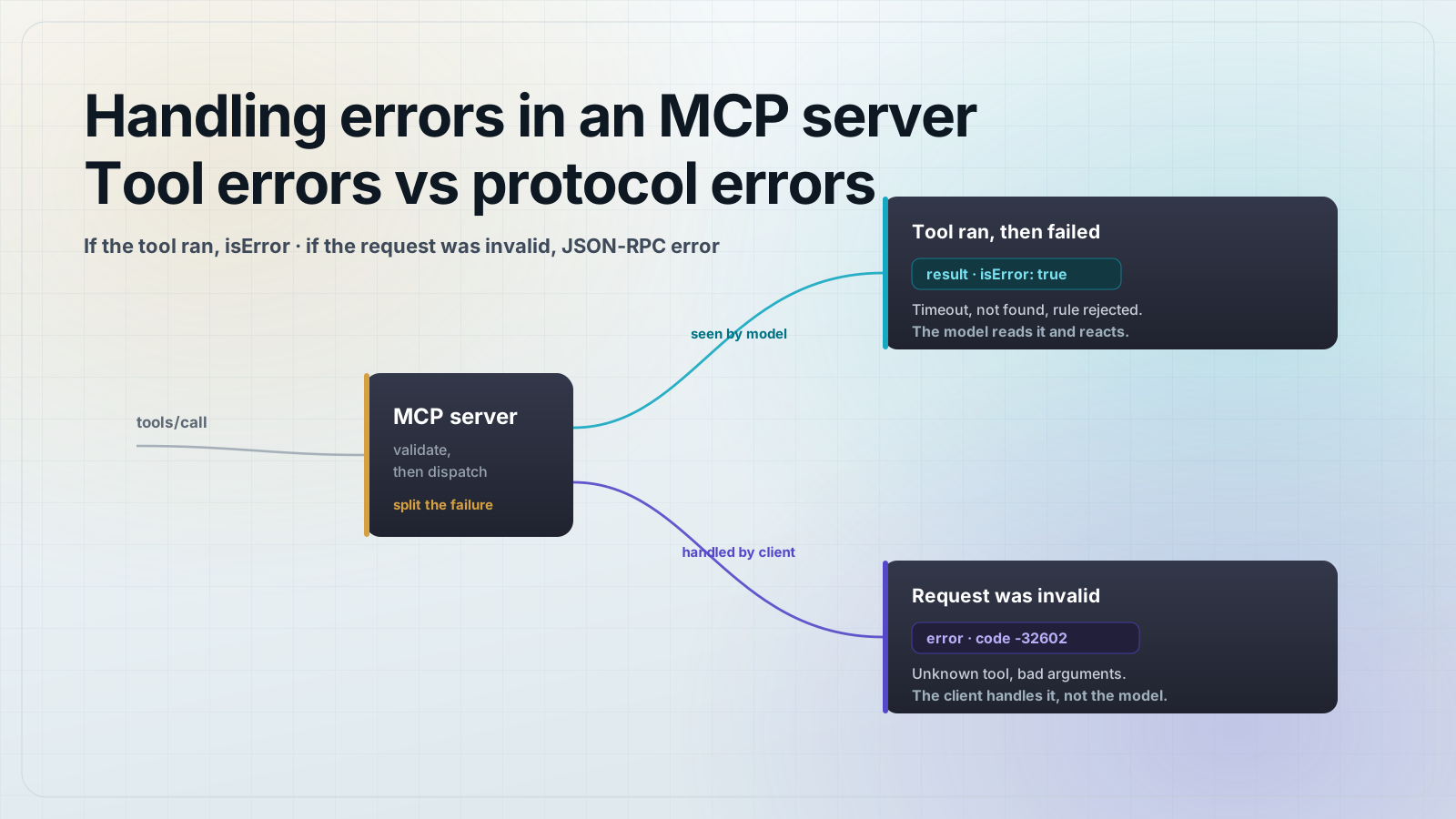
Handle errors in an MCP server by splitting them into two kinds. When a tool runs and fails, return a normal tool result with isError set to true and a message describing what went wrong, so the model can read it and react. When the request itself is invalid, like an unknown tool or malformed arguments, return a JSON-RPC protocol error with a numeric code, so the client handles it before the model is ever involved.
The mistake most people make is treating every failure the same way. A database timeout and a call to a tool that does not exist are not the same event. One happened inside your tool while it was working as designed, and the model should see it. The other means the request never should have reached your tool logic at all. Model Context Protocol (MCP) gives you a separate channel for each, and using the right one is the difference between a model that recovers and a model that stalls.
What is the difference between a tool error and a protocol error in MCP?
MCP runs on JSON-RPC 2.0, which already has an error mechanism: a response can carry a result or an error, never both. MCP keeps that layer for protocol-level problems, and adds a second, softer channel on top of it for tool execution problems. The softer channel is a successful JSON-RPC response whose result is a tool result that happens to be flagged with isError: true.
The test is simple. Ask whether the request was well formed and named a real tool with valid arguments. If yes, your tool ran, and any failure from here is a tool error that belongs in the result. If no, the request was broken before your tool logic started, and that is a protocol error.
Situation                                      Which error?
---------------------------------------------  ----------------------
Upstream API returned 500 or timed out         Tool error (isError)
Record not found for a valid query             Tool error (isError)
Business rule rejected the input               Tool error (isError)
Third-party auth token expired                 Tool error (isError)

Client called a tool that does not exist       Protocol error (-32602)
Arguments failed the tool's input schema       Protocol error (-32602)
Method name is not a real MCP method           Protocol error (-32601)
Request body is not valid JSON                  Protocol error (-32700)
Unexpected server bug before the tool ran Protocol error (-32603)How do you return a tool error the model can see?
A tool error is an ordinary tools/call response. The JSON-RPC layer says success, and the tool result inside sets isError: true with content that explains the failure in plain text. The client passes that text back to the model as the tool's output, so the model can decide what to do next. This is why the message matters: it is not a log line, it is an instruction the model will read.
// tools/call response for a tool that ran and failed
{
  "jsonrpc": "2.0",
  "id": 7,
  "result": {
    "content": [
      {
        "type": "text",
        "text": "Weather lookup failed: no city named 'Atlantpis'. Check the spelling or try a nearby city."
      }
    ],
    "isError": true
  }
}
In the TypeScript SDK you return that shape straight from the tool handler. Set isError: true and put an actionable message in the content. The example below pins @modelcontextprotocol/sdk@1.30.0 and zod@4.4.3 on Node 25, the same versions the rest of our tutorials use.
// Return a tool error the model can read and recover from
server.registerTool(
  "get_weather",
  {
    title: "Get weather",
    description: "Get the current weather for a city.",
    inputSchema: { city: z.string() },
  },
  async ({ city }) => {
    const res = await fetch(`https://api.example.com/weather?city=${city}`);

    if (res.status === 404) {
      return {
        content: [{ type: "text", text: `No city named '${city}'. Check the spelling or try a nearby city.` }],
        isError: true,
      };
    }

    if (!res.ok) {
      return {
        content: [{ type: "text", text: `Weather service is unavailable right now (status ${res.status}). Try again shortly.` }],
        isError: true,
      };
    }

    const data = await res.json();
    return { content: [{ type: "text", text: `It is ${data.tempC}C and ${data.summary} in ${city}.` }] };
  }
);
When should you return a JSON-RPC protocol error instead?
Return a protocol error when the request is not a valid call in the first place. The client asked for a tool that is not registered, sent arguments that do not match the tool's input schema, or sent something that is not a real MCP method. These are faults in the request, not in the world your tool talks to, and the model cannot fix them by trying again with different reasoning.
// tools/call response when the arguments are invalid
{
  "jsonrpc": "2.0",
  "id": 8,
  "error": {
    "code": -32602,
    "message": "Invalid params: 'city' is required and must be a string"
  }
}
Most protocol errors are raised for you. When you declare a tool's inputSchema, the SDK validates incoming arguments against it and returns -32602 on a mismatch before your handler runs. It returns -32601 for an unknown method and -32700 for a body that is not valid JSON. You rarely hand-write these, and that is the point: schema-level failures are the protocol's job, so let it do them.
- -32700 Parse error: the request body was not valid JSON.
- -32600 Invalid Request: the JSON was valid but not a valid JSON-RPC request.
- -32601 Method not found: the method name is not a real MCP method.
- -32602 Invalid params: arguments failed the tool's declared input schema.
- -32603 Internal error: an unexpected server fault before or around dispatch.
Why does isError live in a successful result and not a JSON-RPC error?
Because the model needs to see it. A JSON-RPC error is handled by the client transport and is treated as a broken call, so it often never reaches the model as tool output. If a valid tool call fails and you report it as a protocol error, the model is left blind: it asked for the weather, got nothing usable back, and cannot tell whether to retry, rephrase, or give up.
An isError result keeps the model in the loop. It comes back as normal tool output, so the model reads No city named 'Atlantpis' and can correct the spelling on the next call, or tell the user the service is down. That feedback loop is the whole reason MCP added a tool-level error channel instead of reusing JSON-RPC errors for everything.
What makes a good MCP error message?
Write the message for the model that will read it, not for a human tailing logs. State what failed, why, and what to try next, in one or two plain sentences. Include the value that caused the problem when it is safe to echo. Skip the codes and the jargon that the model cannot act on.
Weak    : "Error: request failed"
Weak    : "NullPointerException at WeatherService.java:214"
Strong  : "No city named 'Atlantpis'. Check the spelling or try a nearby city."
Strong  : "Weather service is unavailable right now (status 503). Try again shortly."
Strong  : "That date range is over 90 days. Narrow it to 90 days or fewer and retry."
How do you catch exceptions so one bad tool does not crash the server?
In the TypeScript SDK you get a safety net for free: if a tool handler throws, the SDK catches the exception and returns it as an isError result rather than letting it take down the connection. That is sensible default behavior, but a raw exception message is rarely a good message for the model, so it is worth shaping your own.
// Wrap a handler so thrown exceptions become clean, model-readable tool errors
function safeTool(handler) {
  return async (args, extra) => {
    try {
      return await handler(args, extra);
    } catch (err) {
      // Log the full detail on your side; return only the safe summary.
      console.error("tool failed", { name: extra?.toolName, err });
      const message =
        err instanceof Error ? err.message : "Unexpected error while running the tool.";
      return {
        content: [{ type: "text", text: `The tool could not complete: ${message}` }],
        isError: true,
      };
    }
  };
}

server.registerTool(
  "get_weather",
  { title: "Get weather", description: "Get the current weather for a city.", inputSchema: { city: z.string() } },
  safeTool(async ({ city }) => {
    // ... normal logic, free to throw on unexpected failures ...
  })
);
The wrapper gives you one place to decide what leaves the server. Expected failures still return their own tailored isError messages inside the handler. Unexpected exceptions get caught, logged in full, and reduced to a short, safe summary. Either way the connection stays up and the model gets something it can read.
Frequently asked questions
Frequently asked questions
- Should an MCP tool return isError or throw a JSON-RPC error when it fails?
- Return a result with
isError: truewhen the tool ran and the operation failed, like an upstream timeout or a record that was not found. Use a JSON-RPC protocol error only when the request itself was invalid, like an unknown tool or arguments that fail the input schema. TheisErrorresult is visible to the model, so it can react; the protocol error is handled by the client. - What are the JSON-RPC error codes MCP uses?
- MCP uses the standard JSON-RPC 2.0 codes:
-32700parse error,-32600invalid request,-32601method not found,-32602invalid params, and-32603internal error. Argument validation failures against a tool's input schema come back as-32602. Servers may also define their own codes outside that reserved range for specific protocol-level conditions. - Does the model see a JSON-RPC error from my MCP server?
- Usually not. A JSON-RPC error is handled by the client transport and treated as a failed call, so it typically does not reach the model as tool output. That is exactly why a failed-but-valid tool call should return an
isErrorresult instead: the model reads the message and can retry or change approach. - What happens if my MCP tool handler throws an exception?
- In the TypeScript SDK the framework catches the exception and returns it as a tool result with
isError: true, so a single failing tool does not crash the connection. The raw exception message is rarely ideal for a model, so wrap your handlers to log the full error and return a short, safe summary instead. - How should I write an MCP error message?
- Write it for the model that reads it, not for your logs. Say what failed and what to try next in one or two plain sentences, and echo the offending value when it is safe. Never include stack traces, secrets, database strings, or internal hostnames; log those on your side keyed by the request id.
Connect your server in MCPOrbit and call the failing tool by hand. You see the real isError results and JSON-RPC errors a client receives, so you catch a bad error path before an agent hits it.
About the author
MCPOrbit Team
Engineering, MCPOrbit
The MCPOrbit engineering team builds MCPOrbit, a free desktop client for the Model Context Protocol. It connects to any MCP server so you can browse its tools, call them by hand, and run them through a real agent loop.