Tutorial
How to paginate results from an MCP tool
A tool that returns thousands of rows floods the model's context and breaks the call. Here is cursor-based pagination for an MCP tool: an opaque cursor, a server-capped page size, and typed structuredContent, tested end to end.
Mark
Head of Marketing, MCPOrbit
- Published
- Updated
- · Updated
- Read time
- · 8 min read
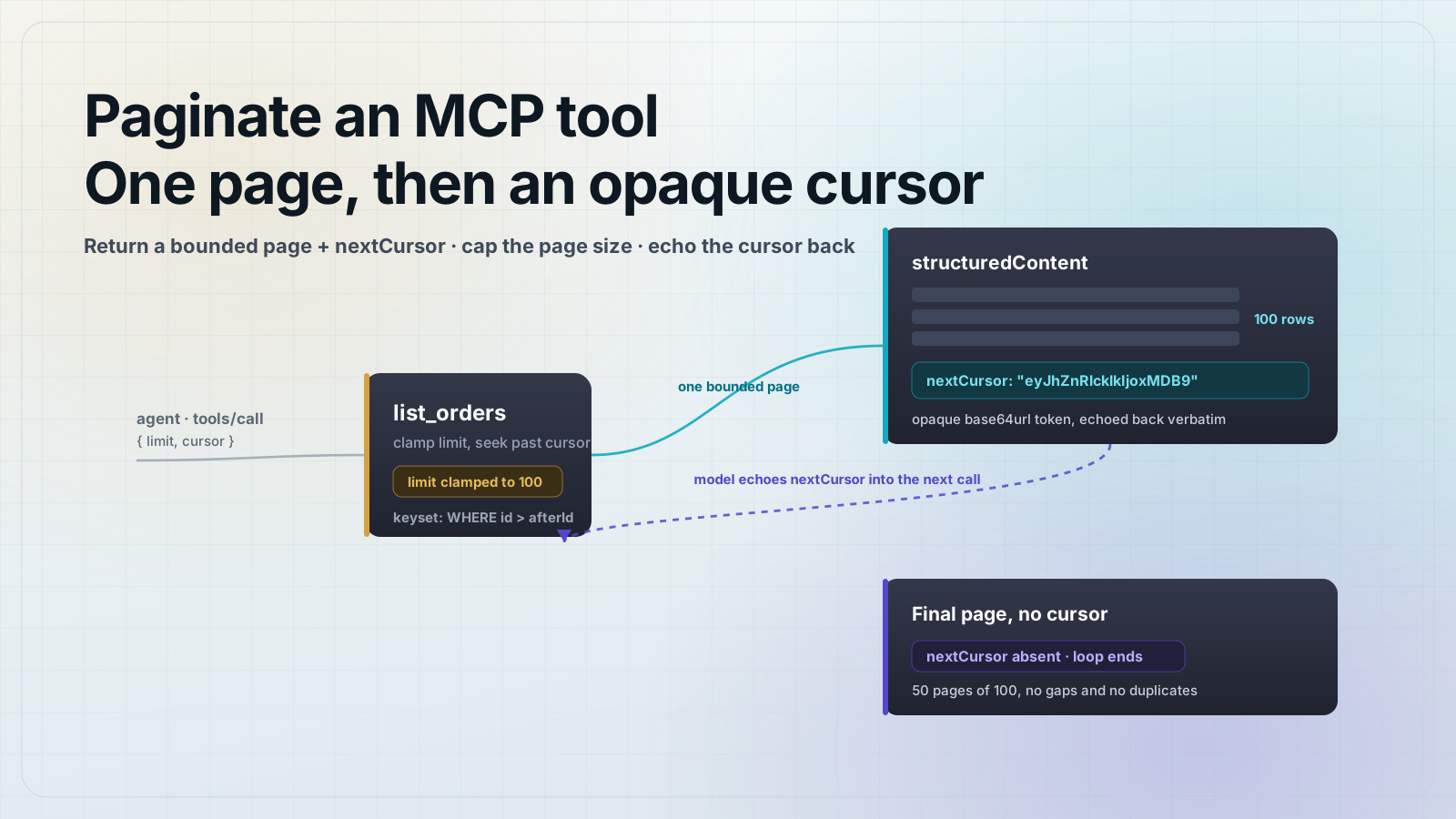
To paginate results from an MCP tool, give the tool a limit and a cursor input, return one bounded page plus an opaque nextCursor in structuredContent, and let the model call again with that cursor until it comes back empty. Cap the page size on the server and make the cursor a token the caller cannot edit. This keeps a large result set from flooding the model's context window.
A tool that returns everything is a tool that breaks. Ask an agent to "list the orders" and a naive tool dumps 5,000 rows into a single response. That response either blows past the model's context window, gets silently truncated, or costs a fortune in tokens before the model reads a single useful field. Pagination fixes this: return a small page, hand back a cursor, and let the model pull the next page only if it actually needs it. The Model Context Protocol (MCP) already uses cursor-based pagination for its own list operations like tools/list, so this pattern matches how MCP clients already think.
How do you paginate an MCP tool?
Add two optional inputs to the tool: limit (how many rows to return) and cursor (where to resume). The tool returns one page of rows and, if more remain, a nextCursor string. The model reads nextCursor and calls the tool again with it. When the tool returns no cursor, the model knows it has reached the end. The cursor is opaque: the client stores it and echoes it back without interpreting it, exactly like MCP's own tools/list pagination.
Start with the cursor itself. Encode it as a base64url token that carries the id of the last row on the page. Decoding a tampered or truncated cursor returns null, which the tool turns into a clean error rather than a crash.
// cursor.ts
// An opaque, base64url cursor. The client treats it as a token it echoes back,
// never as a number it can edit. We keyset on the last id we returned.
export type Cursor = { afterId: number }

export function encodeCursor(c: Cursor): string {
  return Buffer.from(JSON.stringify(c), "utf8").toString("base64url")
}

export function decodeCursor(raw: string | undefined): Cursor | null {
  if (!raw) return null
  try {
    const c = JSON.parse(Buffer.from(raw, "base64url").toString("utf8"))
    if (typeof c?.afterId === "number") return c as Cursor
    return null
  } catch {
    return null
  }
}
Return one bounded page plus a typed nextCursor
The tool does three things: clamp the requested limit to a server maximum, seek past the cursor's last id, and take one page. It returns the page and a nextCursor in structuredContent, backed by an outputSchema so the model receives typed JSON. Emit nextCursor only when rows remain, so its absence is an unambiguous end-of-list signal.
// server.ts
import { McpServer } from "@modelcontextprotocol/sdk/server/mcp.js"
import { z } from "zod"
import { encodeCursor, decodeCursor } from "./cursor.js"

// Stand-in data source: 5,000 orders, sorted by id. A real tool queries a DB.
type Order = { id: number; email: string; total: number }
const ORDERS: Order[] = Array.from({ length: 5000 }, (_, i) => ({
  id: i + 1,
  email: `user${i + 1}@example.com`,
  total: (i * 37) % 500,
}))

const MAX_PAGE = 100
const DEFAULT_PAGE = 25

export const server = new McpServer({ name: "orders", version: "1.0.0" })

server.registerTool(
  "list_orders",
  {
    description: "List orders, newest id last. Page through with the cursor.",
    inputSchema: {
      limit: z.number().int().positive().max(MAX_PAGE).optional(),
      cursor: z.string().optional(),
    },
    outputSchema: {
      orders: z.array(
        z.object({ id: z.number(), email: z.string(), total: z.number() }),
      ),
      nextCursor: z.string().optional(),
    },
  },
  async ({ limit, cursor }) => {
    // Bound the page size server-side. A caller cannot demand 10,000 rows.
    const pageSize = Math.min(limit ?? DEFAULT_PAGE, MAX_PAGE)

    const decoded = decodeCursor(cursor)
    if (cursor && !decoded) {
      return {
        isError: true,
        content: [{ type: "text", text: "Invalid or expired cursor." }],
      }
    }

    const afterId = decoded?.afterId ?? 0
    // Keyset pagination: seek past the last id we returned, take one page.
    const page = ORDERS.filter((o) => o.id > afterId).slice(0, pageSize)
    const last = page[page.length - 1]
    // Only emit a cursor if more rows remain after this page.
    const more = last ? ORDERS.some((o) => o.id > last.id) : false
    const nextCursor = more && last ? encodeCursor({ afterId: last.id }) : undefined

    const structuredContent = { orders: page, nextCursor }
    return {
      structuredContent,
      content: [{ type: "text", text: JSON.stringify(structuredContent) }],
    }
  },
)How the model follows the cursor
The caller does not need special support. It calls the tool, reads nextCursor from the structured result, and passes it into the next call. When nextCursor is missing, the loop ends. In practice an agent rarely reads every page; it stops as soon as it has the rows it needs, which is the whole point of paging instead of dumping.
// The caller follows nextCursor until it is gone.
let cursor: string | undefined
const all: Order[] = []

do {
  const res = await client.callTool({
    name: "list_orders",
    arguments: { limit: 100, ...(cursor ? { cursor } : {}) },
  })
  const { orders, nextCursor } = res.structuredContent as {
    orders: Order[]
    nextCursor?: string
  }
  all.push(...orders)
  cursor = nextCursor // undefined on the last page ends the loop
} while (cursor)
Run it in one command
npm i @modelcontextprotocol/sdk@1.30.0 zod@3
npx tsx server.ts
Point an MCP client at the server and call list_orders in a loop, following nextCursor each time. It walks the full 5,000 rows in 50 pages of 100 with no gaps and no duplicates, then returns a page with no cursor to signal the end. A garbage cursor comes back as a tool error, and a request for more than 100 rows is clamped to 100. This exact flow is tested end to end with an in-memory client before publishing.
- Set a sane default page size (25 here) so a caller that omits
limitstill gets a small response. - Never trust the cursor's contents for authorization. Re-check the caller's permissions on every page, because the cursor is resumable state, not a grant.
- For search or filtered results, fold the filter into the cursor so a resumed page uses the same query, not a new one.
- If your rows can change under you, keyset on a stable, monotonic column (an id or a created timestamp with a tiebreaker), not on a mutable field.
- Pair this with structured output so
nextCursoris typed data the model reads directly, not a string it has to fish out of text.
Frequently asked questions
Frequently asked questions
- How do I paginate results from an MCP tool?
- Give the tool
limitandcursorinputs, return at most one page of rows, and include an opaquenextCursortoken when more rows remain. The model calls the tool again with that cursor and stops when a response comes back without one. Return the cursor instructuredContentwith anoutputSchemaso the model gets typed JSON. - Why not just return all the rows from an MCP tool?
- A large result set floods the model's context window, gets truncated, or burns tokens before the model reads anything useful. Returning a bounded page keeps responses small and lets the agent fetch more only when it needs them, which is faster and cheaper.
- Should an MCP cursor be an offset or an opaque token?
- Make it an opaque token. Encode the resume position (a last id, plus any filter) as a base64url string the client echoes back without interpreting. An opaque cursor lets you change the pagination strategy later without breaking callers, and it stops a client from editing a raw offset to skip access checks.
- Keyset or offset pagination for an MCP tool?
- Prefer keyset (seek) pagination: resume with
WHERE id > :afterIdinstead ofOFFSET n. Keyset pages stay correct when rows are inserted or deleted between calls, and they use an index instead of counting past every skipped row. Offset is only fine for small, static data sets. - How does the model know it reached the last page?
- Omit
nextCursorfrom the final page. When the tool returns a page with no cursor, the client knows there are no more rows and stops calling. Emitting a cursor on every page, even the last, leaves the model unsure whether to call again.
Get your server into MCPOrbit, call the tool, and read the raw page it returns, cursor and all. A tool that dumps thousands of rows shows the problem immediately. Pair this with our guides on returning structured output from an MCP tool and rate limiting an MCP server.
About the author
Mark
Head of Marketing, MCPOrbit
Mark leads marketing at MCPOrbit, the free desktop client for the Model Context Protocol. He writes the build-it and reliability guides, and the code in them is run before it ships.