Tutorial
How to return an image from an MCP tool
Return an image from an MCP tool as a base64 image content block, or as a resource_link when the file is large. Runnable code and measured payload sizes.
Mark
Head of Marketing, MCPOrbit
- Published
- Updated
- · Updated
- Read time
- · 9 min read
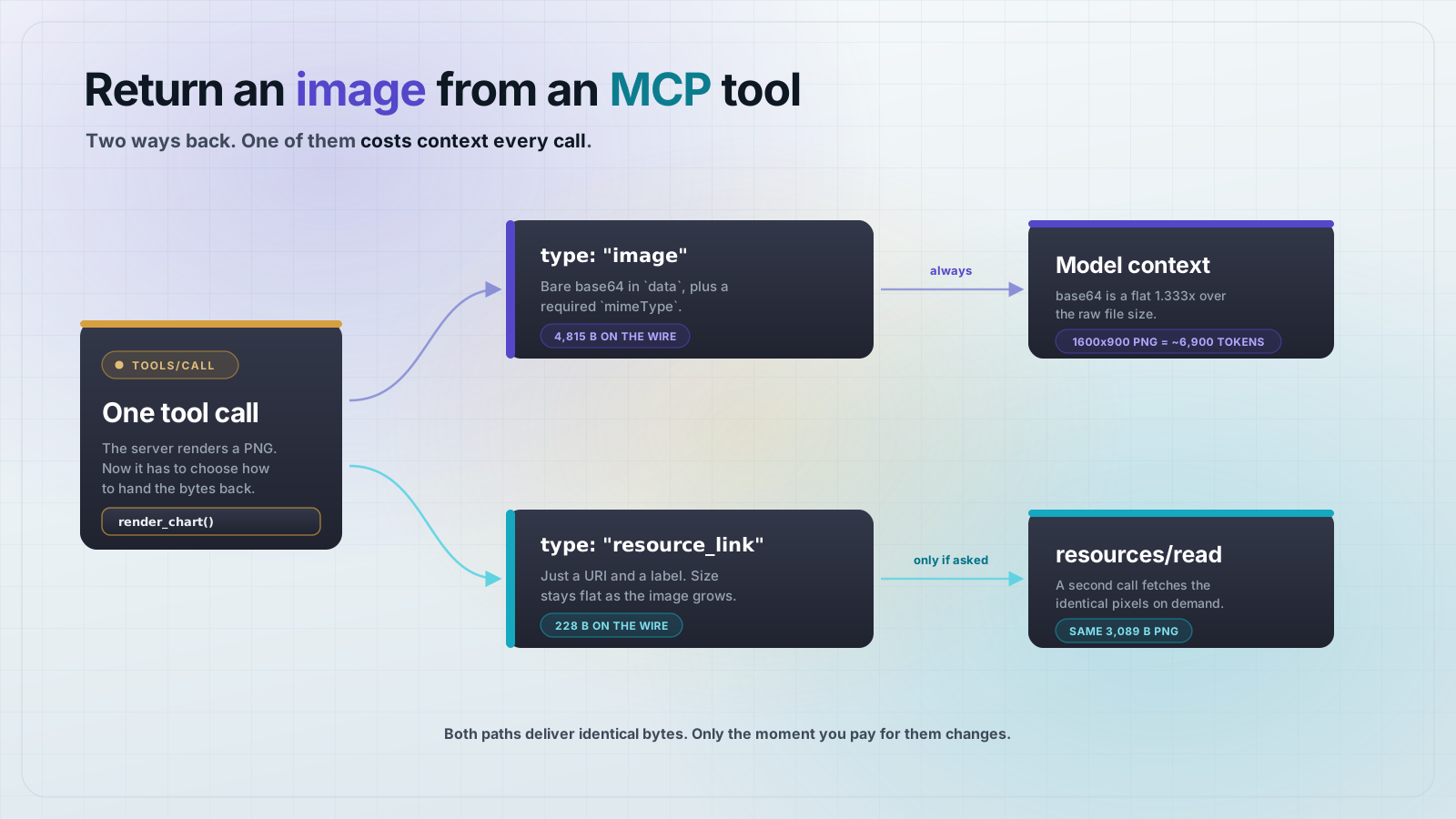
An MCP tool returns an image by putting an image content block in its result: { type: "image", data: <base64>, mimeType: "image/png" }. The data field is bare base64 with no data: URL prefix, and mimeType is required. For anything bigger than a small chart, return a resource_link instead and let the client fetch the bytes only if it wants them.
Both paths are part of the Model Context Protocol (MCP) spec, and the choice between them is a context-budget decision, not a style preference. Inline base64 lands in the model's context window every single time the tool runs. A link costs a couple of hundred bytes and defers the pixels to a separate resources/read call. This post builds one server that does both, then measures what each one actually costs on the wire.
What does an MCP image content block look like?
Every MCP tool result carries a content array. Each element is a typed block, and image is one of the built-in types alongside text, audio, resource, and resource_link. The shape is small:
{
  "content": [
    {
      "type": "image",
      "data": "iVBORw0KGgoAAAANSUhEUgAA...",
      "mimeType": "image/png"
    }
  ]
}
Three things about that payload trip people up. data is the raw base64 encoding of the file bytes, not a data URL, so it starts with the base64 of the PNG signature (iVBORw0KGgo) rather than with data:image/png. mimeType is required, not optional. And nothing in the protocol checks that the bytes decode to a real image, so a valid-shaped block can still carry garbage.
Build a server that returns a chart
Set up a project. This uses the v2 split-package SDK, pinned to the versions this post was tested on.
mkdir chart-server && cd chart-server
npm init -y
npm pkg set type=module
npm i @modelcontextprotocol/server@2.0.0 @modelcontextprotocol/client@2.0.0 zod@4.4.3
The server needs something to return. Rather than pull in an image library, here is a small PNG encoder built on Node's own zlib. It keeps the project at three dependencies and makes the whole thing copy-pasteable. Save it as png.js.
// png.js: a tiny PNG encoder. No dependencies, so the server stays copy-pasteable.
import { deflateSync } from "node:zlib";

// CRC-32, the checksum every PNG chunk carries.
const CRC_TABLE = Uint32Array.from({ length: 256 }, (_, n) => {
  let c = n;
  for (let k = 0; k < 8; k++) c = c & 1 ? 0xedb88320 ^ (c >>> 1) : c >>> 1;
  return c >>> 0;
});

function crc32(buf) {
  let c = 0xffffffff;
  for (const byte of buf) c = CRC_TABLE[(c ^ byte) & 0xff] ^ (c >>> 8);
  return (c ^ 0xffffffff) >>> 0;
}

function chunk(type, data) {
  const len = Buffer.alloc(4);
  len.writeUInt32BE(data.length);
  const body = Buffer.concat([Buffer.from(type, "ascii"), data]);
  const crc = Buffer.alloc(4);
  crc.writeUInt32BE(crc32(body));
  return Buffer.concat([len, body, crc]);
}

// Encode an RGB pixel buffer (width * height * 3 bytes) as a PNG.
export function encodePng(width, height, rgb) {
  const ihdr = Buffer.alloc(13);
  ihdr.writeUInt32BE(width, 0);
  ihdr.writeUInt32BE(height, 4);
  ihdr[8] = 8; // bit depth
  ihdr[9] = 2; // color type 2 = truecolor RGB
  // bytes 10-12 stay 0: deflate, adaptive filtering, no interlace

  // Each scanline is prefixed with a filter byte. 0 means "no filter".
  const stride = width * 3;
  const raw = Buffer.alloc((stride + 1) * height);
  for (let y = 0; y < height; y++) {
    raw[y * (stride + 1)] = 0;
    rgb.copy(raw, y * (stride + 1) + 1, y * stride, (y + 1) * stride);
  }

  return Buffer.concat([
    Buffer.from([0x89, 0x50, 0x4e, 0x47, 0x0d, 0x0a, 0x1a, 0x0a]),
    chunk("IHDR", ihdr),
    chunk("IDAT", deflateSync(raw, { level: 9 })),
    chunk("IEND", Buffer.alloc(0)),
  ]);
}

// Draw a bar chart and return it as a PNG buffer.
export function barChartPng(values, { width = 640, height = 360 } = {}) {
  const rgb = Buffer.alloc(width * height * 3, 0xff); // white canvas

  const put = (x, y, r, g, b) => {
    if (x < 0 || y < 0 || x >= width || y >= height) return;
    const i = (y * width + x) * 3;
    rgb[i] = r;
    rgb[i + 1] = g;
    rgb[i + 2] = b;
  };

  const max = Math.max(...values, 1);
  const pad = 24;
  const slot = Math.floor((width - pad * 2) / values.length);
  const barW = Math.max(1, Math.floor(slot * 0.7));

  values.forEach((v, i) => {
    const h = Math.round(((height - pad * 2) * v) / max);
    const x0 = pad + i * slot;
    for (let x = x0; x < x0 + barW; x++) {
      for (let y = height - pad - h; y < height - pad; y++) put(x, y, 0x54, 0x47, 0xc9);
    }
  });

  // Baseline axis.
  for (let x = pad; x < width - pad; x++) put(x, height - pad, 0x0e, 0x18, 0x22);

  return encodePng(width, height, rgb);
}
Now the server. It registers two tools that render the same chart, one inline and one behind a link, plus the resource the link resolves to. Save it as server.js.
// server.js: an MCP server that returns a chart image two ways.
import { McpServer, ResourceTemplate } from "@modelcontextprotocol/server";
import { StdioServerTransport } from "@modelcontextprotocol/server/stdio";
import { randomUUID } from "node:crypto";
import { z } from "zod";
import { barChartPng } from "./png.js";

const server = new McpServer({ name: "chart-server", version: "1.0.0" });

// Rendered charts, kept in memory so a resource_link has something to resolve to.
const charts = new Map();

// Approach 1: inline. The bytes travel back inside the tool result.
server.registerTool(
  "render_chart",
  {
    title: "Render a bar chart",
    description:
      "Render a bar chart from a list of numbers and return the PNG inline.",
    inputSchema: { values: z.array(z.number()).min(1).max(64) },
  },
  async ({ values }) => {
    const png = barChartPng(values);
    return {
      content: [
        { type: "image", data: png.toString("base64"), mimeType: "image/png" },
      ],
    };
  }
);

// Approach 2: link. The tool result carries a pointer, not the bytes.
server.registerTool(
  "render_chart_link",
  {
    title: "Render a bar chart and return a link",
    description:
      "Render a bar chart from a list of numbers and return a link to the PNG.",
    inputSchema: { values: z.array(z.number()).min(1).max(64) },
  },
  async ({ values }) => {
    const png = barChartPng(values);
    const id = randomUUID();
    charts.set(id, png);
    return {
      content: [
        {
          type: "resource_link",
          uri: `chart://${id}`,
          name: `chart-${id}.png`,
          mimeType: "image/png",
        },
        {
          type: "text",
          text: `Bar chart of ${values.length} values, max ${Math.max(...values)}.`,
        },
      ],
    };
  }
);

// The resource the link points at. Only read when the client actually wants pixels.
server.registerResource(
  "chart",
  new ResourceTemplate("chart://{id}", { list: undefined }),
  { title: "Rendered chart", mimeType: "image/png" },
  async (uri, { id }) => {
    const png = charts.get(id);
    if (!png) throw new Error(`No chart with id ${id}`);
    return {
      contents: [
        { uri: uri.href, mimeType: "image/png", blob: png.toString("base64") },
      ],
    };
  }
);

await server.connect(new StdioServerTransport());
Note the two differences between the paths. The inline tool returns one block. The link tool returns two: the resource_link itself, and a short text block describing what the chart shows. That text block matters. A model cannot see pixels it has not fetched, so without a description it has no idea whether the link is worth following.
Prove it works, and measure what it costs
A tutorial that says "this returns an image" without checking is worth nothing. Save this as check.mjs. It connects a real client over stdio, calls both tools, asserts the bytes really are a PNG, and prints the size of each result.
// check.mjs: connect a real client over stdio and exercise both tools.
import { Client } from "@modelcontextprotocol/client";
import { StdioClientTransport } from "@modelcontextprotocol/client/stdio";
import assert from "node:assert/strict";

const VALUES = [12, 45, 23, 67, 34, 89, 51, 40, 72, 18];

const client = new Client({ name: "checker", version: "1.0.0" });
await client.connect(
  new StdioClientTransport({ command: "node", args: ["server.js"] })
);

const tools = await client.listTools();
console.log("tools:", tools.tools.map((t) => t.name).join(", "));

// --- Approach 1: inline image ---
const inline = await client.callTool({
  name: "render_chart",
  arguments: { values: VALUES },
});
const img = inline.content[0];
assert.equal(img.type, "image");
assert.equal(img.mimeType, "image/png");
const bytes = Buffer.from(img.data, "base64");
assert.equal(bytes.subarray(1, 4).toString(), "PNG", "inline data is a real PNG");
const inlineWire = Buffer.byteLength(JSON.stringify(inline), "utf8");
console.log(
  `inline: png=${bytes.length}B base64=${img.data.length}B wire=${inlineWire}B`
);

// --- Approach 2: resource_link ---
const linked = await client.callTool({
  name: "render_chart_link",
  arguments: { values: VALUES },
});
const link = linked.content[0];
assert.equal(link.type, "resource_link");
assert.equal(link.mimeType, "image/png");
assert.match(link.uri, /^chart:\/\//);
const linkWire = Buffer.byteLength(JSON.stringify(linked), "utf8");
console.log(`link: wire=${linkWire}B uri=${link.uri}`);

// The bytes are still reachable, on demand.
const read = await client.readResource({ uri: link.uri });
const blob = Buffer.from(read.contents[0].blob, "base64");
assert.equal(blob.subarray(1, 4).toString(), "PNG", "resource blob is a real PNG");
assert.equal(blob.length, bytes.length, "same image either way");
console.log(`resources/read: png=${blob.length}B`);

console.log(`\nwire ratio: link is ${(inlineWire / linkWire).toFixed(1)}x smaller`);
console.log("ALL CHECKS PASSED");
await client.close();
Run it with node check.mjs. On the tested setup it prints:
tools: render_chart, render_chart_link
inline: png=3089B base64=4120B wire=4183B
link: wire=227B uri=chart://b567b2f5-09a4-4e65-b65a-d511dcff7b14
resources/read: png=3089B

wire ratio: link is 18.4x smaller
ALL CHECKS PASSED
The last assertion is the one that matters: blob.length equals bytes.length. The client gets identical pixels either way. The only thing that changed is when it pays for them.
How much context does an inline image actually cost?
Base64 encodes three bytes as four characters, so the floor is a 1.333x expansion. That is not an estimate. Measured across a 3,169-byte chart, a 3,562-byte chart, and a 20,657-byte one, the ratio came back as 1.334x, 1.334x, and 1.333x. There is no size at which it gets better.
Put that against a realistic image. A 1600x900 PNG from this same encoder is 20,657 bytes. Base64 makes it 27,544 characters. At a rough four characters per token, inlining it spends about 6,900 tokens of context on one tool call. Do that three times in a conversation and a fifth of a 100k window is gone before the model has reasoned about anything.
The same comparison on the wire, from the size sweep in the tested project:
bars=8   png=3169B base64=4228B inflation=1.334x  inlineWire=4291B linkWire=226B  ratio=19.0x
bars=64  png=3562B base64=4752B inflation=1.334x  inlineWire=4815B linkWire=228B  ratio=21.1x
The link result barely moves. It is 226 to 228 bytes whether the chart has 8 bars or 64, because a URI does not grow with the image. That flatness is the real argument for links: the cost of a link is independent of the size of the thing it points at.
Which should you return, inline or a link?
Return the image inline when the model needs to look at it to answer the question, and the image is small. A sparkline, a small chart, a cropped diff, an icon. If the whole point of the tool call is "look at this and tell me what you see," a link just adds a round trip.
Return a resource_link when any of these is true:
- The image is large. Full-page screenshots, high-resolution renders, and anything over roughly 100 KB are expensive to inline and rarely need to be seen in full.
- The image is one of many. A tool that returns twelve thumbnails should return twelve links, not twelve base64 blobs.
- The image is a by-product. A build artifact, a generated report, or a saved plot that the user may want but the model does not need to read.
- The user is the audience, not the model. A link lets a client render or download the file without spending any context at all.
When you return a link, always pair it with a text block that says what the image contains. The model is choosing whether to spend a resources/read call, and it can only make that choice from the description.
Two mistakes the SDK catches for you
The two most common image-block errors both fail loudly on the v2 SDK, which is better than the alternative. Both were tested by writing a deliberately broken server and calling it.
Wrapping the base64 in a data URL
If you have written web code, data:image/png;base64,... is muscle memory. It is wrong here. The data field takes the bare base64 string. Returning a prefixed one produced a validation failure naming base64 as the problem, raised at the client as an Invalid tools/call result. The tool call fails rather than returning an image that quietly refuses to render.
Leaving out mimeType
mimeType is required on an image block. Omitting it does not default to PNG. The result fails union validation against the content block types and the client raises Invalid tools/call result mentioning mimeType. Set it explicitly, and set it correctly: image/png, image/jpeg, or image/webp.
Frequently asked questions
Frequently asked questions
- How do I return an image from an MCP tool?
- Put an
imagecontent block in the tool result:{ type: "image", data: <base64>, mimeType: "image/png" }. Thedatafield is the bare base64 encoding of the file bytes, with nodata:URL prefix, andmimeTypeis required. - Can an MCP tool return a PNG file path instead of the bytes?
- Not usefully as a path, because the client may run on a different machine. Return a
resource_linkblock with a URI the server can resolve, and register a matching resource so the client can fetch the bytes withresources/readwhen it wants them. - Does base64 make my MCP image bigger?
- Yes, by a flat 1.333x. Measured on PNGs from 3 KB to 20 KB, the expansion was 1.333x to 1.334x every time. A 20,657-byte PNG becomes 27,544 base64 characters, roughly 6,900 tokens of context.
- When should I use resource_link instead of an inline image?
- Use a link when the image is large, when there are many of them, or when the user rather than the model is the audience. In testing, swapping an inline chart for a link cut the tool result from 4,815 bytes to 228 bytes, and the link size stayed flat as the image grew.
- Why is my MCP image content block rejected?
- The two usual causes are a
data:image/png;base64,prefix on thedatafield, which fails base64 validation, and a missingmimeType, which fails content-block union validation. Both surface at the client asInvalid tools/call result. - Can an MCP tool return audio or PDFs the same way?
- Yes. There is an
audiocontent block with the samedataandmimeTypeshape. For any other file type, return aresource_linkor an embeddedresourceblock with the bytes inbloband the correctmimeType.
The short version: inline small images the model must look at, link everything else, and always describe the link in a text block so the model can decide whether to follow it.
MCPOrbit connects to any MCP server and shows the full JSON of every result as you build, including the base64 payload of an image and the fields of a resource_link, so you can see what a client actually gets back before you wire the server into an agent.
About the author
Mark
Head of Marketing, MCPOrbit
Mark leads marketing at MCPOrbit, the free desktop client for the Model Context Protocol. He writes the build-it and reliability guides, and the code in them is run before it ships.