Tutorial
How to combine multiple MCP servers into one
Put several MCP servers behind one gateway: a server that is also a client, with prefixed tool names and a dead upstream contained. Runnable TypeScript.
Mark
Head of Marketing, MCPOrbit
- Published
- Updated
- · Updated
- Read time
- · 10 min read
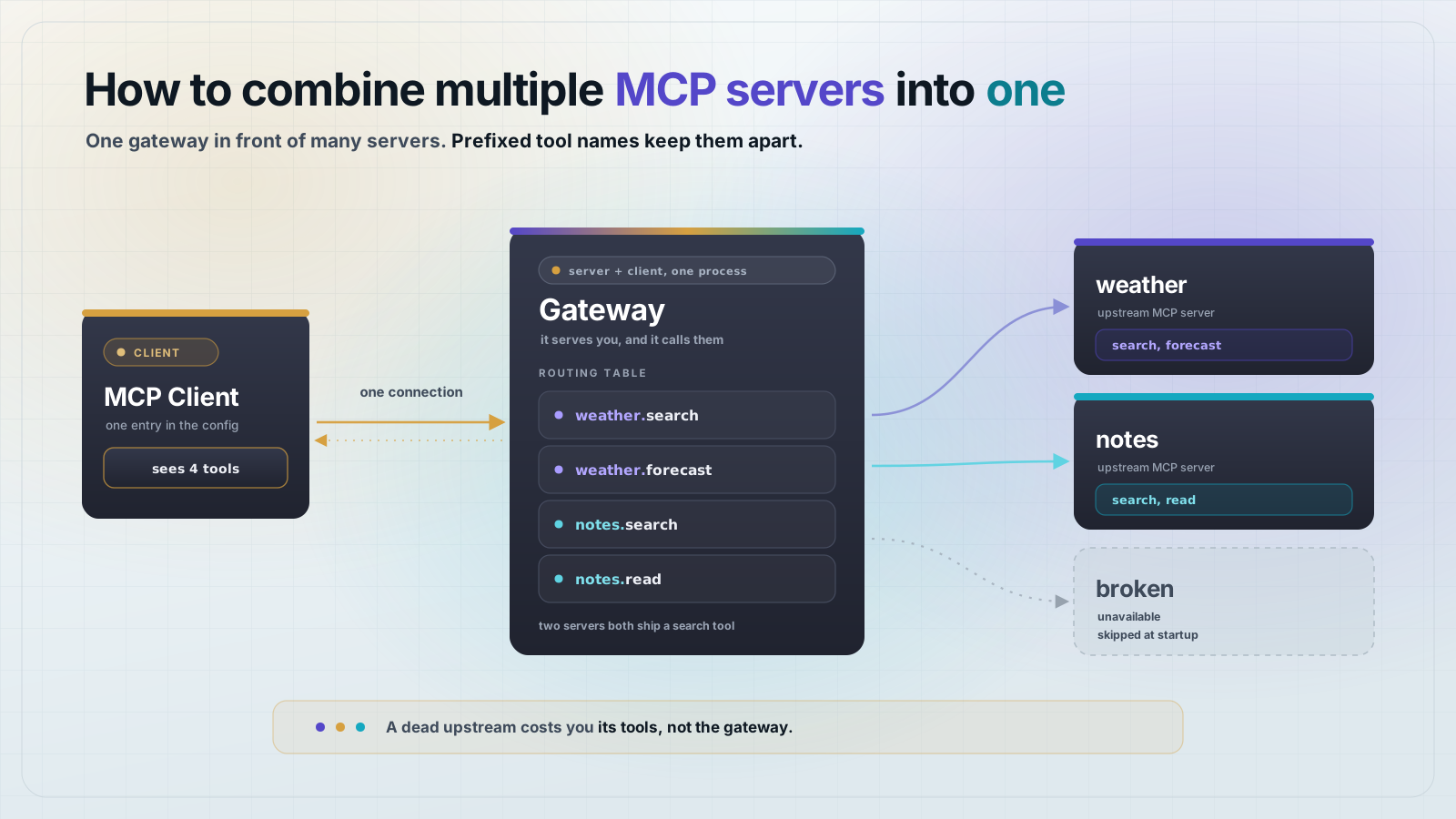
To combine several Model Context Protocol (MCP) servers into one, build a gateway: a single MCP server that is also an MCP client. It connects to each upstream server when it starts, collects the tools they expose, and republishes all of them under one name. Whatever you point at the gateway sees one server.
This is worth doing because clients do not handle many servers gracefully. Every server a user adds is another config entry, another process to start, and another thing that can fail on its own. A gateway collapses that list into one endpoint. The whole gateway below is 80 lines of TypeScript, and the code in this post runs as written.
What is an MCP gateway?
An MCP gateway is a server that sits between one client and many servers. To the client it is an ordinary MCP server: it answers tools/list and tools/call like any other. To each upstream it is an ordinary MCP client. Nothing in the protocol treats it as special.
That is the whole trick. In the SDK, a server and a client are two separate objects with no shared state, so one process can hold both. The gateway keeps a routing table that maps the tool names it advertises to the upstream client that can actually run them.
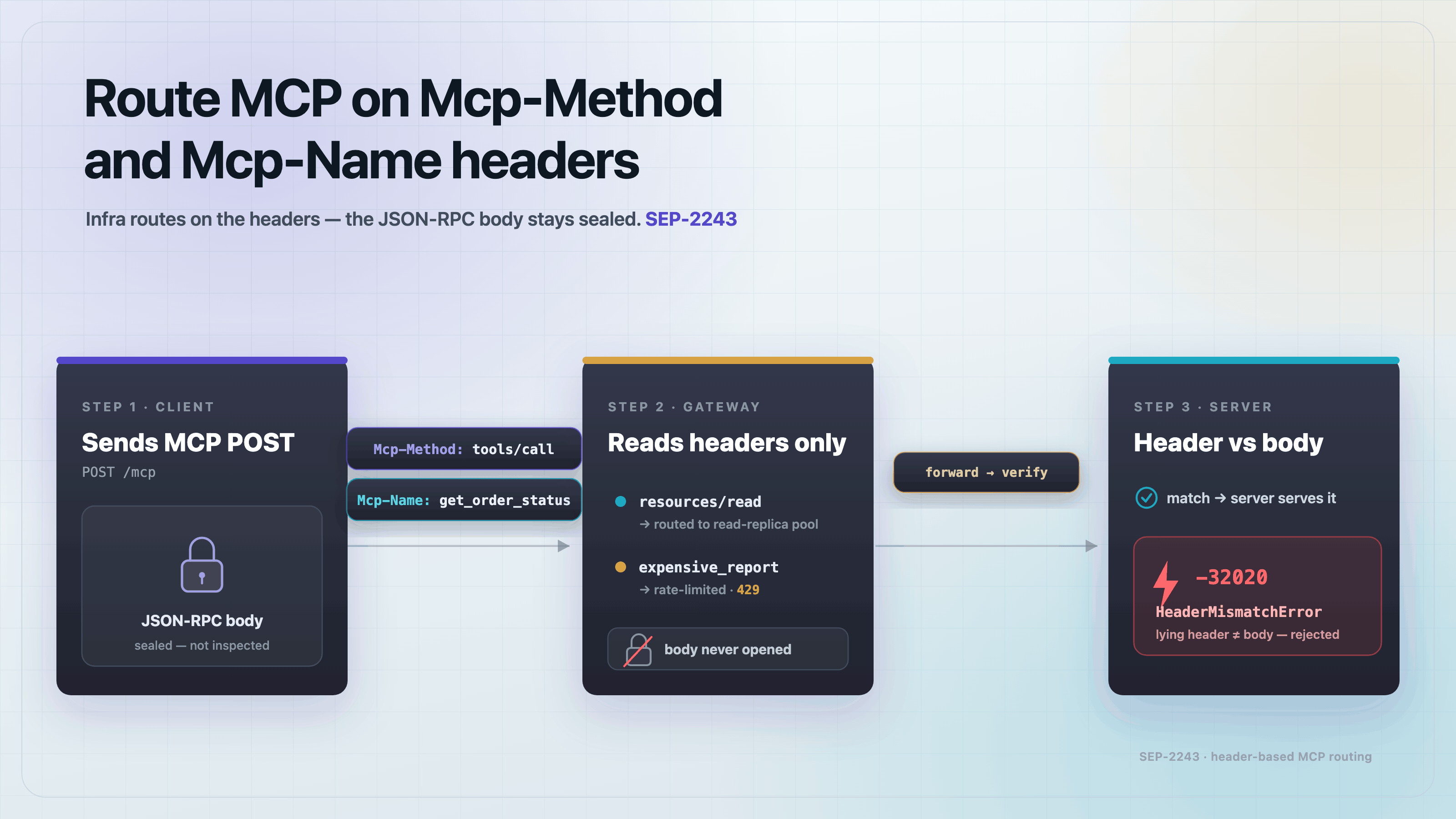
This is a different job from routing MCP traffic at the network edge with the Mcp-Method and Mcp-Name headers. Those headers let a proxy forward a request without reading the body. A gateway does read the body: it owns the tool list and decides which upstream each call belongs to.
Set up the project
Create a fresh directory. The gateway needs both SDK packages, because it acts as a server and as a client.
{
  "name": "mcp-gateway-demo",
  "private": true,
  "type": "module",
  "dependencies": {
    "@modelcontextprotocol/client": "2.0.0",
    "@modelcontextprotocol/server": "2.0.0",
    "zod": "4.4.3"
  }
}
npm installTwo servers to put behind the gateway
You need something to combine. These two servers are deliberately small, and they are chosen to collide: both expose a tool called search. That collision is the problem a gateway has to solve, so it is better to hit it now than in production.
// upstream-weather.ts: a tiny MCP server, standing in for a real one.
import { McpServer } from "@modelcontextprotocol/server";
import { serveStdio } from "@modelcontextprotocol/server/stdio";
import { z } from "zod";

const CITIES = ["Lisbon", "Reykjavik", "Nairobi"];

function makeServer() {
  const server = new McpServer({ name: "weather", version: "1.0.0" });

  server.registerTool(
    "search",
    {
      description: "Search the city list. Returns matching city names.",
      inputSchema: z.object({ query: z.string() }),
    },
    async ({ query }) => {
      const hits = CITIES.filter((c) =>
        c.toLowerCase().includes(query.toLowerCase()),
      );
      return { content: [{ type: "text", text: hits.join(", ") || "no match" }] };
    },
  );

  server.registerTool(
    "forecast",
    {
      description: "Get tomorrow's forecast for a city.",
      inputSchema: z.object({ city: z.string() }),
    },
    async ({ city }) => {
      if (!CITIES.includes(city)) throw new Error(`Unknown city: ${city}`);
      return { content: [{ type: "text", text: `${city}: 18C, light rain` }] };
    },
  );

  return server;
}

serveStdio(() => makeServer());
// upstream-notes.ts: a second MCP server. Note that it also has a "search" tool.
import { McpServer } from "@modelcontextprotocol/server";
import { serveStdio } from "@modelcontextprotocol/server/stdio";
import { z } from "zod";
const NOTES = [
{ id: "n1", title: "Standup", body: "Ship the gateway." },
{ id: "n2", title: "Groceries", body: "Coffee, oats." },
];
function makeServer() {
const server = new McpServer({ name: "notes", version: "1.0.0" });
server.registerTool(
"search",
{
description: "Search notes by title. Returns matching note ids.",
inputSchema: z.object({ query: z.string() }),
},
async ({ query }) => {
const hits = NOTES.filter((n) =>
n.title.toLowerCase().includes(query.toLowerCase()),
);
const text = hits.map((n) => `${n.id}: ${n.title}`).join("\n");
return { content: [{ type: "text", text: text || "no match" }] };
},
);
server.registerTool(
"read",
{
description: "Read one note by id.",
inputSchema: z.object({ id: z.string() }),
},
async ({ id }) => {
const note = NOTES.find((n) => n.id === id);
if (!note) throw new Error(`No note with id ${id}`);
return { content: [{ type: "text", text: note.body }] };
},
);
return server;
}
serveStdio(() => makeServer());Each one is a normal stdio MCP server. Run either directly and a client can talk to it. Replace them later with real servers, such as a filesystem server and a database server. The gateway does not care what an upstream is, only that it speaks MCP.
How do you combine multiple MCP servers into one?
List the upstreams in a config file so adding a server is an edit, not a code change. The third entry points at a file that does not exist. That is on purpose, to prove the gateway survives a dead upstream.
{
  "servers": [
    { "name": "weather", "command": "node", "args": ["upstream-weather.ts"] },
    { "name": "notes", "command": "node", "args": ["upstream-notes.ts"] },
    { "name": "broken", "command": "node", "args": ["does-not-exist.ts"] }
  ]
}
The gateway starts by connecting to each upstream and asking for its tools. Then it builds one server that mirrors every tool it found and forwards calls to the right client.
// gateway.ts: one MCP server that fronts several others.
import { readFileSync } from "node:fs";
import { McpServer, fromJsonSchema } from "@modelcontextprotocol/server";
import { serveStdio } from "@modelcontextprotocol/server/stdio";
import { Client } from "@modelcontextprotocol/client";
import { StdioClientTransport } from "@modelcontextprotocol/client/stdio";

type Upstream = { name: string; command: string; args: string[] };

type Route = {
  client: Client;
  toolName: string;
  description?: string;
  inputSchema: any;
};

const config: { servers: Upstream[] } = JSON.parse(
  readFileSync("servers.json", "utf8"),
);

// One entry per upstream tool, keyed by the name the gateway exposes.
const routes = new Map<string, Route>();

async function connectUpstream(entry: Upstream): Promise<number> {
  const client = new Client({ name: "gateway", version: "1.0.0" });
  const transport = new StdioClientTransport({
    command: entry.command,
    args: entry.args,
    stderr: "ignore",
  });
  await client.connect(transport);

  const { tools } = await client.listTools();
  for (const tool of tools) {
    routes.set(`${entry.name}.${tool.name}`, {
      client,
      toolName: tool.name,
      description: tool.description,
      inputSchema: tool.inputSchema,
    });
  }
  return tools.length;
}

// Connect to every upstream before serving. One dead server must not take the
// gateway down with it, so a failure is logged and skipped.
for (const entry of config.servers) {
  try {
    const count = await connectUpstream(entry);
    console.error(`[gateway] ${entry.name}: ${count} tools`);
  } catch (error) {
    console.error(`[gateway] ${entry.name} unavailable: ${(error as Error).message}`);
  }
}

function makeServer(): McpServer {
  const server = new McpServer({ name: "gateway", version: "1.0.0" });

  for (const [publicName, route] of routes) {
    server.registerTool(
      publicName,
      {
        description: route.description,
        // The upstream already published a JSON Schema. Pass it straight
        // through instead of rebuilding it by hand.
        inputSchema: fromJsonSchema(route.inputSchema),
      },
      async (args) => {
        return await route.client.callTool({
          name: route.toolName,
          arguments: args as Record<string, unknown>,
        });
      },
    );
  }

  return server;
}

serveStdio(() => makeServer());
Three decisions in that file carry the design. Tool names are prefixed with the upstream name, so search becomes weather.search and notes.search and the two stop fighting. The upstream's own inputSchema is handed to fromJsonSchema and passed through untouched, so the gateway never has to understand what a tool takes. And the connect loop catches failures per upstream, so a server that is down costs you its tools and nothing else.
Test it end to end
Write a client that spawns the gateway, lists what it advertises, and calls a tool from each upstream. This is the check that matters, because it exercises the full path: client to gateway, gateway to upstream, and back.
// test.ts: connect to the gateway and exercise tools from both upstreams.
import assert from "node:assert/strict";
import { Client } from "@modelcontextprotocol/client";
import { StdioClientTransport } from "@modelcontextprotocol/client/stdio";

const client = new Client({ name: "test", version: "1.0.0" });
await client.connect(
  new StdioClientTransport({ command: "node", args: ["gateway.ts"] }),
);

const { tools } = await client.listTools();
const names = tools.map((t) => t.name).sort();
console.log("TOOLS:", names.join(", "));

// Both upstreams export a tool called "search". The prefix keeps them apart.
assert.deepEqual(names, [
  "notes.read",
  "notes.search",
  "weather.forecast",
  "weather.search",
]);

// The unreachable upstream in servers.json did not stop the gateway.
assert.ok(!names.some((n) => n.startsWith("broken.")));

const forecast = await client.callTool({
  name: "weather.forecast",
  arguments: { city: "Lisbon" },
});
console.log("weather.forecast ->", forecast.content[0].text);
assert.match(forecast.content[0].text, /Lisbon/);

const note = await client.callTool({
  name: "notes.read",
  arguments: { id: "n1" },
});
console.log("notes.read ->", note.content[0].text);
assert.equal(note.content[0].text, "Ship the gateway.");

// Each "search" reaches its own upstream, not the other one.
const cities = await client.callTool({
  name: "weather.search",
  arguments: { query: "re" },
});
console.log("weather.search ->", cities.content[0].text);
assert.equal(cities.content[0].text, "Reykjavik");

const notes = await client.callTool({
  name: "notes.search",
  arguments: { query: "stand" },
});
console.log("notes.search ->", notes.content[0].text);
assert.equal(notes.content[0].text, "n1: Standup");

// An upstream error comes back as a tool error, not a dead gateway.
const missing = await client.callTool({
  name: "notes.read",
  arguments: { id: "nope" },
});
assert.equal(missing.isError, true);
console.log("notes.read (bad id) -> isError:", missing.isError);

// The gateway is still usable after that error.
const again = await client.callTool({
  name: "notes.read",
  arguments: { id: "n2" },
});
assert.equal(again.content[0].text, "Coffee, oats.");

await client.close();
console.log("ALL CHECKS PASSED");
Run it with node test.ts. The first three lines come from the gateway's own stderr, which is where the startup report goes so it cannot corrupt the JSON-RPC stream on stdout.
[gateway] weather: 2 tools
[gateway] notes: 2 tools
[gateway] broken unavailable: Connection closed
TOOLS: notes.read, notes.search, weather.forecast, weather.search
weather.forecast -> Lisbon: 18C, light rain
notes.read -> Ship the gateway.
weather.search -> Reykjavik
notes.search -> n1: Standup
notes.read (bad id) -> isError: true
ALL CHECKS PASSED
Four tools from two servers, under one connection. The broken upstream reported Connection closed and was skipped, and the gateway served the rest anyway. A bad note id came back as a tool error rather than a crash, and the next call still worked.
Why prefix every tool name?
Because without a prefix the gateway does not start. Tool names are unique per server, and the SDK enforces that when you register them:
// Two upstreams, both with a tool called "search".
server.registerTool("search", { description: "A", inputSchema: z.object({ q: z.string() }) }, handlerA);
server.registerTool("search", { description: "B", inputSchema: z.object({ q: z.string() }) }, handlerB);

// Error: Tool search is already registered
That error is thrown while the gateway is booting, before any client connects, so the failure is at least loud. The quieter version of this bug is worse: a gateway that silently keeps the last registration wins, and calls to search reach the wrong server for the rest of the session.
Pick one separator and keep it. A dot reads well and matches what most people expect from a namespace. Whatever you choose, the prefix should be the upstream's name from your config, not the server's self-reported name, because two vendors can ship servers that both call themselves search-server.
What a gateway does not fix
A gateway changes where tools come from. It does not change how many the model sees. Front five servers with twelve tools each and the model now reads 60 tool descriptions on every call, which is well past the point where tool selection gets unreliable. Combining servers can make that worse, because adding one is suddenly cheap.
A gateway also concentrates trust. Every call now flows through one process that holds credentials for several servers. Treat it as a security boundary: log which upstream each call reached, and do not let a prompt-injected tool result from one server steer a call into another.
Frequently asked questions
Frequently asked questions
- How do I combine multiple MCP servers into one?
- Build a gateway: one MCP server that is also an MCP client. It connects to each upstream at startup, calls
tools/list, and registers every tool it finds on itself under a prefixed name. The client you point at the gateway sees a single server. - Does an MCP gateway need special protocol support?
- No. A gateway is a normal MCP server to the client in front of it and a normal MCP client to each server behind it. Nothing in the spec treats it as a distinct role, and no extra capability has to be negotiated.
- What happens if two MCP servers have tools with the same name?
- Registering the second one throws
Tool search is already registeredand the gateway fails at startup. Prefix every tool with the name of the upstream it came from, sosearchbecomesweather.searchandnotes.search. - Should a gateway re-validate tool arguments?
- It does not need to rewrite the schema. Pass the upstream's published JSON Schema straight through with
fromJsonSchemafrom@modelcontextprotocol/server, and the upstream still validates arguments on its own side when the call arrives. - Can one gateway front both stdio and HTTP MCP servers?
- Yes. The client package exports
StreamableHTTPClientTransportalongsideStdioClientTransport. Give each upstream the transport it needs at connect time; the routing table and the forwarding code stay the same. - Does a gateway reduce the number of tools a model sees?
- No. It changes where the tools come from, not how many there are. If the combined list is long enough to hurt tool selection, filter it inside the gateway before registering.
You now have one endpoint in front of as many MCP servers as you want to run, with collisions handled and a dead upstream contained. Point it at real servers by editing servers.json. If you want to see what a server exposes before you put it behind a gateway, MCPOrbit lists every tool a server publishes with its full description and input schema.
About the author
Mark
Head of Marketing, MCPOrbit
Mark leads marketing at MCPOrbit, the free desktop client for the Model Context Protocol. He writes the build-it and reliability guides, and the code in them is run before it ships.