Tutorial
How to rate limit an MCP server (and handle 429s the right way)
Rate limiting is a common way MCP servers fall over in production. Here is a token-bucket limiter, a sliding-window variant, and the one rule that keeps agents stable: bubble the 429 back to the model, never retry inside the turn.
Mark
Head of Marketing, MCPOrbit
- Published
- Updated
- · Updated
- Read time
- · 9 min read
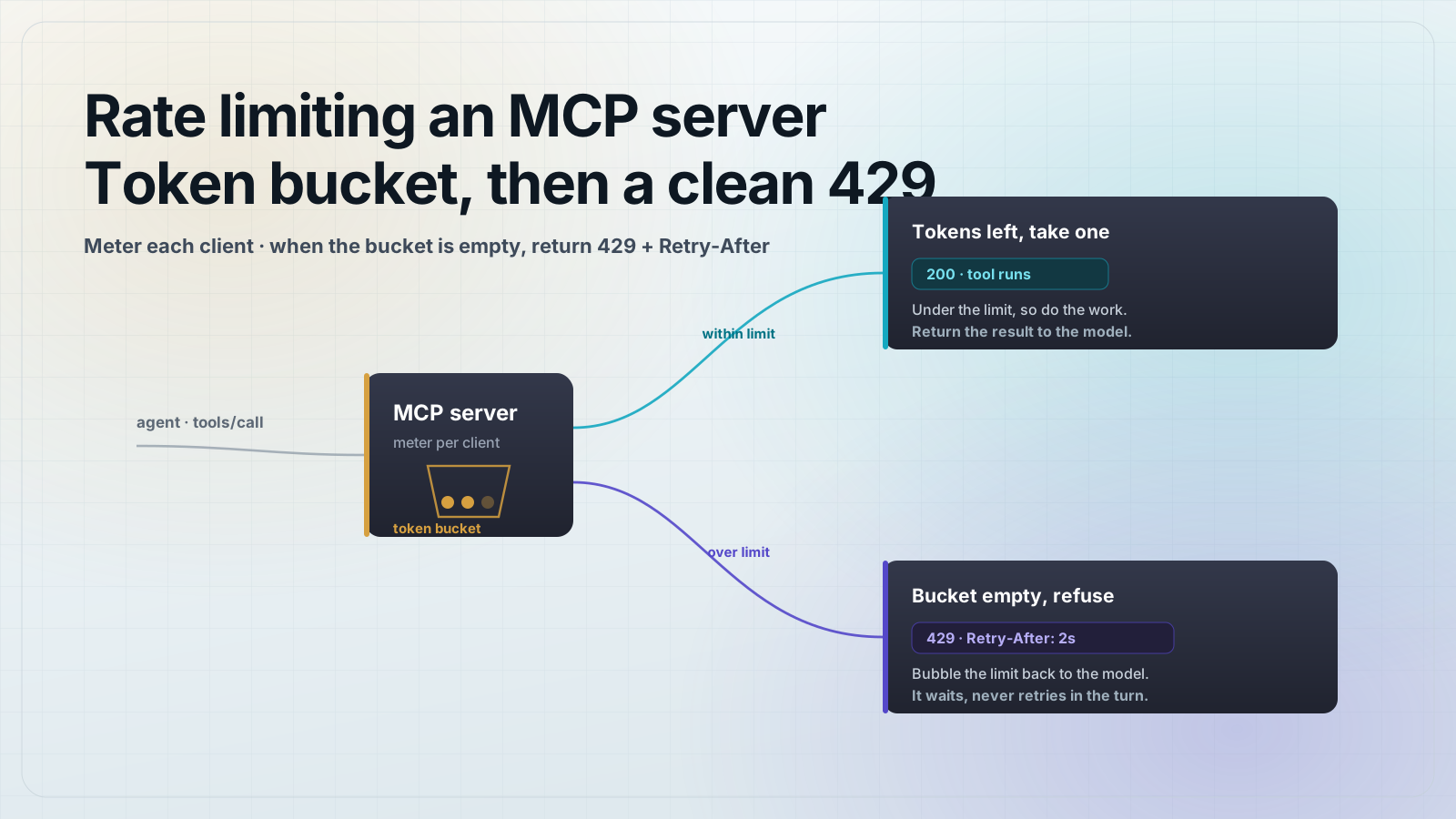
To rate limit an MCP server, meter requests per client with a token bucket, and when a caller is over the limit return an MCP tool error with a Retry-After hint instead of doing the work. The one rule that matters: never retry inside the model's turn. Bubble the 429 back to the agent and let it decide when to try again.
Rate limiting is a common way MCP servers fall over in production. An agent will happily fire the same tool four or five times in one turn, and a server with no limiter either melts its upstream API or gets throttled by it. The failure that turns a slow request into an outage is almost always the same: the server retries the throttled call inside the turn, the retries stack, and the whole request budget burns before the model gets an answer. This guide shows the limiter, the correct error response, and the upstream-call pattern that keeps a burst from becoming a cascade.
How do you rate limit an MCP server?
Use a token bucket. Each client gets a bucket that holds a fixed number of tokens (the burst) and refills at a steady rate (the sustained limit). Every tool call removes a token; if the bucket is empty, the call is refused and the bucket tells you how long until the next token is available. This tolerates short bursts while capping the sustained rate, which matches how agents actually behave: quiet, then a flurry of calls, then quiet again.
// token-bucket.ts
// A per-client token bucket. Burst = capacity, sustained = refillPerSec.
export class TokenBucket {
  private tokens: number
  private lastRefill: number

  constructor(private capacity: number, private refillPerSec: number) {
    this.tokens = capacity
    this.lastRefill = Date.now()
  }

  take(cost = 1): { ok: boolean; retryAfterMs: number } {
    const now = Date.now()
    const refill = ((now - this.lastRefill) / 1000) * this.refillPerSec
    this.tokens = Math.min(this.capacity, this.tokens + refill)
    this.lastRefill = now

    if (this.tokens >= cost) {
      this.tokens -= cost
      return { ok: true, retryAfterMs: 0 }
    }
    const deficit = cost - this.tokens
    return { ok: false, retryAfterMs: Math.ceil((deficit / this.refillPerSec) * 1000) }
  }
}

const buckets = new Map<string, TokenBucket>()

// 20-request burst, 5 requests/second sustained, per client.
export function bucketFor(clientId: string): TokenBucket {
  let b = buckets.get(clientId)
  if (!b) {
    b = new TokenBucket(20, 5)
    buckets.set(clientId, b)
  }
  return b
}
Return a 429 the model can act on, and don't retry inside the turn
When a caller is over its limit, do not throw and do not sleep-then-retry. Return a normal MCP tool result with isError: true and a message that states the limit and the wait in seconds. The model reads that text, backs off, and re-calls later in a fresh turn. This is the entire difference between a server that degrades gracefully and one that takes its upstream down with it.
// server.ts
import { McpServer } from "@modelcontextprotocol/sdk/server/mcp.js"
import { z } from "zod"
import { bucketFor } from "./token-bucket.js"

const server = new McpServer({ name: "orders", version: "1.0.0" })

server.registerTool(
  "search_orders",
  {
    description: "Search orders by customer email.",
    inputSchema: { email: z.string().email() },
  },
  async ({ email }, extra) => {
    // Prefer the authenticated client from validated auth; fall back to a header.
    const clientId =
      extra.authInfo?.clientId ??
      extra.requestInfo?.headers["mcp-client-id"]?.toString() ??
      "anonymous"

    const { ok, retryAfterMs } = bucketFor(clientId).take()
    if (!ok) {
      const seconds = Math.ceil(retryAfterMs / 1000)
      return {
        isError: true,
        content: [
          {
            type: "text",
            text: `Rate limited. Retry after ${seconds}s. This server allows 5 requests/second per client, with a burst of 20.`,
          },
        ],
      }
    }

    const orders = await findOrders(email) // your real work
    return { content: [{ type: "text", text: JSON.stringify(orders) }] }
  },
)Use a sliding window when you need strict fairness
A token bucket smooths bursts, but it does not enforce a hard cap of exactly N requests in any rolling window. When a downstream contract says '100 requests per 60 seconds, no exceptions,' use a sliding-window counter instead: record the timestamp of each request, drop timestamps older than the window, and refuse once the count hits the limit. It costs a little memory per client but never lets a burst slip past the ceiling.
// sliding-window.ts
export class SlidingWindow {
  private hits: number[] = []

  constructor(private limit: number, private windowMs: number) {}

  take(): { ok: boolean; retryAfterMs: number } {
    const now = Date.now()
    const cutoff = now - this.windowMs
    // Drop timestamps that have aged out of the window.
    this.hits = this.hits.filter((t) => t > cutoff)

    if (this.hits.length < this.limit) {
      this.hits.push(now)
      return { ok: true, retryAfterMs: 0 }
    }
    // The window frees up when the oldest hit ages out.
    const retryAfterMs = this.hits[0] + this.windowMs - now
    return { ok: false, retryAfterMs }
  }
}

// 100 requests per 60 seconds, strict.
const window = new SlidingWindow(100, 60_000)
Throttle your upstream calls, not just your clients
Client-side limiting protects you from your callers. It does nothing for the API your tools call. If that upstream returns a 429, the correct move is the same rule again: do not retry it in place. Read its Retry-After header, wrap it as an MCP tool error, and hand the wait back to the model. The agent pauses; your server does not spin.
// upstream.ts
export class UpstreamRateLimit extends Error {
  constructor(public retryAfterSec: number) {
    super(`upstream rate limited; retry after ${retryAfterSec}s`)
  }
}

export async function callUpstream(url: string, token: string) {
  const res = await fetch(url, {
    headers: { authorization: `Bearer ${token}` },
  })

  if (res.status === 429) {
    const retryAfter = Number(res.headers.get("retry-after") ?? "1")
    // Do NOT retry here. Surface it so the agent can back off.
    throw new UpstreamRateLimit(retryAfter)
  }
  if (!res.ok) throw new Error(`upstream ${res.status}`)
  return res.json()
}

// In the tool handler:
//   try { return ok(await callUpstream(url, token)) }
//   catch (e) {
//     if (e instanceof UpstreamRateLimit)
//       return { isError: true, content: [{ type: "text",
//         text: `Upstream is rate limited. Retry after ${e.retryAfterSec}s.` }] }
//     throw e
//   }
Run it in one command
npm i @modelcontextprotocol/sdk@1.30.0 zod@3
npx tsx server.ts
Point an MCP client at the server and call the tool in a tight loop. The first 20 calls succeed, then you get clean 429 tool errors with a wait in seconds, then throughput settles at five per second. No thrown exceptions, no upstream meltdown, and the agent simply paces itself.
- Key the limiter on the authenticated client ID so one noisy caller cannot starve the rest.
- In-memory buckets reset when the process restarts; behind a load balancer, back them with Redis so limits hold across instances.
- Set the sustained rate below your upstream's published limit, not at it, to leave headroom for retries that happen in later turns.
- Log every 429 with the client ID and the tool name. A client that hits the limit constantly is a bug in the agent, not traffic to accommodate.
- Pair this with proper tool error semantics so a rate-limit error reads the same way as any other recoverable failure.
Frequently asked questions
Frequently asked questions
- How do I rate limit an MCP server?
- Meter requests per client with a token bucket: each client gets a burst capacity and a steady refill rate, and every tool call removes a token. When the bucket is empty, return an MCP tool error with a Retry-After hint instead of doing the work. Key the bucket on the authenticated client ID so callers are limited independently.
- Should an MCP server retry when it hits a rate limit?
- No. Retrying a throttled call inside the model's turn is a common cause of MCP production outages. Return the 429 as a tool error with the wait in seconds and let the agent back off and re-call in a later turn. The server should never sleep-and-retry in place.
- Token bucket or sliding window for MCP rate limiting?
- Use a token bucket when you want to tolerate short bursts while capping the sustained rate, since it fits how agents call tools. Use a sliding-window counter when a downstream contract requires a strict cap of exactly N requests per fixed window, because a bucket can let a burst briefly exceed that ceiling.
- How should an MCP server report a rate limit to the model?
- Return a normal tool result with isError set to true and a plain-language message stating the limit and the retry time in seconds, for example: 'Rate limited. Retry after 3s. This server allows 5 requests/second per client.' Models read that text and pace their calls; a thrown exception or an opaque 500 gives them nothing to act on.
- Do in-memory rate limiters work behind a load balancer?
- Not on their own. In-memory buckets are per-process, so with multiple instances each one enforces only a fraction of your intended limit. Back the counters with a shared store like Redis so the limit holds across every instance, which is straightforward now that the 2026-07-28 spec makes MCP servers stateless and horizontally scalable.
Add your server to MCPOrbit, call the tool repeatedly, and watch for the 429 your limiter is supposed to return. A limiter that never fires and one that fires too early look the same from the code. Pair this with our guides on handling errors in an MCP server and making your MCP server stateless.
About the author
Mark
Head of Marketing, MCPOrbit
Mark leads marketing at MCPOrbit, the free desktop client for the Model Context Protocol. He writes the build-it and reliability guides, and the code in them is run before it ships.