Tutorial
How to return structured output from an MCP tool
Give an MCP tool an outputSchema and return structuredContent so the model gets typed JSON, not a string it has to re-parse. Runnable, tested code.
Mark
Head of Marketing, MCPOrbit
- Published
- Updated
- · Updated
- Read time
- · 8 min read
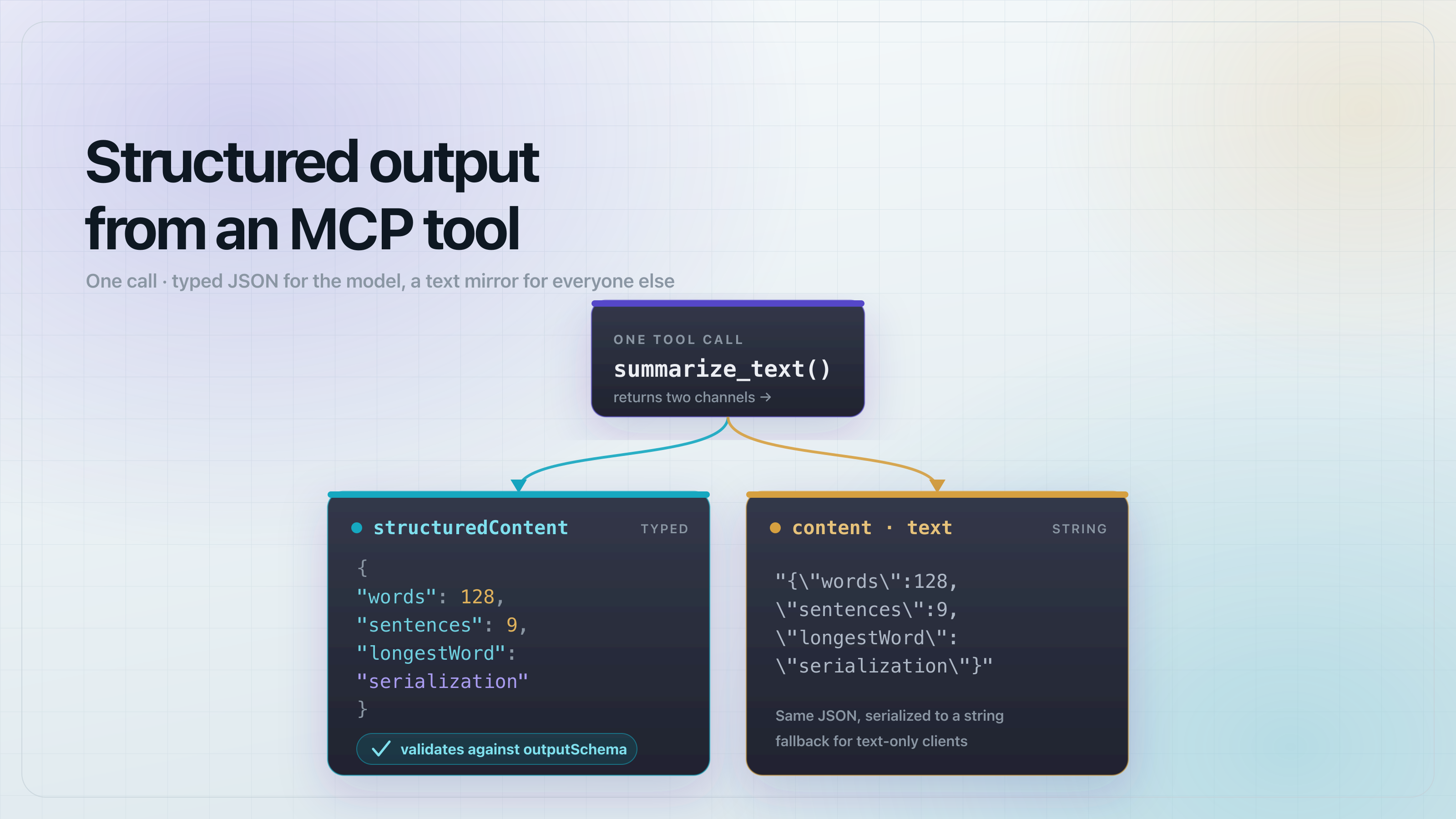
To return structured output from a Model Context Protocol (MCP) tool, declare an outputSchema on the tool and return a structuredContent value from its handler. The client advertises the schema in tools/list, validates the tool's result against it, and hands the model typed JSON instead of a string it has to parse back out of text.
Without an output schema, a tool can only return a text content block. The model reads it as a string and guesses at the shape. With structuredContent, the tool returns real JSON that matches a declared schema, so the model, and any code downstream of it, can read fields directly. This walkthrough builds a tiny server with one structured-output tool, tests it end to end, and shows exactly what the client does when your output does not match its schema. Every code block below was run on @modelcontextprotocol/sdk@1.30.0.
What is structured output in an MCP tool?
A tool result has two channels. content is a list of blocks (usually text) meant for display. structuredContent is a single JSON value that conforms to the tool's outputSchema. A tool that declares an outputSchema should populate both: structuredContent for clients and models that consume typed data, and a text block carrying the same data as a fallback for clients that only render content.
The outputSchema lives next to the inputSchema in the tool definition, so a client sees the exact shape of a tool's return value before it ever calls it. That is what makes the output parseable rather than a string the model has to reverse-engineer.
Declare an outputSchema and return structuredContent
Here is the whole server. The summarize_text tool takes a string and returns three fields: words, sentences, and longestWord. The outputSchema is a Zod shape; the SDK derives a JSON Schema from it, advertises that schema in tools/list, and validates every result against it.
// server.js - an MCP server with a tool that returns structured output.
import { McpServer } from "@modelcontextprotocol/sdk/server/mcp.js";
import { z } from "zod";

export function buildServer() {
  const server = new McpServer(
    { name: "structured-output-demo", version: "1.0.0" },
    { capabilities: { tools: {} } }
  );

  // A tool with an outputSchema. The SDK derives a JSON Schema from the Zod
  // shape, advertises it in tools/list, and validates structuredContent
  // against it before the result reaches the model.
  server.registerTool(
    "summarize_text",
    {
      title: "Summarize text",
      description: "Return word count, sentence count, and the longest word for a string.",
      inputSchema: { text: z.string().min(1) },
      outputSchema: {
        words: z.number().int(),
        sentences: z.number().int(),
        longestWord: z.string(),
      },
    },
    async ({ text }) => {
      const words = text.trim().split(/\s+/).filter(Boolean);
      const sentences = text.split(/[.!?]+/).filter((s) => s.trim().length > 0);
      const longestWord = words.reduce((a, b) => (b.length > a.length ? b : a), "");
      const structuredContent = {
        words: words.length,
        sentences: sentences.length,
        longestWord,
      };
      // Mirror structuredContent into a text block for clients that ignore it.
      return {
        structuredContent,
        content: [{ type: "text", text: JSON.stringify(structuredContent) }],
      };
    }
  );

  return server;
}
Two rules matter here. Return structuredContent whose shape matches the schema, and mirror the same data into a text block. The mirror is not decoration: a client that does not support structured output still needs a readable result, and the spec asks servers to provide one.
Wire it up and run it
Pin the two dependencies and add a stdio entrypoint so any MCP client can launch the server. These are the only two files you need beyond server.js.
{
  "name": "mcp-structured-output-demo",
  "version": "1.0.0",
  "private": true,
  "type": "module",
  "scripts": {
    "start": "node index.js",
    "test": "node test.js"
  },
  "dependencies": {
    "@modelcontextprotocol/sdk": "1.30.0",
    "zod": "3.25.76"
  }
}
// index.js - run the server over stdio so any MCP client can launch it.
import { StdioServerTransport } from "@modelcontextprotocol/sdk/server/stdio.js";
import { buildServer } from "./server.js";
const server = buildServer();
await server.connect(new StdioServerTransport());Run npm install, then npm start to serve over stdio. To point a client at it, run node index.js as the command. That is the full server: one tool, typed output, one command to launch.
How do I test that the structured output is correct?
Connect an in-memory client to the server in the same process, list the tools, and call one. No network, no external services, so the test runs anywhere. InMemoryTransport.createLinkedPair() gives you a client and server transport wired to each other.
// test.js - connect an in-memory client and exercise the tool end to end.
import { Client } from "@modelcontextprotocol/sdk/client/index.js";
import { InMemoryTransport } from "@modelcontextprotocol/sdk/inMemory.js";
import { buildServer } from "./server.js";
import assert from "node:assert/strict";

const [clientTransport, serverTransport] = InMemoryTransport.createLinkedPair();
const server = buildServer();
await server.connect(serverTransport);

const client = new Client({ name: "test", version: "1.0.0" });
await client.connect(clientTransport);

const { tools } = await client.listTools();
const tool = tools.find((t) => t.name === "summarize_text");
assert.ok(tool.outputSchema, "tool advertises an outputSchema");
assert.equal(tool.outputSchema.type, "object");
console.log("PASS outputSchema advertised:", JSON.stringify(tool.outputSchema));

const res = await client.callTool({
  name: "summarize_text",
  arguments: { text: "MCP is great. Structured output rocks!" },
});
assert.deepEqual(res.structuredContent, { words: 6, sentences: 2, longestWord: "Structured" });
console.log("PASS structuredContent:", JSON.stringify(res.structuredContent));

console.log("\nALL TESTS PASSED");
await client.close();
await server.close();
Run npm test. The output shows the advertised schema and the typed result:
PASS outputSchema advertised: {"type":"object","properties":{"words":{"type":"integer"},"sentences":{"type":"integer"},"longestWord":{"type":"string"}},"required":["words","sentences","longestWord"],"additionalProperties":false,"$schema":"http://json-schema.org/draft-07/schema#"}
PASS structuredContent: {"words":6,"sentences":2,"longestWord":"Structured"}

ALL TESTS PASSED
Note the $schema line: on SDK 1.30.0 the derived schema is JSON Schema draft-07, and its root is an object. Both of those change under the 2026-07-28 spec, covered below.
What happens when the output does not match the schema?
The SDK validates structuredContent against outputSchema on the server side, before the result is sent. If a handler returns the wrong type, the call comes back as a tool error, not a valid result. Return words: "6" (a string) instead of a number, and the client receives:
{
  "content": [
    {
      "type": "text",
      "text": "MCP error -32602: Output validation error: Invalid structured content for tool summarize_text: Expected number, received string at words"
    }
  ],
  "isError": true
}
This is the payoff of declaring a schema. A tool that drifts from its own contract fails loudly with -32602 (invalid params) at the tool boundary, instead of shipping malformed JSON to the model and causing a confusing failure two steps later.
What changed for structured output in the 2026-07-28 spec?
SEP-2106 in the 2026-07-28 specification loosens two constraints on structured output:
outputSchemais lifted to full JSON Schema 2020-12. It can use composition (oneOf,anyOf,allOf), conditionals, and references ($ref,$defs). Implementations must not auto-dereference external$refURIs and should bound schema depth and validation time.structuredContentcan now be any JSON value, not only an object. A tool can return a top-level array, a number, or a string as its structured result.inputSchemakeeps itstype: "object"root but gains the same composition and reference features.
Support lags the spec, so pin your expectations to the SDK you actually run. On the released TypeScript SDK (1.30.0), the client rejects a tool whose outputSchema has a non-object root: a list_primes tool with outputSchema: { type: "array", items: { type: "integer" } } fails when the client parses tools/list. Top-level non-object output schemas need the SDK line that targets the 2026-07-28 spec. Until you are on it, keep your output schemas object-rooted, which is what the tutorial above does.
Frequently asked questions
Frequently asked questions
- How do I return structured JSON from an MCP tool instead of text?
- Add an
outputSchemato the tool definition and return astructuredContentvalue from the handler that matches it. Also mirror the same data into atextcontent block so clients that do not read structured output still get a usable result. - What is the difference between content and structuredContent in an MCP tool result?
contentis a list of display blocks, usuallytext, meant to be rendered.structuredContentis a single JSON value that conforms to the tool'soutputSchema, meant to be consumed as typed data by the model or downstream code.- Does the MCP SDK validate my tool's structured output?
- Yes. The server validates
structuredContentagainst the tool'soutputSchemabefore sending the result. On a mismatch it returns a-32602output validation error withisError: truerather than a valid result. - Can an MCP tool return a top-level array as structured output?
- Under the 2026-07-28 spec (SEP-2106) yes, because
structuredContentcan be any JSON value. On the released TypeScript SDK 1.30.0 the client still requires an object-rootedoutputSchema, so a top-level array needs the SDK line that targets the 2026-07-28 spec. - Do I still need a text content block if I return structuredContent?
- Yes, in practice. Not every client reads
structuredContent, so mirror the same JSON into atextblock. It costs one line and keeps the tool usable everywhere.
Point MCPOrbit at this server to see its tools, call them by hand, and read the full JSON result so you can confirm structuredContent comes back on every call.
About the author
Mark
Head of Marketing, MCPOrbit
Mark leads marketing at MCPOrbit, the free desktop client for the Model Context Protocol. He writes the build-it and reliability guides, and the code in them is run before it ships.