Build-it
How to Build an MCP Server for the Filesystem
Build a filesystem MCP server in Python that reads, writes, and lists files, sandboxed to one directory so a path like ../../etc/passwd is refused.
Mark
Head of Marketing, MCPOrbit
- Published
- Updated
- · Updated
- Read time
- · 8 min read
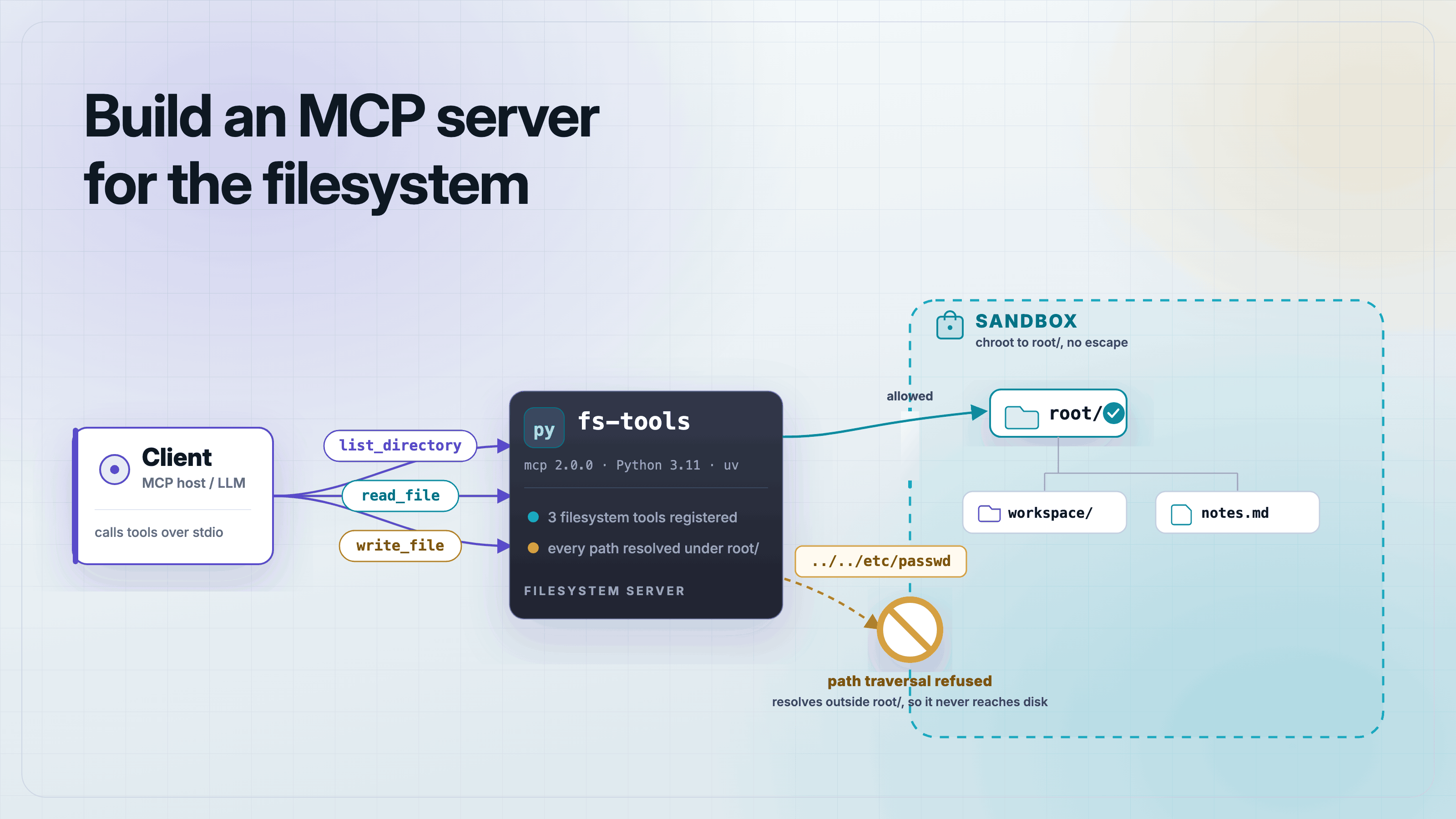
To build a Model Context Protocol (MCP) server for the filesystem, expose read, write, and list tools from the official Python mcp SDK, and run every path a tool receives through one sandbox check that refuses anything outside a chosen root directory. That check is the whole job: without it, a request for ../../etc/passwd reads a file you never meant to share.
Below is a complete filesystem server in one file. It gives a client three tools, list_directory, read_file, and write_file, plus a resource that reports its sandbox root. Every snippet here was run and asserted before publishing. Versions are pinned to mcp 2.0.0, Python 3.11, and uv 0.11.16, which track the 2026-07-28 MCP spec.
What does a filesystem MCP server do?
A filesystem MCP server turns local files into tools an AI client can call. Instead of pasting file contents into a prompt, the client asks the server to list a directory, read a file, or write one. The server owns the disk access. The client only sees the tools you expose and the sandbox you allow.
This is the most requested MCP build after a database server, and it is more dangerous than it looks. A tool that reads any path the caller names is a file-disclosure bug waiting to happen. The design below closes that hole first, then adds the features.
Set up the project
Create a project with uv and add the SDK. The mcp package pulls in Pydantic, which validates your tool inputs and outputs for you.
uv init --python 3.11 fs-tools && cd fs-tools
uv add "mcp[cli]>=2.0.0"
Write the sandbox check first
The security spine of a filesystem server is one function. It joins the caller's path onto a fixed root, resolves the result to an absolute path with .. segments collapsed, and confirms the result is still inside the root. If it is not, it raises before any file is touched.
import os
from pathlib import Path

# The sandbox root. Nothing outside this directory is ever readable or writable.
ROOT = Path(os.environ.get("MCP_FS_ROOT", ".")).resolve()


def _safe(path: str) -> Path:
    """Resolve `path` against ROOT and refuse anything that escapes the sandbox."""
    candidate = (ROOT / path).resolve()
    if candidate != ROOT and ROOT not in candidate.parents:
        raise ValueError(f"path escapes the sandbox root: {path}")
    return candidate
The order matters. Resolve first, then check. Resolving turns notes/../../../etc/passwd into a real absolute path, so the parent check sees where the request actually points, not where it pretends to. Checking a raw string for .. is not enough, because symlinks and absolute paths get past a string test.
Add the tools
Now the tools. Each one calls _safe before it touches disk, so the sandbox check runs on every request without being repeated by hand. Type the return values. When a tool returns a typed object, the SDK builds a JSON Schema from the type hints and the client receives structured output it can parse. Return a bare string and the client gets text only.
from typing_extensions import TypedDict

from mcp.server.mcpserver import MCPServer

mcp = MCPServer(name="fs-tools", version="1.0.0")


class Entry(TypedDict):
    name: str
    type: str  # "file" or "dir"
    size: int


class WriteResult(TypedDict):
    path: str
    bytes_written: int


@mcp.tool()
def list_directory(path: str = ".") -> list[Entry]:
    """List the entries in a directory inside the sandbox."""
    target = _safe(path)
    entries: list[Entry] = []
    for child in sorted(target.iterdir()):
        entries.append(
            Entry(
                name=child.name,
                type="dir" if child.is_dir() else "file",
                size=child.stat().st_size,
            )
        )
    return entries


@mcp.tool()
def read_file(path: str) -> str:
    """Read a UTF-8 text file inside the sandbox and return its contents."""
    return _safe(path).read_text(encoding="utf-8")


@mcp.tool()
def write_file(path: str, content: str) -> WriteResult:
    """Write UTF-8 text to a file inside the sandbox, creating parents as needed."""
    target = _safe(path)
    target.parent.mkdir(parents=True, exist_ok=True)
    written = target.write_text(content, encoding="utf-8")
return WriteResult(path=str(target.relative_to(ROOT)), bytes_written=written)Expose the root as a resource and run over stdio
A resource is read-only data a client can fetch without calling a tool. Publish the sandbox root as one, so a client can confirm what the server is scoped to. Then start the server on stdio, the transport local clients launch.
@mcp.resource("info://root")
def sandbox_root() -> str:
    """The absolute path the server is sandboxed to."""
    return f"fs-tools v1.0.0 sandboxed to {ROOT}"


if __name__ == "__main__":
    mcp.run("stdio")
That is the whole server. Save the setup helper, the tools, the resource, and this run block together as server.py. Set MCP_FS_ROOT to the directory you want to expose, and nothing outside it is reachable.
Test it end to end before you trust it
A filesystem server is exactly the kind of code you do not ship on faith. This test spawns the server over stdio, writes a file, reads it back, lists the directory, and confirms a traversal attempt is refused. It sandboxes the server to a fresh temp directory so the test never touches your real files.
"""End-to-end test: spawn server.py over stdio, connect a client, exercise it."""
import asyncio
import os
import tempfile

from mcp import ClientSession, StdioServerParameters, stdio_client


async def main() -> None:
    sandbox = tempfile.mkdtemp(prefix="fs-sandbox-")
    env = {**os.environ, "MCP_FS_ROOT": sandbox}
    params = StdioServerParameters(
        command="uv", args=["run", "python", "server.py"], env=env
    )
    async with stdio_client(params) as (read, write):
        async with ClientSession(read, write) as session:
            await session.initialize()

            tools = await session.list_tools()
            names = sorted(t.name for t in tools.tools)
            assert names == ["list_directory", "read_file", "write_file"], names

            # write_file returns a typed WriteResult -> structured_content
            w = await session.call_tool(
                "write_file", {"path": "notes/todo.txt", "content": "ship the post"}
            )
            assert w.structured_content == {
                "path": "notes/todo.txt",
                "bytes_written": 13,
            }, w.structured_content

            # read_file returns a str -> wrapped as {"result": ...}
            r = await session.call_tool("read_file", {"path": "notes/todo.txt"})
            assert r.structured_content["result"] == "ship the post", r.structured_content

            # list_directory returns a list -> wrapped as {"result": [...]}
            ls = await session.call_tool("list_directory", {"path": "notes"})
            assert ls.structured_content["result"] == [
                {"name": "todo.txt", "type": "file", "size": 13}
            ], ls.structured_content

            # path traversal is refused: the tool call reports an error
            escape = await session.call_tool("read_file", {"path": "../../etc/passwd"})
            assert escape.is_error, "traversal should have been rejected"
            assert "escapes the sandbox" in escape.content[0].text, escape.content

    print("ALL CHECKS PASSED")


if __name__ == "__main__":
    asyncio.run(main())
Run it with one command. The last two assertions are the ones that matter: the write returns a typed result, and the traversal attempt comes back as a tool error instead of the contents of a system file.
uv run python test_server.py
# ALL CHECKS PASSEDAdd it to Claude Desktop
Point a local client at the server with an absolute directory and a sandbox root. This entry launches the server with uv and scopes it to one folder. Change MCP_FS_ROOT to the only directory you want the model to reach.
{
  "mcpServers": {
    "fs-tools": {
      "command": "uv",
      "args": ["--directory", "/abs/path/to/fs-tools", "run", "python", "server.py"],
      "env": { "MCP_FS_ROOT": "/abs/path/to/the/folder/to/expose" }
    }
  }
}
Frequently asked questions
Frequently asked questions
- How do I build an MCP server for the filesystem?
- Expose
read_file,write_file, andlist_directorytools from the PythonmcpSDK, and run every path through a check that resolves it to an absolute path and rejects anything outside a fixed root directory. Serve it over stdio withmcp.run("stdio"). - How do I stop path traversal in an MCP filesystem server?
- Resolve the requested path against your root with
Path.resolve(), which collapses..and follows symlinks, then confirm the root is a parent of the result. Raise an error if it is not. Do this before opening any file, and do not rely on a string check for... - Why import TypedDict from typing_extensions instead of typing?
- On Python versions before 3.12, Pydantic raises a
PydanticUserErrorwhen it builds a schema for atyping.TypedDictused inside a list return. ImportingTypedDictfromtyping_extensionsavoids the error and behaves the same on newer versions. - Do MCP tools return structured data or just text?
- Both, depending on the return type. A tool that returns a typed object such as a TypedDict gives the client structured output built from the type hints. A tool that returns a bare string gives the client text, wrapped as
{"result": "..."}in the structured field. - Can I make the filesystem server read-only?
- Yes. Drop the
write_filetool and keepread_fileandlist_directory. The client can only expose the tools the server registers, so removing a tool removes the capability. - What versions does this code target?
- It is pinned to
mcp2.0.0, Python 3.11, and uv 0.11.16, which track the 2026-07-28 MCP specification. The sandbox pattern itself is version-independent.
That is a filesystem MCP server that reads, writes, and lists files without handing a caller the keys to the whole disk. The sandbox check is small, but it is the difference between a useful tool and a data-disclosure bug. Build the check first, test the escape case, then add features.
About the author
Mark
Head of Marketing, MCPOrbit
Mark leads marketing at MCPOrbit, the free desktop client for the Model Context Protocol. He writes the build-it and reliability guides, and the code in them is run before it ships.