MCP Tutorials
Build an MCP server that renders its own UI (MCP Apps extension)
Build an MCP App: an MCP tool that ships a sandboxed iframe UI via the MCP Apps extension (SEP-1865). Full tested code inlined, with a real wire trace.
Mark
Head of Marketing, MCPOrbit
- Published
- Updated
- · Updated
- Read time
- · 14 min read
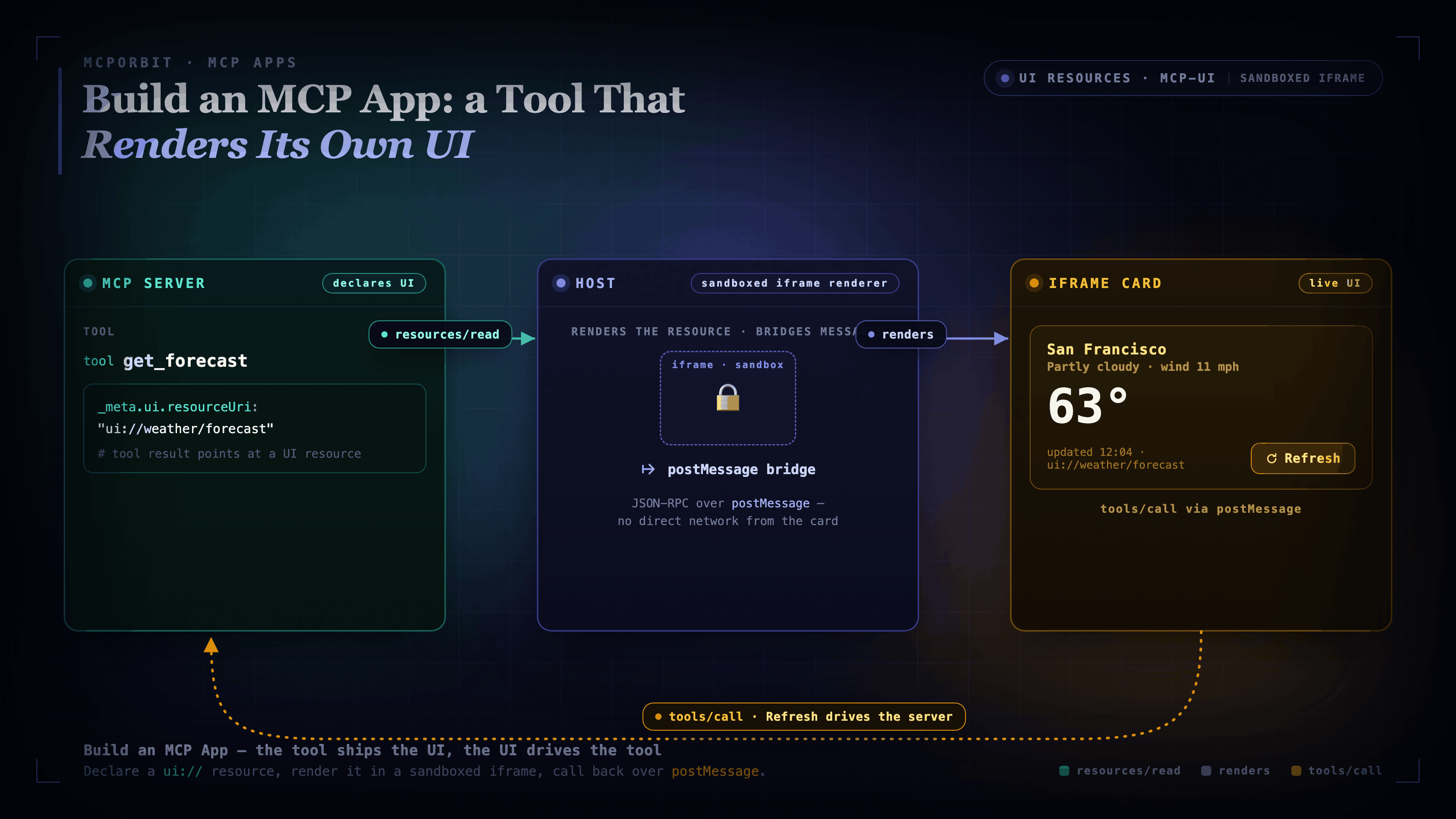
An MCP App is a normal Model Context Protocol (MCP) tool that also ships a piece of HTML. Register the UI once as a resource under the ui:// URI scheme, point your tool at it with _meta.ui.resourceUri, and the host renders it in a sandboxed iframe when the tool runs. The iframe talks back to the host over the same JSON-RPC you already use, tools/call and resources/read, sent across postMessage. That is the whole model.
You are not building a web app or standing up a frontend. You add one resource and one _meta field to a tool you already have. A tool that used to return JSON now returns JSON and an interactive surface the host can render inline in the conversation.
What MCP Apps adds to the protocol
Before the 2026-07-28 spec, an MCP tool could only return text, structured content, or resource links, and the host decided how to display the result. MCP Apps (SEP-1865) lets the server ship the display. It is one of the two headline Extensions in the largest revision of MCP since launch, alongside the Tasks extension for long-running work.
The key design decision is predeclared templates. A tool names its UI resource up front at registration time, so the host can prefetch it, cache it, and security-review it before any tool runs. Nothing is injected at call time. That is what makes it safe enough for hosts to render third-party UI inline.
Step 1: Install the SDK
MCP Apps ships in @modelcontextprotocol/ext-apps. The server-side helpers live in its /server subpath; the iframe-side App class is the main export. We use Vite with vite-plugin-singlefile to bundle the UI into one inlinable HTML file that the server returns as a resource.
npm install @modelcontextprotocol/ext-apps@1.7.4 @modelcontextprotocol/sdk@1.29.0 express cors
npm install -D typescript vite vite-plugin-singlefile tsx concurrently cross-env @types/express @types/cors @types/node
Step 2: Register the UI resource (the ui:// scheme)
Import registerAppResource from @modelcontextprotocol/ext-apps/server. The SDK pattern is to pass the ui:// URI as both the second and third arguments. The resource name and the resource URI are the same identifier.
import { registerAppResource, registerAppTool, RESOURCE_MIME_TYPE } from '@modelcontextprotocol/ext-apps/server';
import { McpServer } from '@modelcontextprotocol/sdk/server/mcp.js';
import { StreamableHTTPServerTransport } from '@modelcontextprotocol/sdk/server/streamableHttp.js';
import fs from 'node:fs/promises';

const RESOURCE_URI = 'ui://weather/forecast';

// Pass RESOURCE_URI twice: once as the name, once as the URI.
// This is the SDK pattern: the resource identifier is the same as the URI.
registerAppResource(
  server,
  RESOURCE_URI,
  RESOURCE_URI,
  { mimeType: RESOURCE_MIME_TYPE },
  async () => {
    const html = await fs.readFile(UI_HTML, 'utf-8'); // single-file Vite bundle
    return {
      contents: [{ uri: RESOURCE_URI, mimeType: RESOURCE_MIME_TYPE, text: html }],
    };
  }
);
The host fetches this resource at registration time, before any tool call. Because the template is predeclared, the host can cache and review it without trusting anything injected at runtime.
Step 3: Link the tool to the UI with _meta.ui.resourceUri
registerAppTool wraps the standard tool registration and adds the _meta link. When the tool runs, the host renders the ui://weather/forecast resource in a sandboxed iframe and passes the tool result to it.
import { z } from 'zod';

registerAppTool(
  server,
  'get_forecast',
  {
    title: 'Get Weather Forecast',
    description: 'Returns a mock weather forecast for a city.',
    inputSchema: z.object({ city: z.string() }),
    _meta: { ui: { resourceUri: RESOURCE_URI } }, // links tool to UI resource
  },
  async ({ city }) => ({
    content: [{
      type: 'text',
      text: JSON.stringify({ city, temp_c: 9, condition: 'Clear', source: 'mock' }),
    }],
  })
);
When the host runs this tool, it fetches the ui://weather/forecast resource, renders it in a sandboxed iframe, and passes the tool result to the view. The client never has to know there is a UI at all. It just calls the tool normally.
Step 4: Build the iframe view with the App class
The iframe-side JavaScript uses new App() from @modelcontextprotocol/ext-apps. Call app.connect() to run the ui/initialize handshake. The host will not route tool results or relay tools/call until it completes. Register app.ontoolresult to receive the initial result, and call app.callServerTool() for UI-driven refreshes.
// ui/index.html <script type="module">
import { App } from '@modelcontextprotocol/ext-apps';

const app = new App({ name: 'Weather Forecast App', version: '1.0.0' });

// The host calls this when the tool result arrives, and again after each
// UI-driven tools/call completes.
app.ontoolresult = (result) => {
  const text = result.content?.find((c) => c.type === 'text')?.text ?? '{}';
  const data = JSON.parse(text);
  cityEl.textContent = data.city;
  tempEl.textContent = `${data.temp_c}\u00b0C`;
  conditionEl.textContent = data.condition;
};

// The Refresh button drives a tools/call back over postMessage to the MCP server,
// relayed through the host. No direct network call from the iframe.
refreshBtn.addEventListener('click', async () => {
  const result = await app.callServerTool({ name: 'get_forecast', arguments: { city: lastCity } });
  app.ontoolresult(result);
});

// ui/initialize -> ui/notifications/initialized handshake.
// The host will not route messages until this completes.
await app.connect();
The callServerTool call posts a tools/call JSON-RPC message over postMessage. The host relays it to the MCP server and passes the response back to the view. Every interaction is an auditable JSON-RPC message, not an opaque network fetch.
The live wire trace: initialize handshake and tools/call round trip
Running npm run demo builds the UI bundle, starts the server, and drives it with a Streamable HTTP client. Here is the real output. This is not mocked.
--- initialize handshake: complete ---

--- tools/list (get_forecast) ---
{
  "name": "get_forecast",
  "description": "Returns a mock weather forecast for a city.",
  "_meta": {
    "ui": {
      "resourceUri": "ui://weather/forecast"
    },
    "ui/resourceUri": "ui://weather/forecast"
  }
}

--- resources/list ---
[{"uri":"ui://weather/forecast","mimeType":"text/html;profile=mcp-app"}]

--- resources/read ui://weather/forecast ---
mimeType: text/html;profile=mcp-app
html length: 324482 chars (single-file Vite bundle)

--- tools/call get_forecast({city:"London"}) ---
{"city":"London","temp_c":9,"condition":"Clear","source":"mock"}

--- tools/call get_forecast({city:"Tokyo"}) ---
{"city":"Tokyo","temp_c":27,"condition":"Clear","source":"mock"}

--- tools/call get_forecast({city:"London"}) [repeat: determinism check] ---
temp_c matches: true | condition matches: true
The MIME type text/html;profile=mcp-app is the RESOURCE_MIME_TYPE constant from the ext-apps SDK. Hosts use it to identify UI resources and tell them apart from plain HTML. The repeated London call returns the same values, which is the determinism the tests rely on.
The security model: sandboxed iframe, restrictive by default
Views render in sandboxed iframes with no access to the host's DOM, cookies, or storage. The UI cannot read the surrounding page, cannot exfiltrate credentials, and cannot escape its container. Because all communication goes through postMessage as JSON-RPC, the host can audit and gate every message.
Network access is restrictive by default. A server declares the domains its UI is allowed to reach via CSP metadata, and the host enforces those declarations. If your card needs an external resource, declare that domain explicitly. Anything undeclared is blocked.
Common mistakes when building MCP Apps
- Treating the UI like a normal web page. It has no cookies, no storage, and no access to the parent DOM. State lives in your server or in the model context via
ui/update-model-context, not inlocalStorage. - Fetching data directly from the iframe. Undeclared network calls are blocked by CSP. Get data by posting
tools/callorresources/readback through the host, or declare the domain you need in the CSP. - Building the template at call time. Templates are predeclared at registration so the host can prefetch and review them. Injecting UI during a call defeats the security model.
- Skipping the lifecycle handshake. The host will not route messages until the view sends
ui/notifications/initialized, whichapp.connect()does for you. Wire the handshake first. - Passing a display name as the third argument to
registerAppResource. Pass the resource URI as both the second and third arguments:registerAppResource(server, uri, uri, opts, handler). A display name there makesreadResourcefail with "not found".
Run it yourself: the full reference implementation
Every trace above came from these files. Create a new folder, save each file at the path shown, then run the setup below. This is the whole project, nothing is hidden in a repo. Tested, not described: the same files ship 5 tests that assert the wire behavior, so you can verify it end to end before you trust it.
# In a new, empty folder, create every file below at the path shown, then:
npm install
npm test        # 5/5 tests pass
npm run demo    # builds the UI bundle, starts the server, prints the wire trace
package.json pins the versions and wires the scripts. npm run demo builds the UI, then runs the server and the demo client together.
{
  "name": "mcp-app-example",
  "version": "1.0.0",
  "description": "Minimal MCP server that renders its own UI using the MCP Apps extension (SEP-1865).",
  "type": "module",
  "scripts": {
    "build": "tsc && vite build",
    "dev": "concurrently \"npm run build:watch\" \"npm run server:dev\"",
    "build:watch": "vite build --watch",
    "server:dev": "cross-env NODE_ENV=development tsx watch src/server.ts",
    "start": "npm run build && node dist/server.js",
    "demo": "npm run build && concurrently \"node dist/server.js\" \"node dist/host.js\"",
    "test": "node --test dist/server.test.js"
  },
  "dependencies": {
    "@modelcontextprotocol/ext-apps": "1.7.4",
    "@modelcontextprotocol/sdk": "1.29.0",
    "express": "^4.18.0",
    "cors": "^2.8.5"
  },
  "devDependencies": {
    "typescript": "^5.9.0",
    "vite": "^5.0.0",
    "vite-plugin-singlefile": "^2.0.0",
    "@types/express": "^4.17.0",
    "@types/cors": "^2.8.0",
    "@types/node": "^20.0.0",
    "tsx": "^4.0.0",
    "concurrently": "^8.0.0",
    "cross-env": "^7.0.0"
  }
}tsconfig.json. Strict TypeScript targeting ES2022 with NodeNext modules, compiling src into dist.
{
  "compilerOptions": {
    "target": "ES2022",
    "module": "NodeNext",
    "moduleResolution": "NodeNext",
    "outDir": "dist",
    "rootDir": "src",
    "strict": true,
    "esModuleInterop": true,
    "skipLibCheck": true
  },
  "include": ["src/**/*.ts"],
  "exclude": ["node_modules", "ui"]
}vite.config.ts. vite-plugin-singlefile inlines all JS and CSS into one dist/ui/index.html, so the server can return the UI as a single resource.
import { defineConfig } from "vite";
import { viteSingleFile } from "vite-plugin-singlefile";

export default defineConfig({
  plugins: [viteSingleFile()],
  root: "ui",
  build: {
    outDir: "../dist/ui",
    emptyOutDir: true,
  },
});src/server.ts. The full server: an Express endpoint over stateless Streamable HTTP, the ui://weather/forecast resource, and the get_forecast tool linked to it. The forecast is a deterministic mock so the tests can assert exact values.
import { McpServer } from "@modelcontextprotocol/sdk/server/mcp.js";
import { StreamableHTTPServerTransport } from "@modelcontextprotocol/sdk/server/streamableHttp.js";
import {
  registerAppResource,
  registerAppTool,
  RESOURCE_MIME_TYPE,
} from "@modelcontextprotocol/ext-apps/server";
import { z } from "zod";
import express from "express";
import cors from "cors";
import fs from "node:fs/promises";
import path from "node:path";
import { fileURLToPath } from "node:url";

const __dirname = path.dirname(fileURLToPath(import.meta.url));
const UI_HTML = path.join(__dirname, "..", "dist", "ui", "index.html");
const RESOURCE_URI = "ui://weather/forecast";
const PORT = Number(process.env.PORT ?? 3000);

const app = express();
app.use(cors());
app.use(express.json());

// One transport per session (stateless Streamable HTTP).
app.all("/mcp", async (req, res) => {
  const server = buildMcpServer();
  const transport = new StreamableHTTPServerTransport({
    sessionIdGenerator: undefined, // stateless: any replica can serve any request
  });
  await server.connect(transport);
  await transport.handleRequest(req, res, req.body);
  res.on("close", () => server.close());
});

function buildMcpServer(): McpServer {
  const server = new McpServer({ name: "weather-mcp-app", version: "1.0.0" });

  // Register the UI resource, predeclared so the host can prefetch and security-review
  // it before any tool runs. Returns the single-file HTML bundle built by Vite.
  registerAppResource(
    server,
    RESOURCE_URI,
    RESOURCE_URI,
    { mimeType: RESOURCE_MIME_TYPE },
    async () => {
      const html = await fs.readFile(UI_HTML, "utf-8");
      return {
        contents: [{ uri: RESOURCE_URI, mimeType: RESOURCE_MIME_TYPE, text: html }],
      };
    }
  );

  // Register the tool that references the UI resource via _meta.ui.resourceUri.
  // The host renders the iframe when this tool runs and passes the result to the view.
  registerAppTool(
    server,
    "get_forecast",
    {
      title: "Get Weather Forecast",
      description: "Returns a mock weather forecast for a city.",
      inputSchema: z.object({ city: z.string().describe("City name") }),
      _meta: { ui: { resourceUri: RESOURCE_URI } },
    },
    async ({ city }) => {
      // Deterministic mock: same city always returns the same forecast so tests
      // can assert exact values without live network calls.
      const hash = [...city].reduce((h, c) => (h * 31 + c.charCodeAt(0)) | 0, 0);
      const temps = [18, 21, 24, 27, 14, 9, 15];
      const conditions = ["Sunny", "Partly cloudy", "Overcast", "Light rain", "Clear", "Windy", "Thunderstorms"];
      const temp = temps[Math.abs(hash) % temps.length];
      const condition = conditions[Math.abs(hash + 1) % conditions.length];
      return {
        content: [
          {
            type: "text",
            text: JSON.stringify({ city, temp_c: temp, condition, source: "mock" }),
          },
        ],
      };
    }
  );

  return server;
}

app.listen(PORT, () => {
  console.log(`MCP App server listening on http://localhost:${PORT}/mcp`);
});src/host.ts. The demo client that stands in for a host. It connects over Streamable HTTP, runs the handshake, and prints the wire trace above: tools/list, resources/list, resources/read, and three tools/call round trips.
/**
 * Demo client (host stand-in) for the weather MCP App server.
 * Run: node dist/host.js  (npm run demo boots the server, then runs this)
 *
 * Connects over Streamable HTTP, runs the MCP handshake, and prints a real
 * wire trace: tools/list, resources/list, resources/read, and three tools/call
 * round trips including a determinism check. Nothing here is mocked.
 */
import { Client } from "@modelcontextprotocol/sdk/client/index.js";
import { StreamableHTTPClientTransport } from "@modelcontextprotocol/sdk/client/streamableHttp.js";

const URL = new URL(process.env.MCP_URL ?? "http://localhost:3000/mcp");
const RESOURCE_URI = "ui://weather/forecast";

// The demo starts the server and this client concurrently, so the first
// connect can race the listen. Retry briefly until the server is up.
async function connect(): Promise<Client> {
  const client = new Client({ name: "demo-host", version: "1.0.0" });
  for (let attempt = 1; ; attempt++) {
    try {
      await client.connect(new StreamableHTTPClientTransport(URL));
      return client;
    } catch (err) {
      if (attempt >= 20) throw err;
      await new Promise((r) => setTimeout(r, 250));
    }
  }
}

async function callForecast(client: Client, city: string) {
  const res = await client.callTool({ name: "get_forecast", arguments: { city } });
  const text = (res.content as any[]).find((c) => c.type === "text")?.text ?? "{}";
  return JSON.parse(text);
}

async function main() {
  const client = await connect();
  console.log("--- initialize handshake: complete ---\n");

  const { tools } = await client.listTools();
  const forecast = tools.find((t) => t.name === "get_forecast");
  console.log("--- tools/list (get_forecast) ---");
  console.log(
    JSON.stringify(
      {
        name: forecast?.name,
        description: forecast?.description,
        _meta: (forecast as any)?._meta,
      },
      null,
      2
    ) + "\n"
  );

  const { resources } = await client.listResources();
  console.log("--- resources/list ---");
  console.log(
    JSON.stringify(resources.map((r) => ({ uri: r.uri, mimeType: r.mimeType }))) + "\n"
  );

  const read = await client.readResource({ uri: RESOURCE_URI });
  const first = read.contents[0] as any;
  console.log(`--- resources/read ${RESOURCE_URI} ---`);
  console.log(`mimeType: ${first.mimeType}`);
  console.log(`html length: ${String(first.text ?? "").length} chars (single-file Vite bundle)\n`);

  const london = await callForecast(client, "London");
  console.log(`--- tools/call get_forecast({city:"London"}) ---`);
  console.log(JSON.stringify(london) + "\n");

  const tokyo = await callForecast(client, "Tokyo");
  console.log(`--- tools/call get_forecast({city:"Tokyo"}) ---`);
  console.log(JSON.stringify(tokyo) + "\n");

  const londonAgain = await callForecast(client, "London");
  console.log(`--- tools/call get_forecast({city:"London"}) [repeat: determinism check] ---`);
  console.log(
    `temp_c matches: ${londonAgain.temp_c === london.temp_c} | condition matches: ${londonAgain.condition === london.condition}`
  );

  await client.close();
  process.exit(0);
}

main().catch((err) => {
  console.error(err);
  process.exit(1);
});src/server.test.ts. Five tests that wire a real MCP Client to the server in memory and assert the tool lists with its _meta.ui.resourceUri, the UI resource reads back with the right MIME type, and get_forecast returns deterministic JSON.
/**
 * Tests for the weather MCP App server.
 * Run: node --test dist/server.test.js
 *
 * We test the MCP protocol layer directly via the in-process SDK client,
 * so no running HTTP server or browser is required.
 */
import { describe, it, before, after } from "node:test";
import assert from "node:assert/strict";
import { McpServer } from "@modelcontextprotocol/sdk/server/mcp.js";
import { Client } from "@modelcontextprotocol/sdk/client/index.js";
import { InMemoryTransport } from "@modelcontextprotocol/sdk/inMemory.js";
import {
  registerAppResource,
  registerAppTool,
  RESOURCE_MIME_TYPE,
  RESOURCE_URI_META_KEY,
} from "@modelcontextprotocol/ext-apps/server";
import { z } from "zod";

// Build a minimal server identical to the real one, but returns inline HTML
// so we don't need a Vite build for testing.
function buildTestServer(): McpServer {
  const server = new McpServer({ name: "weather-mcp-app", version: "1.0.0" });
  const RESOURCE_URI = "ui://weather/forecast";

  registerAppResource(
    server,
    RESOURCE_URI,
    RESOURCE_URI,
    { mimeType: RESOURCE_MIME_TYPE },
    async () => ({
      contents: [
        { uri: RESOURCE_URI, mimeType: RESOURCE_MIME_TYPE, text: "<html>test ui</html>" },
      ],
    })
  );

  registerAppTool(
    server,
    "get_forecast",
    {
      title: "Get Weather Forecast",
      description: "Returns a mock weather forecast for a city.",
      inputSchema: z.object({ city: z.string() }),
      _meta: { ui: { resourceUri: RESOURCE_URI } },
    },
    async ({ city }) => {
      const hash = [...city].reduce((h, c) => (h * 31 + c.charCodeAt(0)) | 0, 0);
      const temps = [18, 21, 24, 27, 14, 9, 15];
      const conditions = ["Sunny", "Partly cloudy", "Overcast", "Light rain", "Clear", "Windy", "Thunderstorms"];
      return {
        content: [
          {
            type: "text",
            text: JSON.stringify({
              city,
              temp_c: temps[Math.abs(hash) % temps.length],
              condition: conditions[Math.abs(hash + 1) % conditions.length],
              source: "mock",
            }),
          },
        ],
      };
    }
  );

  return server;
}

let client: Client;
let server: McpServer;

before(async () => {
  server = buildTestServer();
  client = new Client({ name: "test-client", version: "1.0.0" });
  const [clientTransport, serverTransport] = InMemoryTransport.createLinkedPair();
  await server.connect(serverTransport);
  await client.connect(clientTransport);
});

after(async () => {
  await client.close();
  await server.close();
});

describe("MCP App server", () => {
  it("lists get_forecast tool with _meta.ui.resourceUri", async () => {
    const { tools } = await client.listTools();
    const tool = tools.find((t) => t.name === "get_forecast");
    assert.ok(tool, "get_forecast tool should be listed");
    const meta = (tool as any)._meta ?? {};
    assert.ok(
      meta?.ui?.resourceUri === "ui://weather/forecast",
      `expected _meta.ui.resourceUri = 'ui://weather/forecast', got ${JSON.stringify(meta)}`
    );
  });

  it("lists the ui://weather/forecast resource", async () => {
    const { resources } = await client.listResources();
    const res = resources.find((r) => r.uri === "ui://weather/forecast" || r.name === "ui://weather/forecast");
    assert.ok(res, "ui://weather/forecast resource should be listed");
    assert.equal(res.mimeType, RESOURCE_MIME_TYPE);
  });

  it("reads the UI resource and returns HTML with the correct MIME type", async () => {
    const { contents } = await client.readResource({ uri: "ui://weather/forecast" });
    assert.ok(contents.length > 0);
    const item = contents[0] as any;
    assert.equal(item.mimeType, RESOURCE_MIME_TYPE);
    assert.ok(typeof item.text === "string" && item.text.includes("<html>"));
  });

  it("calls get_forecast and returns deterministic JSON for 'London'", async () => {
    const result = await client.callTool({ name: "get_forecast", arguments: { city: "London" } });
    const text = (result.content as any[]).find((c) => c.type === "text")?.text ?? "";
    const data = JSON.parse(text);
    assert.equal(data.city, "London");
    assert.equal(typeof data.temp_c, "number");
    assert.ok(typeof data.condition === "string" && data.condition.length > 0);
    assert.equal(data.source, "mock");
    // Same city must return same values (deterministic).
    const result2 = await client.callTool({ name: "get_forecast", arguments: { city: "London" } });
    const data2 = JSON.parse((result2.content as any[]).find((c) => c.type === "text")?.text ?? "{}");
    assert.equal(data2.temp_c, data.temp_c);
    assert.equal(data2.condition, data.condition);
  });

  it("different cities return different forecasts", async () => {
    const r1 = await client.callTool({ name: "get_forecast", arguments: { city: "London" } });
    const r2 = await client.callTool({ name: "get_forecast", arguments: { city: "Tokyo" } });
    const d1 = JSON.parse((r1.content as any[]).find((c) => c.type === "text")?.text ?? "{}");
    const d2 = JSON.parse((r2.content as any[]).find((c) => c.type === "text")?.text ?? "{}");
    // At least one field differs for different city names.
    assert.ok(d1.city !== d2.city || d1.temp_c !== d2.temp_c || d1.condition !== d2.condition);
  });
});ui/index.html. The iframe view. It runs the app.connect() handshake, renders the forecast from ontoolresult, and drives a tools/call from the Refresh button, all over postMessage.
<!DOCTYPE html>
<html lang="en">
<head>
  <meta charset="UTF-8" />
  <title>Weather Forecast</title>
  <style>
    body {
      font-family: system-ui, sans-serif;
      background: #0f172a;
      color: #f1f5f9;
      margin: 0;
      padding: 1.5rem;
      min-height: 100vh;
      display: flex;
      flex-direction: column;
      gap: 1rem;
    }
    #status { font-size: 0.875rem; color: #94a3b8; min-height: 1.25rem; }
    #card {
      background: #1e293b;
      border: 1px solid #334155;
      border-radius: 0.75rem;
      padding: 1.5rem;
      display: none;
    }
    #card.visible { display: block; }
    #city { font-size: 1.25rem; font-weight: 600; margin-bottom: 0.25rem; }
    #temp { font-size: 2.5rem; font-weight: 700; color: #38bdf8; }
    #condition { color: #94a3b8; margin-top: 0.25rem; }
    button {
      background: #0ea5e9;
      color: white;
      border: none;
      border-radius: 0.5rem;
      padding: 0.6rem 1.2rem;
      font-size: 0.9rem;
      cursor: pointer;
      align-self: flex-start;
    }
    button:hover { background: #0284c7; }
    button:disabled { background: #334155; cursor: default; }
  </style>
</head>
<body>
  <div id="status">Connecting to host...</div>
  <div id="card">
    <div id="city"></div>
    <div id="temp"></div>
    <div id="condition"></div>
  </div>
  <button id="refresh" disabled>Refresh</button>
  <script type="module">
    import { App } from "@modelcontextprotocol/ext-apps";

    const statusEl = document.getElementById("status");
    const cardEl = document.getElementById("card");
    const cityEl = document.getElementById("city");
    const tempEl = document.getElementById("temp");
    const conditionEl = document.getElementById("condition");
    const refreshBtn = document.getElementById("refresh");

    // Extract city from initial tool result delivered by the host.
    let lastCity = "";

    const app = new App({ name: "Weather Forecast App", version: "1.0.0" });

    // Called by the host when the tool result arrives (initial render) or when
    // a Refresh-triggered tools/call completes.
    app.ontoolresult = (result) => {
      try {
        const text = result.content?.find((c) => c.type === "text")?.text ?? "{}";
        const data = JSON.parse(text);
        lastCity = data.city ?? lastCity;
        cityEl.textContent = data.city ?? "Unknown";
        tempEl.textContent = `${data.temp_c}°C`;
        conditionEl.textContent = data.condition ?? "";
        cardEl.classList.add("visible");
        statusEl.textContent = "Connected via postMessage JSON-RPC.";
        refreshBtn.disabled = false;
      } catch {
        statusEl.textContent = "Error parsing result.";
      }
    };

    // Refresh button drives a tools/call back over postMessage to the MCP server,
    // relayed through the host. No direct network call from the iframe.
    refreshBtn.addEventListener("click", async () => {
      refreshBtn.disabled = true;
      statusEl.textContent = "Calling tools/call via postMessage...";
      try {
        const result = await app.callServerTool({
          name: "get_forecast",
          arguments: { city: lastCity },
        });
        app.ontoolresult(result);
      } catch (err) {
        statusEl.textContent = `Error: ${err.message}`;
        refreshBtn.disabled = false;
      }
    });

    // Handshake: ui/initialize -> ui/notifications/initialized.
    // The host won't route tool results or relay tools/call until this completes.
    app.connect().then(() => {
      statusEl.textContent = "Handshake complete. Waiting for tool result...";
    }).catch((err) => {
      statusEl.textContent = `Connection failed: ${err.message}`;
    });
  </script>
</body>
</html>Frequently asked questions
- What is an MCP App?
- An MCP App is an MCP tool that also ships an HTML UI. The server declares the UI as a
ui://resource and links it from the tool with_meta.ui.resourceUri; the host renders it in a sandboxed iframe when the tool runs. It is defined by SEP-1865 in the 2026-07-28 MCP spec. - How does an MCP App's UI communicate with the server?
- Through JSON-RPC sent over
postMessage. The iframe callstools/callandresources/readto reach the server, relayed by the host, and usesui/messageandui/update-model-contextto interact with the conversation. It never makes direct network calls. - How do I declare a UI for my MCP tool?
- Register an HTML resource under the
ui://scheme withregisterAppResource, passing the URI as both the second and third arguments. Then add_meta: { ui: { resourceUri: 'ui://your/template' } }to the tool viaregisterAppTool. - Are MCP Apps secure? Can the UI steal data?
- Yes, they are secure. The UI runs in a sandboxed iframe with no access to the host's DOM, cookies, or storage, and every message is auditable JSON-RPC. Network access is restrictive by default: servers declare allowed domains via CSP metadata and the host enforces them.
- Which clients support MCP Apps?
- As of the 2026-07-28 release candidate: Claude, Claude Desktop, VS Code GitHub Copilot, Microsoft 365 Copilot, Goose, Postman, MCPJam, and Archestra.AI.
- Do I need to rewrite my MCP server to add a UI?
- No. You add one resource, the
ui://template, and one_meta.ui.resourceUrifield to an existing tool. The tool's logic and input schema stay the same; it just gains a rendered surface.
About the author
Mark
Head of Marketing, MCPOrbit
Mark leads marketing at MCPOrbit, the free desktop client for the Model Context Protocol. He writes the build-it and reliability guides, and the code in them is run before it ships.