Build-it
How to build an MCP server that wraps a REST API (stateless, 2026-07-28 spec)
Turn any REST API into an MCP server: one tool per endpoint, Zod-validated arguments, a shared HTTP client, and stateless Streamable HTTP so it runs behind a plain load balancer under the 2026-07-28 spec. Runnable TypeScript, no session store.
MCPOrbit Team
Engineering, MCPOrbit
- Published
- Updated
- · Updated
- Read time
- · 10 min read
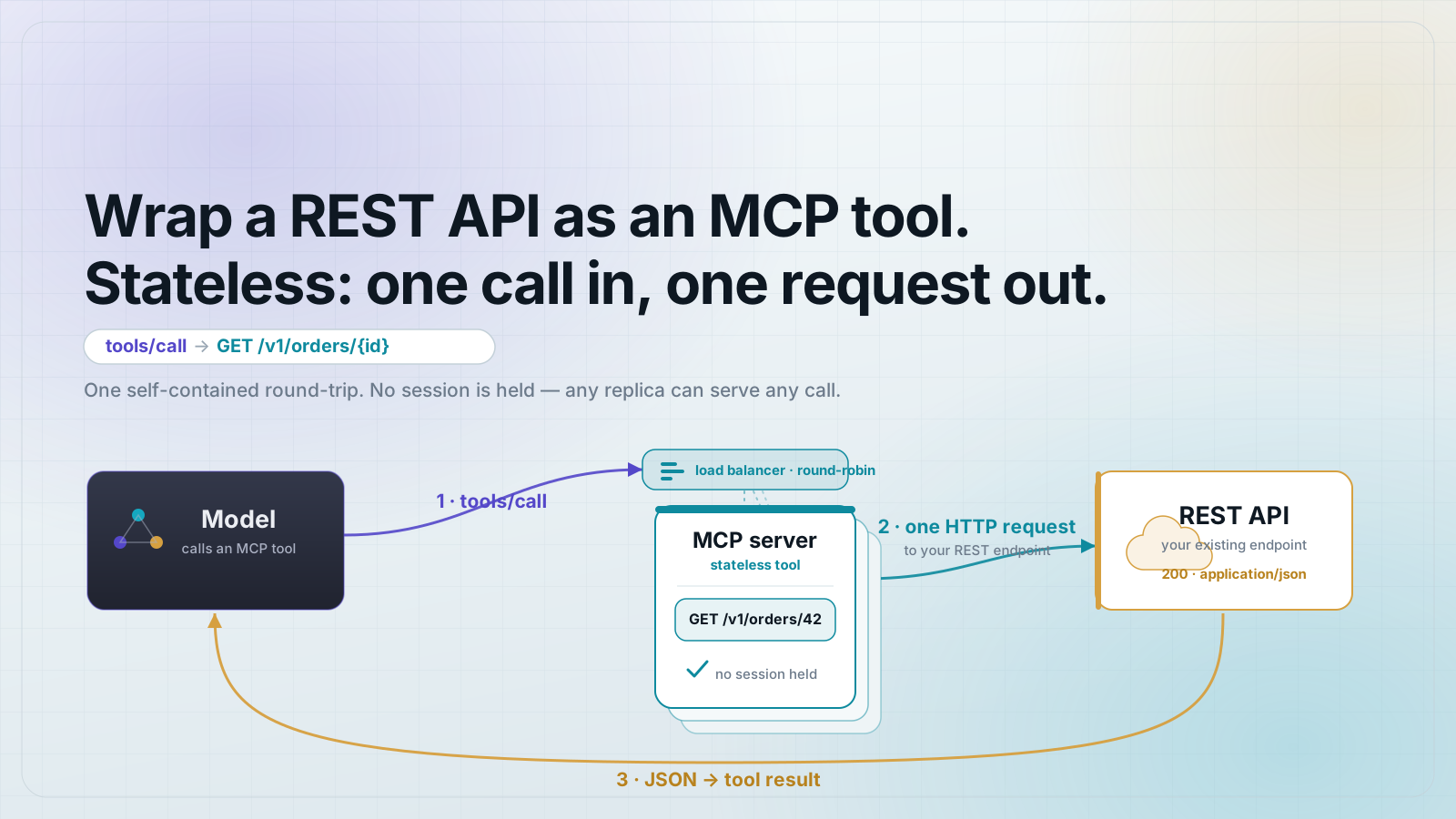
To turn a REST API into an MCP server, register one MCP tool per useful endpoint, validate the model's arguments with a Zod schema, call the API with a shared HTTP client, and return the response as text. Then serve it over stateless Streamable HTTP so it runs behind a plain round-robin load balancer. Under the 2026-07-28 spec there are no sessions to hold, so every tool call is a self-contained request: fetch, format, return.
This walkthrough builds a working server in TypeScript that wraps a real, key-free public API (Open-Meteo) so the code below runs as written. The same shape wraps any REST API you already own; the auth section shows how to add a key.
What does wrapping a REST API in MCP actually mean?
An MCP server exposes tools. Each tool is a named function with a typed input schema and a description the model reads to decide when to call it. Wrapping a REST API means: for each endpoint worth exposing, register one tool whose handler makes the HTTP request and returns the result. The model picks the tool and fills in the arguments; your handler does the fetch. You are not teaching the model your API, you are giving it typed, described entry points and doing the call yourself.
Set up the project (SDK + Zod)
You need Node 18+ (for the built-in fetch), the official MCP SDK, Zod for input validation, and Express to serve HTTP. Versions are pinned to the 2026-07-28 beta line so the code is reproducible.
npm init -y
npm i @modelcontextprotocol/sdk@1.30.0-beta.1 zod express
npm i -D tsx typescript @types/express
Build one reusable HTTP client
Centralize the base URL, headers, timeout, and (later) auth in a single helper so individual tools stay thin. A shared client is also where you enforce a timeout, so a slow upstream cannot hang a tool call forever.
// http.ts
const GEO_BASE = "https://geocoding-api.open-meteo.com/v1";
const API_BASE = "https://api.open-meteo.com/v1";

export async function apiGet(url: string): Promise<any> {
  const res = await fetch(url, {
    headers: { accept: "application/json" },
    signal: AbortSignal.timeout(10_000), // never hang a tool call
  });
  if (!res.ok) {
    throw new Error(`Upstream ${res.status}: ${await res.text()}`);
  }
  return res.json();
}

export { GEO_BASE, API_BASE };
Register a tool per endpoint, with Zod input validation
Never trust the model's arguments. Each tool declares its inputs as a Zod schema; the SDK rejects calls that do not match before your handler runs. Here two tools wrap two endpoints: geocode a city name to coordinates, then fetch the forecast for those coordinates. Chaining two small tools beats one tool that guesses, and it mirrors how the REST API is actually shaped.
// server.ts
import { McpServer } from "@modelcontextprotocol/sdk/server/mcp.js";
import { z } from "zod";
import { apiGet, GEO_BASE, API_BASE } from "./http.js";
export function buildServer() {
const server = new McpServer({ name: "weather-rest-wrapper", version: "1.0.0" });
server.registerTool(
"geocode_city",
{
title: "Find a city's coordinates",
description: "Look up latitude and longitude for a city name. Call this before get_forecast.",
inputSchema: { city: z.string().min(1).describe("City name, e.g. 'Berlin'") },
},
async ({ city }) => {
try {
const data = await apiGet(`${GEO_BASE}/search?name=${encodeURIComponent(city)}&count=1`);
const hit = data.results?.[0];
if (!hit) {
return { content: [{ type: "text", text: `No match for "${city}".` }], isError: true };
}
return { content: [{ type: "text", text: JSON.stringify({
name: hit.name, country: hit.country, latitude: hit.latitude, longitude: hit.longitude,
}) }] };
} catch (err) {
return { content: [{ type: "text", text: `Geocode failed: ${(err as Error).message}` }], isError: true };
}
},
);
server.registerTool(
"get_forecast",
{
title: "Get the current weather forecast",
description: "Return the current forecast for a latitude/longitude. Get coordinates from geocode_city first.",
inputSchema: {
latitude: z.number().min(-90).max(90),
longitude: z.number().min(-180).max(180),
},
},
async ({ latitude, longitude }) => {
try {
const data = await apiGet(
`${API_BASE}/forecast?latitude=${latitude}&longitude=${longitude}¤t=temperature_2m,wind_speed_10m`,
);
return { content: [{ type: "text", text: JSON.stringify(data.current) }] };
} catch (err) {
return { content: [{ type: "text", text: `Forecast failed: ${(err as Error).message}` }], isError: true };
}
},
);
return server;
}Return results the model can use, and handle errors with isError
Return structured text the model can read, and on failure return content with isError: true instead of throwing. A thrown exception crashes the request; an isError result hands the model a message it can read and recover from (retry, pick a different city, ask the user). This one habit is the difference between an agent that self-corrects and one that dies on the first bad input.
Serve it statelessly (the 2026-07-28 spec)
The 2026-07-28 spec removes sessions and the initialization handshake, so a remote MCP server can run behind a plain round-robin load balancer with no sticky sessions or shared session store. The Streamable HTTP transport supports this directly: run it in stateless mode by leaving sessionIdGenerator undefined, and build a fresh server plus transport per request. Nothing is held between calls, so any instance can serve any request.
// index.ts
import express from "express";
import { StreamableHTTPServerTransport } from "@modelcontextprotocol/sdk/server/streamableHttp.js";
import { buildServer } from "./server.js";

const app = express();
app.use(express.json());

app.post("/mcp", async (req, res) => {
  // Stateless: fresh server + transport per request. No session store,
  // so any instance behind a round-robin load balancer can serve any call.
  const server = buildServer();
  const transport = new StreamableHTTPServerTransport({
    sessionIdGenerator: undefined,            // stateless mode (2026-07-28 spec)
    enableDnsRebindingProtection: true,
    allowedHosts: ["127.0.0.1", "localhost"],
  });
  res.on("close", () => { transport.close(); server.close(); });
  await server.connect(transport);
  await transport.handleRequest(req, res, req.body);
});

app.listen(3000, () => console.log("MCP server on http://localhost:3000/mcp"));
Add authentication for APIs that need a key
Open-Meteo needs no key, but most APIs do. Read the key from an environment variable and inject it in the shared client. Never hardcode a secret, and never put it in a tool's input schema: the model should not see or supply your API key, only the business arguments.
const API_KEY = process.env.MY_API_KEY; // never hardcode; never expose to the model

export async function apiGet(url: string): Promise<any> {
  const res = await fetch(url, {
    headers: {
      accept: "application/json",
      ...(API_KEY ? { authorization: `Bearer ${API_KEY}` } : {}),
    },
    signal: AbortSignal.timeout(10_000),
  });
  if (!res.ok) throw new Error(`Upstream ${res.status}: ${await res.text()}`);
  return res.json();
}
Run it and test with one command
npx tsx index.ts
# in another shell, list the tools:
curl -s http://localhost:3000/mcp \
  -H 'content-type: application/json' \
  -H 'accept: application/json, text/event-stream' \
  -d '{"jsonrpc":"2.0","id":1,"method":"tools/list"}'
You should get back both tools with their schemas. Point any 2026-07-28 MCP client at http://localhost:3000/mcp and the model can now geocode a city and fetch its forecast. Swap the two Open-Meteo endpoints for your own API's routes and you have wrapped your REST API in MCP.
Frequently asked questions
- Should I register one tool per endpoint or one big tool?
- One tool per meaningful action. A model chooses tools by their name and description, so small, well-described tools get called correctly far more often than one overloaded tool that takes a 'mode' argument.
- Does the MCP server have to be stateless under the 2026-07-28 spec?
- The spec removes sessions and the handshake, so stateless is the default and lets you run behind a plain round-robin load balancer with no sticky sessions. You can still keep state in your own backend; just do not rely on an MCP session to hold it between calls.
- How do I handle API keys and secrets?
- Read them from environment variables and inject them in your shared HTTP client. Never hardcode a secret and never put it in a tool's input schema; the model should only supply business arguments, not credentials.
- What happens when the upstream REST API returns an error?
- Catch it in the handler and return content with isError: true and a plain-language message, rather than throwing. The model reads the error text and can retry or adjust; an unhandled throw just fails the call.
- Why wrap the API in MCP instead of letting the model call it directly?
- MCP gives the model typed, described, discoverable tools with validated inputs and consistent error handling, and it works across any MCP client. Hand-rolled function-calling glue has to be rebuilt for every model and app.
- How do I keep the exposed tool list from drifting out of sync with the API?
- Treat the tool schemas as a contract: version-pin the API, and test the server against the live endpoints in CI so a changed field or removed route fails the build instead of silently returning wrong data to the model.
About the author
MCPOrbit Team
Engineering, MCPOrbit
The MCPOrbit engineering team builds MCPOrbit, a free desktop client for the Model Context Protocol. It connects to any MCP server so you can browse its tools, call them by hand, and run them through a real agent loop.