Field notes
How to build an MCP server in TypeScript
Build an MCP server in TypeScript with the official v2 SDK: register tools with Zod schemas and serve over stdio. Full runnable code, tested on SDK 2.0.0.
MCPOrbit Team
Engineering, MCPOrbit
- Published
- Updated
- · Updated
- Read time
- · 9 min read
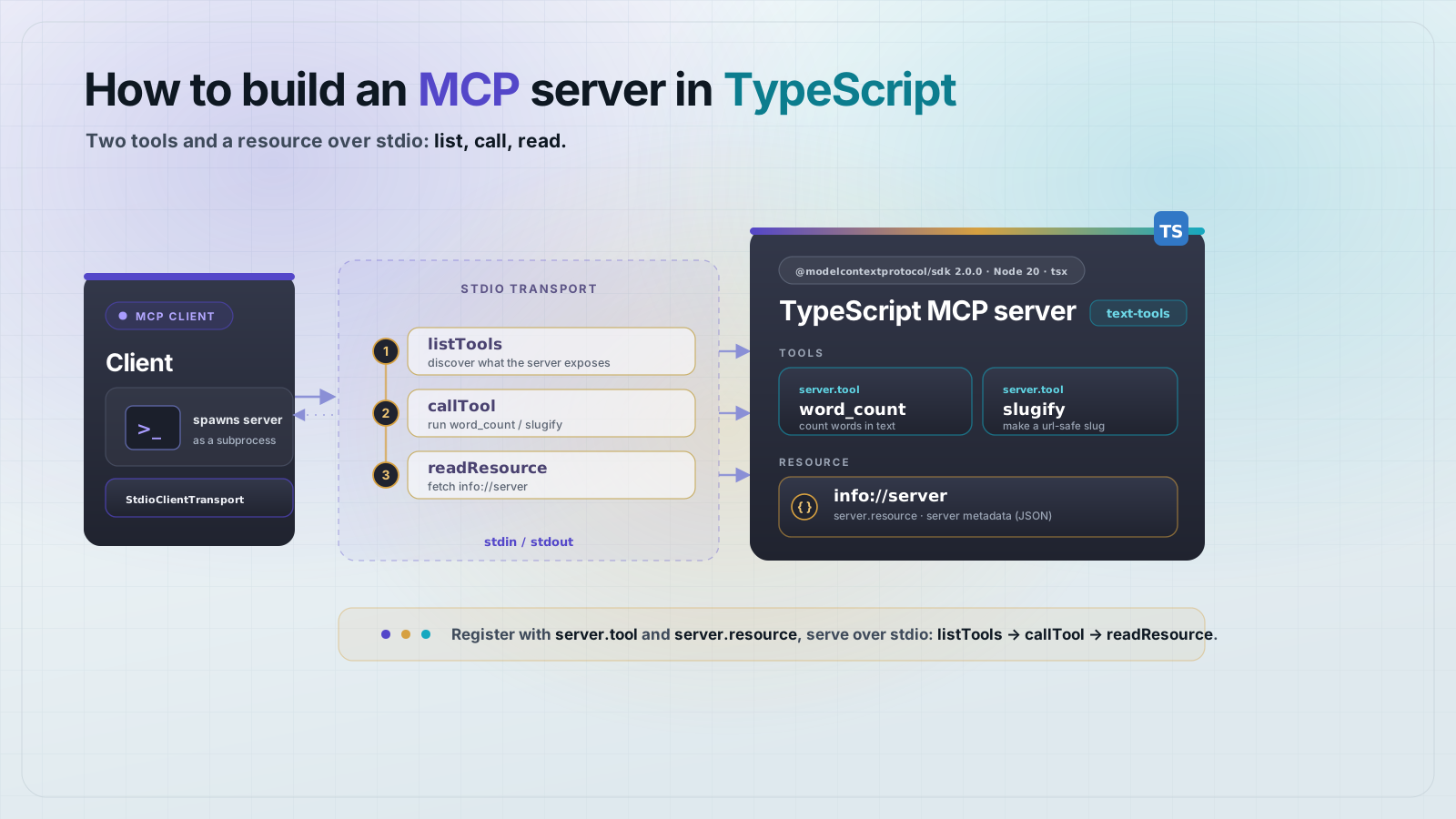
Build an MCP server in TypeScript with the official v2 SDK: install @modelcontextprotocol/server, create an McpServer, register functions with server.registerTool(), and call serveStdio(). Any MCP client can then discover and call your tools. The whole server is one file, and this one is tested end to end.
TypeScript is one of MCP's two Tier-1 SDKs, and it is the reference implementation the spec ships against. The 2.0 line tracks the 2026-07-28 Model Context Protocol (MCP) specification and splits the old @modelcontextprotocol/sdk package into @modelcontextprotocol/server and @modelcontextprotocol/client. This walkthrough builds a small text-tools server with two tools and a resource, then connects a real client over stdio and asserts the results. Every command below was run against @modelcontextprotocol/server 2.0.0, zod 4.4.3, and tsx 4 on Node.js 25.8.1.
What do you need to build an MCP server in TypeScript?
You need Node.js 20 or newer and a fresh npm project set to ES modules. Install the server SDK, the client SDK (for the test at the end), and Zod for input and output schemas. Add tsx as a dev dependency so you can run TypeScript directly without a separate build step.
npm init -y
npm pkg set type=module
npm install @modelcontextprotocol/server@2.0.0 @modelcontextprotocol/client@2.0.0 zod@^4.2.0
npm install -D tsx@4
Set "type": "module" in package.json (the npm pkg set line above does this). The v2 SDK is ESM and this server uses top-level constructs that need an ES module. Skip it and Node treats the file as CommonJS and the import fails.
Write the server
The whole server is one file. It creates an McpServer, registers two tools and one resource, then hands the server to serveStdio(). word_count declares an outputSchema, so it returns structuredContent that clients read as typed fields. slugify returns plain text. The resource serves static metadata at a URI.
// A minimal, tested MCP server in TypeScript using the official v2 SDK.
import { z } from "zod";
import { McpServer } from "@modelcontextprotocol/server";
import { serveStdio } from "@modelcontextprotocol/server/stdio";

function createServer() {
  const server = new McpServer(
    { name: "text-tools", version: "1.0.0" },
    { capabilities: { tools: {}, resources: {} } }
  );

  // A tool that returns structured output. The outputSchema populates
  // structuredContent, so clients get typed data, not just a text blob.
  server.registerTool(
    "word_count",
    {
      title: "Word count",
      description: "Count words, characters, and sentences in a block of text.",
      inputSchema: z.object({ text: z.string() }),
      outputSchema: z.object({
        words: z.number(),
        characters: z.number(),
        sentences: z.number(),
      }),
    },
    async ({ text }) => {
      const words = text.trim().split(/\s+/).filter(Boolean);
      const sentences = text.split(/[.!?]+/).filter((s) => s.trim());
      const output = {
        words: words.length,
        characters: text.length,
        sentences: sentences.length,
      };
      return {
        content: [{ type: "text", text: JSON.stringify(output) }],
        structuredContent: output,
      };
    }
  );

  // A tool that returns plain text.
  server.registerTool(
    "slugify",
    {
      title: "Slugify",
      description: "Turn a title into a URL-safe slug.",
      inputSchema: z.object({ text: z.string() }),
    },
    async ({ text }) => {
      const slug = text
        .trim()
        .toLowerCase()
        .replace(/[^a-z0-9]+/g, "-")
        .replace(/^-+|-+$/g, "");
      return { content: [{ type: "text", text: slug }] };
    }
  );

  // A resource: read-only data a client can fetch without calling a tool.
  server.registerResource(
    "server-info",
    "info://server",
    { title: "Server info", mimeType: "text/plain" },
    async (uri) => ({
      contents: [
        { uri: uri.href, text: "text-tools v1.0.0: word_count, slugify" },
      ],
    })
  );

  return server;
}

// serveStdio owns the connection: it reads JSON-RPC from stdin and writes to
// stdout. Never write logs to stdout, it corrupts the protocol. Use stderr.
serveStdio(createServer);
console.error("text-tools MCP server running on stdio");
How do you run and test an MCP server in TypeScript?
Test it with the SDK's own client. This script spawns the server over stdio, runs the initialize handshake, then lists the tools, calls each one, and reads the resource. It asserts on the results, so a broken tool fails loudly. No external client app is needed.
// Spawns the server over stdio and asserts the tools and resource work.
import assert from "node:assert/strict";
import { Client } from "@modelcontextprotocol/client";
import { StdioClientTransport } from "@modelcontextprotocol/client/stdio";

const transport = new StdioClientTransport({
  command: "npx",
  args: ["tsx", "server.ts"],
});

const client = new Client({ name: "test-client", version: "1.0.0" });
await client.connect(transport);

const { tools } = await client.listTools();
assert.deepEqual(tools.map((t) => t.name).sort(), ["slugify", "word_count"]);

const wc = await client.callTool({
  name: "word_count",
  arguments: { text: "Hello world. This works!" },
});
assert.deepEqual(wc.structuredContent, { words: 4, characters: 24, sentences: 2 });

const slug = await client.callTool({
  name: "slugify",
  arguments: { text: "Build an MCP Server!" },
});
assert.equal(slug.content[0].text, "build-an-mcp-server");

const info = await client.readResource({ uri: "info://server" });
assert.match(info.contents[0].text, /text-tools v1\.0\.0/);

console.log("ALL ASSERTIONS PASSED");
await client.close();
Run the test. tsx compiles and runs the TypeScript in one step, and the client launches the server as a subprocess.
npx tsx test-client.tsYou should see the server's stderr line, then the passing assertion:
text-tools MCP server running on stdio
ALL ASSERTIONS PASSEDAdd the server to Claude Desktop
Claude Desktop launches stdio servers from its config file. Point it at your server.ts through tsx. On macOS the file is at ~/Library/Application Support/Claude/claude_desktop_config.json. Use an absolute path to the server file.
{
  "mcpServers": {
    "text-tools": {
      "command": "npx",
      "args": ["-y", "tsx", "/Users/you/text-tools/server.ts"]
    }
  }
}
Restart Claude Desktop. The text-tools server appears in the tools menu, and word_count and slugify are callable from a chat. For a production server, compile to JavaScript first and point command at node with the built file, so you are not running the TypeScript loader on every launch.
The same server in MCPOrbit is the same values in a form, with no file to keep valid and no restart. Command is npx, and Arguments is the rest of the line, -y tsx /Users/you/text-tools/server.ts. The production note above still applies: compile first, then point Command at node and put the built file in Arguments. How to add an MCP server to MCPOrbit has the whole flow.
The gotchas that bite TypeScript MCP servers
- Zod version: the 2.0 SDK converts Zod schemas to JSON Schema and needs
zod4.2.0 or newer. A zod 3 schema throwsSchema appears to be from zod 3when a tool is called. - ES modules: the SDK is ESM only. Set
"type": "module"inpackage.jsonor imports fail. - stdout is sacred:
console.log()breaks the stdio protocol. Log to stderr withconsole.error(). - Package names changed: v2 is
@modelcontextprotocol/serverand@modelcontextprotocol/client, not the single@modelcontextprotocol/sdk. Tutorials that import from@modelcontextprotocol/sdkare on the 1.x line. - Return shape: a tool returns
{ content: [...] }. AddstructuredContentonly when you declared anoutputSchema.
Frequently asked questions
Frequently asked questions
- What package do I install to build an MCP server in TypeScript?
- Install
@modelcontextprotocol/serverfor the server and@modelcontextprotocol/clientfor a client. In the 2.0 line these replace the single@modelcontextprotocol/sdkpackage. Add them withnpm install @modelcontextprotocol/server@2.0.0 @modelcontextprotocol/client@2.0.0. - Which Zod version does the MCP TypeScript SDK need?
- Version 4.2.0 or newer. The 2.0 SDK converts your Zod input and output schemas to JSON Schema, and a zod 3 schema throws
Schema appears to be from zod 3at call time. Installzod@^4.2.0. - How do I return structured data from a TypeScript MCP tool?
- Give the tool an
outputSchemain its config and return astructuredContentfield alongsidecontent. The SDK validatesstructuredContentagainst that schema. Without anoutputSchema, there is no structured output and the client receives only the text content. - Which transport should a TypeScript MCP server use?
- Use stdio for a local server that one client launches as a subprocess, which is what Claude Desktop starts. Use the Streamable HTTP transport for a remote server that many clients reach over the network. Call
serveStdio()for the local case. - How do I test an MCP server without a full client app?
- Use the SDK's own
ClientwithStdioClientTransport. It spawns your server over stdio, runs the initialize handshake, and lets you calllistTools,callTool, andreadResourceand assert on the results, with no external client needed.
Once your server works locally, connect your TypeScript server in MCPOrbit and call every tool by hand. You see the exact tool list, arguments, and results an MCP client sees, before you add the server to Claude Desktop or Cursor.
About the author
MCPOrbit Team
Engineering, MCPOrbit
The MCPOrbit engineering team builds MCPOrbit, a free desktop client for the Model Context Protocol. It connects to any MCP server so you can browse its tools, call them by hand, and run them through a real agent loop.