Field notes
How to build an MCP server in Python
Build an MCP server in Python with the official mcp SDK: create a project with uv, make an MCPServer, decorate functions with @mcp.tool(), and run it over stdio. Full runnable code, tested on mcp 2.0.0 and Python 3.11.
MCPOrbit Team
Engineering, MCPOrbit
- Published
- Updated
- · Updated
- Read time
- · 8 min read
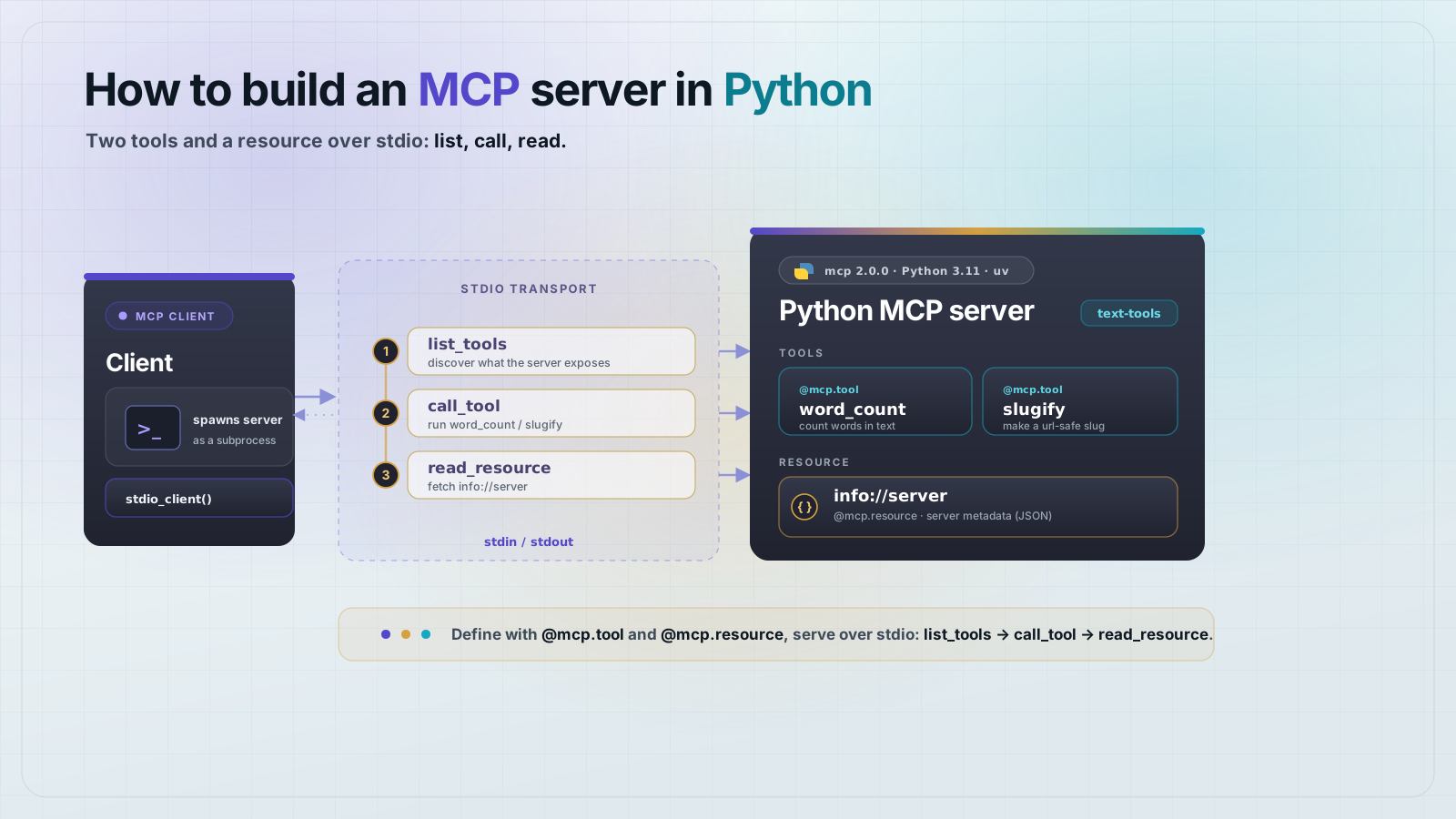
Build an MCP server in Python with the official mcp SDK: create a project with uv, make an MCPServer, decorate plain functions with @mcp.tool(), and call mcp.run("stdio"). Any MCP client can then discover and call your tools. The whole server is one file, and this one is tested end to end.
The Python SDK is one of MCP's two Tier-1 SDKs and crossed a billion total downloads in 2026, so it is a first-class way to ship a server, not a port of the TypeScript one. This walkthrough builds a small text-tools server with two tools and a resource, then connects a real client over stdio and asserts the results. Every command below was run against mcp 2.0.0 on Python 3.11 with uv 0.11.16.
What do you need to build an MCP server in Python?
Python 3.10 or newer and the mcp package. Use uv for the project and environment. It is what the SDK's own docs standardize on, and it pins an exact Python for you. Create the project and add the SDK with its CLI extra in two commands:
uv init --python 3.11 text-tools && cd text-tools
uv add "mcp[cli]>=2.0.0"
That is the entire dependency list. mcp[cli] pulls in the server, the client, and the mcp command-line tool. Everything below runs with uv run, so the virtual environment is handled for you.
Write the server
Create server.py. You make an MCPServer, then hang tools off it with @mcp.tool(). The function's name becomes the tool name, its docstring becomes the description, and its type hints become the input schema, so you do not write schema by hand. Note the return type on word_count: it is a TypedDict, which is what gives the tool a structured result.
"""A minimal, tested MCP server in Python using the official SDK (mcp 2.0)."""
from typing import TypedDict

from mcp.server.mcpserver import MCPServer

mcp = MCPServer(name="text-tools", version="1.0.0")


class Counts(TypedDict):
    words: int
    characters: int
    sentences: int


@mcp.tool()
def word_count(text: str) -> Counts:
    """Count words, characters, and sentences in a block of text."""
    words = text.split()
    sentences = [s for s in text.replace("!", ".").replace("?", ".").split(".") if s.strip()]
    return Counts(words=len(words), characters=len(text), sentences=len(sentences))


@mcp.tool()
def slugify(text: str) -> str:
    """Turn a title into a URL-safe slug."""
    keep = [c.lower() if c.isalnum() else "-" for c in text.strip()]
    slug = "".join(keep)
    while "--" in slug:
        slug = slug.replace("--", "-")
    return slug.strip("-")


@mcp.resource("info://server")
def server_info() -> str:
    """Static metadata a client can read without calling a tool."""
    return "text-tools v1.0.0: word_count, slugify"


if __name__ == "__main__":
mcp.run("stdio")How do you run and test an MCP server in Python?
Do not eyeball it. Connect a real client. The SDK ships a client too, so a test can spawn the server over stdio exactly as a production client would, then list and call the tools. Create test_server.py:
"""End-to-end test: spawn server.py over stdio, connect a client, exercise it."""
import asyncio
from mcp import ClientSession, StdioServerParameters, stdio_client


async def main() -> None:
    params = StdioServerParameters(command="uv", args=["run", "python", "server.py"])
    async with stdio_client(params) as (read, write):
        async with ClientSession(read, write) as session:
            await session.initialize()

            tools = await session.list_tools()
            names = sorted(t.name for t in tools.tools)
            assert names == ["slugify", "word_count"], names

            r = await session.call_tool("word_count", {"text": "Hello world. How are you?"})
            data = r.structured_content
            assert data == {"words": 5, "characters": 25, "sentences": 2}, data

            r2 = await session.call_tool("slugify", {"text": "How to Build an MCP Server!"})
            assert r2.structured_content["result"] == "how-to-build-an-mcp-server", r2.structured_content

            res = await session.list_resources()
            assert any(str(x.uri) == "info://server" for x in res.resources), res.resources
            body = await session.read_resource("info://server")
            assert "text-tools" in body.contents[0].text

            print("tools:", names)
            print("word_count:", data)
            print("slugify:", r2.structured_content["result"])
    print("ALL CHECKS PASSED")


if __name__ == "__main__":
    asyncio.run(main())
Run it with one command:
uv run python test_server.pyThe client boots the server, initializes, and exercises every tool and the resource:
tools: ['slugify', 'word_count']
word_count: {'words': 5, 'characters': 25, 'sentences': 2}
slugify: how-to-build-an-mcp-server
ALL CHECKS PASSEDAdd the server to Claude Desktop
Because mcp.run("stdio") speaks stdio, a local client launches your server as a subprocess. Point Claude Desktop (or any stdio client) at the same command you tested with:
{
  "mcpServers": {
    "text-tools": {
      "command": "uv",
      "args": ["--directory", "/abs/path/to/text-tools", "run", "python", "server.py"]
    }
  }
}
Use an absolute path for --directory so the client can find the project no matter where it launches from.
The rules that keep a Python MCP server clean
- Give every tool a clear docstring. It is the description the model reads to decide when to call the tool, so vague docstrings cause wrong calls.
- Type every argument and the return value. The SDK turns hints into the input and output schema; untyped args fall back to loose validation.
- Return a
TypedDictor Pydantic model when the result is structured. Reserve bare strings for genuinely single-value results. - Keep tools side-effect-aware: annotate read-only tools so a client knows they are safe to auto-run, and be explicit about anything destructive.
- Test with the SDK's own client over stdio. It is the same path a production client takes, so a passing test means the server actually works.
Frequently asked questions
Frequently asked questions
- What package do I install to build an MCP server in Python?
- The official
mcppackage, installed asmcp[cli]. It bundles the server, the client, and themcpcommand-line tool. Add it withuv add "mcp[cli]>=2.0.0". The 2.0 line tracks the 2026-07-28 MCP specification. - What is the difference between MCPServer and FastMCP?
MCPServeris the high-level server class in the 2.0 SDK; it is the successor to theFastMCPname from the 1.x line. The ergonomics are the same: decorate functions with@mcp.tool()and@mcp.resource(), so older FastMCP tutorials mostly translate by swapping the class name.- How do I return structured data from a Python MCP tool?
- Annotate the tool's return type with a
TypedDictor a Pydantic model. The SDK derives an output schema from that annotation and populatesstructuredContent. If you return a baredictwith no annotation, there is no schema and the client receives only the text form. - Which transport should a Python MCP server use?
- Use stdio for a local server that one client launches as a subprocess. It is what Claude Desktop starts. Use Streamable HTTP for a remote server that many clients reach over the network.
mcp.run("stdio")andmcp.run("streamable-http")select between them. - How do I test an MCP server without a full client app?
- Use the SDK's own client in a script.
stdio_clientplusClientSessionspawns your server over stdio, runs the initialize handshake, and lets you calllist_tools,call_tool, andread_resourceand assert on the results, no external client needed.
About the author
MCPOrbit Team
Engineering, MCPOrbit
The MCPOrbit engineering team builds MCPOrbit, a free desktop client for the Model Context Protocol. It connects to any MCP server so you can browse its tools, call them by hand, and run them through a real agent loop.