Field notes
How to build an MCP server in Rust
Build an MCP server in Rust with the official rmcp SDK: derive your schemas, return Json for structured output, ship one 3.5 MB binary. Tested on rmcp 3.1.4.
Mark
Head of Marketing, MCPOrbit
- Published
- Updated
- · Updated
- Read time
- · 9 min read
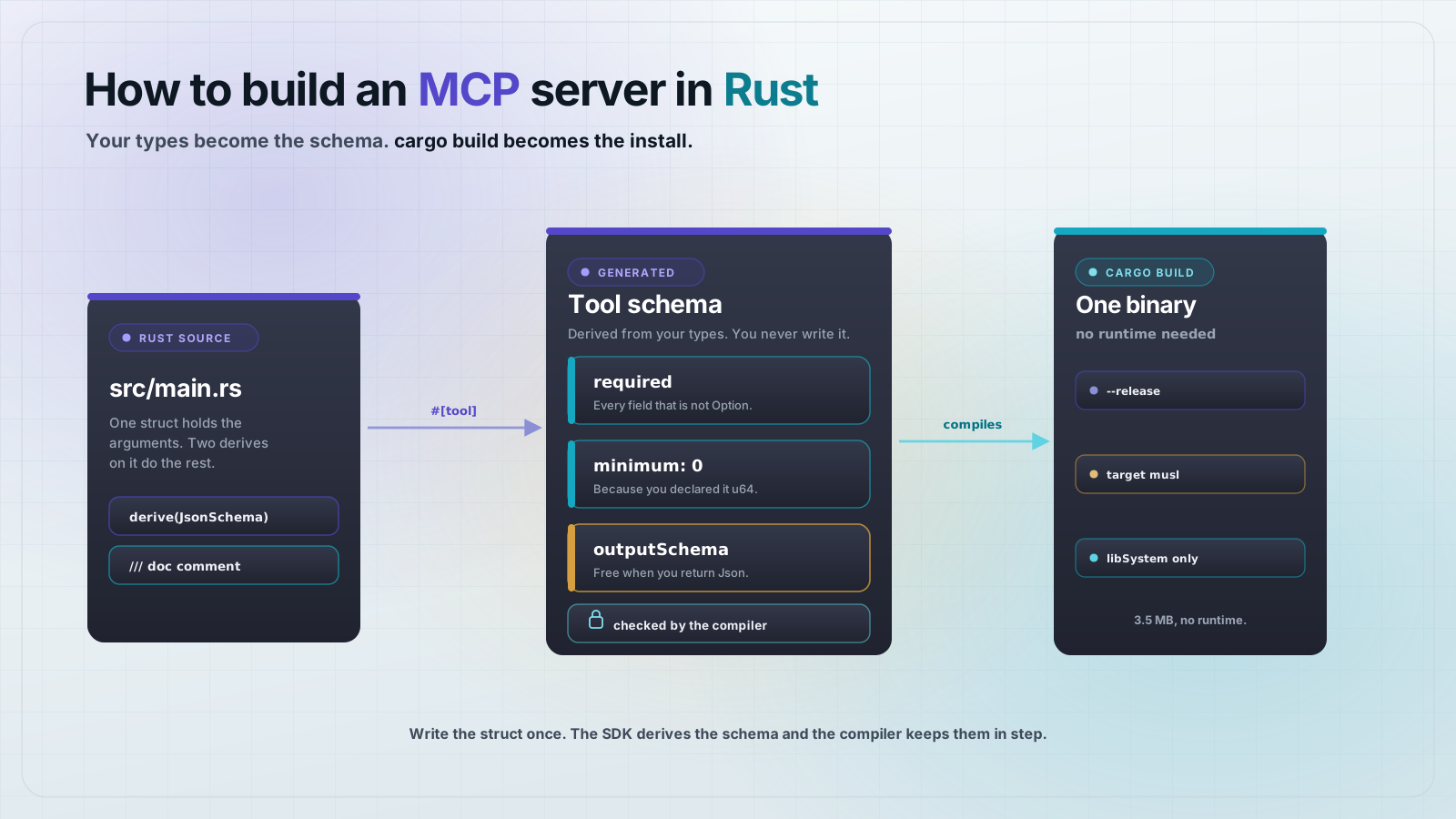
Build a Model Context Protocol (MCP) server in Rust with the official rmcp crate: define an argument struct that derives JsonSchema, annotate a method with #[tool], and serve it over stdio. The schema is generated from your types, so the compiler and the protocol agree by construction. Everything below was built and run on rmcp 3.1.4 and Rust 1.98.0.
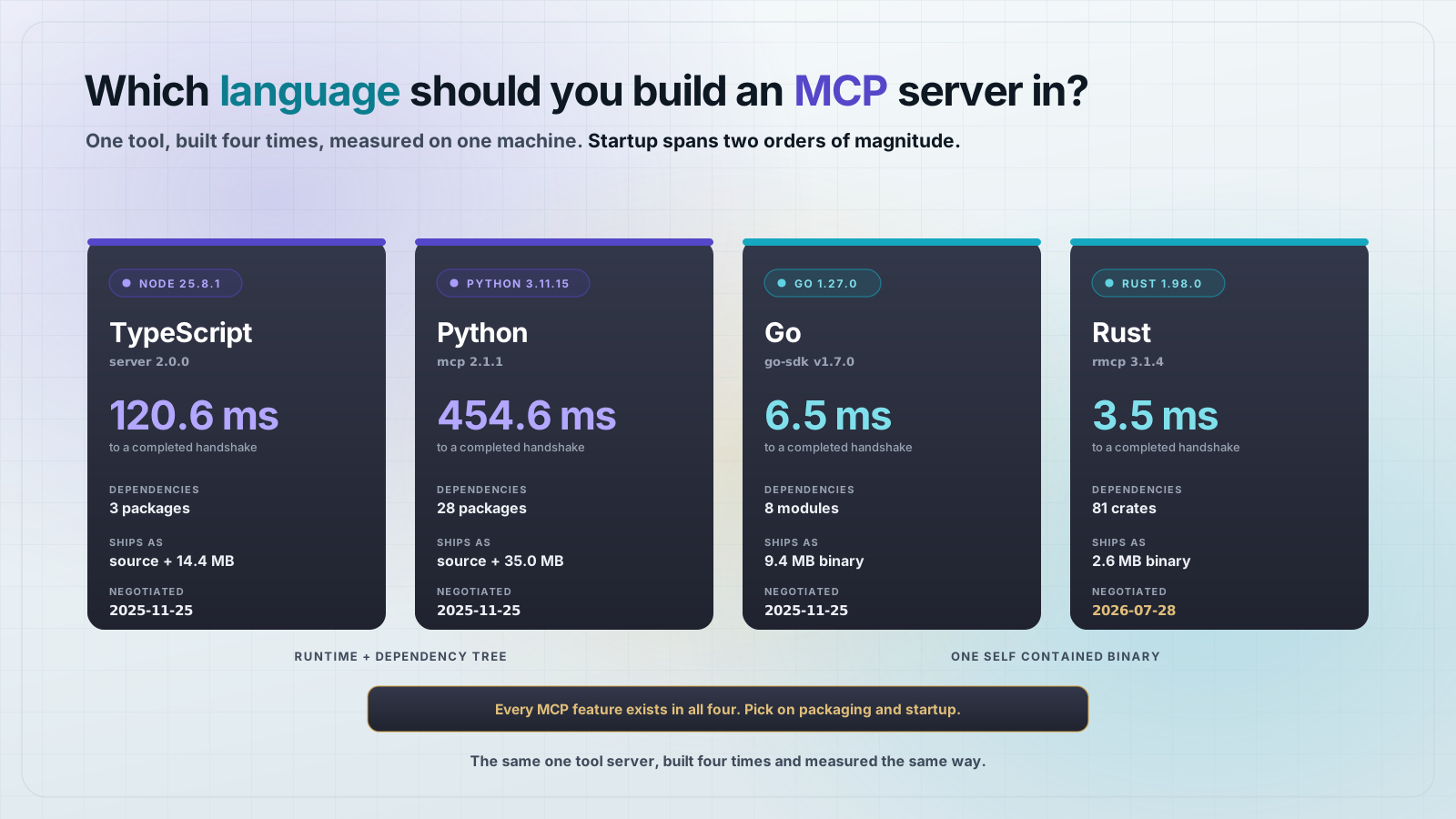
Rust is the fourth serious option for MCP servers after TypeScript, Python and Go. The official SDK is rmcp, maintained in the modelcontextprotocol/rust-sdk repository, currently at 3.1.4 with about 11.5 million recent downloads. It is a real, maintained SDK, not a community stub.
What do you need to build an MCP server in Rust?
A Rust toolchain and two dependencies. This post was built on rustc 1.98.0 and cargo 1.98.0, installed with rustup. Start a binary crate and add what you need.
cargo new --bin semver-mcp
cd semver-mcp

cargo add rmcp@3.1.4 --features server,transport-io,macros,schemars
cargo add tokio@1 --features rt-multi-thread,macros,io-std
cargo add serde@1 --features derive
cargo add schemars@1 semver@1
The feature list is the part worth reading twice. server and macros are on by default, but schemars and transport-io are not. schemars is what turns your #[derive(JsonSchema)] into a tool input schema, and transport-io is the stdio transport. Leave either one out and the code below will not compile.
That produces this Cargo.toml. The versions are the ones that were resolved and tested.
[package]
name = "semver-mcp"
version = "0.1.0"
edition = "2024"

[dependencies]
rmcp = { version = "3.1.4", features = ["macros", "schemars", "server", "transport-io"] }
schemars = "1"
semver = "1"
serde = { version = "1", features = ["derive"] }
tokio = { version = "1", features = ["rt-multi-thread", "macros", "io-std"] }
How do you define an MCP tool in Rust?
You define an argument struct, a result struct, and a method. The argument struct derives Deserialize and JsonSchema, which together give you parsing and the published input schema from one definition.
#[derive(Debug, Deserialize, JsonSchema)]
pub struct ParseRequest {
    /// A semantic version string, for example "1.4.2" or "2.0.0-rc.1".
    pub version: String,
}
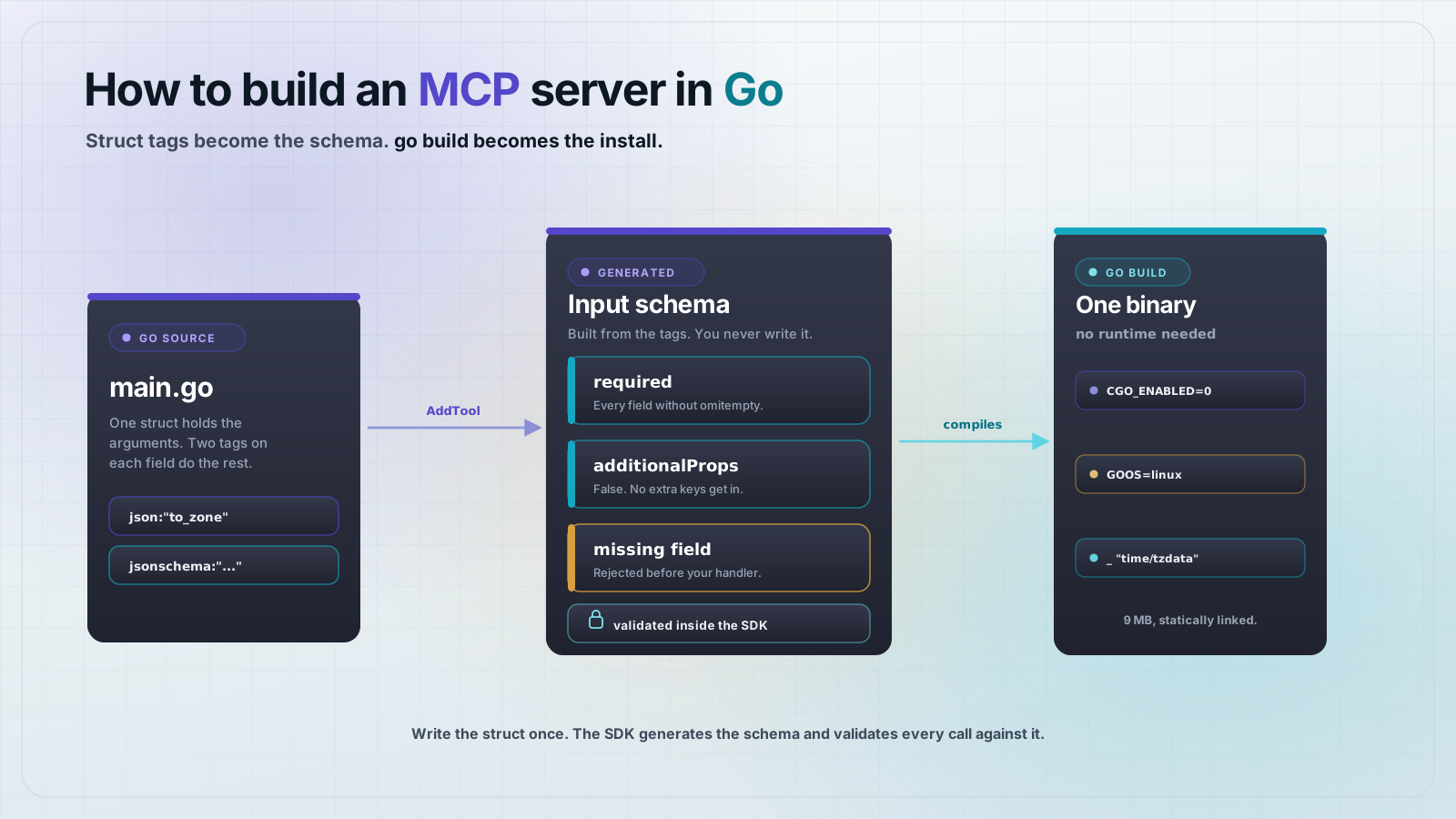
The doc comment is not decoration. schemars lifts it into the description field of the generated schema, so the model sees it. This is the Rust equivalent of Go's jsonschema struct tag, except you write it as ordinary documentation and it also shows up in cargo doc.
The handler is a method on your server type. The Parameters wrapper is what marks an argument as the tool's input, and destructuring it in the signature keeps the body clean.
#[tool(description = "Parse a semantic version string into its numeric parts")]
async fn parse_version(
    &self,
    Parameters(ParseRequest { version }): Parameters<ParseRequest>,
) -> Result<Json<ParsedVersion>, ErrorData> {
    let v = semver::Version::parse(&version)
        .map_err(|e| ErrorData::invalid_params(format!("{version:?} is not a version: {e}"), None))?;

    Ok(Json(ParsedVersion {
        major: v.major,
        minor: v.minor,
        patch: v.patch,
        pre: v.pre.to_string(),
        is_prerelease: !v.pre.is_empty(),
    }))
}
The Json wrapper in the return type is the important bit. Return Json<T> and the SDK serializes T into structuredContent and derives an outputSchema from it. Return a plain String and you get text content and no output schema. You choose which by picking a return type, not by setting a flag.
What does the full Rust MCP server look like?
One file. Two tools, one that parses a version and one that tests a version against a requirement. Copy this into src/main.rs and the server is finished.
use rmcp::{
    ErrorData, Json, ServerHandler, ServiceExt,
    handler::server::{router::tool::ToolRouter, wrapper::Parameters},
    model::{Implementation, ServerCapabilities, ServerInfo},
    tool, tool_handler, tool_router,
    transport::stdio,
};
use schemars::JsonSchema;
use serde::{Deserialize, Serialize};

#[derive(Debug, Deserialize, JsonSchema)]
pub struct ParseRequest {
    /// A semantic version string, for example "1.4.2" or "2.0.0-rc.1".
    pub version: String,
}

#[derive(Debug, Serialize, JsonSchema)]
pub struct ParsedVersion {
    pub major: u64,
    pub minor: u64,
    pub patch: u64,
    /// Empty when the version carries no pre-release tag.
    pub pre: String,
    pub is_prerelease: bool,
}

#[derive(Debug, Deserialize, JsonSchema)]
pub struct SatisfiesRequest {
    /// A Cargo-style version requirement, for example "^1.2" or ">=1.0, <2.0".
    pub requirement: String,
    /// The concrete version to test against the requirement.
    pub version: String,
}

#[derive(Debug, Serialize, JsonSchema)]
pub struct SatisfiesResult {
    pub matches: bool,
    pub requirement: String,
    pub version: String,
}

#[derive(Debug, Clone)]
pub struct SemverServer {
    tool_router: ToolRouter<Self>,
}

#[tool_router(router = tool_router)]
impl SemverServer {
    pub fn new() -> Self {
        Self {
            tool_router: Self::tool_router(),
        }
    }

    #[tool(description = "Parse a semantic version string into its numeric parts")]
    async fn parse_version(
        &self,
        Parameters(ParseRequest { version }): Parameters<ParseRequest>,
    ) -> Result<Json<ParsedVersion>, ErrorData> {
        let v = semver::Version::parse(&version)
            .map_err(|e| ErrorData::invalid_params(format!("{version:?} is not a version: {e}"), None))?;

        Ok(Json(ParsedVersion {
            major: v.major,
            minor: v.minor,
            patch: v.patch,
            pre: v.pre.to_string(),
            is_prerelease: !v.pre.is_empty(),
        }))
    }

    #[tool(description = "Check whether a version satisfies a version requirement")]
    async fn satisfies(
        &self,
        Parameters(SatisfiesRequest { requirement, version }): Parameters<SatisfiesRequest>,
    ) -> Result<Json<SatisfiesResult>, ErrorData> {
        let req = semver::VersionReq::parse(&requirement)
            .map_err(|e| ErrorData::invalid_params(format!("{requirement:?} is not a requirement: {e}"), None))?;
        let v = semver::Version::parse(&version)
            .map_err(|e| ErrorData::invalid_params(format!("{version:?} is not a version: {e}"), None))?;

        Ok(Json(SatisfiesResult {
            matches: req.matches(&v),
            requirement,
            version,
        }))
    }
}

#[tool_handler(router = self.tool_router)]
impl ServerHandler for SemverServer {
    fn get_info(&self) -> ServerInfo {
        ServerInfo::new(ServerCapabilities::builder().enable_tools().build())
            .with_server_info(Implementation::new(
                env!("CARGO_PKG_NAME"),
                env!("CARGO_PKG_VERSION"),
            ))
            .with_instructions("Parses and compares semantic version strings.")
    }
}

#[tokio::main]
async fn main() -> Result<(), Box<dyn std::error::Error>> {
    eprintln!("semver-mcp starting on stdio");

    let service = SemverServer::new().serve(stdio()).await?;
    service.waiting().await?;

    Ok(())
}
Three macros do the wiring. #[tool] registers one method, #[tool_router] collects every #[tool] in the block into a ToolRouter, and #[tool_handler] implements the ServerHandler dispatch against that router. The tool_router field on the struct is not optional, the generated code expects it.
Why does the server report its name as rmcp?
Because the default identity comes from the SDK, not from you. Run a bare ServerInfo::new(...) without overriding server_info and the initialize response says this:
{
  "serverInfo": {
    "name": "rmcp",
    "version": "3.1.4"
  }
}
That is your server announcing itself as the SDK. The cause is in rmcp's own source: the default is built with env!("CARGO_CRATE_NAME"), and env! expands at the compile time of the crate that contains it. That crate is rmcp, so the value is always rmcp, no matter what your package is called.
The fix is one builder call. Use the same macro in your own crate, where it expands to your package name.
ServerInfo::new(ServerCapabilities::builder().enable_tools().build())
    .with_server_info(Implementation::new(
        env!("CARGO_PKG_NAME"),
        env!("CARGO_PKG_VERSION"),
    ))
    .with_instructions("Parses and compares semantic version strings.")
After that the handshake reports semver-mcp and 0.1.0. Check this before you publish anything, because clients show that name to users and log it, and the default is wrong in a way that still looks like it works.
How do you run and test a Rust MCP server?
You do not need a client to start. The stdio transport reads newline-delimited JSON-RPC from stdin, so a shell pipe is enough to drive a full session.
cargo build --release

{
  echo '{"jsonrpc":"2.0","id":1,"method":"initialize","params":{"protocolVersion":"2026-07-28","capabilities":{},"clientInfo":{"name":"probe","version":"1"}}}'
  echo '{"jsonrpc":"2.0","method":"notifications/initialized"}'
  echo '{"jsonrpc":"2.0","id":2,"method":"tools/call","params":{"name":"satisfies","arguments":{"requirement":"^1.2","version":"1.4.2"}}}'
  sleep 1
} | ./target/release/semver-mcp
The tool call comes back with both shapes at once, the text block and the structured object:
{
  "jsonrpc": "2.0",
  "id": 2,
  "result": {
    "resultType": "complete",
    "content": [
      {
        "type": "text",
        "text": "{\"matches\":true,\"requirement\":\"^1.2\",\"version\":\"1.4.2\"}"
      }
    ],
    "structuredContent": {
      "matches": true,
      "requirement": "^1.2",
      "version": "1.4.2"
    },
    "isError": false
  }
}
structuredContent is the machine-readable copy and content is the fallback for clients that predate structured output. You wrote neither. Both came from returning Json<SatisfiesResult>.
tools/list shows the other half of what the derives bought you, a generated outputSchema alongside the input schema:
{
  "name": "parse_version",
  "description": "Parse a semantic version string into its numeric parts",
  "inputSchema": {
    "$schema": "https://json-schema.org/draft/2020-12/schema",
    "properties": {
      "version": {
        "description": "A semantic version string, for example \"1.4.2\" or \"2.0.0-rc.1\".",
        "type": "string"
      }
    },
    "required": ["version"],
    "type": "object"
  },
  "outputSchema": {
    "$schema": "https://json-schema.org/draft/2020-12/schema",
    "properties": {
      "is_prerelease": { "type": "boolean" },
      "major": { "format": "uint64", "minimum": 0, "type": "integer" },
      "minor": { "format": "uint64", "minimum": 0, "type": "integer" },
      "patch": { "format": "uint64", "minimum": 0, "type": "integer" },
      "pre": {
        "description": "Empty when the version carries no pre-release tag.",
        "type": "string"
      }
    },
    "required": ["major", "minor", "patch", "pre", "is_prerelease"],
    "type": "object"
  }
}
Note "format": "uint64" and "minimum": 0. Those came from declaring the fields u64. A Rust type that cannot be negative produces a schema that says so, which is a real advantage over hand-written schemas that drift from the code.
What happens when a tool call fails?
Two failures, two different wire shapes, and the difference matters when you are debugging. Send a malformed version, then send a call with the argument missing entirely.
{
  "jsonrpc": "2.0",
  "id": 5,
  "error": {
    "code": -32602,
    "message": "\"not-a-version\" is not a version: unexpected character 'n' while parsing major version number"
  }
}
{
"jsonrpc": "2.0",
"id": 6,
"result": {
"resultType": "complete",
"content": [
{
"type": "text",
"text": "failed to deserialize parameters: missing field `version`"
}
],
"isError": true
}
}The first is a protocol error. Your handler ran, returned Err(ErrorData::invalid_params(...)), and the SDK turned it into a JSON-RPC error with code -32602. There is no result at all.
The second never reached your handler. Serde could not deserialize the arguments into ParseRequest, so the SDK produced a successful JSON-RPC response whose payload is a failed tool result. The model sees the message and can retry with better arguments.
That split is worth designing around. A missing argument is the model's problem and it should see it as tool output. A broken upstream is not, and an ErrorData says so at the protocol level. Returning Result<Json<T>, ErrorData> gives you both without extra plumbing.
Do responses come back in the order you sent them?
No, and you should not build anything that assumes they do. Each request is dispatched onto the tokio runtime as its own task, so handlers run concurrently and finish whenever they finish. Sending three calls with ids 3, 4 and 5 three times in a row returned them in these orders:
run 1: response id order = [1, 3, 5, 4]
run 2: response id order = [1, 4, 5, 3]
run 3: response id order = [1, 4, 5, 3]
This is correct JSON-RPC behavior and every compliant client matches responses by id. It only bites when you are testing by hand and read the transcript top to bottom, or when you write a quick script that assumes the first line back answers the first line sent.
Why ship an MCP server as a Rust binary?
Because the install instruction becomes a file path. No runtime, no virtualenv, no node_modules. Build in release mode and look at what you get.
$ cargo build --release
$ ls -l target/release/semver-mcp
3668768 bytes

$ otool -L target/release/semver-mcp
target/release/semver-mcp:
	/usr/lib/libiconv.2.dylib
	/usr/lib/libSystem.B.dylib
3.5 MB, and the only things it links are two system libraries that ship with the OS. There is no third-party dynamic dependency to install or version-match. For comparison, the equivalent Go server in this series comes out around 9 MB.
For Linux containers, build against musl and the binary links nothing at all, which means it runs in a scratch image. That is the smallest an MCP server gets.
rustup target add x86_64-unknown-linux-musl
cargo build --release --target x86_64-unknown-linux-musl
How do you add a Rust MCP server to Claude Desktop?
Point command at the binary with an absolute path. There are no args, because there is no interpreter to invoke first.
{
  "mcpServers": {
    "semver": {
      "command": "/Users/you/code/semver-mcp/target/release/semver-mcp"
    }
  }
}
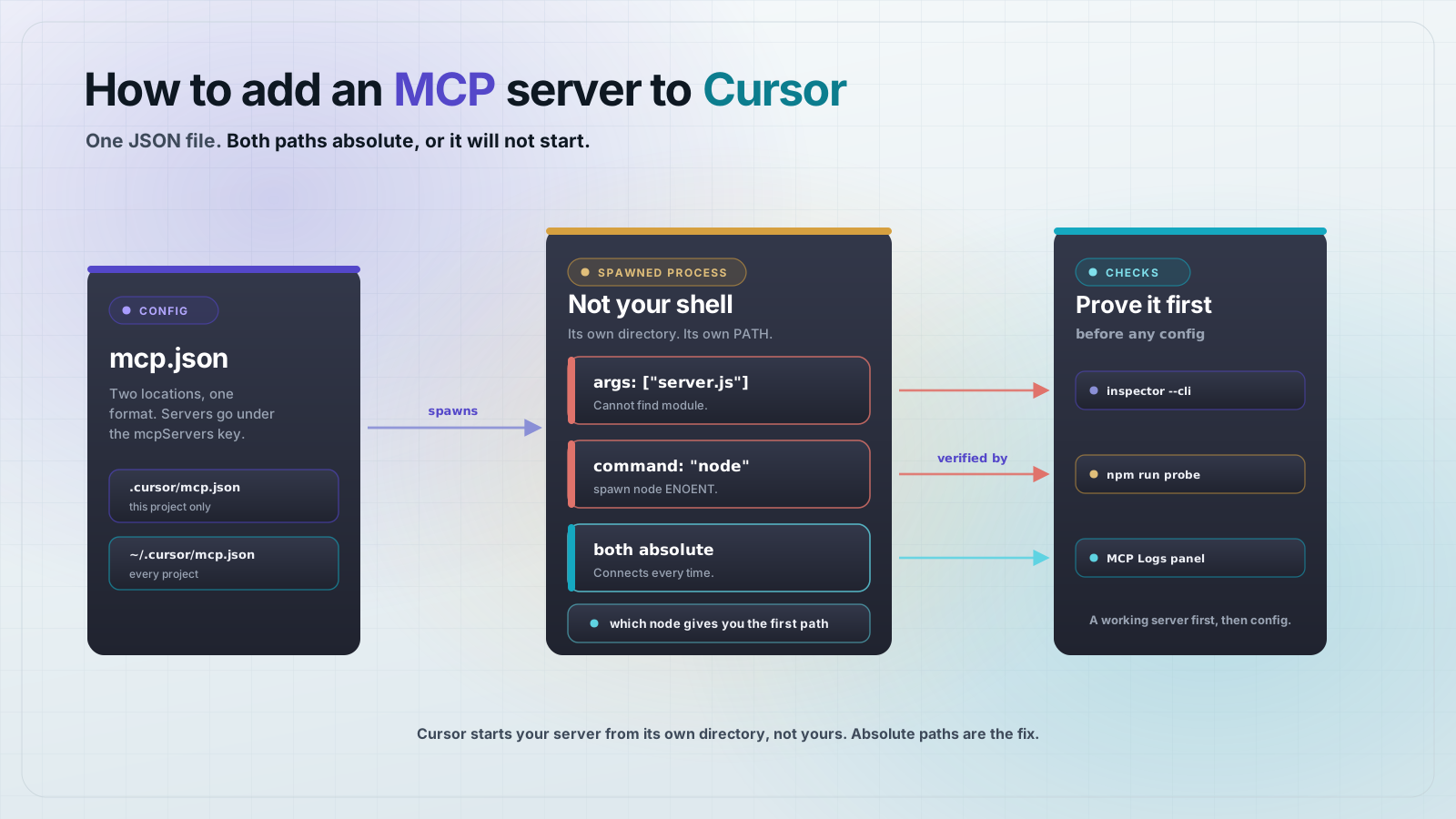
On macOS that file is ~/Library/Application Support/Claude/claude_desktop_config.json. Restart the app after editing it. If the server does not appear, run the binary by hand first, because a crash on startup and a bad path look identical from inside the client.
MCPOrbit takes the same binary with no file in the way. Command is /Users/you/code/semver-mcp/target/release/semver-mcp, Arguments stays empty, and there is nothing to restart. The debugging advice above gets easier as well: when the binary fails to start, MCPOrbit prints the reason above the Connect button, so a crash on startup and a bad path stop looking identical. How to add an MCP server to MCPOrbit covers the form and that output.
Frequently asked questions
Frequently asked questions
- What is the official Rust SDK for MCP?
rmcp, published on crates.io and developed in themodelcontextprotocol/rust-sdkrepository. The current stable release is 3.1.4. It supports servers and clients over stdio and streamable HTTP.- Do I need async and tokio to build an MCP server in Rust?
- Yes.
rmcpis built ontokioand the serve loop is async, so you need a runtime. A#[tokio::main]entry point with thert-multi-thread,macrosandio-stdfeatures is enough for a stdio server. - Why does my Rust MCP tool have no input schema?
- Almost always because the
schemarsfeature is not enabled onrmcp. It is not a default feature. Add it withcargo add rmcp --features schemars, and make sure your argument struct derivesJsonSchemaas well asDeserialize. - How do I return structured output from a Rust MCP tool?
- Return
Json<T>whereTderivesSerializeandJsonSchema. The SDK fills instructuredContentand generates anoutputSchemafor the tool. Returning a plainStringgives you a text content block and no output schema. - Why does my server report its name as rmcp?
- The default
serverInfois built fromenv!("CARGO_CRATE_NAME")inside the SDK, so it always resolves tormcp. Override it with.with_server_info(Implementation::new(env!("CARGO_PKG_NAME"), env!("CARGO_PKG_VERSION")))in yourget_infoimplementation. - Is Rust a good choice for an MCP server?
- It is a good choice when you want a single dependency-free binary, strict argument typing, or you are wrapping an existing Rust library. For a thin wrapper around an HTTP API, TypeScript or Python will get you there faster.
The short version: one struct for the arguments, one for the result, #[tool] on the method and #[tool_router] on the block. The schema is derived from your types, so it cannot drift from the code that reads it. Override server_info before you ship, and remember that stdout belongs to the protocol.
About the author
Mark
Head of Marketing, MCPOrbit
Mark leads marketing at MCPOrbit, the free desktop client for the Model Context Protocol. He writes the build-it and reliability guides, and the code in them is run before it ships.