Field notes
How to build an MCP server in Go
Build an MCP server in Go with the official SDK: struct tags become the tool schema, and go build gives you one binary. Tested on go-sdk v1.7.0 and Go 1.27.
Mark
Head of Marketing, MCPOrbit
- Published
- Updated
- · Updated
- Read time
- · 9 min read
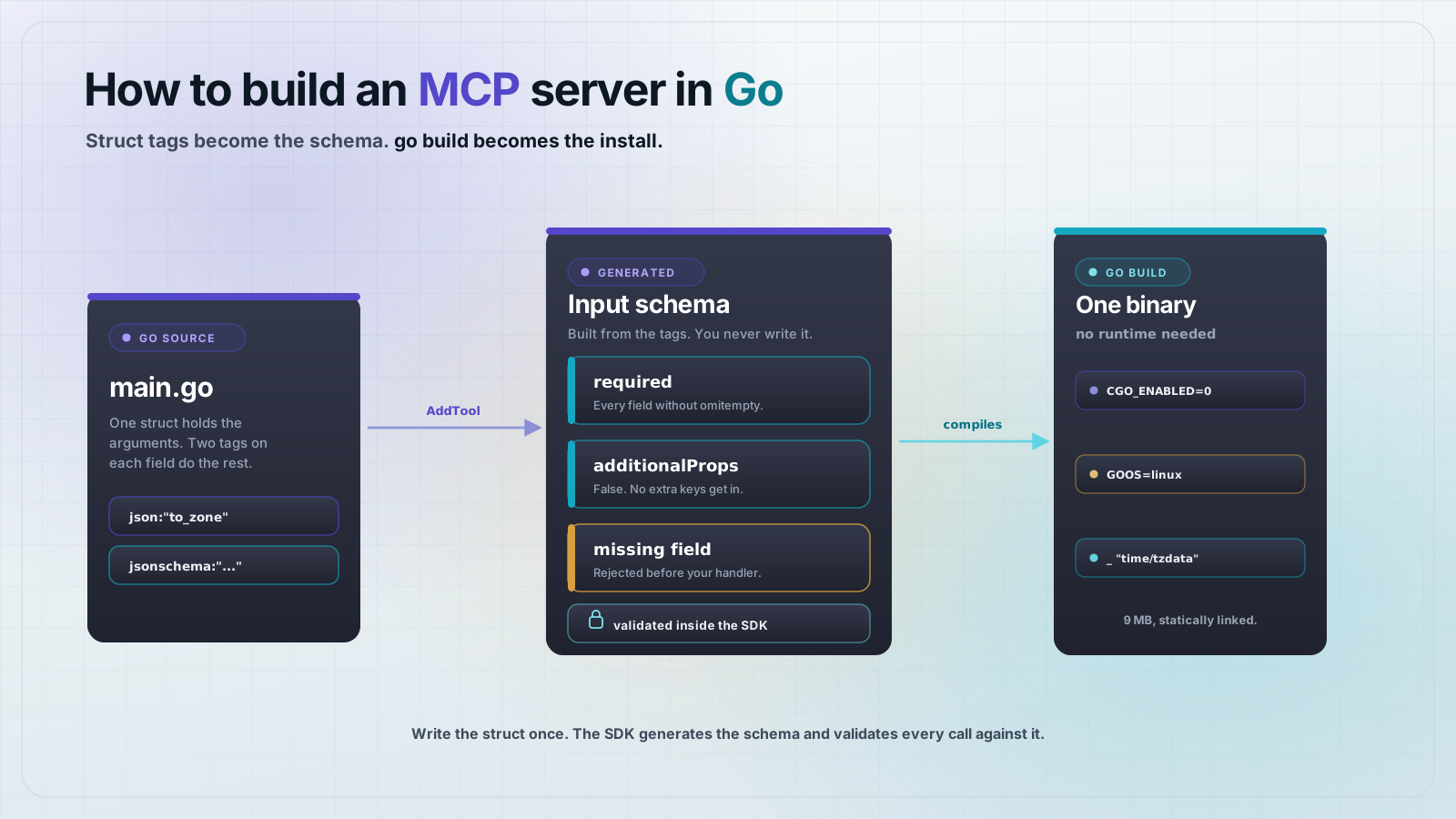
Build a Model Context Protocol (MCP) server in Go with the official github.com/modelcontextprotocol/go-sdk: define a plain Go struct for the tool's arguments, pass a normal function to mcp.AddTool, and call server.Run with an mcp.StdioTransport. The SDK derives the JSON Schema from your struct tags, validates every incoming call against it, and go build gives you one binary with no runtime to install.
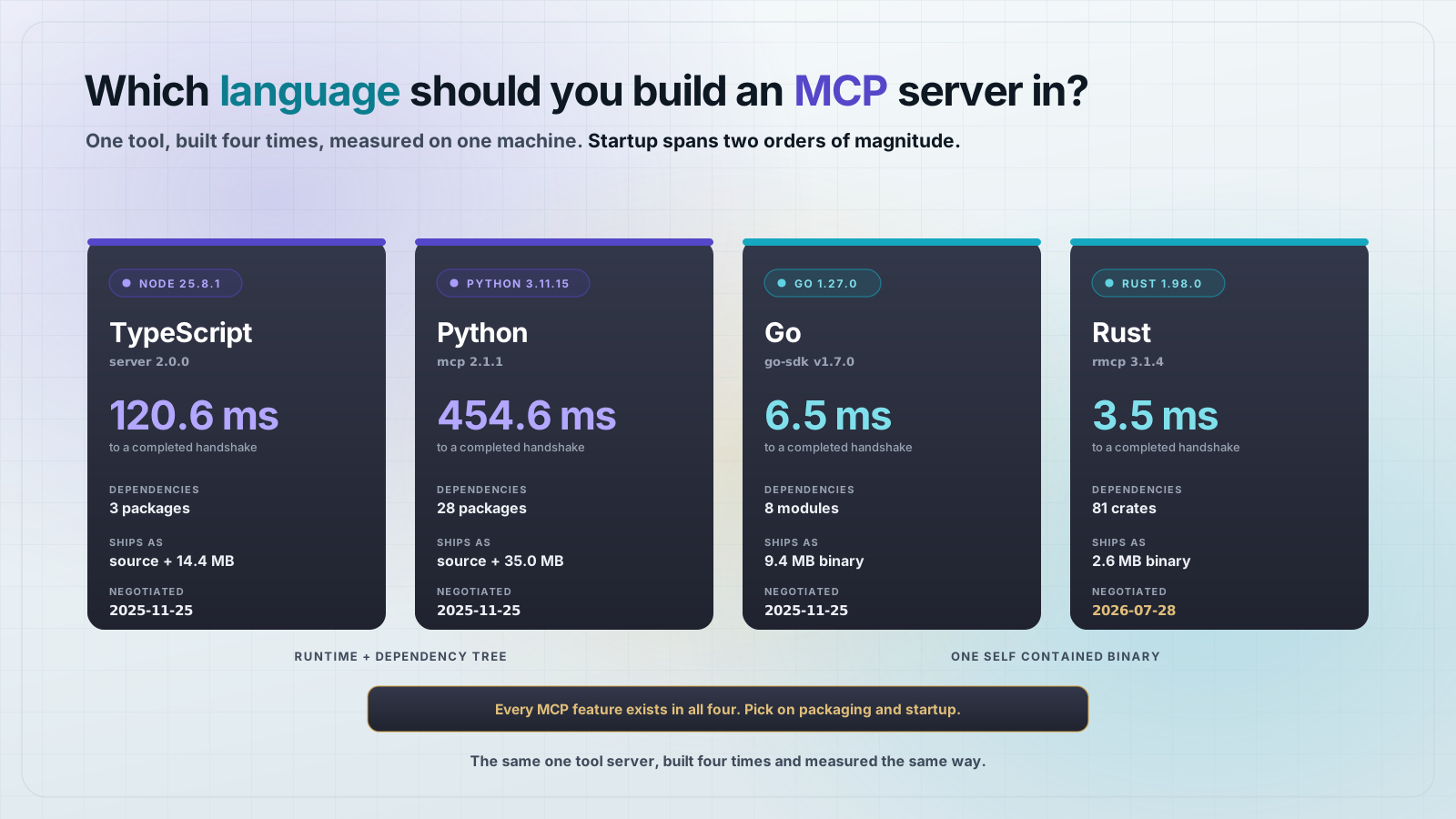
Go is the third serious option for MCP servers after TypeScript and Python, and it is the one that changes how you ship. A Node or Python server is a directory of source plus a package manager plus an interpreter that has to already be on the machine. A Go server is a single executable. That difference shows up the moment you hand the server to someone else or run it in a container.
What do you need to build an MCP server in Go?
Go 1.21 or newer and one dependency. Everything in this post was built and run on Go 1.27.0 with go-sdk v1.7.0. Start a module and add the SDK.
mkdir timezone-mcp && cd timezone-mcp
go mod init example.com/timezone
go get github.com/modelcontextprotocol/go-sdk@v1.7.0
That writes a go.mod with the SDK as your only direct requirement. The indirect list is what the SDK itself pulls in, mostly the JSON Schema generator that makes AddTool work.
module example.com/timezone

go 1.27.0

require github.com/modelcontextprotocol/go-sdk v1.7.0

require (
	github.com/google/jsonschema-go v0.4.3 // indirect
	github.com/segmentio/asm v1.1.3 // indirect
	github.com/segmentio/encoding v0.5.4 // indirect
	github.com/yosida95/uritemplate/v3 v3.0.2 // indirect
	golang.org/x/oauth2 v0.35.0 // indirect
	golang.org/x/sync v0.20.0 // indirect
	golang.org/x/sys v0.41.0 // indirect
	golang.org/x/time v0.15.0 // indirect
)
How do you define an MCP tool in Go?
You define two structs and one function. The input struct is the tool's arguments, the output struct is its result, and the function is the handler. This is the part of the Go SDK that is genuinely nicer than the alternatives: there is no schema builder API to learn, because the schema comes from tags you were going to write anyway.
type ConvertInput struct {
	Time     string `json:"time" jsonschema:"a wall clock time as YYYY-MM-DD HH:MM"`
	FromZone string `json:"from_zone" jsonschema:"IANA zone the time is written in, for example Europe/Berlin"`
	ToZone   string `json:"to_zone" jsonschema:"IANA zone to convert into, for example America/New_York"`
}

type ConvertOutput struct {
	Converted string `json:"converted" jsonschema:"the converted wall clock time"`
	Offset    string `json:"offset" jsonschema:"UTC offset of the target zone at that instant"`
	Abbrev    string `json:"abbrev" jsonschema:"zone abbreviation at that instant, for example EDT"`
}
The json tag names the field in the protocol. The jsonschema tag becomes its description, which is the text the model reads when it decides whether to call your tool. Treat those descriptions as prompt engineering, not documentation. Write them for a reader who has never seen your code.
The handler signature is fixed. It takes a context.Context, the raw *mcp.CallToolRequest, and your typed input. It returns a *mcp.CallToolResult, your typed output, and an error.
func convertTime(ctx context.Context, req *mcp.CallToolRequest, in ConvertInput) (*mcp.CallToolResult, ConvertOutput, error) {
	// ...
	return nil, ConvertOutput{
		Converted: local.Format(layout),
		Offset:    fmt.Sprintf("%+03d:%02d", seconds/3600, (seconds%3600)/60),
		Abbrev:    abbrev,
	}, nil
}
Note the nil in the first return position. You almost never build a CallToolResult by hand. Return your typed struct and the SDK serializes it into both halves of the response.
What does the full Go MCP server look like?
One file. Create main.go with this, and the server is finished.
// main.go
package main

import (
	"context"
	"fmt"
	"log"
	"os"
	"time"

	// Embeds the IANA time zone database in the binary so LoadLocation works
	// on a machine that has no zoneinfo files of its own.
	_ "time/tzdata"

	"github.com/modelcontextprotocol/go-sdk/mcp"
)

// logf writes to stderr. On stdio, stdout belongs to the protocol.
func logf(format string, args ...any) {
	fmt.Fprintf(os.Stderr, "[timezone] "+format+"\n", args...)
}

type ConvertInput struct {
	Time     string `json:"time" jsonschema:"a wall clock time as YYYY-MM-DD HH:MM"`
	FromZone string `json:"from_zone" jsonschema:"IANA zone the time is written in, for example Europe/Berlin"`
	ToZone   string `json:"to_zone" jsonschema:"IANA zone to convert into, for example America/New_York"`
}

type ConvertOutput struct {
	Converted string `json:"converted" jsonschema:"the converted wall clock time"`
	Offset    string `json:"offset" jsonschema:"UTC offset of the target zone at that instant"`
	Abbrev    string `json:"abbrev" jsonschema:"zone abbreviation at that instant, for example EDT"`
}

const layout = "2006-01-02 15:04"

func convertTime(ctx context.Context, req *mcp.CallToolRequest, in ConvertInput) (*mcp.CallToolResult, ConvertOutput, error) {
	logf("convert_time %q %s -> %s", in.Time, in.FromZone, in.ToZone)

	from, err := time.LoadLocation(in.FromZone)
	if err != nil {
		return nil, ConvertOutput{}, fmt.Errorf("unknown from_zone %q", in.FromZone)
	}
	to, err := time.LoadLocation(in.ToZone)
	if err != nil {
		return nil, ConvertOutput{}, fmt.Errorf("unknown to_zone %q", in.ToZone)
	}

	t, err := time.ParseInLocation(layout, in.Time, from)
	if err != nil {
		return nil, ConvertOutput{}, fmt.Errorf("time must look like 2026-09-11 14:30")
	}

	local := t.In(to)
	abbrev, seconds := local.Zone()

	return nil, ConvertOutput{
		Converted: local.Format(layout),
		Offset:    fmt.Sprintf("%+03d:%02d", seconds/3600, (seconds%3600)/60),
		Abbrev:    abbrev,
	}, nil
}

func main() {
	server := mcp.NewServer(&mcp.Implementation{
		Name:    "timezone",
		Version: "1.0.0",
	}, nil)

	mcp.AddTool(server, &mcp.Tool{
		Name:        "convert_time",
		Title:       "Convert time between zones",
		Description: "Convert a wall clock time from one IANA time zone to another.",
	}, convertTime)

	logf("starting on stdio")
	if err := server.Run(context.Background(), &mcp.StdioTransport{}); err != nil {
		log.Fatalf("server failed: %v", err)
	}
}
The logf helper at the top is the one thing to copy into every Go MCP server you write. On stdio the client reads your stdout as a stream of JSON-RPC frames, so a stray fmt.Println writes into the protocol. Define logf on os.Stderr once, before you write your first tool, and the problem never comes up.
How do you run and test a Go MCP server?
Build it, then point MCP Inspector at the binary. Inspector does not care that the server is Go. It spawns a process and speaks stdio, which is the whole point of the transport.
go build -o timezone-mcp .

npx @modelcontextprotocol/inspector@2.4.0 --cli ./timezone-mcp \
  --method tools/call \
  --tool-name convert_time \
  --tool-arg time="2026-09-11 14:30" \
  --tool-arg from_zone=Europe/Berlin \
  --tool-arg to_zone=Asia/Tokyo
[timezone] starting on stdio
[timezone] convert_time "2026-09-11 14:30" Europe/Berlin -> Asia/Tokyo
{
"content": [
{
"type": "text",
"text": "{\"abbrev\":\"JST\",\"converted\":\"2026-09-11 21:30\",\"offset\":\"+09:00\"}"
}
],
"structuredContent": {
"abbrev": "JST",
"converted": "2026-09-11 21:30",
"offset": "+09:00"
}
}Two lines of stderr, then the result. The structuredContent object is your ConvertOutput struct. The content array is the same data as a JSON string, because clients that predate structured output still need something to show. You wrote neither of them.
How do you drive the server from a Go client?
The same module gives you a client. This is worth thirty lines because it runs the real handshake, it runs in your test loop, and it prints the generated schema so you can see exactly what the model will see.
// cmd/probe/main.go
package main

import (
	"context"
	"encoding/json"
	"fmt"
	"log"
	"os"
	"os/exec"

	"github.com/modelcontextprotocol/go-sdk/mcp"
)

func main() {
	ctx := context.Background()

	client := mcp.NewClient(&mcp.Implementation{Name: "probe", Version: "1.0.0"}, nil)

	cmd := exec.Command("./timezone-mcp")
	cmd.Stderr = os.Stderr // let the server's logs through

	session, err := client.Connect(ctx, &mcp.CommandTransport{Command: cmd}, nil)
	if err != nil {
		log.Fatalf("connect: %v", err)
	}
	defer session.Close()

	tools, err := session.ListTools(ctx, nil)
	if err != nil {
		log.Fatalf("list tools: %v", err)
	}
	for _, t := range tools.Tools {
		fmt.Printf("tool: %s - %s\n", t.Name, t.Description)
		schema, _ := json.MarshalIndent(t.InputSchema, "", "  ")
		fmt.Printf("input schema: %s\n", schema)
	}

	res, err := session.CallTool(ctx, &mcp.CallToolParams{
		Name: "convert_time",
		Arguments: map[string]any{
			"time":      "2026-09-11 14:30",
			"from_zone": "Europe/Berlin",
			"to_zone":   "America/New_York",
		},
	})
	if err != nil {
		log.Fatalf("call tool: %v", err)
	}
	out, _ := json.MarshalIndent(res, "", "  ")
	fmt.Printf("result: %s\n", out)

	// Now a bad zone, to see how the SDK reports a handler error.
	bad, err := session.CallTool(ctx, &mcp.CallToolParams{
		Name: "convert_time",
		Arguments: map[string]any{
			"time":      "2026-09-11 14:30",
			"from_zone": "Europe/Berlin",
			"to_zone":   "Mars/Olympus_Mons",
		},
	})
	if err != nil {
		fmt.Printf("transport error: %v\n", err)
	} else {
		out, _ := json.MarshalIndent(bad, "", "  ")
		fmt.Printf("bad zone result: %s\n", out)
	}

	// And a missing required argument, to see schema validation fire.
	missing, err := session.CallTool(ctx, &mcp.CallToolParams{
		Name:      "convert_time",
		Arguments: map[string]any{"time": "2026-09-11 14:30"},
	})
	if err != nil {
		fmt.Printf("transport error: %v\n", err)
	} else {
		out, _ := json.MarshalIndent(missing, "", "  ")
		fmt.Printf("missing arg result: %s\n", out)
	}
}
go build -o probe ./cmd/probe
./probe[timezone] starting on stdio
tool: convert_time - Convert a wall clock time from one IANA time zone to another.
input schema: {
"additionalProperties": false,
"properties": {
"from_zone": {
"description": "IANA zone the time is written in, for example Europe/Berlin",
"type": "string"
},
"time": {
"description": "a wall clock time as YYYY-MM-DD HH:MM",
"type": "string"
},
"to_zone": {
"description": "IANA zone to convert into, for example America/New_York",
"type": "string"
}
},
"required": [
"time",
"from_zone",
"to_zone"
],
"type": "object"
}That schema was generated, not written. Every field is required because none of them is a pointer or carries omitempty, and additionalProperties is false so a client cannot smuggle in extra keys. If you want an optional argument, make the field a pointer or tag it json:"foo,omitempty".
What happens when a tool call fails?
Two different failures, two different paths, and the distinction matters. The probe above calls the tool with a time zone that does not exist, and then with two required arguments missing.
bad zone result: {
  "content": [
    {
      "type": "text",
      "text": "unknown to_zone \"Mars/Olympus_Mons\""
    }
  ],
  "isError": true
}

missing arg result: {
  "content": [
    {
      "type": "text",
      "text": "validating \"arguments\": validating root: required: missing properties: [\"from_zone\" \"to_zone\"]"
    }
  ],
  "isError": true
}
The first came from your handler returning an error. The SDK caught it, put the message in the result, and set isError. The session stayed open. The model reads that message and can try again, which is why your error strings should say what to do, not just what broke.
The second never reached the handler. The SDK validated the arguments against the generated schema and rejected the call before convertTime ran. You get that for free by using the generic AddTool, and it is the main reason not to drop down to the lower-level API.
Why ship an MCP server as a Go binary?
Because the install instruction becomes a file path. Set CGO_ENABLED=0 and Go produces a statically linked executable that you can cross-compile from a Mac for a Linux box without a toolchain, a container, or a second machine.
CGO_ENABLED=0 GOOS=linux GOARCH=amd64 go build -o timezone-linux .
file timezone-linux
# timezone-linux: ELF 64-bit LSB executable, x86-64, statically linked, Go BuildID=...
That binary is 9 MB and depends on nothing. Copy it into a scratch container and it runs. There is no node_modules to restore and no Python version to match, which is most of what goes wrong when an MCP server works locally and not on the host machine.
The time zone database is the exception worth knowing about, and this server hits it directly. time.LoadLocation normally reads zoneinfo files from the host. In a minimal container there are none, so LoadLocation("Europe/Berlin") fails at runtime on a server that worked perfectly on your laptop. The blank import at the top of main.go fixes it.
import (
	// Embeds the IANA time zone database in the binary so LoadLocation works
	// on a machine that has no zoneinfo files of its own.
	_ "time/tzdata"
)
It is not free, but it is cheap. Building this server with and without that one line is a difference of 412,976 bytes, about 403 KB on a 9 MB binary. For a server that answers time zone questions, paying 403 KB to remove a class of works-on-my-machine failure is not a close call.
How do you add a Go MCP server to Claude Desktop?
Point command at the binary with an absolute path. There are no args because there is no interpreter to invoke, which is the shortest MCP server entry you will ever write.
{
  "mcpServers": {
    "timezone": {
      "command": "/Users/you/timezone-mcp/timezone-mcp"
    }
  }
}
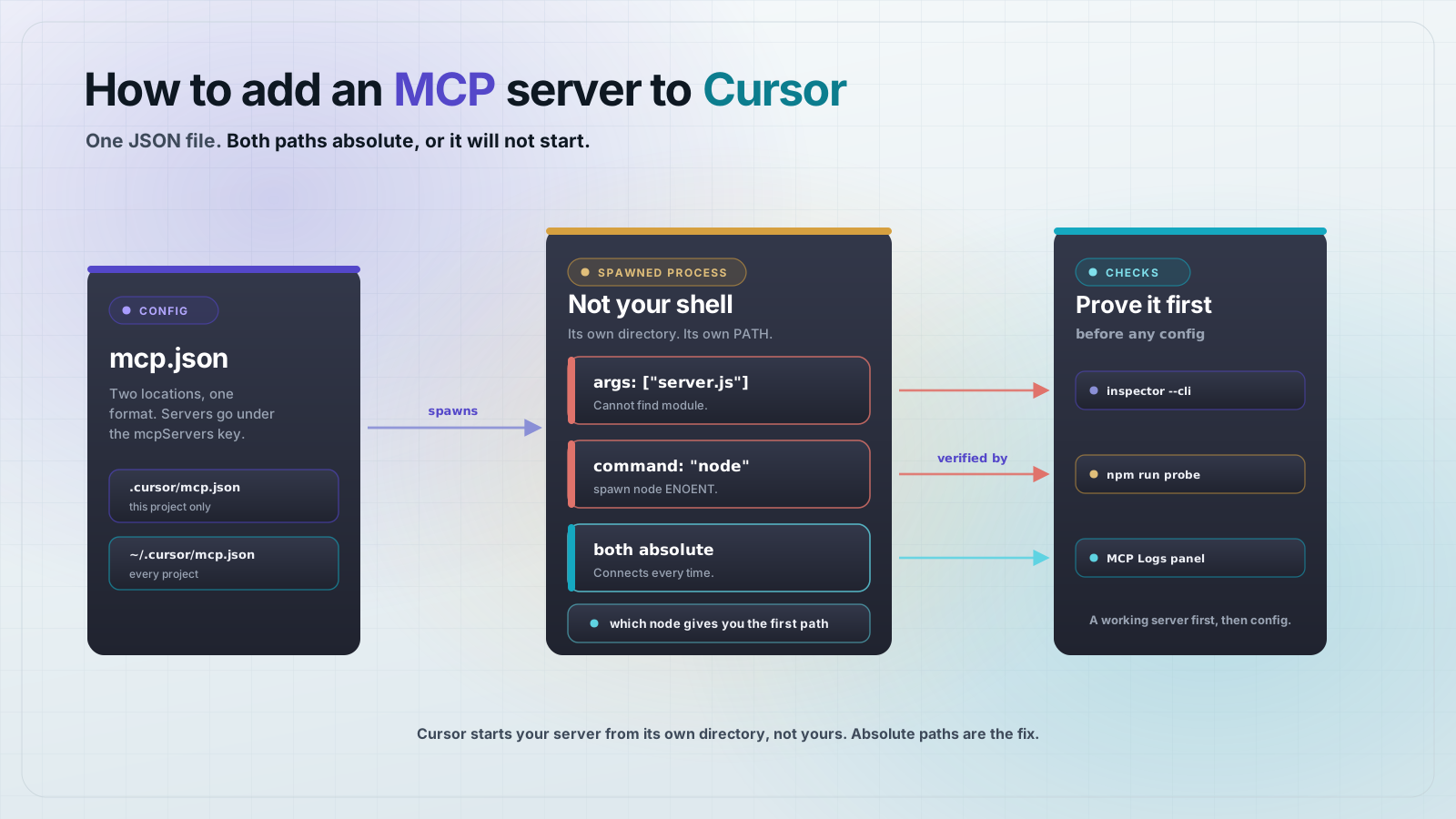
On macOS that file is ~/Library/Application Support/Claude/claude_desktop_config.json. Use the absolute path. The client does not launch the server from your project directory, so a relative path resolves somewhere you did not expect and the server never starts.
A compiled binary is the shortest case in MCPOrbit too. Command is the absolute path, /Users/you/timezone-mcp/timezone-mcp, and Arguments stays empty, because there is no interpreter to invoke. Name and Command are the only fields a local server needs, and there is no config file in the picture to point at the wrong directory. How to add an MCP server to MCPOrbit shows where that form lives.
Frequently asked questions
Frequently asked questions
- Which Go SDK should I use for MCP?
- The official one:
github.com/modelcontextprotocol/go-sdk. It is maintained in the modelcontextprotocol organization alongside the TypeScript and Python SDKs. This post was built on v1.7.0 with Go 1.27.0. - Do I have to write a JSON Schema for my MCP tool in Go?
- No. The generic
mcp.AddToolfunction reads your argument struct'sjsonandjsonschematags and generates the schema, including the required list andadditionalProperties: false. The SDK also validates incoming calls against it before your handler runs. - How do I log from a Go MCP server without breaking it?
- Write to stderr.
fmt.Fprintf(os.Stderr, ...)or the standardlogpackage are both safe.fmt.Printlnandfmt.Printfwrite to stdout, which on stdio is the channel carrying JSON-RPC frames. - How do I return an error from an MCP tool in Go?
- Return a non-nil
errorfrom the handler. The SDK turns it into a tool result withisError: trueand the error text incontent, and the session stays open. Write the message for the model, so say what a valid input looks like. - Can I ship a Go MCP server as a single binary?
- Yes, and it is the main reason to pick Go.
CGO_ENABLED=0 go buildproduces a statically linked executable with no runtime dependency, and you can cross-compile for another operating system withGOOSandGOARCH. If your server uses time zones, add_ "time/tzdata"so it does not need the host's zoneinfo files. - Does MCP Inspector work with a Go server?
- Yes. Inspector spawns a process and speaks stdio, so it does not care what language the server is written in. Run
npx @modelcontextprotocol/inspector@2.4.0 --cli ./your-binary --method tools/listagainst the compiled binary.
The short version: one struct for the arguments, one struct for the result, one function, and mcp.AddTool to wire them together. Log to stderr, return errors instead of panicking, and build with CGO_ENABLED=0 so what you hand someone is a file rather than a setup guide.
A compiled Go server is the easiest kind to hand to someone, because there is nothing to install alongside it. Connect the binary in MCPOrbit and call each tool by hand, with its full input schema in front of you and the raw JSON result underneath, so you can see what the model saw when a call went wrong.
About the author
Mark
Head of Marketing, MCPOrbit
Mark leads marketing at MCPOrbit, the free desktop client for the Model Context Protocol. He writes the build-it and reliability guides, and the code in them is run before it ships.