Tutorial
How to build an MCP server for Redis
Expose Redis over MCP: read all five core types, page with SCAN instead of KEYS, and carry each key's TTL in the payload, because the protocol has no field for it.
Mark
Head of Marketing, MCPOrbit
- Published
- Updated
- · Updated
- Read time
- · 12 min read
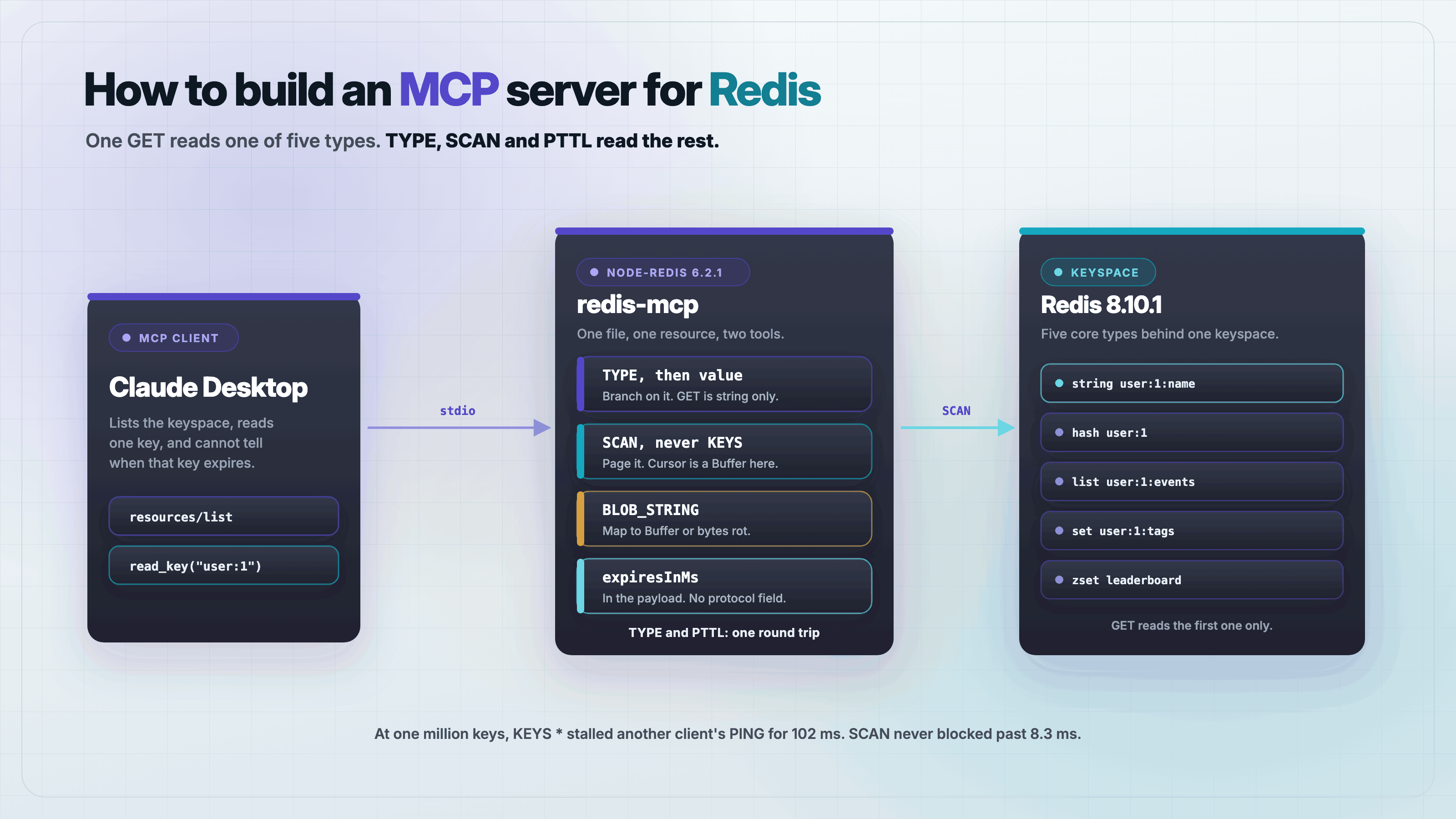
To build a Model Context Protocol (MCP) server for Redis, read the key's type before its value, page the keyspace with SCAN instead of KEYS, map BLOB_STRING to Buffer so binary values survive, and put each key's remaining TTL in the response body yourself. A get tool alone reads one of Redis's five core types and blocks the server on any keyspace worth reading.
Redis is not a table you can SELECT from. It is five different data structures behind one keyspace, and half the useful information about a key is not in its value at all. It is in the type and the TTL. That shapes the server: this one leans on resources rather than tools, because a Redis key is a thing you read, not a question you ask.
What you need before you start
Node.js 20 or newer and a Redis you can write to. A throwaway instance on a spare port is enough, and it does not need to persist anything.
brew install redis
redis-server --port 6399 --daemonize yes --save '' --appendonly no

mkdir redis-mcp && cd redis-mcp
npm init -y
npm pkg set type=module
npm install @modelcontextprotocol/sdk@1.30.0 redis@6.2.1 zod@3.25.76
Seed one key of each core type. Every example below reads these.
redis-cli -p 6399 SET  user:1:name ada
redis-cli -p 6399 HSET user:1 name ada plan pro
redis-cli -p 6399 RPUSH user:1:events login export
redis-cli -p 6399 SADD user:1:tags beta admin
redis-cli -p 6399 ZADD leaderboard 10 ada 7 grace
redis-cli -p 6399 SET  session:abc active EX 30
Why is one get tool not enough for Redis?
Because GET is a string command. Point it at the six keys above and it reads one of them:
user:1:name      type=string  GET -> "ada"
user:1           type=hash    GET -> THREW WRONGTYPE Operation against a key holding the wrong kind of value
user:1:events    type=list    GET -> THREW WRONGTYPE Operation against a key holding the wrong kind of value
user:1:tags      type=set     GET -> THREW WRONGTYPE Operation against a key holding the wrong kind of value
leaderboard      type=zset    GET -> THREW WRONGTYPE Operation against a key holding the wrong kind of value
A model asked to look at user:1 gets an error that names no fix. So the read has to start with TYPE and branch. That is the core of the server:
const [type, pttl] = await Promise.all([redis.type(key), redis.pTTL(key)]);
if (type === 'none') return { key, exists: false };

switch (type) {
  case 'string': value = decode(await redis.get(key)); break;
  case 'hash':   value = await redis.hGetAll(key); break;
  case 'list':   value = await redis.lRange(key, 0, 99); break;
  case 'set':    value = await redis.sMembers(key); break;
  case 'zset':   value = await redis.zRangeWithScores(key, 0, 99); break;
}Why you must not use KEYS to list the keyspace
KEYS * is the obvious way to answer resources/list, and it is the one command most likely to get your server banned from a production Redis. Redis runs commands on a single thread, so KEYS does not just take time, it stops everything else. Measured against a second connection that issues PING the instant KEYS starts:
  100000 keys | KEYS   13 ms | other client's PING blocked  13 ms | SCAN total  28 ms, worst call 0.4 ms,  100 round trips
  500000 keys | KEYS   63 ms | other client's PING blocked  22 ms | SCAN total 134 ms, worst call 6.3 ms,  500 round trips
 1000000 keys | KEYS  175 ms | other client's PING blocked 102 ms | SCAN total 331 ms, worst call 8.3 ms, 1000 round trips
SCAN is slower in total and that is the point. It trades 331 ms of wall time for a worst single block of 8.3 ms, so nothing else queues behind it. On a local instance with no other load the totals look close. On a shared production Redis the middle column is the one that pages people.
async function scanKeys(match, limit) {
  const keys = [];
  let cursor = '0';
  do {
    const r = await redis.scan(cursor, { MATCH: match, COUNT: 500 });
    cursor = r.cursor;
    for (const k of r.keys) {
      keys.push(k);
      if (keys.length >= limit) return { keys, truncated: cursor !== '0' };
    }
  } while (cursor !== '0');
  return { keys, truncated: false };
}
That is the correct loop, and in a moment it will stop terminating. Not because of anything in it.
The binary fix that breaks the scan
Redis values are byte strings. node-redis decodes them as UTF-8 by default, which is fine until someone caches a thumbnail or a protobuf. Write eight bytes of a PNG header and read them back:
wrote               : 89504e470d0a1a0a (8 bytes)
GET default -> utf8 : efbfbd504e470d0a1a0a (10 bytes)
bytes preserved     : false
0x89 is not valid UTF-8, so it was replaced with U+FFFD, which is three bytes. The value did not fail to load. It came back longer than it went in, and nothing raised. The documented fix is a type mapping:
import { createClient, RESP_TYPES } from 'redis';

const redis = await createClient({ url: REDIS_URL })
  .withTypeMapping({ [RESP_TYPES.BLOB_STRING]: Buffer })
  .connect();
GET Buffer mapping : 89504e470d0a1a0a (8 bytes)
bytes preserved : trueCorrect. It also breaks scanKeys, because the SCAN cursor is a blob string too, and the mapping applies to every blob string the connection returns:
plain          | cursor: "4"                       | typeof: string | cursor !== '0': true
               | final cursor: "0"                 | terminates? true

Buffer-mapped  | cursor: {"type":"Buffer","data":[52]} | typeof: object | cursor !== '0': true
               | final cursor: {"type":"Buffer","data":[48]} | terminates? false
Byte 48 is the character 0. The final cursor is right, but it is a Buffer, and a Buffer is never strictly equal to a string. So while (cursor !== '0') is always true. The loop restarts from the beginning of the keyspace and runs until it hits the limit guard, which is the only reason it terminates at all.
The failure is quiet, which is what makes it worth naming. Asking a seven key database for user:* returned this:
{
  "keys": [
    "user:1:tags", "user:1:events", "user:1", "user:1:name",
    "user:1:tags", "user:1:events", "user:1", "user:1:name",
    "user:1:tags", "user:1:events"
  ],
  "truncated": true
}
Ten keys from a database holding four matches, each repeated, and a truncated flag saying there are more. Every field of that response is wrong and none of it threw. resources/list had the same problem and reported 100 resources for a database with 7 keys.
How do you tell a model that a key is about to expire?
This is the part that has no protocol answer today. A Redis key can vanish between the read and the moment the model acts on it. Set a two second TTL and watch it:
PTTL at read time : 2000 ms
value at read time: active
value after 2.2s  : null
EXISTS            : 0
The 2026-07-28 spec revision addresses exactly this with SEP-2549, which puts ttlMs and cacheScope on resources/read. The TypeScript SDK has not caught up. On version 1.30.0, grep -rl 'ttlMs\|cacheScope' across the whole installed package matches zero files, ReadResourceResultSchema is ResultSchema.extend({ contents }) and nothing else, and LATEST_PROTOCOL_VERSION is 2025-11-25.
So there is nowhere to put the TTL except the body. Send it as data, with the read time next to it, and let the model do the arithmetic:
{
  "key": "session:abc",
  "exists": true,
  "type": "string",
  "expiresInMs": 29843,
  "expires": "2026-08-28T15:30:53.131Z",
  "readAt": "2026-08-28T15:30:23.288Z",
  "value": "active"
}
PTTL returns -1 for a key with no expiry and -2 for a key that does not exist, so both need translating before they reach a model. -1 becomes "never". -2 never appears, because TYPE already returned none and the read short circuits to exists: false.
The complete server
One file, server.mjs. It registers one resource template and two tools, and every fix above is in it.
import { McpServer, ResourceTemplate } from '@modelcontextprotocol/sdk/server/mcp.js';
import { StdioServerTransport } from '@modelcontextprotocol/sdk/server/stdio.js';
import { createClient, RESP_TYPES } from 'redis';
import { z } from 'zod';

const REDIS_URL = process.env.REDIS_URL ?? 'redis://127.0.0.1:6379';
const SCAN_PAGE = 500;
const MAX_VALUE_BYTES = 64 * 1024;

const redis = await createClient({ url: REDIS_URL })
  .withTypeMapping({ [RESP_TYPES.BLOB_STRING]: Buffer })
  .connect();

// A value is text only if it survives a UTF-8 round trip. Otherwise it is bytes.
function decode(buf) {
  if (!Buffer.isBuffer(buf)) return buf;
  if (buf.length > MAX_VALUE_BYTES) {
    return { truncated: true, bytes: buf.length, base64: buf.subarray(0, MAX_VALUE_BYTES).toString('base64') };
  }
  const text = buf.toString('utf8');
  return Buffer.from(text, 'utf8').equals(buf)
    ? text
    : { encoding: 'base64', base64: buf.toString('base64') };
}

async function readKey(key) {
  const [type, pttl] = await Promise.all([redis.type(key), redis.pTTL(key)]);
  if (type === 'none') return { key, exists: false };

  let value;
  switch (type) {
    case 'string':
      value = decode(await redis.get(key));
      break;
    case 'hash': {
      const h = await redis.hGetAll(key);
      value = Object.fromEntries(Object.entries(h).map(([k, v]) => [k, decode(v)]));
      break;
    }
    case 'list':
      value = (await redis.lRange(key, 0, 99)).map(decode);
      break;
    case 'set':
      value = (await redis.sMembers(key)).map(decode);
      break;
    case 'zset':
      value = (await redis.zRangeWithScores(key, 0, 99))
        .map(({ value: v, score }) => ({ member: decode(v), score }));
      break;
    default:
      value = null;
  }

  return {
    key,
    exists: true,
    type,
    // The protocol has no field for this on 1.30.0, so it travels in the payload.
    expiresInMs: pttl >= 0 ? pttl : null,
    expires: pttl >= 0 ? new Date(Date.now() + pttl).toISOString() : 'never',
    readAt: new Date().toISOString(),
    value
  };
}

async function scanKeys(match, limit) {
  const keys = [];
  let cursor = '0';
  do {
    const r = await redis.scan(cursor, { MATCH: match, COUNT: SCAN_PAGE });
    // The Buffer type mapping turns the cursor into a Buffer too, and
    // Buffer !== '0' is always true. Normalize it or this loop never ends.
    cursor = r.cursor.toString();
    for (const k of r.keys) {
      keys.push(typeof k === 'string' ? k : k.toString('utf8'));
      if (keys.length >= limit) return { keys, truncated: cursor !== '0' };
    }
  } while (cursor !== '0');
  return { keys, truncated: false };
}

const server = new McpServer({ name: 'redis-mcp', version: '1.0.0' });

server.registerResource(
  'redis-key',
  new ResourceTemplate('redis://key/{key}', {
    list: async () => {
      const { keys } = await scanKeys('*', 100);
      return {
        resources: keys.map(k => ({
          uri: `redis://key/${encodeURIComponent(k)}`,
          name: k,
          mimeType: 'application/json'
        }))
      };
    }
  }),
  { title: 'Redis key', description: 'One Redis key, with its type and remaining TTL' },
  async (uri, { key }) => ({
    contents: [{
      uri: uri.href,
      mimeType: 'application/json',
      text: JSON.stringify(await readKey(decodeURIComponent(key)), null, 2)
    }]
  })
);

server.registerTool(
  'scan_keys',
  {
    description: 'List Redis keys matching a glob pattern. Uses SCAN, never KEYS.',
    inputSchema: {
      match: z.string().default('*').describe('Glob pattern, for example "user:*"'),
      limit: z.number().int().min(1).max(1000).default(100)
    }
  },
  async ({ match, limit }) => ({
    content: [{ type: 'text', text: JSON.stringify(await scanKeys(match, limit), null, 2) }]
  })
);

server.registerTool(
  'read_key',
  {
    description: 'Read one Redis key of any type, with its remaining TTL.',
    inputSchema: { key: z.string() }
  },
  async ({ key }) => ({
    content: [{ type: 'text', text: JSON.stringify(await readKey(key), null, 2) }]
  })
);

await server.connect(new StdioServerTransport());
Two details are worth naming. readKey issues TYPE and PTTL in one Promise.all, which costs one round trip rather than two and measured 0.16 ms locally. And decode decides text against bytes by round tripping through UTF-8 rather than by guessing from the key name, so a JSON blob stays readable and a PNG becomes base64 without either being configured.
Test it end to end
Point the SDK's own client at the server over stdio. This is the test that catches the scan bug, because it is the only one that compares a result against a keyspace you can count.
import { Client } from '@modelcontextprotocol/sdk/client/index.js';
import { StdioClientTransport } from '@modelcontextprotocol/sdk/client/stdio.js';

const client = new Client({ name: 'probe', version: '1.0.0' });
await client.connect(new StdioClientTransport({
  command: 'node',
  args: ['server.mjs'],
  env: { ...process.env, REDIS_URL: 'redis://127.0.0.1:6399' }
}));

const res = await client.listResources();
console.log('resources:', res.resources.length);   // must equal DBSIZE

for (const key of ['user:1', 'leaderboard', 'session:abc', 'thumb:1', 'missing:key']) {
  const out = await client.callTool({ name: 'read_key', arguments: { key } });
  console.log(out.content[0].text);
}
A hash, a sorted set and a key that is not there, all through one tool:
resources: 7

{ "key": "user:1", "exists": true, "type": "hash",
  "expiresInMs": null, "expires": "never",
  "value": { "name": "ada", "plan": "pro" } }

{ "key": "leaderboard", "exists": true, "type": "zset",
  "expiresInMs": null, "expires": "never",
  "value": [ { "member": "grace", "score": 7 }, { "member": "ada", "score": 10 } ] }

{ "key": "session:abc", "exists": true, "type": "string",
  "expiresInMs": 29843, "expires": "2026-08-28T15:30:53.131Z", "value": "active" }

{ "key": "thumb:1", "exists": true, "type": "string",
  "value": { "encoding": "base64", "base64": "iVBORw0KGgo=" } }

{ "key": "missing:key", "exists": false }
The assertion that matters is the first line. resources: 7 against a DBSIZE of 7. Before the cursor fix that line read resources: 100, and every other line in the output looked exactly as correct as it does now.
Frequently asked questions
Frequently asked questions
- Should a Redis MCP server use resources or tools?
- Both, for different jobs. A key is a thing you read, so it maps to a resource template like
redis://key/{key}. Finding keys is a question with arguments, soscan_keysis a tool. Clients differ in how well they support resources, so theread_keytool exists as a fallback path to the same function. - How do I stop an MCP server from blocking Redis?
- Never call
KEYS,FLUSHALLor an unboundedLRANGE. Redis is single threaded, so a slow command blocks every other client. Measured on a million keys,KEYS *stalled another connection'sPINGfor 102 ms, whileSCANover the same keyspace never blocked for more than 8.3 ms at a time. - Why does my SCAN loop never finish with node-redis?
- You added a
Buffertype mapping for binary values. The mapping applies to theSCANcursor too, andBuffer !== '0'is always true, so the termination check never matches and the scan restarts from the beginning. Usecursor = r.cursor.toString(). - Does the MCP SDK support ttlMs and cacheScope for Redis TTLs?
- Not on
@modelcontextprotocol/sdk1.30.0. Neither field appears anywhere in the installed package,ReadResourceResultcarries onlycontents, andLATEST_PROTOCOL_VERSIONis2025-11-25. Until the SDK ships the 2026-07-28 cache hints, putexpiresInMsand areadAttimestamp in the response body. - Can I make a Redis MCP server read-only?
- Yes, and do it in Redis rather than in your code. Create a user with an ACL that allows only read commands, for example
ACL SETUSER mcp_ro on >secret ~* +@read +scan -keys, and connect as that user. A server that simply does not register a write tool is one code change away from having one. - How is this different from using Redis inside an MCP server?
- Rate limiting or caching with Redis makes it your server's private backing store, and no client ever sees a key. This server does the opposite: Redis is the subject, and the keyspace is what you are exposing. The hard parts are different too, since a backing store has a schema you chose and a real keyspace does not.
The server above is a complete, working Redis MCP server. The bugs it routes around share a shape: Redis tells you what went wrong through a type error, a cursor or a byte count rather than an exception, and a server that does not check those things returns a confident wrong answer instead of failing.
Add the server to MCPOrbit and call your Redis tools by hand. You see every response and every error in full, without building the logging first.
About the author
Mark
Head of Marketing, MCPOrbit
Mark leads marketing at MCPOrbit, the free desktop client for the Model Context Protocol. He writes the build-it and reliability guides, and the code in them is run before it ships.