MCP Tutorials
How to Serve Resources From an MCP Server
Expose read-only context from an MCP server with resources. Build a notes server using a fixed resource and a URI template, tested end to end on Node 25.
Mark
Head of Marketing, MCPOrbit
- Published
- Updated
- · Updated
- Read time
- · 9 min read
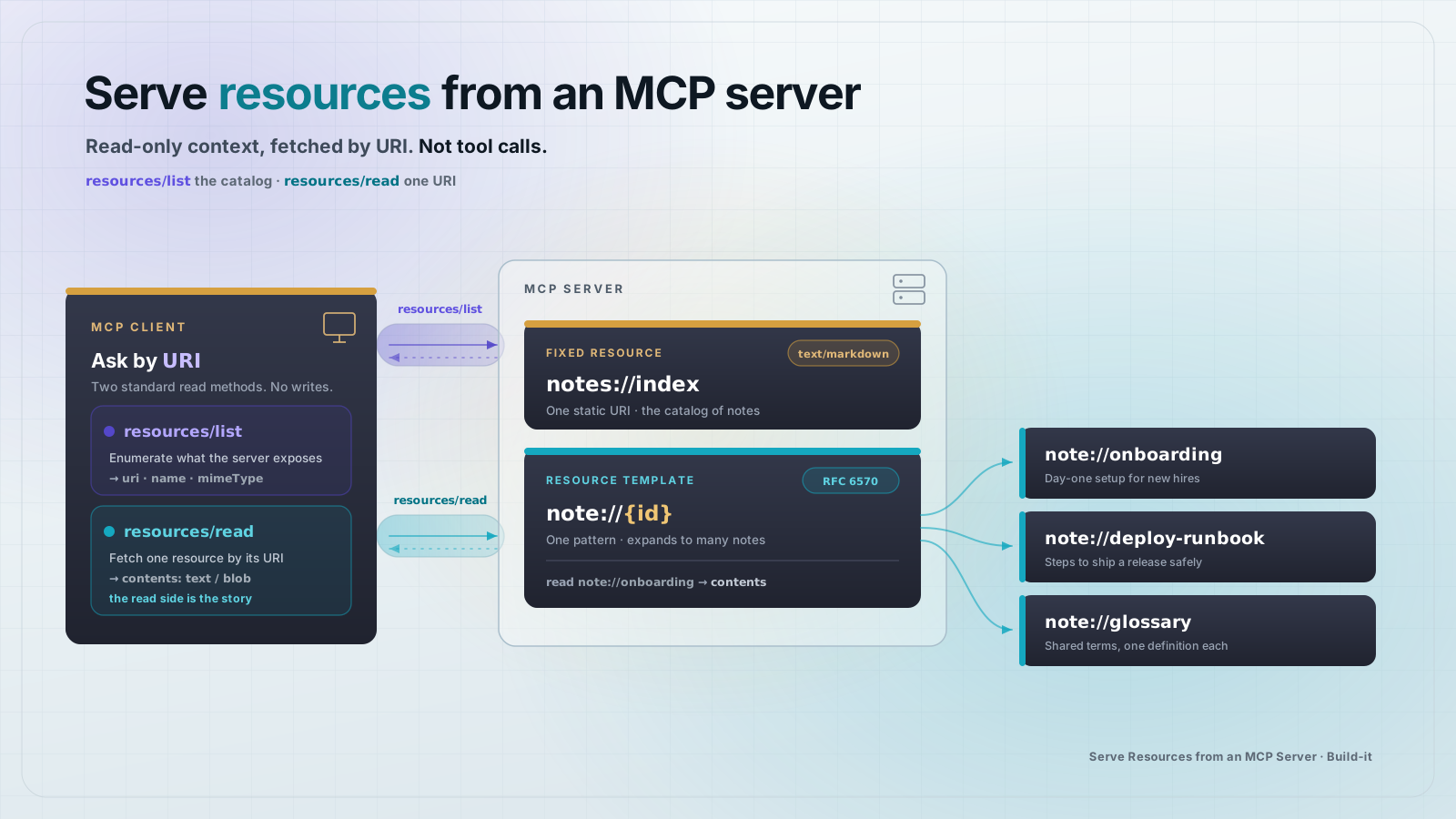
To serve resources from a Model Context Protocol (MCP) server, register each piece of read-only context with the server and return its bytes when a client asks. Resources are the read side of MCP: a client fetches them for context, and reading one never changes state.
This guide builds a small server that exposes a set of notes as MCP resources. You will use two patterns: a fixed resource at a known URI, and a URI template that serves many resources from one registration. The code runs as written on Node 25 with @modelcontextprotocol/sdk 1.30.0. Every file is inlined below, and the whole thing is tested two ways before you ship it.
When should you use a resource instead of a tool?
Reach for a resource when the client only needs to read something and reading it has no side effects. A file, a database row, a config document, an API response you want the model to see as context: these are resources. Reach for a tool when the model needs to do something that changes state or runs an action, like sending an email or writing a record.
The split matters because clients treat them differently. A host app can fetch resources quietly to build context, while tool calls usually go through a permission or confirmation step. If you model a read as a tool, you lose that distinction and push side-effect framing onto plain data.
Set up the project
Create an empty folder and add a package.json. The only direct dependency is the MCP SDK, pinned so the walkthrough stays reproducible.
{
  "name": "notes-mcp-server",
  "version": "1.0.0",
  "type": "module",
  "private": true,
  "scripts": {
    "start": "node server.js",
    "test": "node --test"
  },
  "dependencies": {
    "@modelcontextprotocol/sdk": "1.30.0"
  }
}
Install it with one command:
npm installAdd the data the server will expose
Put the content in its own module. In a real server this is your database, filesystem, or an upstream API. Here it is a small in-memory object so the example stays self-contained.
// A tiny in-memory "knowledge base" the server exposes as MCP resources.
// In a real server this would be your database, filesystem, or API.
export const notes = {
  onboarding: {
    title: "Onboarding checklist",
    body: "1. Clone the repo.\n2. Copy .env.example to .env.\n3. Run npm install.\n4. Run npm test.",
  },
  "deploy-runbook": {
    title: "Deploy runbook",
    body: "Deploys run on merge to main. Roll back with `deploy --to <sha>`. On-call owns the pager.",
  },
  glossary: {
    title: "Glossary",
    body: "MCP: Model Context Protocol. Resource: read-only context a client can fetch. Tool: an action a model can call.",
  },
};
Register a fixed resource
A fixed resource maps a single known URI to a single document. Here notes://index returns a markdown list of every note, so a client can read the index first to learn what is available. The read callback receives the requested URI as a URL and returns a contents array. Each entry carries the uri, a mimeType, and the text.
// A fixed resource at a known URI: an index of every note.
server.registerResource(
  "index",
  "notes://index",
  {
    title: "Notes index",
    description: "A markdown list of every note and its id.",
    mimeType: "text/markdown",
  },
  async (uri) => {
    const lines = Object.entries(notes).map(
      ([id, note]) => `- ${note.title} (\`note://${id}\`)`
    );
    return {
      contents: [
        { uri: uri.href, mimeType: "text/markdown", text: `# Notes\n\n${lines.join("\n")}\n` },
      ],
    };
  }
);
You choose the URI scheme. notes://index is arbitrary, it just has to be a valid URI and unique within your server. The mimeType tells the client how to interpret the bytes, text/markdown here.
Serve many resources with a URI template
You do not register one resource per note. Register a template once. A ResourceTemplate describes a URI pattern with a variable, like note://{id}. When a client reads note://glossary, the SDK matches the pattern, parses the id out as glossary, and hands it to your read callback.
The list callback is what makes the concrete notes discoverable. Without it, resources/list shows only the fixed resources, and the template appears separately under resources/templates/list. With it, each note shows up as its own entry in resources/list, so a client sees every note by URI.
// One registration serves every note. The list callback lets clients
// enumerate the concrete URIs; the read callback receives the parsed {id}.
server.registerResource(
  "note",
  new ResourceTemplate("note://{id}", {
    list: async () => ({
      resources: Object.entries(notes).map(([id, note]) => ({
        uri: `note://${id}`,
        name: note.title,
        mimeType: "text/markdown",
      })),
    }),
  }),
  { title: "Note", description: "A single note, addressed by its id.", mimeType: "text/markdown" },
  async (uri, { id }) => {
    const note = notes[id];
    if (!note) throw new Error(`No note with id "${id}"`);
    return {
      contents: [
        { uri: uri.href, mimeType: "text/markdown", text: `# ${note.title}\n\n${note.body}\n` },
      ],
    };
  }
);
The full server
Here is server.js in full. It builds the server, registers both resources, and exports a createServer factory so the tests can drive it without spawning a process. When run directly, it speaks MCP over stdio, which is how local clients like Claude Desktop launch a server.
import { McpServer, ResourceTemplate } from "@modelcontextprotocol/sdk/server/mcp.js";
import { StdioServerTransport } from "@modelcontextprotocol/sdk/server/stdio.js";
import { notes } from "./notes.js";

// Build the server and register its resources. Exported so tests can drive it
// in memory without spawning a process.
export function createServer() {
  const server = new McpServer(
    { name: "notes-kb", version: "1.0.0" },
    { capabilities: { resources: {} } }
  );

  // 1) A fixed resource at a known URI: an index of every note.
  //    A client reads this to discover what is available.
  server.registerResource(
    "index",
    "notes://index",
    {
      title: "Notes index",
      description: "A markdown list of every note and its id.",
      mimeType: "text/markdown",
    },
    async (uri) => {
      const lines = Object.entries(notes).map(
        ([id, note]) => `- ${note.title} (\`note://${id}\`)`
      );
      return {
        contents: [
          {
            uri: uri.href,
            mimeType: "text/markdown",
            text: `# Notes\n\n${lines.join("\n")}\n`,
          },
        ],
      };
    }
  );

  // 2) A templated resource: note://{id}. One registration serves every note.
  //    The list callback lets clients enumerate the concrete URIs; the read
  //    callback receives the parsed {id} variable.
  server.registerResource(
    "note",
    new ResourceTemplate("note://{id}", {
      list: async () => ({
        resources: Object.entries(notes).map(([id, note]) => ({
          uri: `note://${id}`,
          name: note.title,
          mimeType: "text/markdown",
        })),
      }),
    }),
    {
      title: "Note",
      description: "A single note, addressed by its id.",
      mimeType: "text/markdown",
    },
    async (uri, { id }) => {
      const note = notes[id];
      if (!note) {
        throw new Error(`No note with id "${id}"`);
      }
      return {
        contents: [
          {
            uri: uri.href,
            mimeType: "text/markdown",
            text: `# ${note.title}\n\n${note.body}\n`,
          },
        ],
      };
    }
  );

  return server;
}

// When run directly, talk MCP over stdio (how Claude Desktop and most clients
// launch a local server).
if (import.meta.url === `file://${process.argv[1]}`) {
  const server = createServer();
  const transport = new StdioServerTransport();
  await server.connect(transport);
}
Test it in memory
The fastest test skips the process boundary entirely. InMemoryTransport.createLinkedPair() gives you a client transport and a server transport wired directly together, so a real Client talks to your real server with no stdio and no timing flakiness. Save this as server.test.js.
import { test } from "node:test";
import assert from "node:assert/strict";
import { Client } from "@modelcontextprotocol/sdk/client/index.js";
import { InMemoryTransport } from "@modelcontextprotocol/sdk/inMemory.js";
import { createServer } from "./server.js";

// Spin up the server and an in-memory client joined by a linked transport pair.
// No process, no stdio, no flaky timing.
async function connect() {
  const server = createServer();
  const client = new Client({ name: "test", version: "1.0.0" });
  const [clientTransport, serverTransport] = InMemoryTransport.createLinkedPair();
  await Promise.all([server.connect(serverTransport), client.connect(clientTransport)]);
  return { client, server };
}

test("resources/list returns the index plus one entry per note", async () => {
  const { client } = await connect();
  const { resources } = await client.listResources();
  const uris = resources.map((r) => r.uri).sort();
  assert.deepEqual(uris, [
    "note://deploy-runbook",
    "note://glossary",
    "note://onboarding",
    "notes://index",
  ]);
});

test("reading the index lists every note", async () => {
  const { client } = await connect();
  const res = await client.readResource({ uri: "notes://index" });
  const text = res.contents[0].text;
  assert.match(text, /Onboarding checklist/);
  assert.match(text, /note:\/\/glossary/);
  assert.equal(res.contents[0].mimeType, "text/markdown");
});

test("reading a templated URI returns that note's body", async () => {
  const { client } = await connect();
  const res = await client.readResource({ uri: "note://deploy-runbook" });
  assert.match(res.contents[0].text, /Roll back with/);
  assert.equal(res.contents[0].uri, "note://deploy-runbook");
});

test("reading an unknown note surfaces an error", async () => {
  const { client } = await connect();
  await assert.rejects(() => client.readResource({ uri: "note://does-not-exist" }), /No note with id/);
});
Run it with the built-in Node test runner:
node --testAll four tests pass: the list returns the index plus one entry per note, the index lists every note, a templated URI returns the right body, and an unknown id surfaces an error.
Smoke-test the real process with the Inspector
In-memory tests prove your logic. A smoke test against the real process proves your entry point and transport work too. The MCP Inspector CLI launches your server and calls a method, no GUI needed. List everything the server exposes:
npx @modelcontextprotocol/inspector@2.0.0 --cli node server.js --method resources/listThen read one note by its URI:
npx @modelcontextprotocol/inspector@2.0.0 --cli node server.js \
  --method resources/read --uri "note://deploy-runbook"
You get back the note's markdown in a contents array. That is the same shape any MCP client receives, so once these two checks pass, your server is ready to connect to a host.
Frequently asked questions
Frequently asked questions
- What is a resource in MCP?
- A resource is read-only context an MCP client can fetch by URI. Reading a resource returns data and has no side effects, which is what separates it from a tool. Files, database rows, and config documents are typical resources.
- What is the difference between a resource and a tool in MCP?
- A resource is data a client reads for context, and reading it changes nothing. A tool is an action a model invokes, and it can have side effects. Use a resource for reads and a tool for anything that does or changes something.
- How do I serve many resources without registering each one?
- Use a resource template. Register a
ResourceTemplatewith a variable in the URI, likenote://{id}, and one read callback handles every match. Add alistcallback so clients can discover the concrete URIs throughresources/list. - How does a client discover the resources my server offers?
- The client calls
resources/listto get the available URIs andresources/templates/listto get URI templates. It then callsresources/readwith a specific URI to fetch the content. - How do I test an MCP server that exposes resources?
- Write in-memory tests with
node --testandInMemoryTransport.createLinkedPair()so a real client talks to your server with no process. Then run a smoke test against the real process with the MCP Inspector CLI using--method resources/listand--method resources/read. - What content types can an MCP resource return?
- A resource returns a
contentsarray where each entry has auri, amimeType, and eithertextfor text data orblobfor base64-encoded binary. Set themimeTypeso the client knows how to read the bytes, for exampletext/markdownorapplication/json.
That is a complete resources server: a fixed resource, a template that serves many, and two ways to verify it. Add more resources by returning more data from your read callbacks, or expose a live source like a database by reading from it inside the callback instead of an in-memory object.
About the author
Mark
Head of Marketing, MCPOrbit
Mark leads marketing at MCPOrbit, the free desktop client for the Model Context Protocol. He writes the build-it and reliability guides, and the code in them is run before it ships.