Field notes
Which URI Templates Work in MCP Resources
Eight of the ten URI template patterns we tested round-trip on MCP SDK 1.30.0. Two do not: one silently corrupts your variable, the other never matches at all.
Mark
Head of Marketing, MCPOrbit
- Published
- Updated
- · Updated
- Read time
- · 8 min read
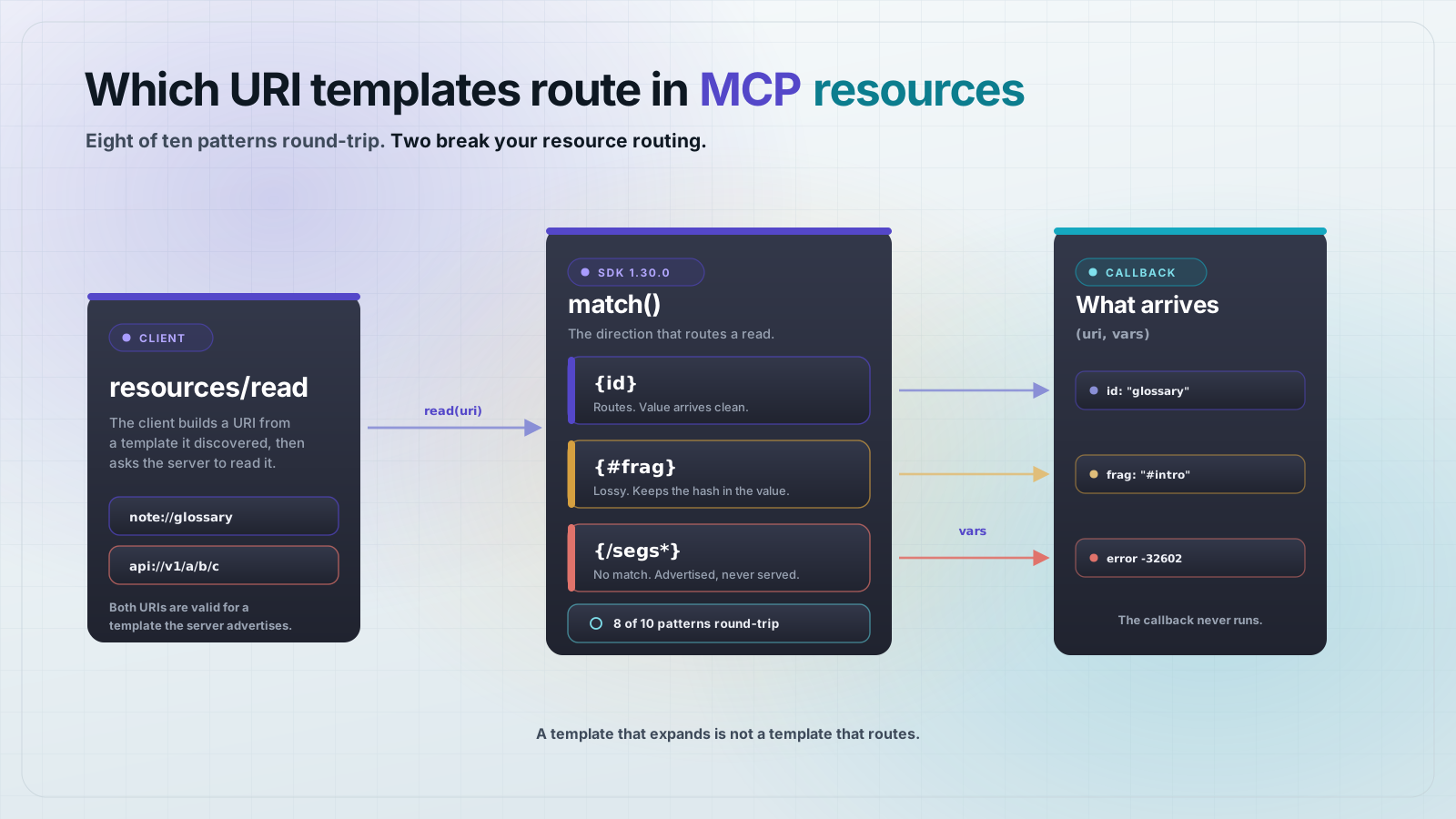
A Model Context Protocol (MCP) resource template is an RFC 6570 URI pattern like note://{id}. The SDK can expand all ten patterns we tested, but only eight of them match a real read back to your callback. {#frag} hands your code a corrupted value, and {/segs*} never matches at all.
The reason is an asymmetry. A template is used in two directions. expand() turns variables into a URI, and match() turns an incoming URI back into variables. Your server only ever needs the second one. Registration does not check that the two agree, so a broken template registers cleanly, shows up in resources/templates/list, and then fails every read.
How does an MCP resource template route a read?
When a client calls resources/read with a concrete URI, the server walks its registered templates and asks each one whether the URI matches. The first template that matches wins. The variables it parsed out are passed to your read callback as the second argument.
That means the match direction is the one that decides whether your resource works. Expansion is only used to build example URIs and to fill a list callback. A template that expands perfectly and matches nothing is a resource your clients can see but never read.
Which URI template patterns actually work?
Here is the check. It builds each template, expands it with known values, then matches the result back and compares. Save it as check-templates.mjs.
{
  "name": "mcp-template-check",
  "private": true,
  "type": "module",
  "dependencies": {
    "@modelcontextprotocol/sdk": "1.30.0"
  }
}
import { UriTemplate } from "@modelcontextprotocol/sdk/shared/uriTemplate.js";
// Every pattern a server might register, with a known set of values.
// expand() builds the URI. match() is the direction the server needs to
// route an incoming resources/read back to your callback.
const patterns = [
["{id}", "note://{id}", { id: "glossary" }],
["{owner}/{name}", "repo://{owner}/{name}", { owner: "acme", name: "web" }],
["{+path}", "file://{+path}", { path: "a/b/c.txt" }],
["{.ext}", "file://name{.ext}", { ext: "json" }],
["{/seg}", "api://v1{/seg}", { seg: "users" }],
["{?q}", "search://x{?q}", { q: "mcp" }],
["{?a,b}", "search://x{?a,b}", { a: "1", b: "2" }],
["{&page}", "search://x?q=1{&page}", { page: "2" }],
["{#frag}", "doc://x{#frag}", { frag: "intro" }],
["{/segs*}", "api://v1{/segs*}", { segs: ["a", "b", "c"] }],
];
for (const [label, template, vars] of patterns) {
const t = new UriTemplate(template);
const uri = t.expand(vars);
const back = t.match(uri);
let verdict;
if (back === null) {
verdict = "BROKEN template does not match its own output";
} else {
const roundTripped = Object.keys(vars).every(
(k) => JSON.stringify(back[k]) === JSON.stringify(vars[k])
);
verdict = roundTripped ? "ok" : `LOSSY got ${JSON.stringify(back)}`;
}
console.log(label.padEnd(16), uri.padEnd(22), verdict);
}Run it with npm install && node check-templates.mjs. This is the real output on Node 25 and SDK 1.30.0.
{id}             note://glossary        ok
{owner}/{name}   repo://acme/web        ok
{+path}          file://a/b/c.txt       ok
{.ext}           file://name.json       ok
{/seg}           api://v1/users         ok
{?q}             search://x?q=mcp       ok
{?a,b}           search://x?a=1&b=2     ok
{&page}          search://x?q=1&page=2  ok
{#frag}          doc://x#intro          LOSSY    got {"frag":"#intro"}
{/segs*}         api://v1/a/b/c         BROKEN   template does not match its own output
Single variables, multiple variables, reserved expansion, label, path, query and ampersand all behave. The two failures are the last two rows.
Why does an exploded path template return resource not found?
{/segs*} is the RFC 6570 form for a repeated path segment. It is the obvious choice for a file tree, and it is the one that fails. The class-level check above already shows match() returning null. A real server confirms what that costs you.
import { McpServer, ResourceTemplate } from "@modelcontextprotocol/sdk/server/mcp.js";
import { Client } from "@modelcontextprotocol/sdk/client/index.js";
import { InMemoryTransport } from "@modelcontextprotocol/sdk/inMemory.js";

const server = new McpServer({ name: "template-probe", version: "1.0.0" });

// Register one resource per pattern. Each read callback just echoes the
// variables it was handed, so we can see exactly what the router parsed.
const echo = (name) => async (uri, vars) => ({
  contents: [
    { uri: uri.href, mimeType: "text/plain", text: `${name} -> ${JSON.stringify(vars)}` },
  ],
});

for (const [name, template] of [
  ["note", "note://{id}"],
  ["repo", "repo://{owner}/{name}"],
  ["tree", "api://v1{/segs*}"],
  ["doc", "doc://x{#frag}"],
]) {
  server.registerResource(
    name,
    new ResourceTemplate(template, { list: undefined }),
    { title: name, mimeType: "text/plain" },
    echo(name)
  );
}

const client = new Client({ name: "probe", version: "1.0.0" });
const [clientSide, serverSide] = InMemoryTransport.createLinkedPair();
await Promise.all([client.connect(clientSide), server.connect(serverSide)]);

const listed = await client.listResourceTemplates();
console.log("advertised by resources/templates/list:");
for (const t of listed.resourceTemplates) console.log("  ", t.uriTemplate);

console.log("\nresources/read:");
for (const uri of ["note://glossary", "repo://acme/web", "api://v1/a/b/c", "doc://x#intro"]) {
  try {
    const result = await client.readResource({ uri });
    console.log("  ok    ", uri.padEnd(18), result.contents[0].text);
  } catch (error) {
    console.log("  error ", uri.padEnd(18), error.message);
  }
}

await client.close();
advertised by resources/templates/list:
note://{id}
repo://{owner}/{name}
api://v1{/segs*}
doc://x{#frag}
resources/read:
ok note://glossary note -> {"id":"glossary"}
ok repo://acme/web repo -> {"owner":"acme","name":"web"}
error api://v1/a/b/c MCP error -32602: MCP error -32602: Resource api://v1/a/b/c not found
ok doc://x#intro doc -> {"frag":"#intro"}Why does a fragment template hand you the wrong value?
{#frag} is worse than the broken case, because it does not fail. The read succeeds and your callback runs. It just receives "#intro" instead of "intro".
The # separator is part of the expansion, and the match pattern captures it along with the value. If you use that variable as a database key or a filename, you get a lookup miss with no error to trace it to. Strip the leading # yourself, or keep fragments out of your URI scheme.
What should you use for multi-segment paths instead?
Use reserved expansion, {+path}. It allows / inside the captured value, so one variable swallows the whole tail. You split it yourself, which is one line.
server.registerResource(
  "tree",
  new ResourceTemplate("api://v1/{+segs}", { list: undefined }),
  { title: "tree", mimeType: "text/plain" },
  async (uri, vars) => {
    const segments = String(vars.segs).split("/");
    return {
      contents: [
        { uri: uri.href, mimeType: "text/plain", text: JSON.stringify(segments) },
      ],
    };
  }
);
ok api://v1/a/b/c ["a","b","c"]
ok api://v1/a ["a"]Both the deep path and the single segment route to the callback. That is the behavior people expect from {/segs*}, and it is available today without waiting on an SDK fix.
One caveat worth knowing. {+path} is greedy, so put it last in the template. A pattern like api://{+a}/{b} gives the first variable everything it can take.
Does upgrading to the v2 server package fix this?
No. @modelcontextprotocol/server 2.0.0 exports its own UriTemplate, and it returns the same results. {/segs*} matches null and {#frag} returns "#intro". The template engine is shared, so the version you pick does not change the answer. Test your own templates either way.
Frequently asked questions
Frequently asked questions
- What is a URI template in MCP?
- It is an RFC 6570 pattern with variables in it, like
note://{id}, registered withResourceTemplate. One registration serves every URI that matches the pattern, and the parsed variables are passed to your read callback. - Why does my MCP resource template return resource not found?
- The most likely cause is an exploded variable such as
{/segs*}. That pattern expands correctly but matches nothing on@modelcontextprotocol/sdk1.30.0, so everyresources/readagainst it fails with error -32602. Replace it with{+path}and split the value on/in your callback. - Which RFC 6570 operators does the MCP SDK support?
- Expansion supports all six operators:
+,#,.,/,?and&. Matching is narrower. Every operator round-trips except#, which includes the separator in the captured value, and exploded variables marked with*, which do not match. - How do I serve a file tree over MCP resources?
- Register a template ending in a reserved expansion, such as
api://v1/{+path}. The variable captures the full remaining path including slashes, and you split it into segments yourself. Put the reserved variable last, because it is greedy. - How can I test that my resource template routes correctly?
- Build the
UriTemplate, callexpand()with known values, then callmatch()on the result and compare. Ifmatch()returns null or different values than you passed in, the template will not route a real read. - Does resources/templates/list validate my templates?
- No. It returns the template strings exactly as you registered them, including ones that cannot match anything. A client can discover a template, build a valid URI from it, and still get an error back.
If you are adding resources to a server for the first time, start with a single variable and add complexity only when you need it. note://{id} and repo://{owner}/{name} cover most real schemes, and both route correctly.
MCPOrbit lists every resource a server publishes and reads any one of them back for you, so you can see what a URI actually returns before your users do.
About the author
Mark
Head of Marketing, MCPOrbit
Mark leads marketing at MCPOrbit, the free desktop client for the Model Context Protocol. He writes the build-it and reliability guides, and the code in them is run before it ships.