Build it
How to build an MCP server for a GraphQL API
Do not hand the model a GraphQL query string. Introspect once, expose one typed tool per operation, and keep the selection set on the server.
Mark
Head of Marketing, MCPOrbit
- Published
- Updated
- · Updated
- Read time
- · 11 min read
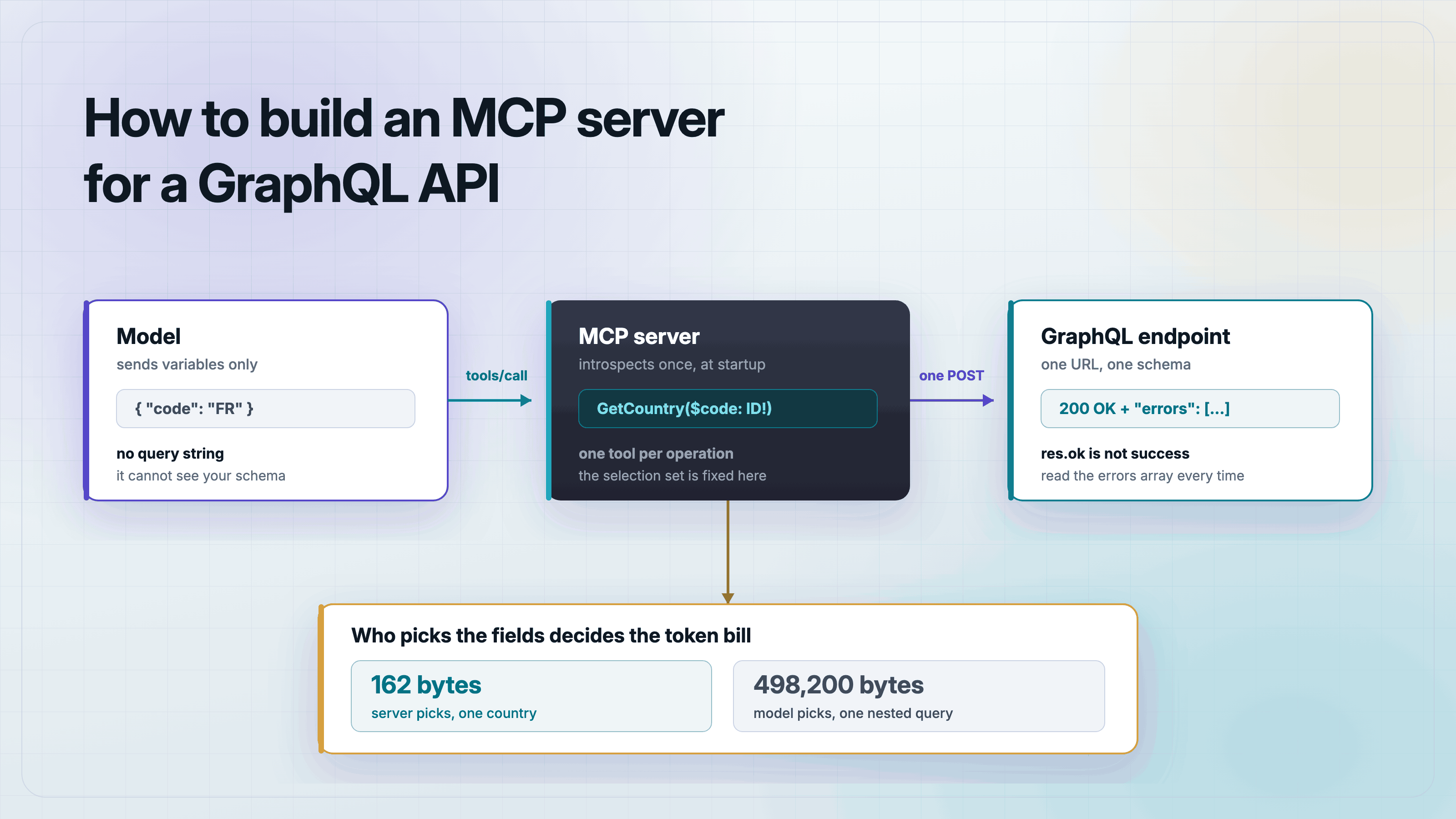
Do not give the model a GraphQL query string. Introspect the schema once when your server starts, then expose one MCP tool per operation, with the query text fixed on the server and only the variables coming from the model.
A REST wrapper is close to mechanical. One endpoint per resource means the tools almost draw themselves. GraphQL is different in the way that matters here: one endpoint, one type system, and a request body that is itself a small program. The design question is who writes that program. If the answer is the model, you have built a bad tool. If the answer is you, at startup, you have built a good one.
Why not just expose one run_graphql_query tool?
It is the obvious move. GraphQL has one endpoint, so one tool that forwards a query string looks like it wraps the entire API for free. Here is the shape, so you can recognize it.
import { McpServer } from "@modelcontextprotocol/server";
import { z } from "zod";
import { execute } from "./graphql.js";

/**
 * DO NOT SHIP THIS. It is here so the post can show the exact shape of the
 * tool to avoid, and so that shape is type-checked rather than hand-waved.
 */
export function registerTrapTool(server: McpServer): void {
  server.registerTool(
    "run_graphql_query",
    {
      title: "Run a GraphQL query",
      description: "Run any GraphQL query against the API.",
      inputSchema: z.object({
        query: z.string().describe("A GraphQL query document"),
      }),
    },
    async ({ query }) => {
      const data = await execute<unknown>(query);
      return { content: [{ type: "text", text: JSON.stringify(data) }] };
    },
  );
}
It fails for three separate reasons, and they compound.
The model is writing against a schema it cannot see
A tool description has no room for a real schema. So the model guesses field names, and GraphQL rejects unknown fields outright. Every guess costs a full round trip: a tool call, an error, a retry. On a schema with any depth the model can spend several turns before it writes something that validates.
You handed over the token budget
When the model picks the selection set, the model decides how much data comes back. Graphs have cycles. A country has a continent, a continent has countries, and those countries have languages. That is an ordinary-looking query, and against the public countries API it returns 498,200 bytes in a single HTTP 200 response. At roughly four bytes per token that is on the order of 125,000 tokens, from one tool call, for a question that needed 162 bytes.
# the fixed selection set this post builds, one country
162 bytes

# a nested query a model could plausibly write, same endpoint, also 200 OK
{ countries { code name capital currency emoji native phone
    continent { code name countries { code name } }
    languages { code name native } states { code name } } }
498,200 bytes
It is an arbitrary query engine with your credentials on it
A free-form query tool is a depth attack and a data exfiltration path at the same time. Anything the token attached to your server can read, the query can reach, including fields you never intended to expose through this integration. Prompt injection turns that into a real problem rather than a theoretical one.
Set up the project
Everything below was built and run before this post was written. The target is a public GraphQL API with no key and no signup, so you can run it immediately.
mkdir graphql-mcp-server && cd graphql-mcp-server
npm init -y
npm pkg set type=module
npm install @modelcontextprotocol/server@2.0.0 \
            @modelcontextprotocol/client@2.0.0 \
            zod@4.4.3 tsx@4.20.3 typescript@5.9.2
Two details that will cost you an hour each if you skip them. The package must be an ES module, because the v2 SDK is ESM only. And zod must be version 4.2 or later, because the SDK throws Schema appears to be from zod 3 at call time on older versions.
Why res.ok is not a success check in GraphQL
This is the gotcha that catches people coming from REST. A GraphQL server that successfully executes your request and finds a problem in it still answers HTTP 200. The failure is in the response body, in an errors array. Ask for a field that does not exist and you get this.
{
  "errors": [
    {
      "message": "Cannot query field \"nonexistentField\" on type \"Country\".",
      "locations": [
        {
          "line": 4,
          "column": 5
        }
      ],
      "extensions": {
        "code": "GRAPHQL_VALIDATION_FAILED"
      }
    }
  ]
}
Status 200. No data key at all. If your client only checks res.ok, it reads that as a success and hands the model an empty result, which is worse than an error because the model will believe it.
The rule is not that GraphQL always returns 200. Errors caught before execution starts can use a 4xx. On this endpoint a variable that fails type coercion returns 400. So you need both checks: res.ok for transport, then the errors array for execution. The request module below does exactly that and nothing else.
const ENDPOINT =
  process.env.GRAPHQL_ENDPOINT ?? "https://countries.trevorblades.com/graphql";

export class GraphQLError extends Error {
  constructor(
    message: string,
    readonly paths: string[],
  ) {
    super(message);
    this.name = "GraphQLError";
  }
}

type GraphQLBody<T> = {
  data?: T | null;
  errors?: Array<{ message: string; path?: Array<string | number> }>;
};

/**
 * The whole point of this wrapper: a GraphQL endpoint answers 200 OK and puts
 * the failure in the body. `res.ok` is a transport check, not a success check.
 */
export async function execute<T>(
  query: string,
  variables: Record<string, unknown> = {},
): Promise<T> {
  const res = await fetch(ENDPOINT, {
    method: "POST",
    headers: {
      "content-type": "application/json",
      ...(process.env.GRAPHQL_TOKEN
        ? { authorization: `Bearer ${process.env.GRAPHQL_TOKEN}` }
        : {}),
    },
    body: JSON.stringify({ query, variables }),
  });

  // Transport-level failure. Still worth checking - it just is not sufficient.
  if (!res.ok) {
    throw new Error(`GraphQL transport error: HTTP ${res.status}`);
  }

  const body = (await res.json()) as GraphQLBody<T>;

  // Field-level failure, delivered inside a 200.
  if (body.errors?.length) {
    throw new GraphQLError(
      body.errors.map((e) => e.message).join("; "),
      body.errors.map((e) => (e.path ?? []).join(".")).filter(Boolean),
    );
  }

  // A partial response is data plus errors; having handled errors above, a
  // null data here means the server gave us nothing usable.
  if (body.data == null) {
    throw new Error("GraphQL response contained neither data nor errors");
  }

  return body.data;
}
Introspect the schema once, at startup
Introspection is how you spend the schema once instead of paying for it on every call. You are not rebuilding the type system in memory. You want a startup guard: if the upstream API dropped a field your tools depend on, fail immediately with a clear message rather than at the first tool call with a confusing one.
import { execute } from "./graphql.js";

/**
 * A deliberately small introspection query. We are not rebuilding the type
 * system in memory - we only want the field names of the root Query type so
 * startup can fail loudly if the API drifted out from under our tools.
 */
const ROOT_FIELDS = /* GraphQL */ `
  query RootFields {
    __schema {
      queryType {
        fields {
          name
        }
      }
    }
  }
`;

type RootFieldsResult = {
  __schema: { queryType: { fields: Array<{ name: string }> } };
};

/** Introspect once, at startup - not once per tool call. */
export async function loadRootFields(): Promise<Set<string>> {
  const data = await execute<RootFieldsResult>(ROOT_FIELDS);
  return new Set(data.__schema.queryType.fields.map((f) => f.name));
}

export function assertFields(available: Set<string>, required: string[]): void {
  const missing = required.filter((f) => !available.has(f));
  if (missing.length) {
    throw new Error(
      `Upstream schema is missing required fields: ${missing.join(", ")}. ` +
        `Refusing to start with tools that cannot work.`,
    );
  }
}
A full introspection query on this API returns 12,768 bytes. The narrow root-fields query above returns 172 bytes. Both are fine at startup, once. Neither belongs in a tool result.
One tool per operation, with the selection set fixed
This is the whole design. Each tool owns one operation. The query text is a server-side constant. The zod input schema mirrors the GraphQL variables, so the model fills in variables and nothing else. It cannot widen the selection set, because it never sees one.
import { McpServer } from "@modelcontextprotocol/server";
import { serveStdio } from "@modelcontextprotocol/server/stdio";
import { z } from "zod";
import { execute, GraphQLError } from "./graphql.js";
import { assertFields, loadRootFields } from "./schema.js";

/**
 * Selection sets are server-side constants. The model never picks fields, so
 * it cannot ask for the whole graph and it cannot ask for a field that does
 * not exist.
 */
const GET_COUNTRY = /* GraphQL */ `
  query GetCountry($code: ID!) {
    country(code: $code) {
      code
      name
      capital
      currency
      emoji
      continent {
        name
      }
      languages {
        name
      }
    }
  }
`;

const LIST_COUNTRIES = /* GraphQL */ `
  query ListCountries($continent: String!) {
    countries(filter: { continent: { eq: $continent } }) {
      code
      name
      capital
    }
  }
`;

const LIST_CONTINENTS = /* GraphQL */ `
  query ListContinents {
    continents {
      code
      name
    }
  }
`;

const countryShape = z.object({
  code: z.string(),
  name: z.string(),
  capital: z.string().nullable(),
  currency: z.string().nullable(),
  emoji: z.string(),
  continent: z.object({ name: z.string() }),
  languages: z.array(z.object({ name: z.string() })),
});

/** One place to turn a thrown GraphQL failure into a readable tool error. */
function toolError(err: unknown) {
  const message =
    err instanceof GraphQLError
      ? `The API rejected the query: ${err.message}`
      : err instanceof Error
        ? err.message
        : String(err);
  return { content: [{ type: "text" as const, text: message }], isError: true };
}

export function buildServer(rootFields: Set<string>): McpServer {
  const server = new McpServer(
    { name: "countries-graphql", version: "1.0.0" },
    { capabilities: { tools: {} } },
  );

  server.registerTool(
    "get_country",
    {
      title: "Get a country by ISO code",
      description:
        "Look up one country by its two-letter ISO 3166-1 alpha-2 code, " +
        "for example US, FR or JP. Returns the name, capital, currency, " +
        "continent and official languages.",
      inputSchema: z.object({
        code: z
          .string()
          .length(2)
          .describe("Two-letter ISO 3166-1 alpha-2 country code, e.g. FR"),
      }),
      outputSchema: z.object({ country: countryShape }),
    },
    async ({ code }) => {
      try {
        const data = await execute<{ country: unknown }>(GET_COUNTRY, {
          code: code.toUpperCase(),
        });
        if (data.country == null) {
          return {
            content: [{ type: "text", text: `No country with code ${code}.` }],
            isError: true,
          };
        }
        const country = countryShape.parse(data.country);
        return {
          content: [
            {
              type: "text",
              text: `${country.name} (${country.code}). Capital: ${
                country.capital ?? "n/a"
              }. Currency: ${country.currency ?? "n/a"}.`,
            },
          ],
          structuredContent: { country },
        };
      } catch (err) {
        return toolError(err);
      }
    },
  );

  server.registerTool(
    "list_countries_in_continent",
    {
      title: "List countries in a continent",
      description:
        "List every country in one continent. Takes a two-letter continent " +
        "code such as EU, AF, NA, SA, AS, OC or AN. Call list_continents " +
        "first if you do not know the code.",
      inputSchema: z.object({
        continent: z
          .string()
          .length(2)
          .describe("Two-letter continent code, e.g. EU"),
      }),
      outputSchema: z.object({
        count: z.number(),
        countries: z.array(
          z.object({
            code: z.string(),
            name: z.string(),
            capital: z.string().nullable(),
          }),
        ),
      }),
    },
    async ({ continent }) => {
      try {
        const data = await execute<{
          countries: Array<{
            code: string;
            name: string;
            capital: string | null;
          }>;
        }>(LIST_COUNTRIES, { continent: continent.toUpperCase() });
        return {
          content: [
            {
              type: "text",
              text: `${data.countries.length} countries: ${data.countries
                .map((c) => c.name)
                .join(", ")}`,
            },
          ],
          structuredContent: {
            count: data.countries.length,
            countries: data.countries,
          },
        };
      } catch (err) {
        return toolError(err);
      }
    },
  );

  server.registerTool(
    "list_continents",
    {
      title: "List continents",
      description:
        "List all continent codes and names. Use this to find the code " +
        "that list_countries_in_continent expects.",
      inputSchema: z.object({}),
      outputSchema: z.object({
        continents: z.array(z.object({ code: z.string(), name: z.string() })),
      }),
    },
    async () => {
      try {
        const data = await execute<{
          continents: Array<{ code: string; name: string }>;
        }>(LIST_CONTINENTS);
        return {
          content: [
            {
              type: "text",
              text: data.continents
                .map((c) => `${c.code}: ${c.name}`)
                .join("\n"),
            },
          ],
          structuredContent: { continents: data.continents },
        };
      } catch (err) {
        return toolError(err);
      }
    },
  );

  // Startup guard. If the upstream schema moved, fail now with a clear
  // message instead of at the first tool call with a field error.
  assertFields(rootFields, ["country", "countries", "continents"]);

  return server;
}

// Introspect once, before any request is served.
const rootFields = await loadRootFields();
// Diagnostics go to stderr. On stdio, stdout is the JSON-RPC channel.
process.stderr.write(
  `[countries-graphql] schema loaded, ${rootFields.size} root fields\n`,
);

await serveStdio(() => buildServer(rootFields));
Three things worth pointing at. The outputSchema is what makes structuredContent valid, so callers get typed data instead of parsing prose. Failures return isError: true with a readable message rather than throwing, which is what lets the model recover. And serveStdio takes a factory, not a server instance. Passing the instance directly returns -32603 Internal server error on every request including initialize, with an empty stderr, which is the most confusing way to lose an afternoon with this SDK.
Point a client at it
For Claude Desktop, Cursor, or VS Code, add the server to the MCP config file. The client spawns your process and supplies the environment, which is also where a real API would get its credentials.
{
  "mcpServers": {
    "countries-graphql": {
      "command": "npx",
      "args": [
        "tsx",
        "/absolute/path/to/graphql-mcp-server/src/server.ts"
      ],
      "env": {
        "GRAPHQL_ENDPOINT": "https://countries.trevorblades.com/graphql"
      }
    }
  }
}
Prove the selection set is really fixed
Assertions, not screenshots. The first suite proves the transport behavior that the post claims, including the 200-with-errors case and the 400 coercion case.
import assert from "node:assert/strict";
import { test } from "node:test";
import { GraphQLError, execute } from "../src/graphql.js";

const ENDPOINT = "https://countries.trevorblades.com/graphql";

test("a GraphQL field error arrives inside an HTTP 200", async () => {
  // Ask for a field that does not exist on the Country type.
  const res = await fetch(ENDPOINT, {
    method: "POST",
    headers: { "content-type": "application/json" },
    body: JSON.stringify({
      query: `{ country(code: "FR") { name nonexistentField } }`,
    }),
  });

  // This is the trap. The transport succeeded.
  assert.equal(res.status, 200);
  assert.equal(res.ok, true);

  const body = await res.json();
  // ...and the failure is in the body.
  assert.ok(Array.isArray(body.errors));
  assert.ok(body.errors.length > 0);
  assert.match(body.errors[0].message, /nonexistentField/);
});

test("execute() turns that 200 into a thrown GraphQLError", async () => {
  await assert.rejects(
    () => execute(`{ country(code: "FR") { name nonexistentField } }`),
    (err: unknown) => {
      assert.ok(err instanceof GraphQLError);
      assert.match((err as GraphQLError).message, /nonexistentField/);
      return true;
    },
  );
});

test("execute() returns data on a valid query", async () => {
  const data = await execute<{ country: { name: string } }>(
    `query Q($code: ID!) { country(code: $code) { name } }`,
    { code: "JP" },
  );
  assert.equal(data.country.name, "Japan");
});

test("a variable coercion error is a 400, so you still need the res.ok check", async () => {
  // `code` is ID!, so passing an object fails variable coercion. This one is
  // rejected before execution starts, and this server answers 400 for it.
  // Execution errors are 200; request-level errors may not be. Check both.
  const res = await fetch(ENDPOINT, {
    method: "POST",
    headers: { "content-type": "application/json" },
    body: JSON.stringify({
      query: `query Q($code: ID!) { country(code: $code) { name } }`,
      variables: { code: { nope: true } },
    }),
  });
  assert.equal(res.status, 400);

  await assert.rejects(
    () =>
      execute(`query Q($code: ID!) { country(code: $code) { name } }`, {
        code: { nope: true },
      }),
    /HTTP 400/,
  );
});
The second suite drives the real server over stdio with the MCP client and checks the tool surface. The important assertion is the one on the returned key set: the server chose those fields, and no tool argument could have changed them.
import assert from "node:assert/strict";
import { after, before, test } from "node:test";
import { Client } from "@modelcontextprotocol/client";
import { StdioClientTransport } from "@modelcontextprotocol/client/stdio";

let client: Client;

before(async () => {
  const transport = new StdioClientTransport({
    command: "npx",
    args: ["tsx", "src/server.ts"],
    // `env` REPLACES the default environment, so PATH/HOME/TMPDIR must be
    // passed through explicitly or the child cannot spawn.
    env: {
      PATH: process.env.PATH!,
      HOME: process.env.HOME!,
      TMPDIR: "/tmp",
    },
  });
  client = new Client({ name: "test-client", version: "1.0.0" });
  await client.connect(transport);
});

after(async () => {
  await client.close();
});

test("exposes three typed tools, not a raw query escape hatch", async () => {
  const { tools } = await client.listTools();
  const names = tools.map((t) => t.name).sort();
  assert.deepEqual(names, [
    "get_country",
    "list_continents",
    "list_countries_in_continent",
  ]);
  assert.ok(
    !names.some((n) => /query|graphql|raw/i.test(n)),
    "no free-form query tool should be exposed",
  );
});

test("get_country declares a typed input schema mirroring the variables", async () => {
  const { tools } = await client.listTools();
  const tool = tools.find((t) => t.name === "get_country")!;
  assert.equal(tool.inputSchema.type, "object");
  assert.deepEqual(Object.keys(tool.inputSchema.properties ?? {}), ["code"]);
  assert.deepEqual(tool.inputSchema.required, ["code"]);
});

test("get_country returns a fixed selection set", async () => {
  const res = await client.callTool({
    name: "get_country",
    arguments: { code: "FR" },
  });
  assert.equal(res.isError, undefined);
  const { country } = res.structuredContent as any;
  assert.equal(country.name, "France");
  assert.equal(country.capital, "Paris");
  assert.equal(country.currency, "EUR");
  assert.equal(country.continent.name, "Europe");
  // The server chose these keys. The model could not have widened them.
  assert.deepEqual(Object.keys(country).sort(), [
    "capital",
    "code",
    "continent",
    "currency",
    "emoji",
    "languages",
    "name",
  ]);
});

test("lowercase codes are normalized by the server", async () => {
  const res = await client.callTool({
    name: "get_country",
    arguments: { code: "jp" },
  });
  assert.equal((res.structuredContent as any).country.name, "Japan");
});

test("list_continents returns all seven continents", async () => {
  const res = await client.callTool({
    name: "list_continents",
    arguments: {},
  });
  const { continents } = res.structuredContent as any;
  assert.equal(continents.length, 7);
  assert.ok(continents.some((c: any) => c.code === "EU"));
});

test("list_countries_in_continent scopes to one continent", async () => {
  const res = await client.callTool({
    name: "list_countries_in_continent",
    arguments: { continent: "EU" },
  });
  const { count, countries } = res.structuredContent as any;
  assert.ok(count > 40, `expected >40 European countries, got ${count}`);
  assert.ok(countries.every((c: any) => typeof c.code === "string"));
  // Fixed selection set again: three fields, not the whole Country type.
  assert.deepEqual(Object.keys(countries[0]).sort(), [
    "capital",
    "code",
    "name",
  ]);
});

test("an unknown country code is a clean tool error, not a crash", async () => {
  const res = await client.callTool({
    name: "get_country",
    arguments: { code: "ZZ" },
  });
  assert.equal(res.isError, true);
  assert.match((res.content as any)[0].text, /No country with code/);
});

test("input validation rejects a bad code before any network call", async () => {
  const res = await client.callTool({
    name: "get_country",
    arguments: { code: "FRANCE" },
  });
  assert.equal(res.isError, true);
});
Note the env block in the transport. It replaces the child process environment rather than extending it, so PATH and HOME have to be passed through explicitly or the server never spawns.
$ npx tsx --test test/*.test.ts

[countries-graphql] schema loaded, 6 root fields
tests 18
pass 18
fail 0
What if you really do need a free-form query tool?
Sometimes the API is genuinely exploratory and typed tools cannot cover it. If you accept a query string, treat it as untrusted input. Cap selection depth before the query reaches the network, so a cycle in the graph cannot inflate the response.
/**
 * A selection-depth guard for the case where you decide to accept a query
 * string anyway. It counts brace nesting, which is crude but dependency-free
 * and catches the shape that matters: a query that walks a cycle in the graph
 * to inflate the response.
 *
 * If you are shipping this for real, validate with the `graphql` package's
 * own rules instead. This is a floor, not a substitute for schema-aware
 * validation.
 */
export function selectionDepth(query: string): number {
  let depth = 0;
  let max = 0;
  let inString = false;
  let inBlockString = false;

  for (let i = 0; i < query.length; i++) {
    const c = query[i];

    if (inBlockString) {
      if (query.startsWith('"""', i)) {
        inBlockString = false;
        i += 2;
      }
      continue;
    }
    if (inString) {
      if (c === "\\") i++;
      else if (c === '"') inString = false;
      continue;
    }
    if (query.startsWith('"""', i)) {
      inBlockString = true;
      i += 2;
      continue;
    }
    if (c === '"') {
      inString = true;
      continue;
    }
    if (c === "#") {
      while (i < query.length && query[i] !== "\n") i++;
      continue;
    }
    if (c === "{") {
      depth++;
      if (depth > max) max = depth;
    } else if (c === "}") {
      depth--;
    }
  }
  return max;
}

export class DepthLimitError extends Error {}

export function assertDepth(query: string, limit = 6): void {
  const depth = selectionDepth(query);
  if (depth > limit) {
    throw new DepthLimitError(
      `Query selection depth ${depth} exceeds the limit of ${limit}.`,
    );
  }
}
Brace counting is a floor, not a real defense. It is dependency-free and it catches the shape that matters. For anything user-facing, validate with the graphql package's own rules, add a cost estimator that weights list fields, and put a hard byte cap on the response before it becomes a tool result. Also give the token behind the query the narrowest scope the API offers, because depth limits do not stop a shallow query from reading a field you did not intend to share.
- Cap selection depth, and cap it before the request goes out.
- Cap the response size independently. Depth is a poor proxy for bytes.
- Scope the upstream credential to exactly the fields this integration needs.
- Log the query text. If you accept arbitrary queries, you want to know what was asked.
How many tools should a GraphQL MCP server expose?
Fewer than the schema has fields, and more than one. Start from the jobs a user actually asks for, not from the type system. Three tools cover the countries API here because there are three real questions: look up one country, list a continent's countries, and find the continent codes. A schema with 200 types does not need 200 tools. It needs the eight operations your integration is for.
The test for a good tool is whether a model can call it correctly with only the description in front of it. get_country(code) passes. run_graphql_query(query) cannot, no matter how the description is written, because the information it needs is in a schema that is not in the prompt.
Frequently asked questions
- Should an MCP server expose a single run_graphql_query tool?
- No. The model has to author valid GraphQL against a schema it cannot see, so it guesses field names and pays a round trip per failure. It also hands the model an arbitrary query engine running with your credentials. Expose one typed tool per operation instead.
- How does an MCP server discover the GraphQL schema?
- With an introspection query at startup, run once and cached in memory. Use it as a startup guard that fails loudly if a field your tools depend on disappeared. Do not introspect per tool call, and do not put the introspection result in a tool result.
- Why does my GraphQL request return 200 but no data?
- Because GraphQL reports execution and validation errors inside a 200 response, in an
errorsarray. A response with anerrorsarray often has nodatakey at all. Checkres.okfor transport failures and then checkerrorsseparately. - Can the model choose which GraphQL fields come back?
- It should not. Keep the selection set as a server-side constant in the query text. That is what stops a nested query from returning half the graph, and it is the difference between a 162 byte response and a 498,200 byte one on the API used here.
- Do I need the graphql npm package to build this?
- No. A GraphQL request is a POST with a JSON body containing
queryandvariables, sofetchis enough. Add thegraphqlpackage when you want real schema-aware validation, such as enforcing depth and cost limits on a free-form query tool. - How do I handle GraphQL mutations in an MCP server?
- The same way as queries: one tool per mutation, with the mutation text fixed on the server and only variables from the model. Mark destructive ones clearly in the tool description, and consider requiring an explicit confirmation argument for anything that deletes data.
About the author
Mark
Head of Marketing, MCPOrbit
Mark leads marketing at MCPOrbit, the free desktop client for the Model Context Protocol. He writes the build-it and reliability guides, and the code in them is run before it ships.