Build-it
How to log from an MCP server (logging is deprecated)
The MCP logging capability was deprecated on 2026-07-28. Log to stderr as JSON instead, and learn which stdout writes really corrupt a stdio server.
Mark
Head of Marketing, MCPOrbit
- Published
- Updated
- · Updated
- Read time
- · 9 min read
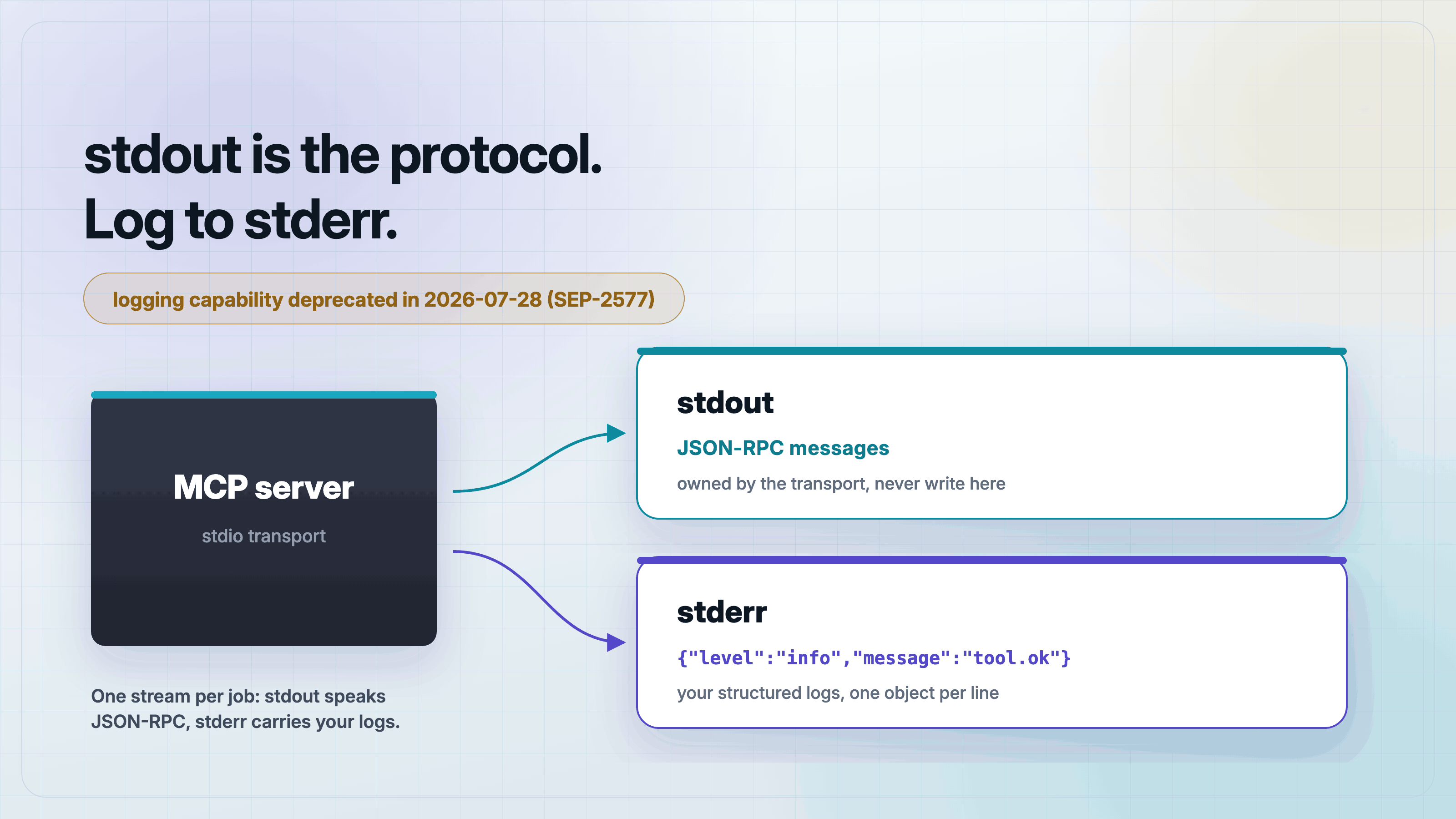
Log from a Model Context Protocol (MCP) server by writing one JSON object per line to stderr. Do not use the protocol's logging capability: sendLoggingMessage was deprecated in the 2026-07-28 spec under SEP-2577, and the official guidance for stdio servers is now stderr or OpenTelemetry.
On stdio, stdout belongs to the protocol. That much is well known. What is less known is exactly which stray writes break it, because the common advice is wrong in a way that makes the bug harder to find. A complete line of non-JSON text is skipped by the reader and costs you nothing. A write with no trailing newline glues itself to the next message and hangs the call. Below is the logger I use instead, plus the test that proves both claims.
Is MCP's logging capability deprecated?
Yes. The 2026-07-28 revision deprecated the logging capability along with sampling, both under SEP-2577. The SDK still ships sendLoggingMessage and the logging/setLevel handler, and the lifecycle policy introduced in the same revision guarantees a deprecated feature keeps working for at least twelve months. So nothing breaks today. The point is that new servers should not adopt it.
The reasoning is the same as for sampling. Protocol logging routes your diagnostics through the client, which means you only see them when a client is attached, only at the level that client asked for, and only in whatever surface that client happens to render. That is a poor fit for the thing you actually want logs for, which is diagnosing a server that is misbehaving in production. The deprecation note in the SDK types is explicit: migrate to stderr logging for stdio servers, or OpenTelemetry.
Why can't an MCP server just use console.log?
A stdio server speaks JSON-RPC over its standard output, one message per line. The usual warning is that any console.log corrupts that stream. I tested it against the v2 SDK, and the real behavior is more specific than that, which matters because it explains why the bug is intermittent.
A complete line of junk is survivable. The reader splits stdout on newlines and skips anything that does not parse as JSON. A server that prints console.log("ready") at startup, or even in the middle of a tool call, keeps working. This is exactly why the mistake spreads: it looks fine in development.
// Survives. The reader skips the line it cannot parse, and the call returns.
console.log("working...");

// Breaks. With no newline this prefix is glued onto the front of the next
// JSON-RPC message, that line fails to parse, and the response is lost.
process.stdout.write("working...");
The second case is the one that bites. The response the server sent is consumed as part of an unparseable line, so the client never sees it. There is no error and no crash. The tool call simply never resolves, and the client eventually times out. Anything that writes a partial line to stdout does this: a progress bar, a spinner, a stray process.stdout.write, or a dependency that prints a startup banner without a newline.
Write the logger
The whole logger is one file and about thirty lines. It does three jobs: filter by level, redact secret-looking fields, and write one JSON object per line to stderr. Structured lines matter because a log shipper can parse them without a regex, and you can still read them with grep.
// Structured logging for an MCP server. Every line goes to stderr, because on
// stdio the stdout stream belongs to the protocol.
const LEVELS = ["debug", "info", "warning", "error"] as const;
type Level = (typeof LEVELS)[number];

// An unrecognized MCP_LOG_LEVEL falls back to "info" rather than logging
// everything, so a typo in a client config cannot flood the log.
const configured = process.env.MCP_LOG_LEVEL as Level | undefined;
const threshold = LEVELS.indexOf(
  configured && LEVELS.includes(configured) ? configured : "info"
);

// Field names whose values must never reach a log file.
const SECRET_KEY = /^(authorization|api[-_]?key|token|password|secret)$/i;

function redact(fields: Record<string, unknown>): Record<string, unknown> {
  const safe: Record<string, unknown> = {};
  for (const [key, value] of Object.entries(fields)) {
    if (value === undefined) continue; // an absent field is not a redacted one
    safe[key] = SECRET_KEY.test(key) ? "[redacted]" : value;
  }
  return safe;
}

export function log(
  level: Level,
  message: string,
  fields: Record<string, unknown> = {}
): void {
  if (LEVELS.indexOf(level) < threshold) return;
  // One JSON object per line: greppable by a human, parseable by a log shipper.
  const line = JSON.stringify({
    ts: new Date().toISOString(),
    level,
    message,
    ...redact(fields),
  });
  process.stderr.write(line + "\n");
}
Two details are worth calling out. Redaction happens by field name inside the logger, so no call site has to remember which values are sensitive. And an unrecognized MCP_LOG_LEVEL falls back to info rather than to index -1, which would have logged everything. A typo in a client config should not turn debug logging on in production.
Use it from a tool
Now a small server with one tool that logs its start, its success, and its failure path. Note that apiKey is passed to the logger by name on purpose, to show the redaction working on a real value.
import { z } from "zod";
import { McpServer } from "@modelcontextprotocol/server";
import { serveStdio } from "@modelcontextprotocol/server/stdio";
import { log } from "./logger.ts";

function createServer() {
  const server = new McpServer(
    { name: "log-demo", version: "1.0.0" },
    { capabilities: { tools: {} } }
  );

  server.registerTool(
    "lookup_order",
    {
      title: "Look up order",
      description: "Fetch the status of an order by its id.",
      inputSchema: z.object({
        orderId: z.string(),
        apiKey: z.string().optional(),
      }),
      outputSchema: z.object({ orderId: z.string(), status: z.string() }),
    },
    async ({ orderId, apiKey }) => {
      const startedAt = Date.now();
      // apiKey is passed to redact() by name and never reaches the log file.
      log("debug", "tool.start", { tool: "lookup_order", orderId, apiKey });

      if (!/^ord_[a-z0-9]+$/.test(orderId)) {
        log("error", "tool.rejected", {
          tool: "lookup_order",
          orderId,
          reason: "malformed order id",
        });
        return {
          content: [{ type: "text", text: `unknown order: ${orderId}` }],
          isError: true,
        };
      }

      const output = { orderId, status: "shipped" };
      log("info", "tool.ok", {
        tool: "lookup_order",
        orderId,
        ms: Date.now() - startedAt,
      });
      return {
        content: [{ type: "text", text: JSON.stringify(output) }],
        structuredContent: output,
      };
    }
  );

  return server;
}

serveStdio(createServer);
log("info", "server.ready", { transport: "stdio", pid: process.pid });
Running it and calling the tool twice, once with a good id and once with a bad one, produces this on stderr. The API key is redacted, the failed call is recorded at error, and the absent apiKey on the second call is omitted rather than reported as redacted.
{"ts":"2026-08-30T09:14:02.857Z","level":"info","message":"server.ready","transport":"stdio","pid":47612}
{"ts":"2026-08-30T09:14:02.869Z","level":"debug","message":"tool.start","tool":"lookup_order","orderId":"ord_1042","apiKey":"[redacted]"}
{"ts":"2026-08-30T09:14:02.869Z","level":"info","message":"tool.ok","tool":"lookup_order","orderId":"ord_1042","ms":0}
{"ts":"2026-08-30T09:14:02.870Z","level":"debug","message":"tool.start","tool":"lookup_order","orderId":"nope"}
{"ts":"2026-08-30T09:14:02.870Z","level":"error","message":"tool.rejected","tool":"lookup_order","orderId":"nope","reason":"malformed order id"}
Prove the stream stayed clean
A logging change is easy to get wrong quietly, so assert it. This test spawns the server over a real stdio connection, sets stderr to pipe so it can read the log stream, and drives both tool paths. Every log line must parse as JSON on its own, which fails if anything except the logger wrote to the stream.
/** Drives the server over a real stdio connection and asserts three things:
 *  the tools still work, the log lines are parseable JSON on stderr, and the
 *  secret never lands in the log. Run it with: node test.ts */
import assert from "node:assert/strict";
import { Client } from "@modelcontextprotocol/client";
import { StdioClientTransport } from "@modelcontextprotocol/client/stdio";

type LogLine = { level: string; message: string; [key: string]: unknown };

// Spawn the server at a given log level, exercise both tool paths, and hand
// back everything it wrote to stderr.
async function run(level: string): Promise<{ lines: LogLine[]; raw: string }> {
  // stderr: "pipe" hands us the server's log stream instead of letting it
  // pass through to our own terminal.
  const transport = new StdioClientTransport({
    command: "node",
    args: ["server.ts"],
    env: { ...process.env, MCP_LOG_LEVEL: level },
    stderr: "pipe",
  });

  let raw = "";
  const client = new Client({ name: "log-test", version: "1.0.0" });
  await client.connect(transport);
  transport.stderr?.on("data", (chunk: Buffer) => (raw += chunk.toString()));

  const ok = await client.callTool({
    name: "lookup_order",
    arguments: { orderId: "ord_1042", apiKey: "sk-live-do-not-log-me" },
  });
  assert.deepEqual(ok.structuredContent, {
    orderId: "ord_1042",
    status: "shipped",
  });

  const bad = await client.callTool({
    name: "lookup_order",
    arguments: { orderId: "'; DROP TABLE orders --" },
  });
  assert.equal(bad.isError, true);

  await new Promise((resolve) => setTimeout(resolve, 250)); // let stderr flush
  await client.close();

  // Every line must be a complete JSON object. A partial or non-JSON line
  // means something wrote to the stream that was not the logger.
  const lines = raw
    .trim()
    .split("\n")
    .filter(Boolean)
    .map((line) => JSON.parse(line) as LogLine);
  return { lines, raw };
}

// 1. At debug level every stage is recorded, and the tool calls above both
//    returned correct results, which only happens if stdout stayed clean.
const debug = await run("debug");
assert.ok(debug.lines.some((l) => l.message === "tool.start" && l.level === "debug"));
assert.ok(debug.lines.some((l) => l.message === "tool.ok" && l.orderId === "ord_1042"));
assert.ok(debug.lines.some((l) => l.message === "tool.rejected" && l.level === "error"));

// 2. The API key was logged by name and came out redacted.
assert.ok(!debug.raw.includes("sk-live-do-not-log-me"));
assert.ok(debug.lines.some((l) => l.apiKey === "[redacted]"));

// 3. At error level the debug and info lines are gone, the error line remains.
const errors = await run("error");
assert.equal(errors.lines.filter((l) => l.level !== "error").length, 0);
assert.ok(errors.lines.some((l) => l.message === "tool.rejected"));

console.log("ALL CHECKS PASSED");
The tool assertions are load-bearing. If a stray write had corrupted stdout, callTool would never resolve and the test would hang instead of passing. Run it with one command. No build step is needed, because Node strips the TypeScript types itself.
npm install @modelcontextprotocol/server@2.0.0 @modelcontextprotocol/client@2.0.0 zod@4.4.3
node test.ts
# ALL CHECKS PASSED
What about HTTP servers?
None of the stdout hazard applies to a streamable HTTP server. The protocol travels over HTTP, so stdout is yours and your normal logger works unchanged. Use whatever your platform already collects, and reach for OpenTelemetry when you want spans across a whole request rather than lines in a file.
One habit carries over from stdio: log an identifier you can correlate on. For HTTP that is the request or session id, so a report of one slow call maps to one trace. Keep the redaction rule too, since an Authorization header is the value most likely to end up somewhere it should not.
Frequently asked questions
Frequently asked questions
- How do I log from an MCP server?
- Write one JSON object per line to stderr with a timestamp, a level, a message, and any structured fields. On a stdio server stdout carries JSON-RPC, so stderr is the only safe destination. Clients capture the server's stderr, so the lines are still available to whoever launched the process.
- Is MCP's logging capability deprecated?
- Yes. The
loggingcapability andsendLoggingMessagewere deprecated in the 2026-07-28 spec revision under SEP-2577. They keep working for at least twelve months under the spec's deprecation policy, but new servers should log to stderr or use OpenTelemetry instead. - Does console.log really break an MCP server?
- Not always, which is why the bug is confusing. A complete line is skipped by the reader because it does not parse as JSON, and the connection survives. A write without a trailing newline, such as a bare
process.stdout.write, is prepended to the next JSON-RPC message and makes that response unreadable, so the call hangs. Treat stdout as off limits rather than trying to remember the difference. - Why is my MCP tool call hanging with no error?
- Check whether anything writes to stdout without a newline: a progress indicator, a debug print, or a dependency's startup banner. A partial line corrupts the framing of the next response, so the client waits for a message it can never parse. Move every diagnostic to stderr and the call resolves.
- How do I keep secrets out of MCP server logs?
- Redact by field name inside the logger, not at each call site. Match keys like
authorization,api_key,token,password, andsecret, and replace their values before serializing. Centralizing it means a new tool cannot leak a credential by forgetting to sanitize. - What versions does this code target?
- It was run against
@modelcontextprotocol/server2.0.0,@modelcontextprotocol/client2.0.0, andzod4.4.3 on Node.js 25.8.1, which track the 2026-07-28 specification. Node runs the TypeScript files directly, so there is no build step.
That is a logging setup that survives the deprecation, keeps credentials out of your log files, and cannot corrupt the protocol. The pattern is small on purpose: one file, one rule about stdout, and a test that fails loudly if either is violated. To confirm stdout stayed clean, run the server in MCPOrbit and watch what actually comes back over the wire.
About the author
Mark
Head of Marketing, MCPOrbit
Mark leads marketing at MCPOrbit, the free desktop client for the Model Context Protocol. He writes the build-it and reliability guides, and the code in them is run before it ships.