Field notes
How do you share environment variables across MCP servers?
Each MCP server keeps its own environment variables, so the same API key gets typed into every server config unless you save it once and reuse it.
Mark
Head of Marketing, MCPOrbit
- Published
- Updated
- · Updated
- Read time
- · 6 min read
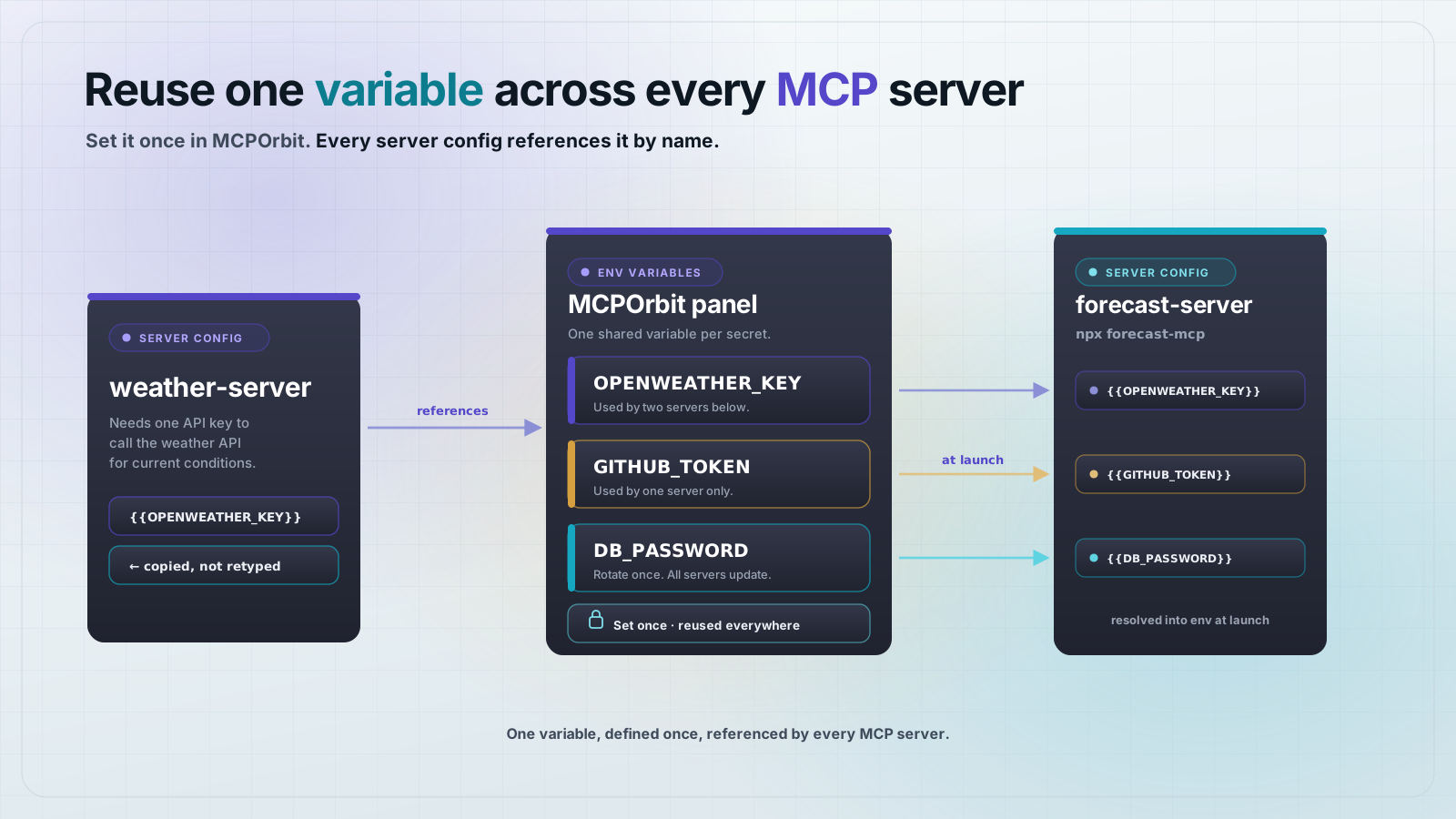
Each Model Context Protocol (MCP) server you connect has its own environment variables, set separately in your client's config. MCP has no built-in way to share one value across servers. A client like MCPOrbit lets you set a value once and reuse it by name in every server that needs it.
This post covers why servers don't share variables, what the config actually looks like, and how to reuse one value without retyping it.
Why does each MCP server need its own environment variables?
Each MCP server config carries its own env block because the Model Context Protocol (MCP) runs every server as a separate process. One process cannot read another process's environment.
A server's environment variables are like a locked drawer that only that server can open. Two servers can sit in the same config file, side by side, and neither can see what's in the other's drawer.
That isolation is deliberate. A weather server with a leaked bug should not be able to read the API key you gave to a billing server next to it in the same config.
What does an MCP server's environment variable config actually look like?
Every MCP client, including Claude Desktop, Cursor, and VS Code, stores server config as a JSON object named mcpServers. Each server gets its own command, args, and env fields.
Here are two servers that both need the same OpenWeather API key. Nothing in the format lets one server point at the other's copy.
{
  "mcpServers": {
    "weather-server": {
      "command": "npx",
      "args": ["-y", "weather-mcp"],
      "env": {
        "OPENWEATHER_KEY": "sk-abc123"
      }
    },
    "forecast-server": {
      "command": "npx",
      "args": ["-y", "forecast-mcp"],
      "env": {
        "OPENWEATHER_KEY": "sk-abc123"
      }
    }
  }
}
The same key, sk-abc123, appears twice. Add a third server that needs it and you type it a third time.
What happens when you reuse the same secret across several servers by hand?
Copying a secret into several server blocks works until the key changes. Rotating an API key means finding every config block that holds the old value and updating each one by hand.
- Miss one server and it keeps using the old key until it fails.
- A failed key usually shows up as an authentication error, not a clear message saying which config is stale.
- A typo made while retyping the same value a third time is easy to miss, because the key itself is not something you can read at a glance.
None of this is a flaw in a specific client. It's a direct result of each server's env block being independent, with no shared reference between them.
The slow part is finding which server is stale. The error comes from the server that failed, not from the config block holding the wrong value, and a server you only use occasionally can sit on an expired key for weeks before anyone calls it. If you do rotate a key by hand, search the whole config file for the old value before you save, and check that the match count drops to zero.
How do you reuse one variable across every MCP server instead of retyping it?
MCPOrbit's environment variables panel sets a named value once, then lets any server reference it by name instead of holding its own copy.
You define the variable with the {{variable}} syntax. MCPOrbit resolves the reference to the saved value when it connects to that server.
{
  "OPENWEATHER_KEY": "{{OPENWEATHER_KEY}}"
}
Both the weather server and the forecast server reference {{OPENWEATHER_KEY}}. Rotate the key once, in one place, and both servers pick up the new value the next time they connect.
Does the MCP spec itself support shared or templated variables?
No. The Model Context Protocol (MCP) specification defines env as a flat list of key and value pairs attached to one server. It says nothing about referencing a value defined elsewhere.
Any variable reuse you see, including {{variable}} syntax, is a convenience a specific client adds on top of the spec. It is resolved before MCP ever sees the config, so a server has no way to know whether its value was typed directly or reused from a saved variable.
What if your MCP client does not support variable reuse?
Most clients do not. The spec defines env as plain key and value pairs and says nothing about expanding a shell variable, so writing something like $OPENWEATHER_KEY into that field may be passed through as those literal characters rather than the value you meant. Whether it expands at all is a decision each client makes on its own, and it is not behaviour you can rely on when you move the same config between clients.
The workaround that does not depend on the client is to move the indirection into the command instead of the value. Launch the server through a small wrapper script that reads the key from your own shell environment and passes it along. The config then holds the name of a script rather than the secret itself, which has a second benefit: the key stays out of a file you might later share with a teammate or commit by accident.
Common questions
Frequently asked questions
- Does MCP let two servers share one environment variable automatically?
- No. Model Context Protocol (MCP) servers each get their own environment, defined in the client's config. Sharing a value across servers is a client feature, not part of the protocol itself.
- Where do you set environment variables for an MCP server?
- Inside that server's own
envblock in your client's config file. Claude Desktop, Cursor, and VS Code all use the same shape for it. A standalone client like MCPOrbit sets them in its connection screen instead of a JSON file. - Is it a security risk to reuse the same API key across multiple MCP servers?
- Reusing a key is not risky if every server using it already needs that same access. The real risk is drift: forgetting to update every copy when the key is rotated, which leaves one server running on a dead key.
- What happens if you rotate an API key used by several MCP servers?
- Every config that holds a copy of the old key needs updating by hand, or that server starts failing. Referencing one saved value instead of pasting the key everywhere means a single update covers every server.
- Can you check an MCP server's environment variables before adding it to a client?
- Yes. Connect the server in a standalone client like MCPOrbit first, set its variables there, and confirm the tools actually run with them. A connection that works there uses the same variables Claude Desktop or Cursor would need.
Every MCP server keeps its own environment variables, so sharing one secret across servers means retyping it everywhere or saving it once and referencing it by name. MCPOrbit's environment variables panel does the second, with one value reused everywhere it's needed.
About the author
Mark
Head of Marketing, MCPOrbit
Mark leads marketing at MCPOrbit, the free desktop client for the Model Context Protocol. He writes the build-it and reliability guides, and the code in them is run before it ships.