Field notes
How to run an MCP server in Docker
A stdio MCP server in Docker has no port. The client runs docker run -i and talks over the pipes. Here is the Dockerfile and the flags that break it.
Mark
Head of Marketing, MCPOrbit
- Published
- Updated
- · Updated
- Read time
- · 10 min read
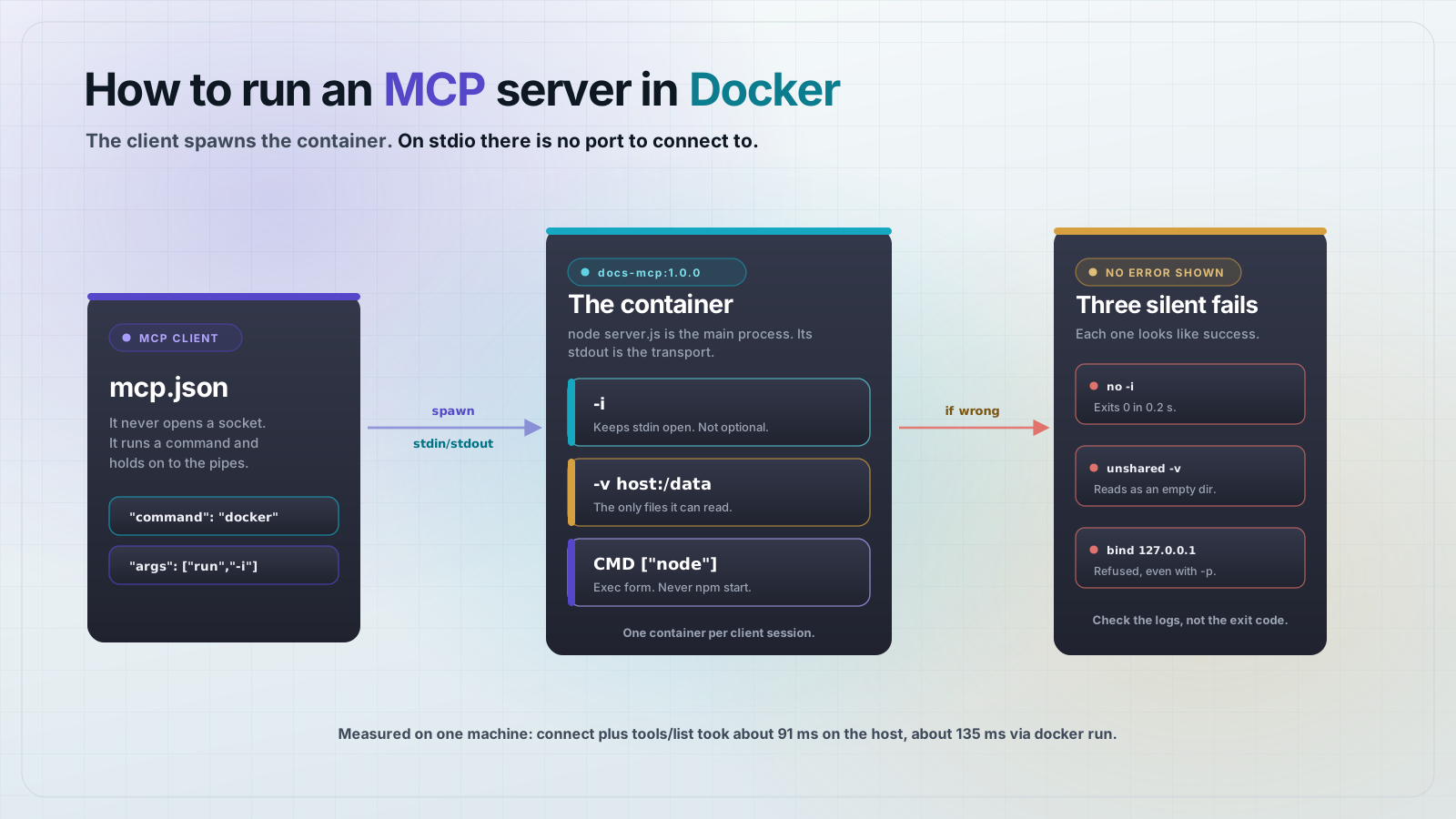
A Model Context Protocol (MCP) server on stdio does not listen on a port, so putting it in Docker does not mean publishing one. The client runs docker run -i itself and talks JSON-RPC over that process's stdin and stdout.
That one difference explains most of what goes wrong. If you think of the container as a service you connect to, you reach for -p, you write a health check, and none of it helps, because nothing is listening. The client is not a caller here. It is a parent process holding two pipes.
Why a containerized stdio server has no port
MCP defines two transports. Over HTTP the server listens and the client sends requests to a URL. Over stdio the client launches the server as a child process and writes JSON-RPC frames to its stdin, reading replies from its stdout. Most desktop MCP clients default to stdio.
Containerizing a stdio server does not change that contract. It only changes the command. Instead of node server.js, the client runs docker run -i --rm your-image. Docker passes the pipes straight through to the process inside. The protocol never notices the container boundary.
The server we are going to containerize
This server exposes two tools over a docs directory. It is deliberately filesystem-backed, because the filesystem is where the container boundary actually bites. Pinned versions: Node 22.14.0 in the image, @modelcontextprotocol/server 2.0.0, zod 4.2.1.
{
  "name": "docs-mcp",
  "version": "1.0.0",
  "type": "module",
  "scripts": {
    "start": "node server.js",
    "probe": "node probe.js"
  },
  "dependencies": {
    "@modelcontextprotocol/server": "2.0.0",
    "zod": "4.2.1"
  },
  "devDependencies": {
    "@modelcontextprotocol/client": "2.0.0"
  }
}
The client SDK is a dev dependency. It is only used by the probe below, and npm ci --omit=dev keeps it out of the image.
// server.js
import { readdir, readFile } from "node:fs/promises";
import { hostname } from "node:os";
import { join, resolve } from "node:path";
import { McpServer } from "@modelcontextprotocol/server";
import { StdioServerTransport } from "@modelcontextprotocol/server/stdio";
import { z } from "zod";

// stdout carries JSON-RPC frames. Every log line goes to stderr.
const log = (...args) => console.error("[docs]", ...args);

// The directory the server serves. Inside the container this is /data.
const DOCS_DIR = resolve(process.env.DOCS_DIR ?? "/data");

const server = new McpServer({ name: "docs", version: "1.0.0" });

server.registerTool(
  "list_docs",
  {
    title: "List docs",
    description: "List the files the server can see in its docs directory.",
    inputSchema: {},
  },
  async () => {
    log("list_docs reading", DOCS_DIR);
    const entries = await readdir(DOCS_DIR, { withFileTypes: true });
    const files = entries.filter((e) => e.isFile()).map((e) => e.name).sort();
    return {
      content: [
        {
          type: "text",
          text: JSON.stringify({ dir: DOCS_DIR, host: hostname(), files }, null, 2),
        },
      ],
    };
  },
);

server.registerTool(
  "read_doc",
  {
    title: "Read doc",
    description: "Read one file from the docs directory.",
    inputSchema: { name: z.string().describe("File name inside the docs directory.") },
  },
  async ({ name }) => {
    const path = join(DOCS_DIR, name);
    if (!path.startsWith(DOCS_DIR + "/")) {
      throw new Error(`refusing to read outside ${DOCS_DIR}`);
    }
    log("read_doc reading", path);
    return { content: [{ type: "text", text: await readFile(path, "utf8") }] };
  },
);

log("starting, DOCS_DIR =", DOCS_DIR);
await server.connect(new StdioServerTransport());
log("connected over stdio");
Note that every log line goes to console.error. On stdio, stdout carries the protocol frames, so it is not available for logging. Inside a container that matters more than usual, because docker logs is often the only view you have of the process.
Write the Dockerfile
Nothing here is MCP-specific except the last line and the missing EXPOSE. Dependencies are installed before the source is copied so the install layer caches across code edits.
# syntax=docker/dockerfile:1
FROM node:22.14.0-alpine

WORKDIR /app

# Install dependencies from the lockfile first so this layer caches.
COPY package.json package-lock.json ./
RUN npm ci --omit=dev

COPY server.js ./

# The directory the server serves. Bind-mount your real docs over it.
ENV DOCS_DIR=/data
RUN mkdir -p /data

# Do not use CMD ["npm", "start"]. npm sits between the client and the
# server process and does not forward signals cleanly.
CMD ["node", "server.js"]
The .dockerignore keeps the host node_modules out of the build context. Copying a macOS node_modules into a Linux image ships native binaries for the wrong platform.
node_modules
data
npm-debug.log
Build it. The image comes out at 246 MB, of which 221 MB is the node:22.14.0-alpine base.
docker build -t docs-mcp:1.0.0 .Use the exec form of CMD
CMD ["node", "server.js"] makes the server PID 1, so it receives signals directly and owns stdin and stdout with nothing in between. CMD ["npm", "start"] puts npm in that position instead. npm does not forward signals cleanly, which turns a clean client shutdown into a container that lingers until Docker kills it.
Point an MCP client at the container
The client config changes in one place: command becomes docker and the image goes in args. This is the shape most desktop clients use, Claude Desktop and Cursor included.
{
  "mcpServers": {
    "docs": {
      "command": "docker",
      "args": [
        "run", "-i", "--rm",
        "-v", "/Users/you/docs:/data:ro",
        "docs-mcp:1.0.0"
      ]
    }
  }
}
Use an absolute host path in the -v flag. The client does not run in your shell, so a relative path resolves against whatever working directory the client happened to have.
Rather than restarting a desktop client to test this, drive it with a real client of your own. This probe spawns exactly the command the config above describes.
// probe.js
// Drives the containerized server the way a real MCP client does:
// it spawns `docker run` and talks JSON-RPC over that process's stdio.
import { Client } from "@modelcontextprotocol/client";
import { StdioClientTransport } from "@modelcontextprotocol/client/stdio";

const docsOnHost = process.argv[2] ?? `${process.cwd()}/data`;

const transport = new StdioClientTransport({
  command: "docker",
  args: [
    "run",
    "-i",
    "--rm",
    "-v",
    `${docsOnHost}:/data:ro`,
    "docs-mcp:1.0.0",
  ],
});

const client = new Client({ name: "probe", version: "1.0.0" });
await client.connect(transport);

console.log("server:", JSON.stringify(client.getServerVersion()));

const { tools } = await client.listTools();
console.log("tools:", tools.map((t) => t.name).join(", "));

const listed = await client.callTool({ name: "list_docs", arguments: {} });
console.log("list_docs ->", listed.content[0].text);

const read = await client.callTool({
  name: "read_doc",
  arguments: { name: "runbook.md" },
});
console.log("read_doc ->", JSON.stringify(read.content[0].text));

await client.close();
node probe.js ~/docsThe run below is the real output. host is the container ID, which is a useful confirmation that the code answering you is the code in the image and not a stale process on your machine.
[docs] starting, DOCS_DIR = /data
[docs] connected over stdio
server: {"name":"docs","version":"1.0.0"}
tools: list_docs, read_doc
[docs] list_docs reading /data
list_docs -> {
  "dir": "/data",
  "host": "2dcab7245023",
  "files": [
    "notes.txt",
    "runbook.md"
  ]
}
[docs] read_doc reading /data/runbook.md
read_doc -> "MCPOrbit runbook.\nStep 1: check the daemon.\n"
Three failures that look like success
Each of these produces no error from Docker and no error from the server. All three were reproduced while writing this post.
Forgetting -i: the container exits 0
Without -i, the container's stdin is closed immediately. The server starts, logs a successful startup, reads end-of-file, and shuts down cleanly. Docker reports exit code 0, so nothing anywhere says the word error.
$ docker run --rm -v ~/docs:/data:ro docs-mcp:1.0.0
[docs] starting, DOCS_DIR = /data
[docs] connected over stdio
$ echo $?
0
The client sees the other half of it. The process it spawned is simply gone before the handshake finishes.
SdkError: Connection closed
code: 'CONNECTION_CLOSED'A mount the VM does not share reads as an empty directory
On macOS and Windows, Docker runs inside a virtual machine, and only certain host paths are shared into it. Bind-mounting a path from outside that set does not fail. Docker creates an empty directory at the target instead, so the server starts fine and reports that your docs folder has no files in it.
That is what happened on the first run of this post's probe. The mount source was a macOS temporary directory, which Colima does not share, so list_docs returned an empty list and read_doc returned ENOENT for a file that plainly existed on the host.
list_docs -> {
  "dir": "/data",
  "host": "06974f494a80",
  "files": []
}
read_doc -> "ENOENT: no such file or directory, open '/data/runbook.md'"
Check what the VM actually shares before assuming the path is wrong. With Colima the shared set is visible from inside the VM, and Docker Desktop lists it under file sharing in settings.
colima ssh -- mount | grep virtiofs
# lima-8a1a853a1749380e on /Users/edem type virtiofs (rw,relatime)
Keeping the mount under your home directory avoids this on every common setup. Mount read-only with :ro while you are at it, since a docs server has no reason to write.
Binding to loopback makes -p useless
This one only applies to the HTTP transport, and it is the classic container networking mistake. A server bound to 127.0.0.1 inside a container is bound to the container's own loopback. Publishing the port with -p 3001:3000 still gets you a refused connection, because the port forward arrives on the container's external interface and nothing is listening there. Bind 0.0.0.0 instead.
What containerizing actually costs
Each docker run starts a fresh container, so the cost lands on startup rather than on individual tool calls. Measuring connect plus tools/list, five runs each, median reported: about 91 ms running node server.js directly, about 135 ms through docker run on the same machine. Call it 40 ms, paid once per client session, on an image whose layers are already local.
The first run after a build or a pull is much slower, because the image has to be fetched or loaded. That is worth knowing before you conclude that MCP over Docker is slow: you are usually measuring the pull, not the protocol.
When to use HTTP instead
Reach for HTTP when the server should outlive any one client, when several clients share it, or when it runs on another machine. Then the container behaves like an ordinary service and you do publish a port.
In @modelcontextprotocol/server 2.0.0 the HTTP entry point is createMcpHandler. It returns an object of the shape { fetch, notify, bus, close }, not a bare function, which is easy to get wrong if you assume it hands back a fetch handler directly.
// http-server.js
import { createServer } from "node:http";
import { readdir } from "node:fs/promises";
import { hostname } from "node:os";
import { resolve } from "node:path";
import { McpServer, createMcpHandler } from "@modelcontextprotocol/server";

const DOCS_DIR = resolve(process.env.DOCS_DIR ?? "/data");
const PORT = Number(process.env.PORT ?? 3000);

// createMcpHandler returns { fetch, notify, bus, close }, not a bare function.
const { fetch: mcpFetch } = createMcpHandler(() => {
  const server = new McpServer({ name: "docs-http", version: "1.0.0" });
  server.registerTool(
    "list_docs",
    { title: "List docs", description: "List files in the docs directory.", inputSchema: {} },
    async () => {
      const entries = await readdir(DOCS_DIR, { withFileTypes: true });
      const files = entries.filter((e) => e.isFile()).map((e) => e.name).sort();
      return {
        content: [
          { type: "text", text: JSON.stringify({ dir: DOCS_DIR, host: hostname(), files }) },
        ],
      };
    },
  );
  return server;
});

// Bridge node:http onto the Web-standard handler createMcpHandler returns.
createServer(async (req, res) => {
  const chunks = [];
  for await (const chunk of req) chunks.push(chunk);
  const body = chunks.length ? Buffer.concat(chunks) : undefined;

  const response = await mcpFetch(
    new Request(`http://localhost:${PORT}${req.url}`, {
      method: req.method,
      headers: req.headers,
      body,
    }),
  );

  res.writeHead(response.status, Object.fromEntries(response.headers));
  res.end(Buffer.from(await response.arrayBuffer()));
})
  // Bind 0.0.0.0, not 127.0.0.1. A server bound to loopback inside a
  // container is unreachable from the host even with -p.
  .listen(PORT, "0.0.0.0", () => {
    console.error(`[docs-http] listening on 0.0.0.0:${PORT}, DOCS_DIR = ${DOCS_DIR}`);
  });
# syntax=docker/dockerfile:1
FROM node:22.14.0-alpine
WORKDIR /app
COPY package.json package-lock.json ./
RUN npm ci --omit=dev
COPY http-server.js ./
ENV DOCS_DIR=/data PORT=3000
RUN mkdir -p /data
EXPOSE 3000
CMD ["node", "http-server.js"]Build it, run it with a published port, and the server answers over HTTP. Note the Accept header: the transport replies as an event stream, so a request that only accepts JSON is rejected.
docker build -f Dockerfile.http -t docs-mcp-http:1.0.0 .
docker run -d --name docs-http -p 3000:3000 -v ~/docs:/data:ro docs-mcp-http:1.0.0

curl -s -X POST http://localhost:3000/ \
  -H 'Content-Type: application/json' \
  -H 'Accept: application/json, text/event-stream' \
  -d '{"jsonrpc":"2.0","id":1,"method":"initialize","params":{"protocolVersion":"2025-06-18","capabilities":{},"clientInfo":{"name":"curl","version":"1.0.0"}}}'
event: message
data: {"result":{"protocolVersion":"2025-06-18","capabilities":{"tools":{"listChanged":true}},"serverInfo":{"name":"docs-http","version":"1.0.0"}},"jsonrpc":"2.0","id":1}Frequently asked questions
Frequently asked questions
- How do I run an MCP server in Docker?
- Build an image whose
CMDstarts the server in exec form, then point your MCP client atdockeras the command withrun -i --rm your-imageas the args. For a stdio server you do not publish a port; the client talks to the container over stdin and stdout. - Why does my MCP server in Docker exit immediately?
- You are almost certainly missing the
-iflag. Without it the container's stdin is closed at startup, so the server reads end-of-file and shuts down cleanly with exit code 0. The client reportsCONNECTION_CLOSEDwhile Docker reports success. - Do I need to EXPOSE a port for an MCP server in Docker?
- Not for stdio, which is what most desktop MCP clients use. The client attaches to the process rather than connecting to a socket, so there is nothing to expose. You only publish a port when you deliberately use the HTTP transport.
- Why can my containerized MCP server not see my files?
- The container has its own filesystem, so anything it should read must be bind-mounted in with
-v. On macOS and Windows there is a second trap: if the host path is not shared into Docker's virtual machine, the mount silently produces an empty directory instead of an error. - Is an MCP server slower in Docker?
- Slightly, and only at startup. Measured on one machine, connecting and listing tools took about 91 ms running Node directly and about 135 ms through
docker run. That cost is paid once per client session, not per tool call. - Should I use CMD ["npm", "start"] in an MCP Dockerfile?
- No. Use the exec form
CMD ["node", "server.js"]so the server is PID 1 and owns stdin and stdout directly. Running it under npm inserts a process that does not forward signals cleanly, so containers linger after the client disconnects.
The pattern generalizes past this example. Any stdio MCP server can be containerized by making the client's command docker and mounting in whatever the server reads. The work is in the mounts and the flags, not the protocol.
MCPOrbit connects straight to a containerized server over stdio or HTTP, so you can call its tools by hand and confirm the mounts and environment are right before you hand the image to anyone else.
About the author
Mark
Head of Marketing, MCPOrbit
Mark leads marketing at MCPOrbit, the free desktop client for the Model Context Protocol. He writes the build-it and reliability guides, and the code in them is run before it ships.