Field notes
How to report progress from a long-running MCP tool
Report progress from a long-running MCP tool by having the client pass a progressToken and the server send notifications/progress updates as it works. Tested on the SDK.
MCPOrbit Team
Engineering, MCPOrbit
- Published
- Updated
- · Updated
- Read time
- · 7 min read
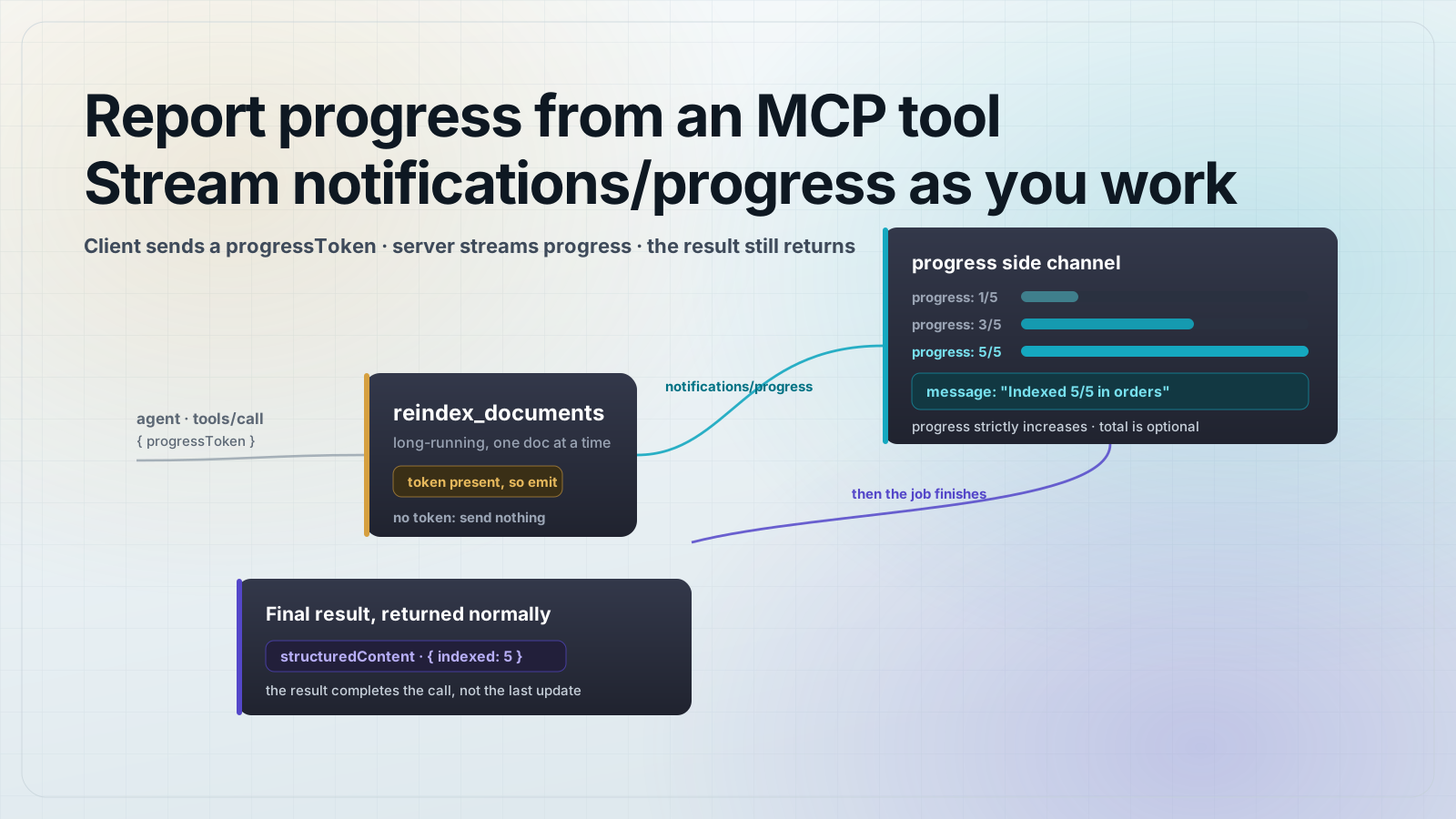
Report progress from a long-running MCP tool by having the client pass a progressToken with the call and the server send notifications/progress updates as it works. The final tool result still comes back normally when the job finishes.
A tool that takes 30 seconds looks frozen to the agent and the person watching it. Progress notifications fix that. The client opts in by attaching a token to the request, and the server streams back how far along it is. Nothing about the return value changes: you still resolve the tool with your normal result. The updates are a side channel that runs while the work happens.
How do progress notifications work in MCP?
Progress is opt-in and per-request. When a client wants updates for a call, it puts a progressToken in the request's _meta field. The token is any string or integer the client picks to identify that call. The server reads the token, does its work, and for each step sends a notifications/progress message that carries the same token back. The client matches the token to the call it made and routes the update to the right place.
A single progress notification looks like this on the wire:
{
  "jsonrpc": "2.0",
  "method": "notifications/progress",
  "params": {
    "progressToken": "abc-123",
    "progress": 3,
    "total": 5,
    "message": "Indexed 3/5 in orders"
  }
}
progress is the current amount of work done. total is optional, because a server does not always know the total up front (a stream of unknown length, for example). When you send total, a client can render a real percentage bar. When you leave it off, the client shows an indeterminate spinner that still proves the server is alive. message is optional human-readable text for whatever the server is doing right now.
Build the server: a tool that streams progress
Start a fresh project and pin the SDK. This is the whole setup:
mkdir mcp-progress && cd mcp-progress
npm init -y
npm pkg set type=module
npm install @modelcontextprotocol/sdk@1.30.0 zod@3.25.76
Here is the server. The tool reindexes a collection one document at a time. The extra argument the SDK hands your tool handler carries the request _meta, so the token is at extra._meta.progressToken. Send updates only when it is present, and use extra.sendNotification so the notification is tied to this request.
// server.js
import { McpServer } from "@modelcontextprotocol/sdk/server/mcp.js";
import { z } from "zod";

export function buildServer() {
  const server = new McpServer({ name: "reindex-server", version: "1.0.0" });

  server.registerTool(
    "reindex_documents",
    {
      title: "Reindex documents",
      description: "Rebuild the search index for a collection. Long-running.",
      inputSchema: { collection: z.string(), count: z.number().int().positive() },
    },
    async ({ collection, count }, extra) => {
      // The client opts in by sending a progressToken with the request.
      const progressToken = extra._meta?.progressToken;

      for (let done = 1; done <= count; done++) {
        // ...real work for each document happens here...
        if (progressToken !== undefined) {
          await extra.sendNotification({
            method: "notifications/progress",
            params: {
              progressToken,
              progress: done,
              total: count,
              message: `Indexed ${done}/${count} in ${collection}`,
            },
          });
        }
      }

      return {
        content: [{ type: "text", text: `Reindexed ${count} documents in ${collection}.` }],
        structuredContent: { collection, indexed: count },
      };
    }
  );

  return server;
}How do I receive progress on the client?
In the TypeScript SDK you do not build the token by hand. Pass an onprogress callback to callTool and the SDK generates a progressToken, attaches it to the request, and calls you back for each matching notification. This client drives the server over an in-memory transport so the whole thing runs in one file:
// test.js
import { Client } from "@modelcontextprotocol/sdk/client/index.js";
import { InMemoryTransport } from "@modelcontextprotocol/sdk/inMemory.js";
import assert from "node:assert/strict";
import { buildServer } from "./server.js";

const [clientTransport, serverTransport] = InMemoryTransport.createLinkedPair();
const server = buildServer();
await server.connect(serverTransport);

const client = new Client({ name: "test-client", version: "1.0.0" });
await client.connect(clientTransport);

const updates = [];
const result = await client.callTool(
  { name: "reindex_documents", arguments: { collection: "orders", count: 5 } },
  undefined,
  { onprogress: (p) => updates.push(p) }
);

assert.equal(updates.length, 5);
assert.deepEqual(updates.map((u) => u.progress), [1, 2, 3, 4, 5]);
assert.equal(updates[4].message, "Indexed 5/5 in orders");
assert.equal(result.structuredContent.indexed, 5);

console.log("progress:", updates.map((u) => `${u.progress}/${u.total}`).join(" "));
console.log("result:", result.structuredContent);

await client.close();
await server.close();
Run it with one command:
node test.jsYou get five updates, then the final result:
progress: 1/5 2/5 3/5 4/5 5/5
result: { collection: 'orders', indexed: 5 }
The rules that keep progress correct
- Only send progress when the client sent a token. A server that pushes progress no one asked for is spamming the connection.
- Keep
progressstrictly increasing across a request. The spec lets a client ignore any update that does not move forward. - Send
totalwhen you know it so the client can show a percentage. Leave it off when the length is unknown; the client falls back to an indeterminate spinner. - Do not rely on the tool call finishing just because progress reached the total. The result is what completes the call, not the last notification.
- Progress is best-effort. A dropped notification must never corrupt the result, so never move real state forward inside the notification path.
Frequently asked questions
Frequently asked questions
- What is a progressToken in MCP?
- It is an identifier the client attaches to a request in the
_metafield to say it wants progress updates for that call. The server echoes the same token in everynotifications/progressmessage so the client can match updates to the right request. No token means the server sends no progress. - Do I have to send a total with progress updates?
- No.
totalis optional. Send it when you know the size of the work so the client can render a percentage. Leave it off for streams of unknown length, and the client shows an indeterminate spinner instead of a bar. - Can progress go backward?
- No. The
progressvalue must increase on every notification for a request. The spec allows a client to ignore any update whose value did not move forward, so a backward number is simply dropped. - How does the client receive progress in the TypeScript SDK?
- Pass an
onprogresscallback in the options tocallTool. The SDK generates theprogressToken, attaches it to the request, and invokes your callback for each matchingnotifications/progressmessage. You do not manage the token yourself. - Does sending progress change how the tool returns its result?
- No. Progress notifications are a side channel that runs while the tool works. You still return the tool result the normal way when the work finishes. Code that ignores progress entirely keeps working unchanged.
Open MCPOrbit and connect your server, then call a long-running tool by hand. You get the final result with the time the call took, so you can confirm the slow path completes before an agent ever touches the tool.
About the author
MCPOrbit Team
Engineering, MCPOrbit
The MCPOrbit engineering team builds MCPOrbit, a free desktop client for the Model Context Protocol. It connects to any MCP server so you can browse its tools, call them by hand, and run them through a real agent loop.