Tutorial
How to add OAuth 2.1 auth to a remote MCP server
Make your remote MCP server an OAuth 2.1 resource server: PRM discovery (RFC 9728), PKCE, and audience-bound tokens (RFC 8707), with runnable code.
Mark
Head of Marketing, MCPOrbit
- Published
- Updated
- · Updated
- Read time
- · 12 min read
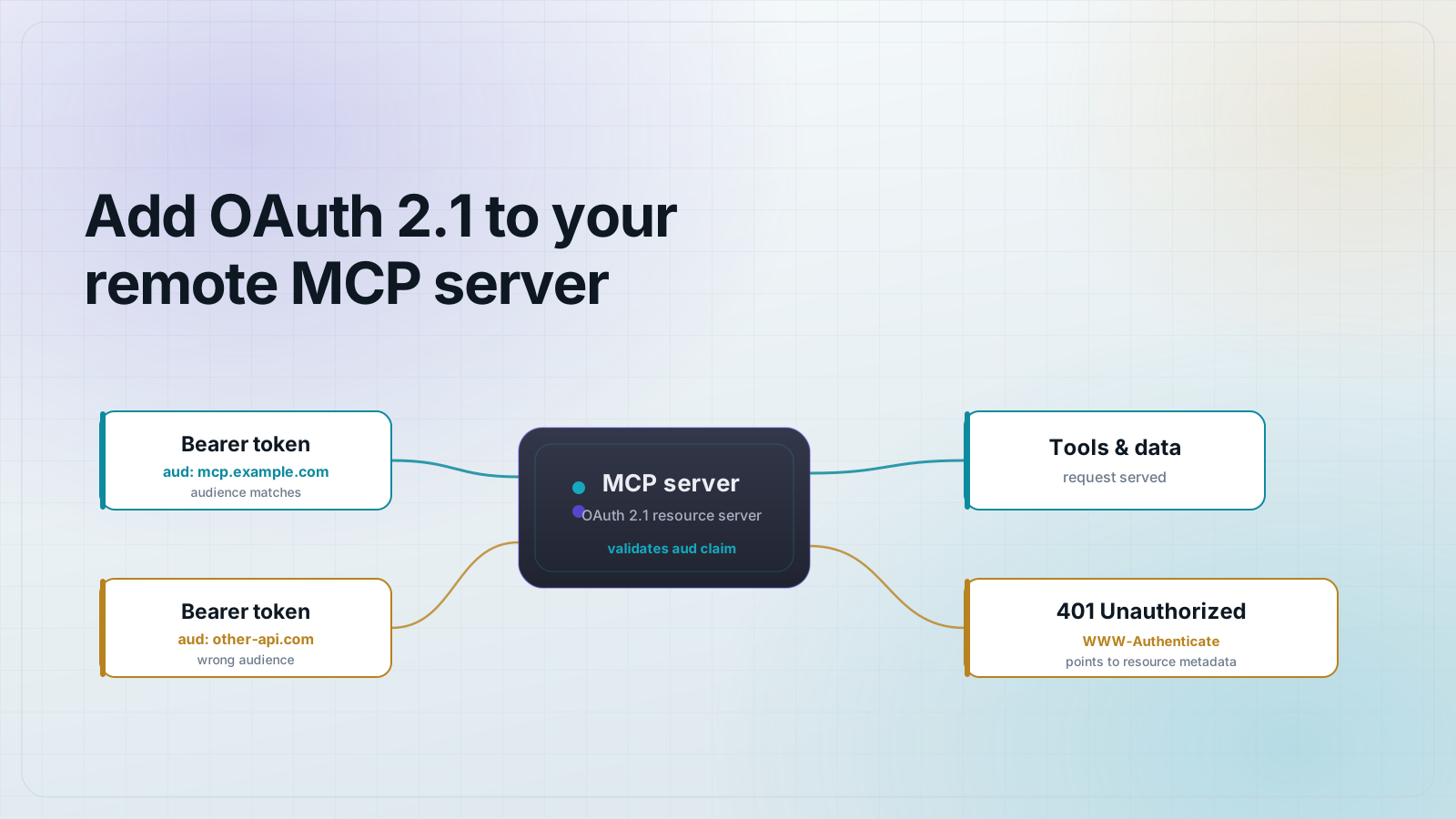
To make a remote MCP server comply with the 2026-07-28 authorization spec, you don't stand up your own OAuth server. You turn your MCP server into an OAuth 2.1 resource server. Concretely: publish a Protected Resource Metadata document at /.well-known/oauth-protected-resource (RFC 9728) that points clients at an authorization server you already trust, then validate that every access token you receive was (1) issued by that authorization server and (2) audience-bound to your server's canonical URL via the RFC 8707 resource parameter. Identity stays with an identity provider (IdP); your job is to verify tokens and check the audience. That is the whole shape of it. The rest of this post is the working code, every file inlined so you can copy it into a new project and run it.
You don't build an auth server, you become a resource server
The single most common mistake devs make reading the MCP authorization spec is assuming they have to implement OAuth themselves: mint tokens, manage users, store passwords. You don't, and you shouldn't.
OAuth 2.1 splits the work across three roles. The client is the MCP host (Claude, or any MCP-speaking app). The authorization server issues tokens and owns identity: that is your IdP, whether Auth0, Okta, Keycloak, WorkOS, Entra, or any spec-compliant issuer you already run. The resource server validates tokens and serves protected resources: that is your MCP server. The 2026-07-28 spec makes your server a resource server, nothing more.
The four things the 2026-07-28 spec requires
1. Authorization Code + PKCE (RFC 7636)
Every client uses the Authorization Code flow with PKCE, no exceptions: public clients and confidential clients alike. PKCE binds the authorization request to the token request with a one-time code verifier, so an intercepted authorization code is useless on its own. There is no implicit flow and no password grant in OAuth 2.1. If a walkthrough tells you to ship a client secret in a desktop app, it is pre-2.1.
2. Protected Resource Metadata (RFC 9728)
Your server publishes a JSON document at /.well-known/oauth-protected-resource listing which authorization server(s) can issue tokens for it and which scopes it expects. This is what lets a client connect with zero hand-configuration: it discovers where to send the user to log in, dynamically, from your server.
3. Resource Indicators (RFC 8707)
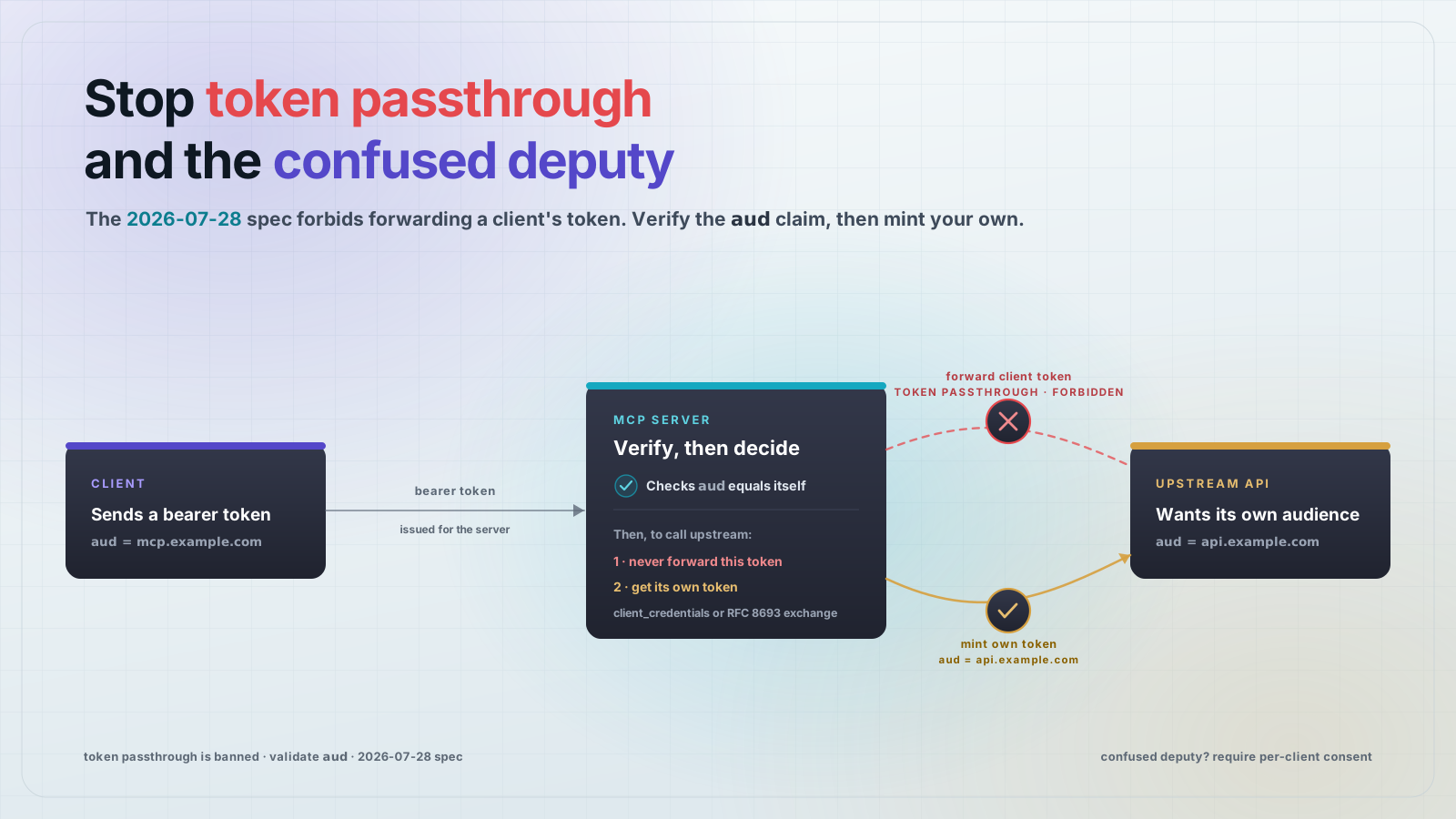
The client MUST send resource=<your server's canonical URI> on both the authorization request and the token request, and your server MUST reject any token whose audience isn't itself. This is the anti-confused-deputy control: it stops a token minted for some other MCP server (or a phishing server) from being replayed against yours. Skipping this check is the difference between "we did OAuth" and "we did OAuth correctly." It is the single most-skipped requirement in the wild.
4. Token validation
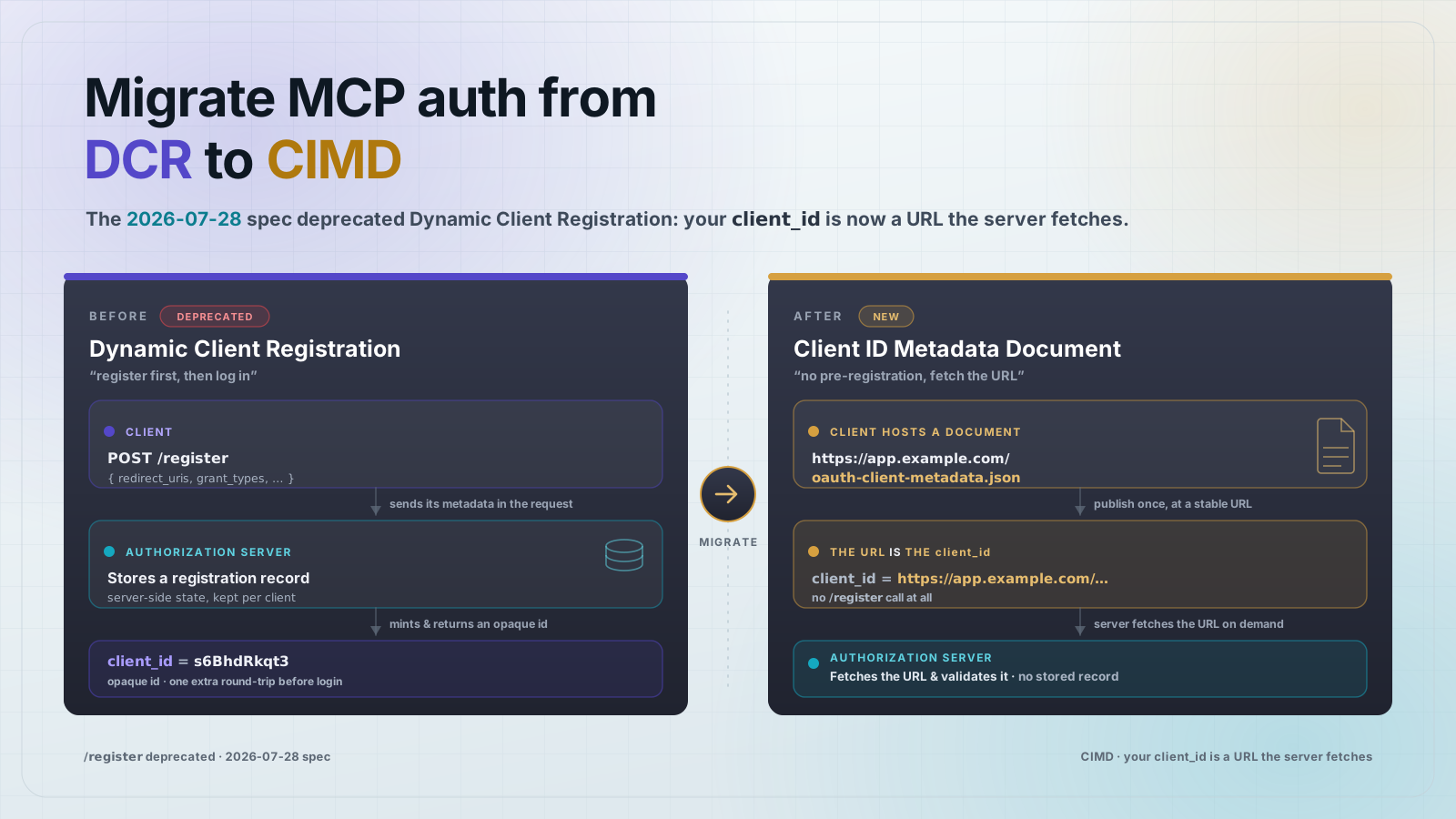
On every request, verify the access token's signature against the authorization server's keys, check the issuer matches your configured authorization server, check it hasn't expired, and check the audience is your canonical URI. Only then do you run the tool call. A missing or bad token gets a 401 with a WWW-Authenticate header pointing back at your PRM document, which is also the client's cue to start the discovery flow. RFC 8414 (Authorization Server Metadata) and RFC 7591 (Dynamic Client Registration) round out the discovery and registration chain so clients can register and find endpoints without a human wiring config. Worth knowing they exist, but your resource server does not implement them.
Add it to a real MCP server, step by step
The server below is a remote (Streamable HTTP) MCP server built on @modelcontextprotocol/sdk@1.29.0, with the OAuth 2.1 resource-server guard sitting in front of the /mcp endpoint. It runs end to end on your machine with one command because it ships a tiny local dev issuer, the stand-in for your real IdP, so you can see the whole handshake offline.
Prerequisites
- Node.js 20 or newer.
- Pinned versions used here: @modelcontextprotocol/sdk@1.29.0, express@5.1.0, jose@6.1.0, zod@3.25.76, TypeScript 5.9.
- No external services: the demo boots the server and a local dev authorization server together.
The project layout
Six source files plus two config files. The only file you keep in production is src/auth.ts. Create the files exactly as shown below.
mcp-remote-auth-example/
  package.json
  tsconfig.json
  src/
    config.ts      # canonical URI + trusted issuer
    auth.ts        # the resource-server guard (the code you own)
    issuer.ts      # dev-only authorization server (delete in prod)
    server.ts      # the remote MCP server over Streamable HTTP
    verify.ts      # npm run demo: the one-command wire trace
    auth.test.ts   # six guard tests (npm test)
package.json
Versions are pinned so the wire trace you see is the wire trace you get.
{
  "name": "mcp-remote-auth-example",
  "version": "1.0.0",
  "private": true,
  "description": "A minimal remote (Streamable HTTP) MCP server that acts as an OAuth 2.1 resource server: PRM discovery (RFC 9728), audience-bound token validation (RFC 8707), and a 401 + WWW-Authenticate discovery entry point.",
  "type": "module",
  "engines": {
    "node": ">=20"
  },
  "scripts": {
    "build": "tsc",
    "start": "node dist/server.js",
    "dev": "tsx src/server.ts",
    "demo": "tsx src/verify.ts",
    "test": "tsx --test src/*.test.ts",
    "prepare": "npm run build"
  },
  "dependencies": {
    "@modelcontextprotocol/sdk": "1.29.0",
    "express": "5.1.0",
    "jose": "6.1.0",
    "zod": "3.25.76"
  },
  "devDependencies": {
    "@types/express": "5.0.3",
    "@types/node": "22.20.1",
    "tsx": "4.23.1",
    "typescript": "5.9.3"
  }
}
tsconfig.json
{
  "compilerOptions": {
    "target": "ES2022",
    "module": "NodeNext",
    "moduleResolution": "NodeNext",
    "outDir": "dist",
    "rootDir": "src",
    "strict": true,
    "esModuleInterop": true,
    "skipLibCheck": true,
    "declaration": false,
    "sourceMap": false
  },
  "include": ["src/**/*.ts"],
  "exclude": ["node_modules", "dist", "src/**/*.test.ts"]
}
src/config.ts
Two values matter: resource is this server's canonical URI (the audience every token must carry), and issuer is the authorization server you trust. In production both come from environment variables pointing at your real IdP.
// Central config for the demo. In production these come from env / your IdP.
// RESOURCE is your MCP server's canonical URI, the audience every token must be bound to (RFC 8707).
// ISSUER is the OAuth 2.1 authorization server you delegate identity to (your IdP).
// In this repo the issuer is a tiny local dev AS so the whole flow runs in one command;
// in production you delete src/issuer.ts and point ISSUER at Auth0/Okta/Keycloak/WorkOS/Entra.

const PORT = Number(process.env.PORT ?? 8080);

export const config = {
  port: PORT,
  // Canonical resource URI of THIS MCP server. Tokens must carry this in `aud`.
  resource: process.env.MCP_RESOURCE ?? `http://localhost:${PORT}/mcp`,
  // The authorization server we trust to mint tokens.
  issuer: process.env.OAUTH_ISSUER ?? `http://localhost:${PORT}`,
  // Scope this resource server expects.
  scope: "mcp:tools",
};
src/auth.ts: the guard you own
This is the only auth code you actually own on a remote MCP server. It does two things. First, it serves the RFC 9728 Protected Resource Metadata document that names your authorization server and scopes. Second, its requireAuth middleware verifies each bearer token with jose, checking issuer and, critically, audience: config.resource, so a token minted for any other resource fails the check. When a token is missing or wrong, it returns a 401 with a WWW-Authenticate: Bearer resource_metadata="..." header that points the client at the discovery document.
// The OAuth 2.1 resource-server guard. This is the code you actually own on a
// remote MCP server: reject unauthenticated requests with a discoverable 401,
// and validate every token's signature, issuer, expiry, AND audience.
//
// The audience check (RFC 8707) is the one everyone skips. Without it, any valid
// token from the same authorization server works against your server, the
// confused-deputy hole. With it, a token minted for another resource is rejected.

import { createRemoteJWKSet, jwtVerify, errors as joseErrors } from "jose";
import type { Request, Response, NextFunction } from "express";
import { config } from "./config.js";

// Path of this resource server's Protected Resource Metadata document (RFC 9728).
export const PRM_PATH = "/.well-known/oauth-protected-resource";

/** RFC 9728 Protected Resource Metadata, how clients discover the AS + scopes. */
export function protectedResourceMetadata() {
  return {
    resource: config.resource,
    authorization_servers: [config.issuer],
    scopes_supported: [config.scope],
    bearer_methods_supported: ["header"],
  };
}

// Verify signatures against the authorization server's published JWKS.
// (The dev issuer serves this at /jwks; a real IdP serves it from its metadata.)
const JWKS = createRemoteJWKSet(new URL(`${config.issuer}/jwks`));

function challenge(res: Response, error?: string, description?: string) {
  // The WWW-Authenticate header points clients at our PRM document. This is the
  // discovery entry point: a spec-compliant client reads it and starts the flow.
  const prmUrl = `${config.issuer}${PRM_PATH}`;
  const parts = [
    `Bearer resource_metadata="${prmUrl}"`,
  ];
  if (error) parts.push(`error="${error}"`);
  if (description) parts.push(`error_description="${description}"`);
  res.setHeader("WWW-Authenticate", parts.join(", "));
  res.status(401).json({ error: error ?? "unauthorized", error_description: description });
}

/** Express middleware: enforce a valid, audience-bound bearer token. */
export async function requireAuth(req: Request, res: Response, next: NextFunction) {
  const header = req.headers.authorization;
  if (!header || !header.toLowerCase().startsWith("bearer ")) {
    return challenge(res, "invalid_request", "missing bearer token");
  }
  const token = header.slice(7).trim();
  try {
    await jwtVerify(token, JWKS, {
      issuer: config.issuer,
      audience: config.resource, // <-- RFC 8707: token MUST be bound to us
    });
    return next();
  } catch (err) {
    if (err instanceof joseErrors.JWTClaimValidationFailed && err.claim === "aud") {
      // Signed and unexpired, but minted for a DIFFERENT resource. Reject it.
      return challenge(res, "invalid_token", "token audience does not match this server");
    }
    if (err instanceof joseErrors.JWTExpired) {
      return challenge(res, "invalid_token", "token expired");
    }
    return challenge(res, "invalid_token", "token validation failed");
  }
}
src/issuer.ts: the dev-only authorization server
This exists only so the tutorial runs end to end in one command. In production you delete this file and point OAUTH_ISSUER at your real IdP; your resource server verifies against that IdP's published keys unchanged. The dev issuer does the minimum: hold an RSA keypair, expose JWKS so the resource server can verify signatures with real crypto, and mint audience-bound tokens.
// A tiny dev-only OAuth 2.1 authorization server.
//
// IMPORTANT: this exists ONLY so the tutorial runs end-to-end in one command.
// In production you DELETE this file and delegate to a real IdP (Auth0, Okta,
// Keycloak, WorkOS, Entra). Your MCP server never needs to be an auth server -
// it only validates the tokens a real IdP issues. See the production note below.
//
// This dev issuer does the minimum to exercise the resource server:
//   - holds an RSA keypair
//   - exposes JWKS so the resource server can verify signatures (real crypto)
//   - mints audience-bound access tokens (RFC 8707: `aud` = the requested `resource`)

import { generateKeyPair, exportJWK, SignJWT, type JWK } from "jose";

const KID = "dev-key-1";
const ALG = "RS256";

let privateKey: CryptoKey;
let publicJwk: JWK;
let ready: Promise<void> | null = null;

async function init(): Promise<void> {
  if (ready) return ready;
  ready = (async () => {
    const { privateKey: priv, publicKey: pub } = await generateKeyPair(ALG);
    privateKey = priv;
    publicJwk = { ...(await exportJWK(pub)), kid: KID, alg: ALG, use: "sig" };
  })();
  return ready;
}

/** JWKS document the resource server fetches to verify token signatures. */
export async function jwks(): Promise<{ keys: JWK[] }> {
  await init();
  return { keys: [publicJwk] };
}

/**
 * Mint an access token. `resource` becomes the token audience (RFC 8707).
 * A token whose `resource` differs from the MCP server's canonical URI will be
 * rejected by the resource server, that is the whole point of the audience check.
 */
export async function mintToken(opts: {
  issuer: string;
  resource: string;
  subject?: string;
  scope?: string;
  expiresInSeconds?: number;
}): Promise<string> {
  await init();
  const now = Math.floor(Date.now() / 1000);
  return new SignJWT({ scope: opts.scope ?? "mcp:tools" })
    .setProtectedHeader({ alg: ALG, kid: KID })
    .setIssuer(opts.issuer)
    .setSubject(opts.subject ?? "dev-user")
    .setAudience(opts.resource) // <-- RFC 8707 audience binding
    .setIssuedAt(now)
    .setExpirationTime(now + (opts.expiresInSeconds ?? 300))
    .sign(privateKey);
}
src/server.ts: the remote MCP server
The Streamable HTTP MCP server. Two public discovery routes (the PRM document and, for the demo only, the dev issuer's /jwks), and the /mcp endpoint guarded by requireAuth. It exposes one trivial whoami tool so tools/list and tools/call have something to return.
// The remote MCP server, over Streamable HTTP, behind an OAuth 2.1 resource-server guard.
//
//   GET  /.well-known/oauth-protected-resource  -> RFC 9728 discovery doc (public)
//   GET  /jwks                                  -> dev issuer's keys (a real IdP serves its own)
//   POST /mcp                                   -> the MCP endpoint, requireAuth-guarded
//   GET|DELETE /mcp                             -> session stream / teardown, also guarded
//
// The only auth code you own in production is src/auth.ts. Everything under /jwks
// and src/issuer.ts is the local dev stand-in for your real IdP.

import { randomUUID } from "node:crypto";
import express, { type Request, type Response } from "express";
import { McpServer } from "@modelcontextprotocol/sdk/server/mcp.js";
import { StreamableHTTPServerTransport } from "@modelcontextprotocol/sdk/server/streamableHttp.js";
import { isInitializeRequest } from "@modelcontextprotocol/sdk/types.js";
import { z } from "zod";
import { config } from "./config.js";
import { PRM_PATH, protectedResourceMetadata, requireAuth } from "./auth.js";
import { jwks } from "./issuer.js";

function buildMcpServer(): McpServer {
  const server = new McpServer({ name: "mcp-remote-auth-example", version: "1.0.0" });
  // One trivial protected tool so `tools/list` and `tools/call` have something to return.
  server.tool(
    "whoami",
    "Returns a fixed identity string, proving the authenticated call reached the tool.",
    { note: z.string().optional().describe("optional echo note") },
    async ({ note }) => ({
      content: [
        {
          type: "text",
          text: `authenticated MCP call ok${note ? `, note: ${note}` : ""}`,
        },
      ],
    }),
  );
  return server;
}

export function createApp() {
  const app = express();
  app.use(express.json());

  // --- Public discovery endpoints ---
  app.get(PRM_PATH, (_req, res) => {
    res.json(protectedResourceMetadata());
  });
  app.get("/jwks", async (_req, res) => {
    res.json(await jwks());
  });

  // --- Guarded MCP endpoint (stateful Streamable HTTP sessions) ---
  const transports: Record<string, StreamableHTTPServerTransport> = {};

  app.post("/mcp", requireAuth, async (req: Request, res: Response) => {
    const sessionId = req.headers["mcp-session-id"] as string | undefined;
    let transport = sessionId ? transports[sessionId] : undefined;

    if (!transport && isInitializeRequest(req.body)) {
      transport = new StreamableHTTPServerTransport({
        sessionIdGenerator: () => randomUUID(),
        onsessioninitialized: (sid) => {
          transports[sid] = transport!;
        },
      });
      transport.onclose = () => {
        if (transport!.sessionId) delete transports[transport!.sessionId];
      };
      await buildMcpServer().connect(transport);
    } else if (!transport) {
      res.status(400).json({
        jsonrpc: "2.0",
        error: { code: -32000, message: "No valid session; send an initialize request first." },
        id: null,
      });
      return;
    }
    await transport.handleRequest(req, res, req.body);
  });

  const sessionStream = async (req: Request, res: Response) => {
    const sessionId = req.headers["mcp-session-id"] as string | undefined;
    const transport = sessionId ? transports[sessionId] : undefined;
    if (!transport) {
      res.status(400).send("Invalid or missing session id");
      return;
    }
    await transport.handleRequest(req, res);
  };
  app.get("/mcp", requireAuth, sessionStream);
  app.delete("/mcp", requireAuth, sessionStream);

  return app;
}

export function startServer(port = config.port) {
  const app = createApp();
  return new Promise<import("node:http").Server>((resolve) => {
    const httpServer = app.listen(port, () => resolve(httpServer));
  });
}

// Run directly: `npm run dev` / `npm start`
if (import.meta.url === `file://${process.argv[1]}`) {
  startServer().then(() => {
    console.log(`MCP resource server listening on ${config.resource}`);
    console.log(`PRM: ${config.issuer}${PRM_PATH}`);
  });
}
src/verify.ts: the one-command wire trace
This is what npm run demo runs. It boots the server, then walks the four wire behaviors and prints the real request and response for each.
// One-command end-to-end proof (`npm run demo`).
// Boots the server, then walks the four wire behaviors the tutorial claims,
// printing the real request/response for each so you can see the auth layer work.

import { Client } from "@modelcontextprotocol/sdk/client/index.js";
import { StreamableHTTPClientTransport } from "@modelcontextprotocol/sdk/client/streamableHttp.js";
import { startServer } from "./server.js";
import { mintToken } from "./issuer.js";
import { config } from "./config.js";
import { PRM_PATH } from "./auth.js";

const line = (s = "") => console.log(s);
const rule = (n: number, title: string) =>
  line(`\n=== ${n}. ${title} ===`);

async function main() {
  const server = await startServer();
  line(`# server up at ${config.resource}\n`);

  const MCP_JSON = { "Content-Type": "application/json", Accept: "application/json, text/event-stream" };
  const initBody = {
    jsonrpc: "2.0",
    id: 1,
    method: "initialize",
    params: {
      protocolVersion: "2025-06-18",
      capabilities: {},
      clientInfo: { name: "wire-trace", version: "1.0.0" },
    },
  };

  // 1. Unauthenticated request -> 401 + WWW-Authenticate pointing at the PRM doc.
  rule(1, "Unauthenticated tools/list -> 401 + WWW-Authenticate");
  {
    const r = await fetch(config.resource, { method: "POST", headers: MCP_JSON, body: JSON.stringify(initBody) });
    line(`> POST /mcp   (no Authorization header)`);
    line(`< HTTP ${r.status}`);
    line(`< WWW-Authenticate: ${r.headers.get("www-authenticate")}`);
    line(`< body: ${await r.text()}`);
  }

  // 2. The client discovers the AS from the PRM document (RFC 9728).
  rule(2, "GET /.well-known/oauth-protected-resource -> RFC 9728 metadata");
  {
    const r = await fetch(`${config.issuer}${PRM_PATH}`);
    line(`> GET ${PRM_PATH}`);
    line(`< HTTP ${r.status}`);
    line(`< body: ${JSON.stringify(await r.json(), null, 2)}`);
  }

  // 3. A correctly audience-bound token (RFC 8707) authenticates and reaches the tools.
  rule(3, "Authorization Code + PKCE would mint this token; here the dev issuer mints it");
  const goodToken = await mintToken({ issuer: config.issuer, resource: config.resource });
  line(`> minted token with aud = ${config.resource}  (matches this server)`);
  {
    const transport = new StreamableHTTPClientTransport(new URL(config.resource), {
      requestInit: { headers: { Authorization: `Bearer ${goodToken}` } },
    });
    const client = new Client({ name: "wire-trace", version: "1.0.0" });
    await client.connect(transport);
    line(`< initialize + session established (HTTP 200)`);
    const tools = await client.listTools();
    line(`< tools/list -> [${tools.tools.map((t) => t.name).join(", ")}]`);
    const call = await client.callTool({ name: "whoami", arguments: { note: "audience ok" } });
    const text = (call.content as Array<{ type: string; text?: string }>)[0]?.text;
    line(`< tools/call whoami -> "${text}"`);
    await client.close();
  }

  // 4. A token minted for a DIFFERENT resource is rejected (the RFC 8707 audience check).
  rule(4, "Wrong-audience token -> 401 invalid_token (the money shot)");
  const wrongToken = await mintToken({ issuer: config.issuer, resource: "https://some-other-mcp.example/mcp" });
  {
    const r = await fetch(config.resource, {
      method: "POST",
      headers: { ...MCP_JSON, Authorization: `Bearer ${wrongToken}` },
      body: JSON.stringify(initBody),
    });
    line(`> POST /mcp   Authorization: Bearer <token aud=https://some-other-mcp.example/mcp>`);
    line(`< HTTP ${r.status}`);
    line(`< WWW-Authenticate: ${r.headers.get("www-authenticate")}`);
    line(`< body: ${await r.text()}`);
  }

  line(`\n# all four behaviors verified`);
  server.close();
}

main().then(
  () => process.exit(0),
  (err) => {
    console.error(err);
    process.exit(1);
  },
);
src/auth.test.ts: the guard tests
Six tests covering the four behaviors plus expired and malformed tokens. Run them with npm test. If any guard breaks, the suite fails.
// Guard tests for the four wire behaviors. Run with `npm test`.
import { test, before, after } from "node:test";
import assert from "node:assert/strict";
import type { Server } from "node:http";
import { startServer } from "./server.js";
import { mintToken } from "./issuer.js";
import { config } from "./config.js";
import { PRM_PATH } from "./auth.js";

const MCP_JSON = {
  "Content-Type": "application/json",
  Accept: "application/json, text/event-stream",
};
const initBody = JSON.stringify({
  jsonrpc: "2.0",
  id: 1,
  method: "initialize",
  params: { protocolVersion: "2025-06-18", capabilities: {}, clientInfo: { name: "t", version: "1" } },
});

let server: Server;
before(async () => {
  server = await startServer();
});
after(() => server.close());

test("unauthenticated request is rejected with 401 + WWW-Authenticate -> PRM", async () => {
  const r = await fetch(config.resource, { method: "POST", headers: MCP_JSON, body: initBody });
  assert.equal(r.status, 401);
  const wa = r.headers.get("www-authenticate") ?? "";
  assert.match(wa, /^Bearer /);
  assert.ok(wa.includes(`resource_metadata="${config.issuer}${PRM_PATH}"`), "points at PRM doc");
});

test("PRM document is a valid RFC 9728 shape", async () => {
  const r = await fetch(`${config.issuer}${PRM_PATH}`);
  assert.equal(r.status, 200);
  const doc = (await r.json()) as Record<string, unknown>;
  assert.equal(doc.resource, config.resource);
  assert.deepEqual(doc.authorization_servers, [config.issuer]);
  assert.ok(Array.isArray(doc.scopes_supported));
});

test("a correctly audience-bound token is accepted", async () => {
  const token = await mintToken({ issuer: config.issuer, resource: config.resource });
  const r = await fetch(config.resource, {
    method: "POST",
    headers: { ...MCP_JSON, Authorization: `Bearer ${token}` },
    body: initBody,
  });
  assert.equal(r.status, 200);
});

test("a wrong-audience token is rejected with invalid_token (RFC 8707)", async () => {
  const token = await mintToken({ issuer: config.issuer, resource: "https://other.example/mcp" });
  const r = await fetch(config.resource, {
    method: "POST",
    headers: { ...MCP_JSON, Authorization: `Bearer ${token}` },
    body: initBody,
  });
  assert.equal(r.status, 401);
  assert.match(r.headers.get("www-authenticate") ?? "", /error="invalid_token"/);
});

test("an expired token is rejected", async () => {
  const token = await mintToken({ issuer: config.issuer, resource: config.resource, expiresInSeconds: -10 });
  const r = await fetch(config.resource, {
    method: "POST",
    headers: { ...MCP_JSON, Authorization: `Bearer ${token}` },
    body: initBody,
  });
  assert.equal(r.status, 401);
});

test("a malformed bearer token is rejected", async () => {
  const r = await fetch(config.resource, {
    method: "POST",
    headers: { ...MCP_JSON, Authorization: "Bearer not-a-jwt" },
    body: initBody,
  });
  assert.equal(r.status, 401);
});
Run it
One install, one command. The demo boots the server and the local dev authorization server together, so there is nothing external to configure.
npm install
npm run demo

# and the guard tests
npm test
In production you delete src/issuer.ts and the /jwks route, set OAUTH_ISSUER to your IdP's issuer URL and MCP_RESOURCE to your server's public canonical URI, and src/auth.ts verifies against your IdP's published keys unchanged. Your IdP already runs the login page, the token endpoint, and the JWKS. You only verify and audience-check.
Prove it works: the wire trace
npm run demo boots the server and walks the four behaviors, printing the real request and response for each. This is the actual captured output, not a mock-up.
First, an unauthenticated call is refused with a 401 whose WWW-Authenticate header points at the metadata document, the client's entry point into discovery:
> POST /mcp   (no Authorization header)
< HTTP 401
< WWW-Authenticate: Bearer resource_metadata="http://localhost:8080/.well-known/oauth-protected-resource", error="invalid_request", error_description="missing bearer token"
The client follows that URL and reads the RFC 9728 document, which tells it exactly which authorization server to use and which scope to request:
> GET /.well-known/oauth-protected-resource
< HTTP 200
{
  "resource": "http://localhost:8080/mcp",
  "authorization_servers": ["http://localhost:8080"],
  "scopes_supported": ["mcp:tools"],
  "bearer_methods_supported": ["header"]
}
After the Authorization Code + PKCE exchange, the client holds a token whose audience is this server's canonical URI. It authenticates, initializes a session, lists tools, and calls one:
> minted token with aud = http://localhost:8080/mcp  (matches this server)
< initialize + session established (HTTP 200)
< tools/list -> [whoami]
< tools/call whoami -> "authenticated MCP call ok, note: audience ok"
Now the one that matters. Take a token that is perfectly valid, correctly signed by the same authorization server and unexpired, but minted for a different resource. The audience check (RFC 8707) rejects it:
> POST /mcp   Authorization: Bearer <token aud=https://some-other-mcp.example/mcp>
< HTTP 401
< WWW-Authenticate: Bearer resource_metadata="http://localhost:8080/.well-known/oauth-protected-resource", error="invalid_token", error_description="token audience does not match this server"
That last rejection is the whole point. Without the audience check, any valid token from the same authorization server would work against your server, the confused-deputy hole. The six guard tests (npm test) cover these behaviors plus expired and malformed tokens; if any break, the suite fails.
Common mistakes
- Building your own authorization server. The spec doesn't ask for this and you almost certainly shouldn't. Delegate to an IdP; be a resource server.
- Skipping the audience check (the confused-deputy hole). Validating that a token is signed and unexpired but not that it was issued for you means any valid token from the same authorization server works against your server. Enforce the RFC 8707 resource and audience match.
- Treating PRM as optional. Without /.well-known/oauth-protected-resource, clients can't discover your authorization server, so the zero-config connect flow breaks and users get cryptic failures instead of a login prompt.
- Adding auth to a local stdio server. Local stdio transports aren't remote and aren't in scope. Don't bolt OAuth onto a server that only ever runs on the user's own machine: friction for zero security gain.
- Hardcoding the authorization server instead of publishing discovery. Pinning one IdP in client config works until it doesn't; discovery via PRM keeps you interoperable as clients and issuers change.
Frequently asked questions
- Do I need to run my own OAuth server for MCP?
- No. Your MCP server is a resource server: it validates tokens issued by an authorization server you already trust (Auth0, Okta, Keycloak, WorkOS, Entra, and so on). You never issue tokens or manage identity yourself.
- What is the resource parameter for?
- It audience-binds the token to your specific server (RFC 8707). The client sends
resource=<your canonical URI>when requesting the token, and you reject any token whose audience isn't you. It is the control that stops a token minted for another server from being replayed against yours, the confused-deputy defense. - Does a local (stdio) MCP server need OAuth?
- No. The authorization requirements apply to remote and HTTP transports. A server that runs locally over stdio on the user's own machine is out of scope.
- What actually breaks on July 28 if I skip it?
- Remote MCP servers that don't implement the authorization spec fall out of compliance, and spec-compliant clients are entitled to refuse to connect to a remote server that can't complete the discovery and token flow. Local stdio servers are unaffected.
- Can I reuse my existing IdP?
- Yes, that is the intended path. If your IdP supports OAuth 2.1 (Authorization Code + PKCE) and can mint audience-bound tokens with a resource or audience claim, you point your PRM document at it and you're most of the way there.
- Do server-to-server clients need PKCE?
- OAuth 2.1 standardizes on Authorization Code + PKCE for interactive clients. Non-interactive service-to-service callers typically use the Client Credentials flow instead, but they still must present audience-bound tokens your server validates the same way.
Once your server validates audience-bound tokens, connect it in MCPOrbit and call the tools yourself. You see the real 401 a client gets, and you see which calls the token is actually allowed to make.
About the author
Mark
Head of Marketing, MCPOrbit
Mark leads marketing at MCPOrbit, the free desktop client for the Model Context Protocol. He writes the build-it and reliability guides, and the code in them is run before it ships.