Field notes
How to migrate MCP auth from DCR to CIMD
The 2026-07-28 MCP spec deprecates Dynamic Client Registration for Client ID Metadata Documents. Here is what changed and how to migrate your OAuth flow.
Mark
Head of Marketing, MCPOrbit
- Published
- Updated
- · Updated
- Read time
- · 9 min read
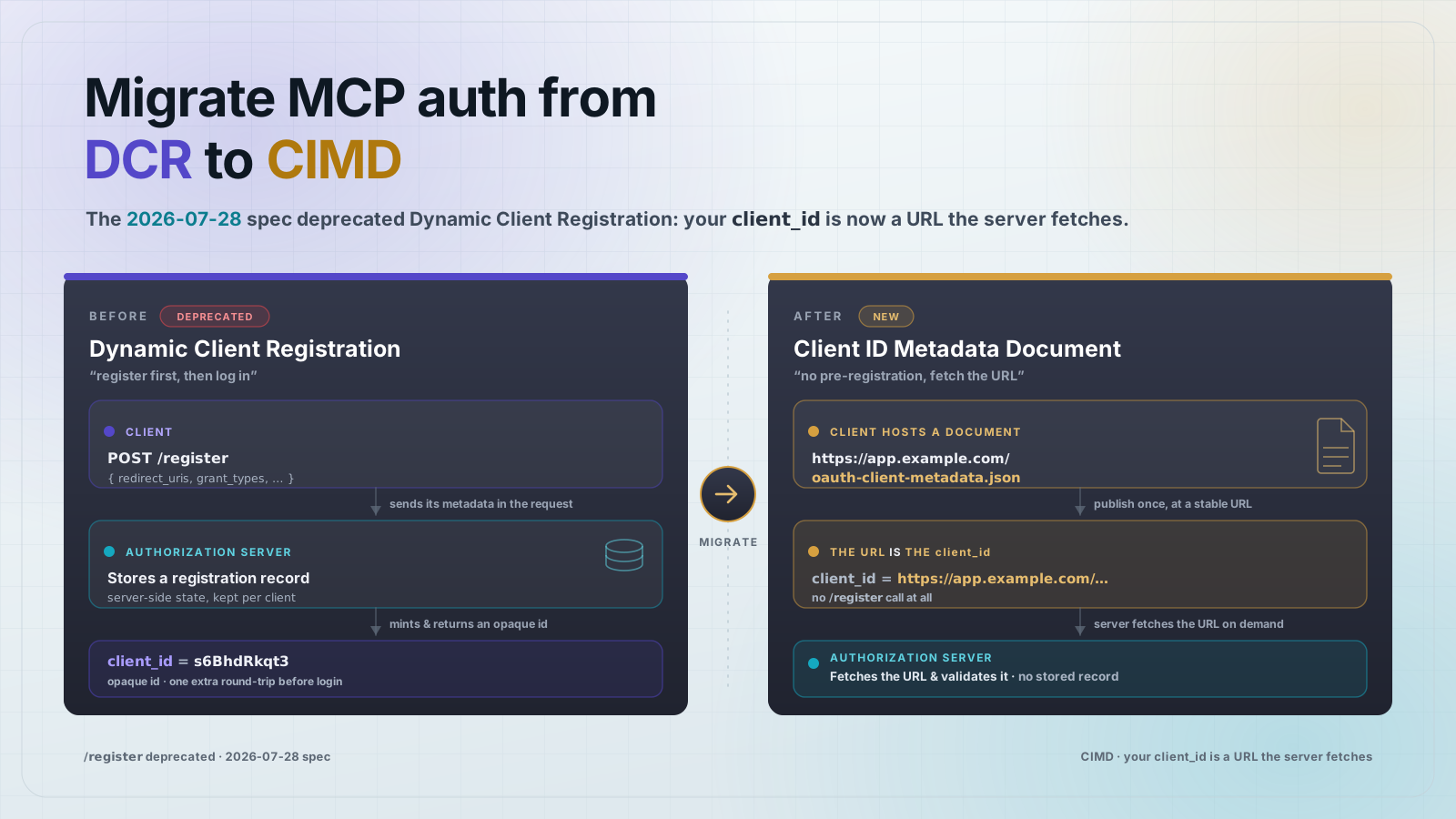
The 2026-07-28 Model Context Protocol (MCP) specification deprecates Dynamic Client Registration (DCR) in favor of Client ID Metadata Documents (CIMD). To migrate, your OAuth client stops POSTing to a registration endpoint and instead hosts a small JSON metadata file at a stable HTTPS URL, then uses that URL as its client_id. DCR still works for backward compatibility, so you can move at your own pace inside the spec's twelve-month minimum deprecation window.
This matters because registration was the part of MCP OAuth that broke first. With DCR, every agent had to call each authorization server's registration endpoint before it could log in, which meant no-registration servers rejected the client and misconfigured ones handed out throwaway credentials. CIMD removes that step: the client_id is a URL the authorization server fetches on demand, so a client can complete a full OAuth flow against a server it has never seen before, with no pre-registration.
What exactly did the 2026-07-28 spec deprecate?
The spec's authorization hardening formally deprecates Dynamic Client Registration, the RFC 7591 flow where a client POSTs its metadata to a /register endpoint and the authorization server mints and stores a client_id and secret. The deprecation is tracked as SEP-2352. Nothing you built on DCR stops working the day the spec ships: DCR remains valid for backward compatibility with authorization servers that do not support CIMD yet. The new formal deprecation policy guarantees a lifecycle of Active, then Deprecated, then Removed, with a minimum of twelve months between deprecation and the earliest possible removal. So this is a migration to plan, not an outage to firefight.
What is a Client ID Metadata Document (CIMD)?
A Client ID Metadata Document is a JSON file, hosted by the client at an HTTPS URL, that describes the client the same way a DCR record would. The difference is where it lives. Instead of the authorization server storing the record in its database, the client hosts the record and the client_id is the URL of that file. When the authorization server sees a request, it fetches the URL, reads the metadata, and validates it on demand. There is no registration call and no shared secret to leak.
A minimal document looks like this. Host it at a stable URL such as https://agent.example.com/oauth/client-metadata.json, and use that same URL as your client_id:
{
  "client_id": "https://agent.example.com/oauth/client-metadata.json",
  "client_name": "Example MCP Agent",
  "client_uri": "https://agent.example.com",
  "application_type": "native",
  "redirect_uris": [
    "http://127.0.0.1:33418/callback",
    "https://agent.example.com/oauth/callback"
  ],
  "grant_types": ["authorization_code", "refresh_token"],
  "response_types": ["code"],
  "token_endpoint_auth_method": "none",
  "scope": "mcp:tools mcp:resources"
}
Two rules make this safe. First, the client_id field inside the document must be byte-for-byte the URL the authorization server fetched, so the identifier and the metadata are bound to the same origin. Second, the redirect_uri in the authorization request must appear in the document's redirect_uris allowlist. An authorization server that follows the spec rejects the request if either check fails.
How does the authorization request change for the client?
Instead of a short opaque client_id handed back by a registration call, you send the URL of your metadata document. Everything else in the authorization-code flow is standard OAuth 2.1 with PKCE. Note the resource parameter: that is the Resource Indicator (RFC 8707) naming the exact MCP server this token is for.
GET /authorize
  ?response_type=code
  &client_id=https%3A%2F%2Fagent.example.com%2Foauth%2Fclient-metadata.json
  &redirect_uri=http%3A%2F%2F127.0.0.1%3A33418%2Fcallback
  &code_challenge=<pkce_s256_challenge>
  &code_challenge_method=S256
  &resource=https%3A%2F%2Fmcp.example.com
  &scope=mcp%3Atools%20mcp%3Aresources
  &state=<opaque_state> HTTP/1.1
Host: auth.example.com
When the authorization server redirects back with the code, the client must check the iss parameter on the response against the issuer it expected (RFC 9207) before redeeming the code. This is the fix for authorization-server mix-up attacks, where a malicious server tries to get your client to send a code to the wrong token endpoint. Bind the credentials you get to that issuer and do not reuse them against a different authorization server.
What does the MCP server itself need to expose?
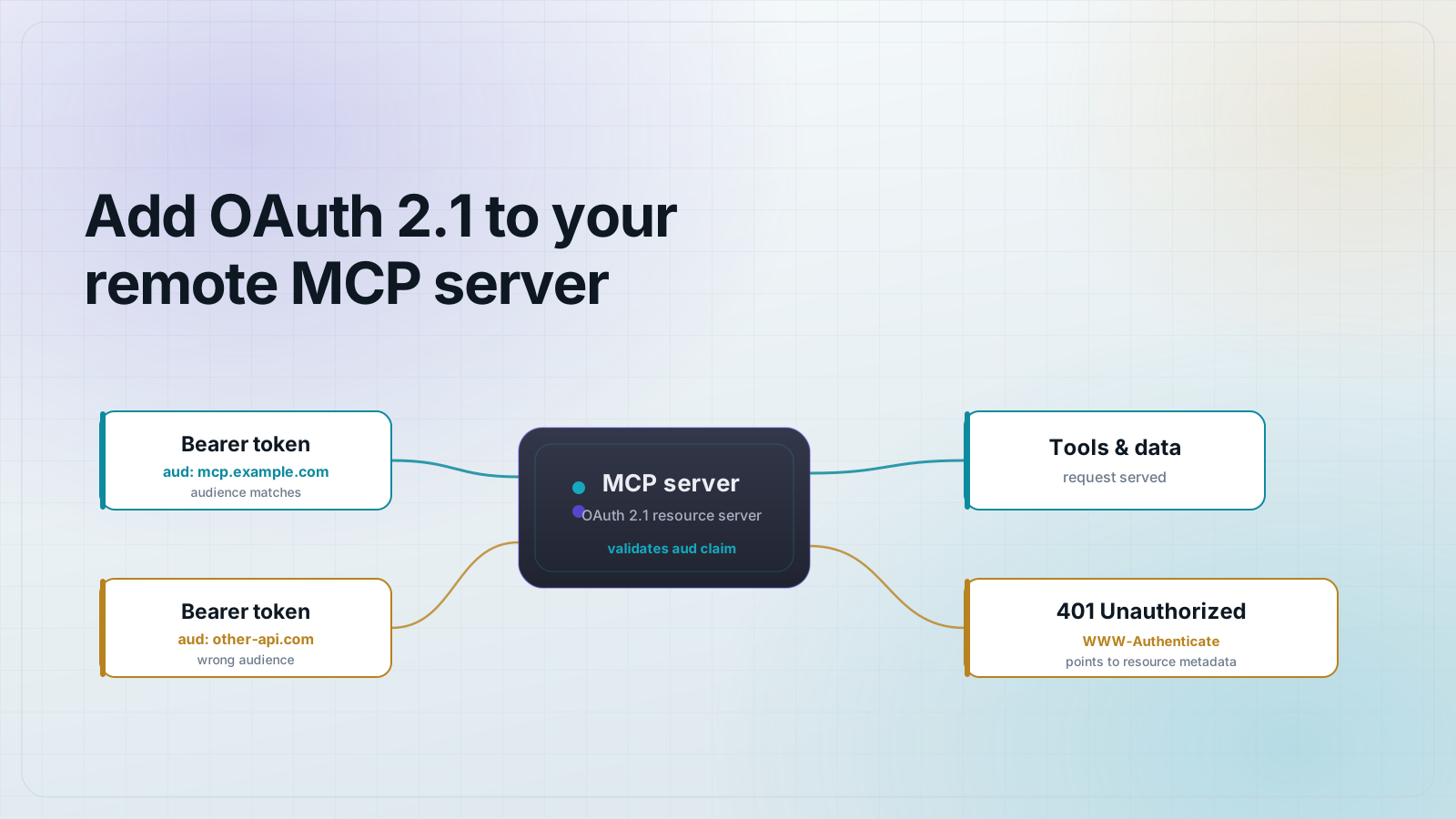
Most of CIMD lives in the client and the authorization server, not in your MCP server's tool code. Your MCP server's job is to act as a spec-compliant OAuth 2.1 protected resource: advertise which authorization server protects it, and validate the bearer token's audience on every request. You advertise the authorization server with a protected-resource metadata document (RFC 9728) at a well-known path:
GET /.well-known/oauth-protected-resource HTTP/1.1
Host: mcp.example.com

{
  "resource": "https://mcp.example.com",
  "authorization_servers": ["https://auth.example.com"],
  "scopes_supported": ["mcp:tools", "mcp:resources"],
  "bearer_methods_supported": ["header"]
}
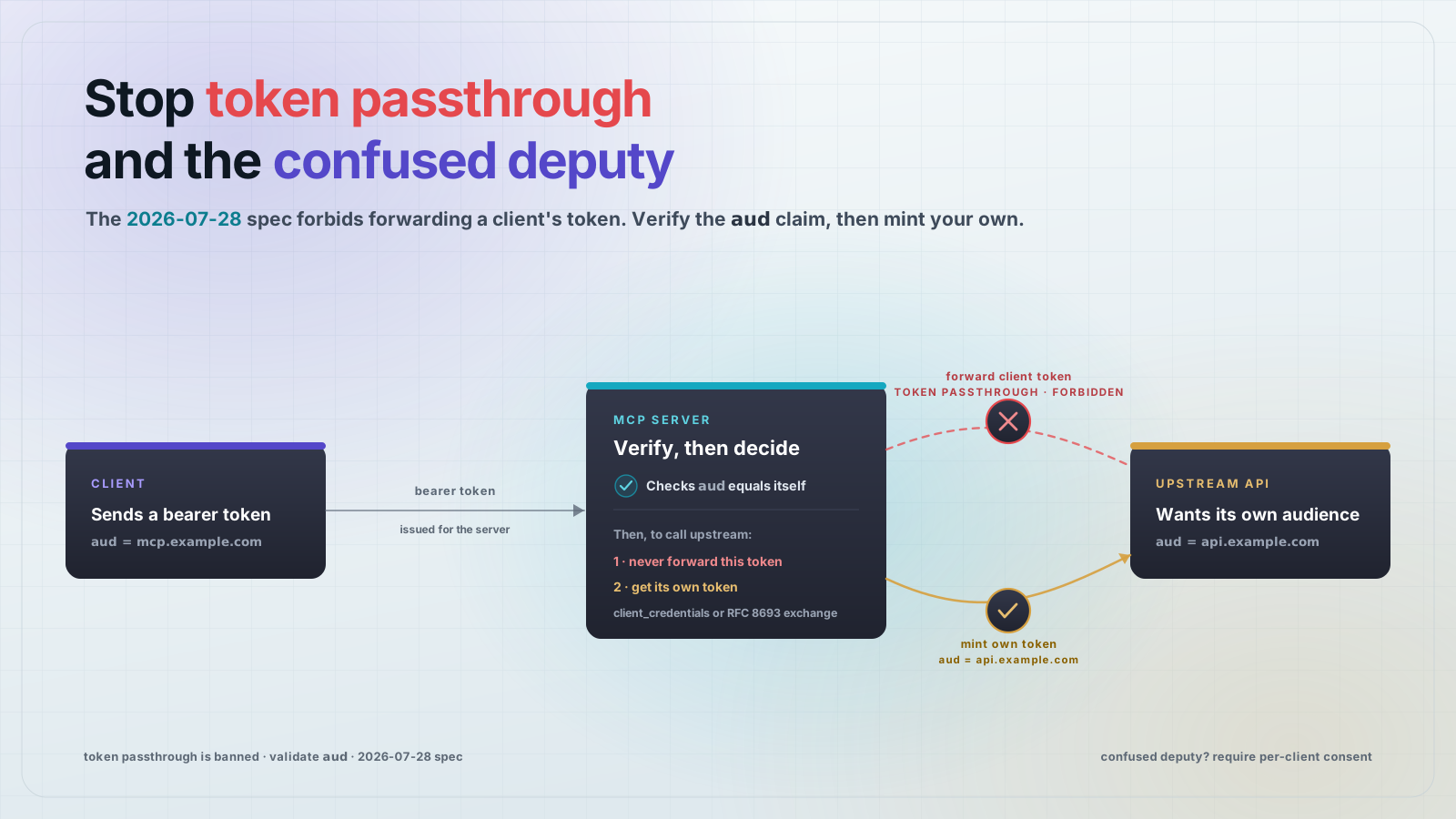
Because clients now send a Resource Indicator, the access token's audience is scoped to your server's resource URL. Reject any token whose audience is not your server. That is what stops a token minted for a different MCP server from being replayed against yours.
A migration path that does not break existing clients
Move in the order that keeps old and new clients working at the same time:
- Keep serving DCR. Leave your
/registerendpoint (or your authorization server's DCR support) in place. Deprecated does not mean removed, and older clients still rely on it. - If you build the client or agent: host a metadata document at a stable HTTPS URL, set its
client_idfield to that same URL, addapplication_type(usenativefor desktop and CLI clients so localhost redirects are accepted), and switch your authorization requests to send the URL asclient_id. - Add Resource Indicators (RFC 8707) to every token request, naming the target MCP server, and validate the
issresponse parameter (RFC 9207) before redeeming the code. - If you run the authorization server: accept URL-form
client_idvalues, fetch and cache the document, and enforce the two checks (documentclient_idequals the URL, requestredirect_uriis in the allowlist). Fall back to DCR when a client is not using a URL client_id. - On your MCP server: expose
/.well-known/oauth-protected-resource(RFC 9728) and validate token audience against yourresourceURL on every call.
Frequently asked questions
- Is Dynamic Client Registration removed in the 2026-07-28 MCP spec?
- No. DCR (RFC 7591) is deprecated, not removed. It keeps working for backward compatibility with authorization servers that do not support CIMD yet. The spec's deprecation policy requires at least twelve months before any deprecated feature can be removed.
- What is a Client ID Metadata Document in MCP OAuth?
- It is a JSON file the client hosts at an HTTPS URL that describes the client (name, redirect URIs, grant types). The URL itself is the
client_id. The authorization server fetches the document on demand and validates it instead of storing a registration record, so no pre-registration step is needed. - How do I set the client_id when using CIMD?
- Use the HTTPS URL of your hosted metadata document as the
client_idin the authorization request. Theclient_idfield inside the document must equal that same URL, and the request'sredirect_urimust be listed in the document'sredirect_urisallowlist. - Do I have to change my MCP server code to support CIMD?
- Usually not much. CIMD is handled by the client and the authorization server. Your MCP server just needs to expose
/.well-known/oauth-protected-resource(RFC 9728) pointing at its authorization server and validate the token audience against its ownresourceURL on every request. - Why do MCP clients now send a resource parameter?
- That is a Resource Indicator (RFC 8707). It names the exact MCP server the token is intended for, so a malicious server cannot obtain a token meant for a different server and replay it. Validate the token audience on the server to enforce it.
- What is the application_type field for?
- Clients declare their OpenID Connect
application_type(SEP-837) during registration. Setting it tonativefor desktop and CLI apps stops authorization servers from defaulting the client toweband rejecting its localhost redirect URI.
MCPOrbit connects to each server you migrate, so you can confirm the new authorization server is the one answering and the token is scoped the way you expect. Check it once per server, before your agents do it for you.
About the author
Mark
Head of Marketing, MCPOrbit
Mark leads marketing at MCPOrbit, the free desktop client for the Model Context Protocol. He writes the build-it and reliability guides, and the code in them is run before it ships.