Tutorial
How to deploy an MCP server to AWS Lambda
Lambda can run an MCP server, but five things break before it does. Here are the measured failures and the one-file handler that fixes every one.
Mark
Head of Marketing, MCPOrbit
- Published
- Updated
- · Updated
- Read time
- · 11 min read
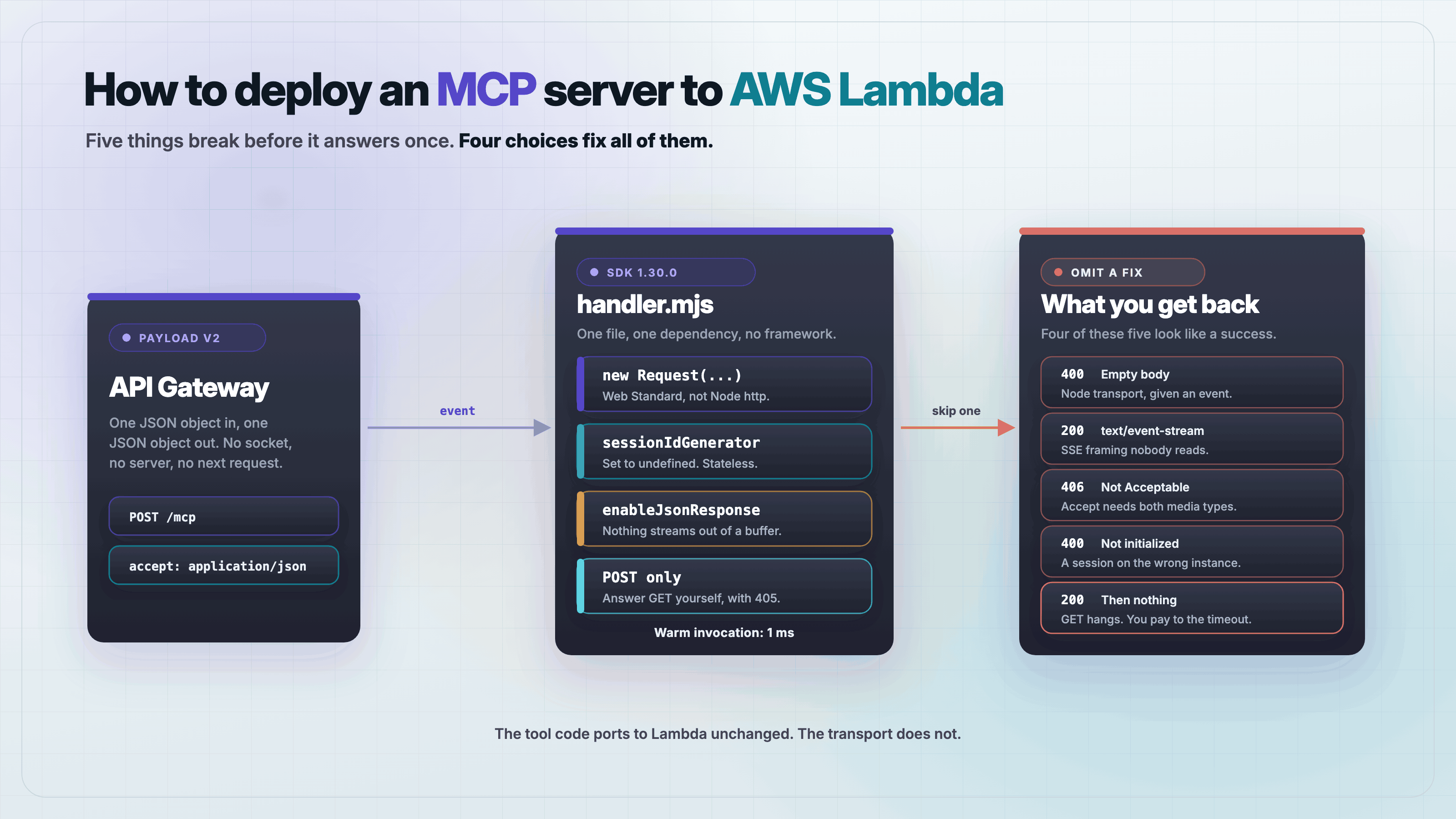
To deploy a Model Context Protocol (MCP) server to AWS Lambda, drop the Node HTTP transport, convert the API Gateway event into a Web Standard Request, and run WebStandardStreamableHTTPServerTransport in stateless mode with enableJsonResponse: true. Answer any non-POST method yourself. That is the whole job, and each of those four choices exists because the obvious alternative fails.
The short answer everyone gives is "yes, Lambda works for request/response MCP servers, just watch your timeout." That is true and it is not enough. We ported a working Express MCP server to a Lambda handler and it failed five separate times before it answered a single tools/list. Four of those failures return a 200 or a bare 400 with no error text, so nothing in the logs tells you what is wrong.
What you need before you start
Node.js 20 or newer and one dependency. The MCP SDK brings its own transports, so there is no Express, no serverless-http, and no framework adapter in this build.
mkdir lambda-mcp && cd lambda-mcp
npm init -y
npm pkg set type=module
npm install @modelcontextprotocol/sdk@1.30.0 zod@3.25.76
Why doesn't the normal Express example port to Lambda?
Every MCP HTTP tutorial uses StreamableHTTPServerTransport from server/streamableHttp.js. It takes a Node IncomingMessage and a ServerResponse. Lambda hands you a plain JSON object instead. The tempting move is to pass the event straight in and give it a response stub.
// Does not work. Kept here so you recognize the symptom.
const transport = new StreamableHTTPServerTransport({ sessionIdGenerator: undefined });
await server.connect(transport);
await transport.handleRequest(event, responseStub);
This does not throw. It resolves cleanly, and the only thing it ever writes to the response is a status line:
promise outcome     : resolved
bytes written to res: [["writeHead", 400, {}], ["end", ""]]
A 400 with an empty body. The transport looked for headers and a readable body on the event object, found neither in the shape it expects, and gave up quietly. There is no error to log and no exception to catch.
The fix is to skip that transport. As of SDK 1.30.0 the Node class is a thin wrapper around WebStandardStreamableHTTPServerTransport, which takes a Request and returns a Response. Its own header calls it "a thin wrapper around WebStandardStreamableHTTPServerTransport that provides compatibility with Node.js HTTP server." On Lambda you do not want that compatibility layer, because you have no Node HTTP server to be compatible with. Use the base class and build the Request yourself.
function eventToRequest(event) {
  const url = `https://${event.requestContext.domainName}${event.rawPath}` +
    (event.rawQueryString ? `?${event.rawQueryString}` : '');

  const body = event.body == null
    ? undefined
    : (event.isBase64Encoded ? Buffer.from(event.body, 'base64') : event.body);

  return new Request(url, {
    method: event.requestContext.http.method,
    headers: new Headers(event.headers),
    body
  });
}Your server answers in SSE even when nothing is streaming
With the Request built correctly, a plain tools/call comes back like this:
status      : 200
content-type: text/event-stream
body        : event: message
              data: {"result":{"content":[{"type":"text","text":"echo: hi"}]},
                     "jsonrpc":"2.0","id":1}
The result is correct, but it is wrapped in SSE framing for a call that streams nothing. The spec allows the server to prefer a stream, and the SDK defaults to preferring one. On Lambda that default costs you something specific. A buffered integration holds the entire body until the function returns, so the frames arrive together at the end. We timed a 300 ms tool call: the response headers resolved in under a millisecond, and the body completed at 303 ms. Nothing reached a client early, because there was no client reading it yet.
Progress notifications have the same fate. They are written into a stream that nobody drains until the invocation ends, which makes them arrive after the work they were reporting on. Ask for JSON instead.
const transport = new WebStandardStreamableHTTPServerTransport({
  sessionIdGenerator: undefined,
  enableJsonResponse: true
});
status : 200
content-type: application/json
body : {"result":{"content":[{"type":"text","text":"echo: hi"}]},"jsonrpc":"2.0","id":1}The Accept header that returns 406
Streamable HTTP requires the client to accept both media types. Send only application/json, which is what curl, most gateway health checks and a lot of internal callers do, and the request is refused:
status: 406
body  : {"jsonrpc":"2.0","error":{"code":-32000,
         "message":"Not Acceptable: Client must accept both application/json and text/event-stream"},
         "id":null}
A compliant MCP client sends both and never sees this. Everything else does. Since the handler already builds the Headers object, set the value there and the problem stops existing:
const headers = new Headers(event.headers);
headers.set('accept', 'application/json, text/event-stream');
Can an MCP session survive between Lambda invocations?
No, and the error it produces points at the wrong thing. Set a sessionIdGenerator and the first invocation looks healthy. It returns 200 and an mcp-session-id header. Send that session ID on a second invocation that lands on a different instance:
invoke 1 status: 200  mcp-session-id: sess-abc
invoke 2 status: 400
invoke 2 body  : {"jsonrpc":"2.0","error":{"code":-32000,
                  "message":"Bad Request: Server not initialized"},"id":null}
The SDK documents an unknown session as a 404 Not Found. What you get is a 400 saying the server is not initialized, because the fresh instance has no session table at all and never reaches the lookup. That message sends people to check their initialize call, which was fine. The session is the problem.
The GET that bills you until the timeout
This is the expensive one. Streamable HTTP defines GET /mcp as the channel a client opens to receive server-initiated messages. Hand that GET to the transport on Lambda and watch what happens:
settled at 1 ms  status 200  content-type: text/event-stream
body: NO CHUNK in 3000ms, stream stays open
The transport answers 200 immediately and opens a stream it intends to hold indefinitely. That is correct behavior for a long-lived server. On a buffered function it means the body never completes, so the invocation cannot return. The function runs until the configured timeout, and you are billed for all of it. One misconfigured client that retries a GET can hold open as many concurrent executions as your account allows.
A stateless server has nothing to push, so there is no reason to accept the request. Answer it before the transport ever sees it.
if (event.requestContext.http.method !== 'POST') {
  return {
    statusCode: 405,
    headers: { 'content-type': 'application/json', allow: 'POST' },
    body: JSON.stringify({
      jsonrpc: '2.0',
      error: { code: -32000, message: 'Method not allowed. This server is stateless and accepts POST only.' },
      id: null
    }),
    isBase64Encoded: false
  };
}The complete handler
One file, handler.mjs. It exposes a single get_forecast tool so the plumbing stays visible. Every fix above is in it.
import { McpServer } from '@modelcontextprotocol/sdk/server/mcp.js';
import { WebStandardStreamableHTTPServerTransport } from '@modelcontextprotocol/sdk/server/webStandardStreamableHttp.js';
import { z } from 'zod';

const METHOD_NOT_ALLOWED = {
  jsonrpc: '2.0',
  error: { code: -32000, message: 'Method not allowed. This server is stateless and accepts POST only.' },
  id: null
};

function buildServer() {
  const server = new McpServer({ name: 'lambda-mcp', version: '1.0.0' });

  server.registerTool(
    'get_forecast',
    {
      description: 'Get a short weather forecast for a city',
      inputSchema: { city: z.string().describe('City name, for example "Lisbon"') }
    },
    async ({ city }) => ({
      content: [{ type: 'text', text: `${city}: 22C, clear.` }]
    })
  );

  return server;
}

function eventToRequest(event) {
  const url = `https://${event.requestContext.domainName}${event.rawPath}` +
    (event.rawQueryString ? `?${event.rawQueryString}` : '');

  const headers = new Headers(event.headers);
  // API Gateway clients routinely send Accept: application/json. The transport
  // answers 406 unless both media types are present, so widen it here.
  headers.set('accept', 'application/json, text/event-stream');

  const body = event.body == null
    ? undefined
    : (event.isBase64Encoded ? Buffer.from(event.body, 'base64') : event.body);

  return new Request(url, { method: event.requestContext.http.method, headers, body });
}

async function responseToResult(response) {
  const headers = {};
  response.headers.forEach((value, key) => { headers[key] = value; });
  return {
    statusCode: response.status,
    headers,
    body: await response.text(),
    isBase64Encoded: false
  };
}

export async function handler(event) {
  // Answer GET and DELETE ourselves. Handing them to the transport returns an
  // SSE stream that never emits, and the function bills until it times out.
  if (event.requestContext.http.method !== 'POST') {
    return {
      statusCode: 405,
      headers: { 'content-type': 'application/json', allow: 'POST' },
      body: JSON.stringify(METHOD_NOT_ALLOWED),
      isBase64Encoded: false
    };
  }

  const server = buildServer();
  const transport = new WebStandardStreamableHTTPServerTransport({
    sessionIdGenerator: undefined,
    enableJsonResponse: true
  });

  try {
    await server.connect(transport);
    const response = await transport.handleRequest(eventToRequest(event));
    return await responseToResult(response);
  } finally {
    await transport.close();
    await server.close();
  }
}
Two details are worth naming. The server and transport are built inside the handler, not at module scope, and both are closed in a finally. A transport left open across invocations on a warm instance keeps stream state that the next request can trip over. Building per request costs a fraction of a millisecond, measured below, and removes the whole class of problem.
Test it end to end
You do not need to deploy to test the part that breaks. Every failure above lives at the event boundary, so a script that calls handler with a payload v2 event exercises the same code AWS will run.
import { handler } from './handler.mjs';

function ev(method, body, headers = {}) {
  return {
    version: '2.0',
    rawPath: '/mcp',
    rawQueryString: '',
    headers: { 'content-type': 'application/json', accept: 'application/json', ...headers },
    requestContext: {
      domainName: 'abc123.lambda-url.eu-west-1.on.aws',
      http: { method }
    },
    body: body ? JSON.stringify(body) : null,
    isBase64Encoded: false
  };
}

// Each call is a separate invocation. Nothing is shared between them.
console.log(await handler(ev('POST', { jsonrpc: '2.0', id: 2, method: 'tools/list', params: {} })));
console.log(await handler(ev('POST', {
  jsonrpc: '2.0', id: 3, method: 'tools/call',
  params: { name: 'get_forecast', arguments: { city: 'Lisbon' } }
})));
console.log(await handler(ev('GET', null, { accept: 'text/event-stream' })));
Run it with node e2e.mjs. Note the Accept: application/json in the fixture, which is the header that returned a 406 earlier and now passes:
--- tools/list
status      : 200
content-type: application/json
body        : {"result":{"tools":[{"name":"get_forecast", ... }]},"jsonrpc":"2.0","id":2}

--- tools/call
status      : 200
content-type: application/json
body        : {"result":{"content":[{"type":"text","text":"Lisbon: 22C, clear."}]},"jsonrpc":"2.0","id":3}

--- GET (the listen channel)
status      : 405
content-type: application/json
body        : {"jsonrpc":"2.0","error":{"code":-32000,
               "message":"Method not allowed. This server is stateless and accepts POST only."},"id":null}
The test worth keeping is the third one below: call tools/call with no initialize in front of it, on an instance that has never seen a client. A correctly stateless server answers it. A server that still has session logic in it does not, and that is the failure you would otherwise find in production, on the first cold start after a deploy.
--- tools/call on a cold instance, no initialize
status      : 200
body        : {"result":{"content":[{"type":"text","text":"Porto: 22C, clear."}]},"jsonrpc":"2.0","id":4}

warm invocation wall time: 1 ms
What does this cost on a cold start?
Two dependencies is not two packages. @modelcontextprotocol/sdk 1.30.0 plus zod 3.25.76 installs 91 packages and 23 MB, which is what your deployment bundle carries. Importing the three modules the handler needs took 40 ms on a warm filesystem, measured over five runs after discarding the first.
node_modules       : 23M, 91 packages
module import      : 63.9 ms (first), then 40.8 / 40.3 / 40.3 / 40.3 ms
warm invocation    : 1 ms
That 40 ms is module loading alone, before the Node runtime itself starts. It is a floor on your cold start, not an estimate of it. The number to take from this is the last line: once warm, the MCP layer costs about a millisecond, so whatever your tool actually does is the entire latency budget.
Frequently asked questions
Frequently asked questions
- Should I use a Lambda Function URL or API Gateway for an MCP server?
- A Function URL is enough for this server and skips a component. Both deliver the payload v2 event shape the handler above expects. Reach for API Gateway when you want its authorizers, usage plans or per-method throttling in front of the function.
- Does Lambda response streaming let me keep SSE?
- Partly. Response streaming works on Function URLs with the
RESPONSE_STREAMinvoke mode and would let SSE frames leave early. It does not help withGET /mcp, because that stream is meant to stay open indefinitely and your function still has a timeout. KeepenableJsonResponse: trueunless you have a tool that genuinely emits progress over many seconds. - Why does my MCP server return 406 on Lambda?
- The client sent
Accept: application/jsonwithouttext/event-stream. Streamable HTTP requires both. Overwrite the header when you build theRequestfrom the event, as the handler above does. - Why do I get "Server not initialized" on the second request?
- You are running the transport with a
sessionIdGeneratorset. The second request reached a different instance with no session state, so it fails before the session lookup and reports a400instead of the documented404. SetsessionIdGenerator: undefined. - Can I run a stateful MCP server on Lambda with a shared session store?
- You could, but there is no reason to. Revision 2026-07-28 removed protocol sessions from MCP entirely, so a session store solves a problem the current spec no longer has. Pass state explicitly as tool arguments instead.
- Do I need to keep the MCP server object outside the handler for performance?
- No. Building the server and transport per invocation measured about 1 ms on a warm instance. Hoisting them to module scope keeps transport state alive between unrelated requests, which is a real correctness risk for a saving you cannot detect.
The handler above is a complete, working MCP server on Lambda. The five failures it routes around are all in the gap between a transport designed for a long-lived HTTP server and a runtime that hands you one event and expects one object back. None of them are hard once you can see them, and four of them are invisible until you go looking.
Connect your deployed URL in MCPOrbit and call the tools by hand. You get every request and response in full, which is a faster first check than wiring up logging.
About the author
Mark
Head of Marketing, MCPOrbit
Mark leads marketing at MCPOrbit, the free desktop client for the Model Context Protocol. He writes the build-it and reliability guides, and the code in them is run before it ships.