Tutorial
How to cache your MCP server's tool list (ttlMs and cacheScope, 2026-07-28 spec)
The 2026-07-28 MCP spec adds ttlMs and cacheScope to tools/list. Here's how to emit them from your server and honor them in a client, so clients stop re-polling your tool list on every turn. Tested TypeScript against @modelcontextprotocol/sdk@1.30.0.
Mark
Head of Marketing, MCPOrbit
- Published
- Updated
- · Updated
- Read time
- · 9 min read
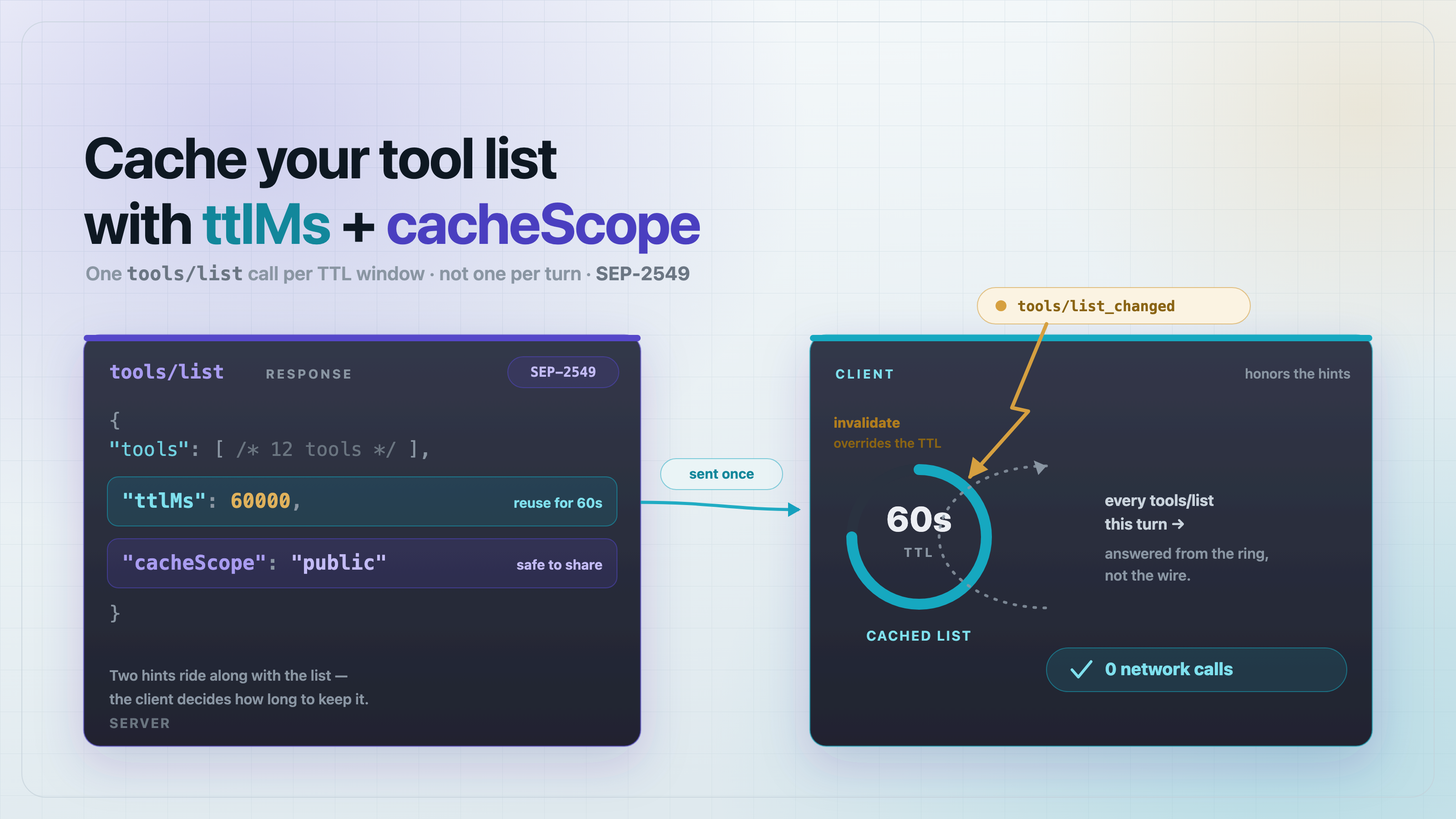
The 2026-07-28 MCP spec (SEP-2549) lets your server tell clients how long to trust its tool list: return ttlMs, a freshness hint in milliseconds, and cacheScope ("public" or "private") on your tools/list response, and a client can serve that list from cache for the whole window instead of re-fetching it on every turn. A tools/list_changed notification still forces an early refresh, so you get caching without going stale. Below is exactly how to emit both fields from a server and honor them in a client, with TypeScript that runs against @modelcontextprotocol/sdk@1.30.0.
What do ttlMs and cacheScope actually do?
SEP-2549 adds two optional fields to the results of tools/list, prompts/list, resources/list, resources/read, and resources/templates/list. The model is borrowed directly from HTTP Cache-Control, and it supplements the existing listChanged notifications, and it does not replace them.
How do I emit ttlMs and cacheScope from my MCP server?
Attach them to the tools/list result. As of @modelcontextprotocol/sdk@1.30.0 the SDK does not populate these fields for you, so you set them yourself on the object your handler returns. Use the low-level Server (not the FastMCP-style sugar) so you own the raw result:
// server.ts
import { Server } from "@modelcontextprotocol/sdk/server/index.js";
import {
  ListToolsRequestSchema,
  CallToolRequestSchema,
} from "@modelcontextprotocol/sdk/types.js";

const TOOLS = [
  {
    name: "get_order",
    description: "Look up an order by id.",
    inputSchema: {
      type: "object",
      properties: { id: { type: "string" } },
      required: ["id"],
    },
  },
];

export function makeServer() {
  const server = new Server(
    { name: "orders", version: "1.0.0" },
    { capabilities: { tools: {} } },
  );

  server.setRequestHandler(ListToolsRequestSchema, async () => ({
    tools: TOOLS,
    // SEP-2549 cache hints. Borrowed from HTTP Cache-Control.
    // Supplements listChanged; it does not replace it.
    ttlMs: 60_000,       // clients may reuse this list for 60s
    cacheScope: "public" // a shared gateway may cache it too
  }));

  server.setRequestHandler(CallToolRequestSchema, async (req) => ({
    content: [{ type: "text", text: `order ${req.params.arguments?.id}` }],
  }));

  return server;
}
That's the whole server-side change: two extra keys on the object you already return. The 1.30.0 result schema passes them through to the client verbatim (verified below), so no custom serializer is needed.
How should I pick a ttlMs value?
- Tool list changes rarely (most servers): minutes. 60_000-300_000 ms. Pair it with a listChanged notification so an unexpected change still refreshes clients immediately.
- Tool list is dynamic per user or per feature flag: seconds, and cacheScope: "private" so a shared gateway never serves one user's tool set to another.
- Tool list is effectively static: minutes to an hour. The longer the TTL, the fewer redundant tools/list calls hit your stateless replicas.
- When in doubt, favor a shorter TTL plus reliable listChanged over a long TTL with no signal. TTL caps staleness; listChanged eliminates it.
How does a client honor ttlMs without going stale?
The 1.30.0 client reads ttlMs and cacheScope off the result but does not cache for you, so you implement the cache. Keep it tiny: store the tools with an expiry, serve from the store inside the window, and expose an invalidate() you call the moment a tools/list_changed notification arrives.
// cachingClient.ts
// Wraps an MCP Client so tools/list honors SEP-2549 ttlMs.
// Inside the TTL window the cached list is returned and NO request
// hits the server.
export class ToolListCache {
  private cache: { tools: unknown[]; cacheScope: string; expiresAt: number } | null = null;
  networkCalls = 0;

  constructor(
    private client: { listTools(): Promise<any> },
    private now: () => number = () => Date.now(),
  ) {}

  async listTools() {
    if (this.cache && this.now() < this.cache.expiresAt) {
      return { tools: this.cache.tools, fromCache: true };
    }
    this.networkCalls++;
    const res = await this.client.listTools();
    const ttlMs = typeof res.ttlMs === "number" ? res.ttlMs : 0;
    this.cache = {
      tools: res.tools,
      cacheScope: res.cacheScope ?? "private",
      expiresAt: this.now() + ttlMs,
    };
    return { tools: res.tools, fromCache: false, ttlMs, cacheScope: res.cacheScope };
  }

  // A tools/list_changed notification must invalidate the cache
  // immediately, regardless of remaining TTL.
  invalidate() {
    this.cache = null;
  }
}
Wire invalidate() to the notification the client already receives: client.setNotificationHandler(ToolListChangedNotificationSchema, () => cache.invalidate()). Now TTL bounds how long you'll trust the list without hearing anything, and listChanged clears the cache the instant something actually changes.
Does this actually work on the shipped SDK? (tested)
Yes, with one caveat worth stating plainly. On @modelcontextprotocol/sdk@1.30.0 the fields are not generated or consumed automatically, but they do survive the wire round-trip as top-level result fields, so the manual approach above is all you need. Here is the test that proves it, run against sdk@1.30.0, zod@4.4.3, Node 25:
// ttl-cache.test.ts
import { test } from "node:test";
import assert from "node:assert/strict";
import { Client } from "@modelcontextprotocol/sdk/client/index.js";
import { InMemoryTransport } from "@modelcontextprotocol/sdk/inMemory.js";
import { makeServer } from "./server.js";
import { ToolListCache } from "./cachingClient.js";

async function connect() {
  const [ct, st] = InMemoryTransport.createLinkedPair();
  const server = makeServer();
  const client = new Client({ name: "test", version: "1.0.0" }, { capabilities: {} });
  await Promise.all([server.connect(st), client.connect(ct)]);
  return client;
}

test("tools/list carries ttlMs + cacheScope over the wire", async () => {
  const client = await connect();
  const res = await client.listTools();
  assert.equal(res.ttlMs, 60_000);
  assert.equal(res.cacheScope, "public");
});

test("client serves from cache within TTL, zero extra network calls", async () => {
  const client = await connect();
  let clock = 1_000;
  const cache = new ToolListCache(client, () => clock);
  await cache.listTools();                       // networkCalls -> 1
  clock += 59_000;                               // still inside 60s
  const second = await cache.listTools();
  assert.equal(second.fromCache, true);
  assert.equal(cache.networkCalls, 1);           // no second request
});

test("cache re-fetches after ttlMs expires", async () => {
  const client = await connect();
  let clock = 1_000;
  const cache = new ToolListCache(client, () => clock);
  await cache.listTools();
  clock += 61_000;                               // past the window
  const third = await cache.listTools();
  assert.equal(third.fromCache, false);
  assert.equal(cache.networkCalls, 2);
});

test("listChanged invalidates immediately, even mid-TTL", async () => {
  const client = await connect();
  let clock = 1_000;
  const cache = new ToolListCache(client, () => clock);
  await cache.listTools();
  cache.invalidate();                            // simulate list_changed
  const after = await cache.listTools();
  assert.equal(after.fromCache, false);
  assert.equal(cache.networkCalls, 2);
});
tests 4 · pass 4 · fail 0 on @modelcontextprotocol/sdk@1.30.0, zod@4.4.3, Node v25.8.1
One-command run
- npm i @modelcontextprotocol/sdk@1.30.0 zod@4.4.3
- Save server.ts, cachingClient.ts, and ttl-cache.test.ts side by side (compile to .js or run with a TS loader).
- node --test, and expect tests 4 · pass 4 · fail 0.
FAQ
Frequently asked questions
- What is ttlMs in the MCP tools/list response?
- ttlMs is a freshness hint, in milliseconds, added by SEP-2549 in the 2026-07-28 spec. It tells a client how long it may reuse a cached tools/list (or prompts/list, resources/list, resources/read, resources/templates/list) result before re-fetching. It is a hint, not a lock; a client may refetch sooner.
- What's the difference between cacheScope "public" and "private"?
- "public" tells shared intermediaries (a gateway, proxy, or fleet-wide cache) that they may cache the response and serve it to multiple clients. "private" restricts caching to the single client that made the request, which is what you want when the tool or resource list is user-specific.
- Does ttlMs replace tools/list_changed notifications?
- No. SEP-2549 supplements listChanged; it does not replace it. TTL bounds how long a client trusts the list without hearing anything; a tools/list_changed notification invalidates the cache immediately, regardless of remaining TTL. Use both: TTL for the no-signal case, listChanged for the change-happened case.
- Does the @modelcontextprotocol/sdk populate ttlMs for me?
- Not as of 1.30.0. The SDK passes the fields through the wire round-trip, but you set them yourself on the tools/list result object (server side) and implement the cache that honors them (client side). The examples above are tested against sdk@1.30.0.
- What ttlMs value should I use?
- Match it to how often your tool list changes. Static lists: minutes to an hour. Rarely-changing lists: 60s-5min plus a listChanged notification. Per-user or feature-flagged lists: a few seconds with cacheScope "private" so a shared gateway never leaks one user's tools to another.
- Which MCP methods support ttlMs and cacheScope?
- tools/list, prompts/list, resources/list, resources/read, and resources/templates/list. All of them accept the two optional fields on their result, following the same HTTP Cache-Control-style model.
About the author
Mark
Head of Marketing, MCPOrbit
Mark leads marketing at MCPOrbit, the free desktop client for the Model Context Protocol. He writes the build-it and reliability guides, and the code in them is run before it ships.